
1. Introduction
Thank you for choosing the WLIVE Industrial TV Stand with LED Lights. This modern entertainment center is designed to accommodate TVs up to 65 inches, offering a blend of industrial aesthetics and practical features. It includes adjustable shelves, integrated LED lighting, and a durable, waterproof, and scratch-resistant surface. This manual provides essential information for safe assembly, operation, and maintenance of your new TV stand.
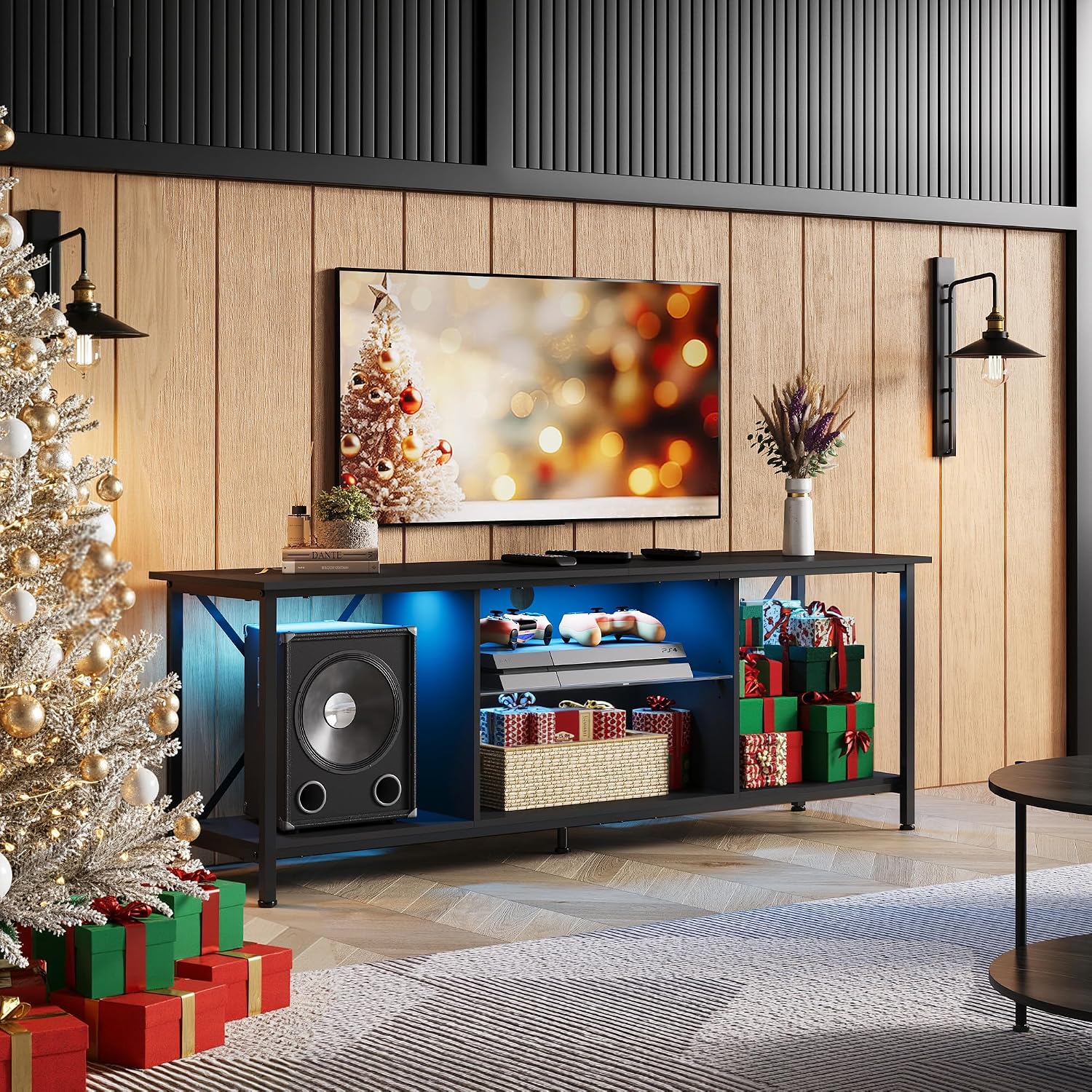
Image 1.1: The WLIVE Industrial TV Stand with LED Lights, showcasing its design and functionality in a home environment.
2. Safety Information
Please read and understand all safety instructions before assembly and use. Failure to follow these instructions may result in injury or product damage.
- Weight Capacity: Do not exceed the maximum weight capacity of 110 lbs (50 kg) for the tabletop. Ensure the weight is evenly distributed.
- Assembly: Assemble the unit on a soft, clean surface to prevent scratches. Ensure all screws and fasteners are securely tightened using the provided tool. Do not overtighten.
- Stability: Always place the TV stand on a flat, level surface. Use the adjustable feet to ensure stability and prevent wobbling.
- Children: Keep small parts and packaging materials away from children. Do not allow children to climb on or play with the TV stand.
- Sharp Edges: Handle components with care during assembly to avoid injury from sharp edges.
- Electrical Safety (LED Lights): Ensure the LED strip and power adapter are installed correctly and kept away from water or excessive heat. Only use the provided power adapter.
3. Package Contents
Before beginning assembly, verify that all parts listed below are present and undamaged. If any parts are missing or damaged, please contact customer support.
- Top Panel
- Bottom Panel
- Side Panels (Metal Frame)
- Adjustable Shelves (Tempered Glass)
- LED Strip (2 strips)
- Remote Control for LED Lights
- Adjustable Feet
- Assembly Hardware (screws, bolts, connectors)
- Assembly Tool (Allen wrench, screwdriver)
- User Manual
4. Setup and Assembly
Assembly is required for this product. Please follow these general steps. Refer to the included detailed assembly instructions for specific diagrams and part identification.
- Unpack and Identify Parts: Carefully remove all components from the packaging. Lay them out on a soft, clean surface to prevent scratches. Identify each part using the provided parts list in the separate assembly guide.
- Assemble the Frame: Attach the side metal frames to the bottom panel using the designated hardware. Ensure all connections are secure.
- Install Shelves: Insert the adjustable tempered glass shelves into the central compartments. Adjust their height as desired before securing them.
- Attach Top Panel: Secure the top panel to the assembled frame using the appropriate screws.
- Install Adjustable Feet: Screw the adjustable feet into the bottom of the stand. Adjust them to ensure the stand is level and stable on your floor.
- Install LED Lights: Adhere the LED strips to the designated areas within the compartments. Connect the LED strips to the power adapter and controller.
- Cable Management: Utilize the built-in cable management holes to route and organize your device cables.

Image 4.1: Key features for assembly and setup, including adjustable feet for stability, cable management for organization, and tempered glass shelves for flexible storage.

Image 4.2: Illustration of the stand's robust construction, highlighting the X-shaped rear design for enhanced stability and ample space for various items.
Video 4.1: An official WLIVE video demonstrating the features and assembly process of the TV stand, including cable management and adjustable components.
5. Operating Instructions
5.1 LED Lighting System
The WLIVE TV stand features integrated LED lights to enhance your viewing experience and room ambiance. The lights are controlled via a remote control.
- Power On/Off: Use the power button on the remote to turn the LED lights on or off.
- Color Selection: The remote allows you to choose from 20 main colors. Press the corresponding color buttons to change the light color.
- Brightness Adjustment: Adjust the brightness of the LED lights using the brightness control buttons (5-level brightness).
- Mode Selection: Select from 22 different lighting modes, such as flash, strobe, fade, or smooth transitions, using the mode buttons on the remote.
- Remote Distance: The remote control operates effectively up to 15 meters (approximately 49 feet).

Image 5.1: The TV stand's LED lights can display 20 colors and are controlled by a remote with a 15-meter range.
5.2 Adjustable Shelves
The central compartments of the TV stand feature adjustable tempered glass shelves, allowing you to customize the storage space for your media devices, consoles, or decorative items.
- Adjusting Height: To adjust the shelf height, carefully lift the shelf and reposition the shelf pins to the desired level. Ensure the shelf is securely seated on all four pins before placing items on it.
- Removal: Shelves can be completely removed if larger items require more vertical space.

Image 5.2: A visual guide demonstrating how to adjust the tempered glass shelves to different heights within the TV stand's compartments.
5.3 Cable Management
The TV stand includes built-in cable management holes to help keep your wires organized and out of sight, contributing to a clean and clutter-free entertainment area.
- Routing Cables: Thread power cords and signal cables through the designated holes in the back panel of the compartments.
- Securing Cables: Use cable ties or clips (not included) to bundle and secure cables, preventing tangles and improving aesthetics.

Image 5.3: Detail of the cable management system, showing how wires can be neatly routed through the back of the stand.
6. Maintenance
Proper care and maintenance will ensure the longevity and appearance of your WLIVE TV stand.
- Cleaning: Wipe the surfaces with a dry, soft cloth. Avoid using harsh chemicals, abrasive cleaners, or wet cloths, as these may damage the finish.
- Spills: Although the surface is waterproof, promptly wipe up any spills to prevent potential damage.
- Inspection: Periodically check all screws and fasteners to ensure they remain tight. Retighten if necessary.
- LED Lights: If the LED lights stop working, check the power connection and the remote control battery.

Image 6.1: The engineered wood surface is designed to be scratch-resistant and waterproof, simplifying maintenance.
7. Troubleshooting
If you encounter any issues with your TV stand, refer to the following common solutions:
| Problem | Possible Cause | Solution |
|---|---|---|
| Stand is wobbly/unstable | Uneven floor; loose fasteners | Adjust the leveling feet; tighten all assembly screws. |
| LED lights not working | Power connection issue; remote battery dead; LED strip damaged | Check if the power adapter is securely plugged in. Replace remote battery. Ensure LED strips are properly connected. |
| Missing parts during assembly | Packaging error | Carefully check all packaging materials. Contact customer support with the specific part number from the assembly guide. |
| Scratches or damage to surface | Improper handling; sharp objects | The surface is scratch-resistant but not scratch-proof. Use furniture polish or repair kits for minor damage. |
8. Specifications
Detailed specifications for the WLIVE Industrial TV Stand (Model ADSG043BL).
- Model Number: ADSG043BL
- Color: Black
- Material: Engineered Wood, Tempered Glass, Steel Frame
- Overall Dimensions (L x W x H): 54.96 x 15.67 x 20.31 inches (139.6 x 39.8 x 51.6 cm)
- Item Weight: 37 Pounds (16.8 kg)
- Tabletop Max. Weight Capacity: 110 lbs (50 kg)
- Number of Shelves: 4 (including 2 adjustable tempered glass shelves)
- TV Size Compatibility: Up to 65 inches
- LED Lights: 2 LED strips, 20 colors, 22 modes, 5-level brightness, 15m remote distance
- Features: Waterproof, Scratch-Resistant, Adjustable Feet, Cable Management, X-shaped rear design
- Assembly Required: Yes

Image 8.1: Detailed dimensions of the TV stand and its maximum weight capacity.
9. Warranty and Support
WLIVE is committed to providing high-quality products and customer satisfaction. While specific warranty details are not provided in this manual, most WLIVE products come with a limited warranty against manufacturing defects.
For warranty claims, missing parts, assembly assistance, or any other product-related inquiries, please contact WLIVE customer support through the retailer where you purchased the product or visit the official WLIVE website for contact information.
Please retain your proof of purchase for any warranty claims.