
1. Introduction
Thank you for choosing the KINGSMITH MC21 Folding Treadmill. This manual provides essential information for the safe and effective use of your new exercise equipment. Please read it thoroughly before initial use and retain it for future reference.
The KINGSMITH MC21 is designed for both running and walking, featuring an innovative double-folding mechanism for compact storage. It incorporates intelligent speed adjustment technology to enhance your workout experience.

Image 1.1: The Kingsmith MC21 Folding Treadmill in its fully unfolded, ready-to-use configuration.
2. Important Safety Information
Before using the treadmill, please read and understand all safety instructions. Failure to follow these instructions may result in injury or damage to the product.
- Consult a physician before starting any new exercise program.
- Ensure the treadmill is placed on a flat, stable surface with adequate clearance around it.
- Keep children and pets away from the treadmill during operation.
- Wear appropriate athletic footwear and clothing.
- Do not operate the treadmill if it is damaged or malfunctioning.
- Always use the safety key/clip during operation.
- Unplug the treadmill from the power source when not in use or before cleaning/maintenance.
- Do not attempt to service the treadmill yourself. Contact qualified personnel for repairs.
3. Package Contents
Verify that all components are present in the package:
- KINGSMITH MC21 Folding Treadmill Unit
- Power Cord
- Remote Controller
- User Manual (this document)
- Lubricant (if included)
- Tools for assembly (if required)
4. Setup and Unfolding
The KINGSMITH MC21 features an innovative double-folding design for easy setup and storage. Follow these steps to unfold and prepare your treadmill for use:
- Positioning: Place the folded treadmill on a flat, stable surface. Ensure there is sufficient space around the unit for safe operation (at least 2 meters behind and 0.5 meters on each side).
- Unfolding the Running Deck: Gently step on the pedal located near the base of the handrail. This will release the running deck. Carefully unfold the running deck until it lies flat on the floor.
- Raising the Handrail: Lift the handrail upwards until it locks securely into place. Ensure both sides of the handrail are fully extended and locked.
- Power Connection: Connect the power cord to the treadmill's power input and then plug it into a grounded electrical outlet.
- Initial Check: Before starting, ensure all parts are securely in place and there are no loose components.

Image 4.1: Illustration of the Kingsmith MC21 treadmill in its fully folded, partially folded, and fully unfolded states, demonstrating its compact design.

Image 4.2: A detailed view of the Kingsmith MC21 treadmill's folding mechanism, highlighting the compact storage capability.
5. Operating Instructions
The KINGSMITH MC21 offers two primary operating modes: Manual (M Mode) and Automatic (A Mode), along with multiple control options.
5.1. Control Methods
- Data Touchpad: The integrated display on the handrail provides real-time data and allows for basic control.
- Remote Controller: Use the provided remote to start, stop, accelerate, decelerate, and switch between modes.
- KS Fit APP: For advanced control, tracking, and personalized workouts, download and connect to the KS Fit application on your smartphone.
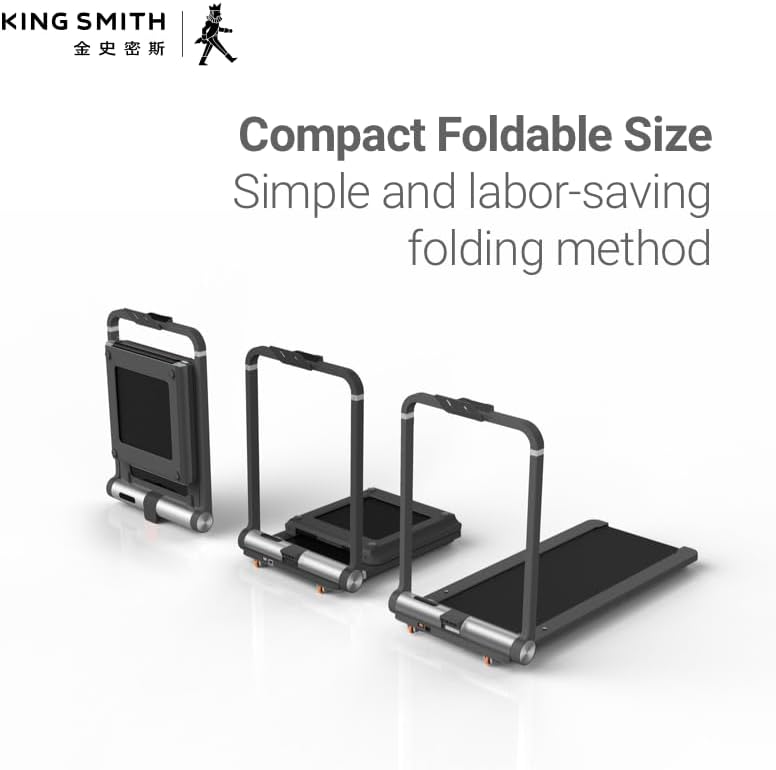
Image 5.1: The control panel on the Kingsmith MC21 handrail and a smartphone displaying the KS Fit app interface for treadmill control.
5.2. M Mode (Manual Mode)
In M Mode, you have full manual control over the treadmill's speed using the remote controller or the data touchpad.
- Start: Press the "Start" button on the remote or touchpad. The treadmill will begin at a low speed.
- Accelerate: Use the "+" button on the remote or touchpad to increase speed.
- Decelerate: Use the "-" button on the remote or touchpad to decrease speed.
- Stop: Press the "Stop" button on the remote or touchpad to halt the treadmill.
5.3. A Mode (Automatic Mode)
A Mode utilizes pressure sensors embedded under the running deck to automatically adjust speed based on your foot placement and frequency. This provides a more intuitive and comfortable running experience.
- Activation: Switch to A Mode using the remote controller or the touchpad.
- Speed Adjustment:
- To increase speed, move towards the front of the running belt.
- To decrease speed, move towards the rear of the running belt.
- To maintain speed, stay in the middle section of the running belt.
- Safety: Always be aware of your position on the belt in A Mode.
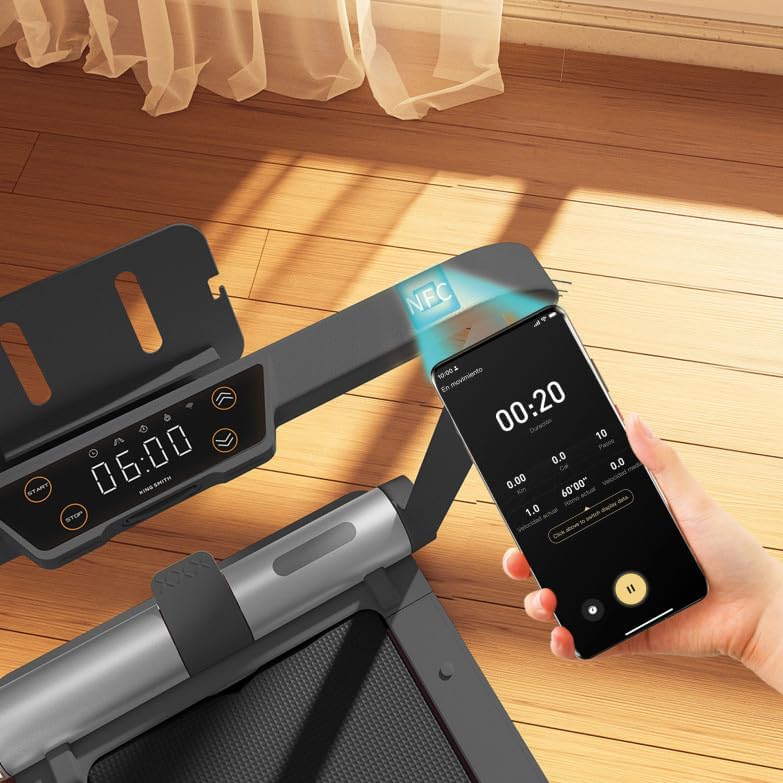
Image 5.2: A user demonstrating proper posture and foot placement while exercising on the Kingsmith MC21 treadmill.
5.4. Folding for Storage
To fold the treadmill for compact storage:
- Stop Operation: Ensure the treadmill is completely stopped and unplugged.
- Lower Handrail: Release the handrail lock mechanism and carefully lower the handrail until it rests flat.
- Fold Running Deck: Lift the running deck from the rear and fold it upwards towards the handrail until it locks into its vertical storage position.
- Move: Use the integrated wheels to move the folded treadmill to its storage location. The double-folding design allows it to occupy less than 0.15 square meters.
6. Maintenance
Regular maintenance ensures the longevity and optimal performance of your treadmill.
- Cleaning: Wipe down the treadmill surfaces with a damp cloth after each use. Avoid abrasive cleaners.
- Belt Lubrication: Periodically lubricate the running belt according to the instructions provided with your lubricant. This typically involves applying silicone oil under the belt. (Frequency depends on usage, refer to lubricant instructions).
- Belt Tension and Alignment: Check the running belt tension and alignment regularly. Adjust if necessary using the provided tools (refer to specific instructions for adjustment screws).
- Motor Compartment: Keep the motor compartment clean and free of dust. Do not open the motor cover unless instructed by a qualified technician.
- Storage: Store the treadmill in a dry, cool place away from direct sunlight and moisture.

Image 6.1: An exploded view illustrating the internal components of the Kingsmith MC21 treadmill, including the brushless motor and running deck layers, relevant for understanding maintenance points.
7. Troubleshooting
If you encounter issues with your treadmill, refer to the following common problems and solutions:
| Problem | Possible Cause | Solution |
|---|---|---|
| Treadmill does not power on. | Power cord not connected; power outlet issue; safety key not in place. | Ensure power cord is securely plugged in. Check power outlet. Insert safety key correctly. |
| Running belt slips or hesitates. | Belt too loose; insufficient lubrication. | Adjust belt tension (refer to maintenance section). Lubricate the running belt. |
| Unusual noise during operation. | Loose components; belt rubbing; motor issue. | Check for loose screws. Ensure belt is centered. If noise persists, contact support. |
| Automatic mode (A Mode) not responding. | Sensors obstructed; user not positioned correctly. | Ensure running belt surface is clean. Adjust foot position to activate sensors. |
If the problem persists after attempting these solutions, please contact customer support.
8. Specifications
| Feature | Detail |
|---|---|
| Brand | KINGSMITH |
| Model Number | FTRMBKEU2110259 |
| Product Grade | Foldable Walkingpad Treadmill |
| Color | Black |
| Display Type | LED |
| Frame Material | Alloy Steel |
| Material | Aluminum |
| Horsepower | 1 Horsepower |
| Meter | Speed |
| Power Source | Plug-in Electric |
| Features | Portable, Double Folding Design |
| Included Components | Power Cord |
| Batteries Included? | Yes (for remote controller) |
| Product Dimensions (D x W x H) | 70D x 15W x 102H centimeters (folded) / 102 x 70 x 15 cm (unfolded) |
| Item Weight | 38 Kilograms |
| Maximum Speed | 10 Kilometers per Hour |
| Recommended Uses | Exercise, Fitness |
| Target Audience | Adult, Youth |
Note: Product dimensions are approximate and may vary slightly.
9. Warranty and Support
For warranty information, please refer to the documentation provided with your purchase or contact your retailer. KINGSMITH products typically come with a manufacturer's warranty covering defects in materials and workmanship.
If you require technical assistance, have questions about operation, or need to report a problem, please contact KINGSMITH customer support or your authorized dealer. Please have your model number (FTRMBKEU2110259) and purchase date ready when contacting support.
Online Resources: For additional support, FAQs, and product updates, visit the official KINGSMITH website: www.kingsmith.com


