
Introduction
This manual provides essential instructions for the Hosim X06 RC Car Transmitter, part number X6-FY-YK01. This transmitter is designed as an accessory and spare part for the 1:10 Hosim X06 RC Car. Please read this manual thoroughly before use to ensure proper operation and longevity of your product.
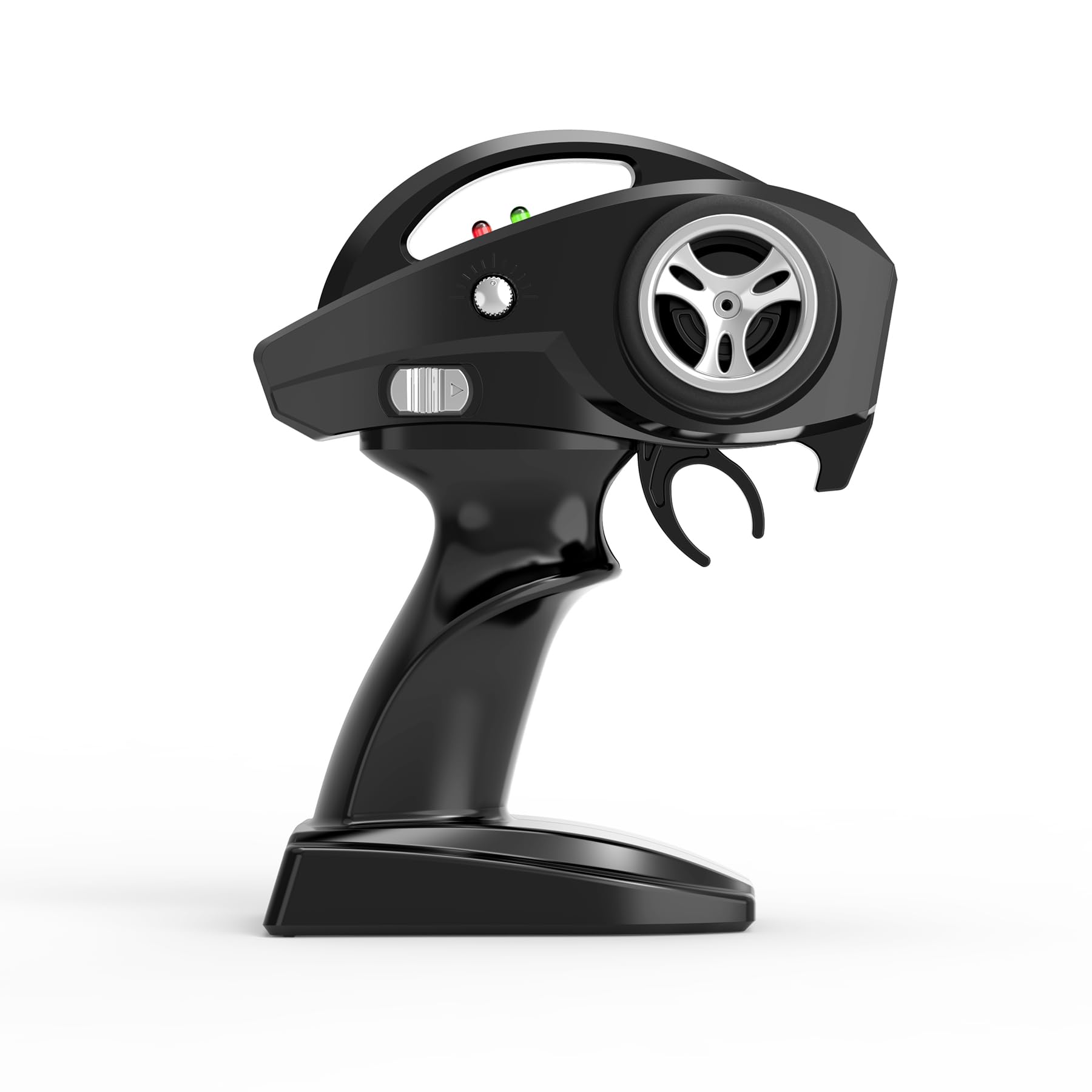
Image: Front-right view of the Hosim X06 RC Car Transmitter.
Setup
1. Battery Installation
- Locate the battery compartment cover on the bottom of the transmitter.
- Slide the cover open or remove the screw if present.
- Insert the required batteries (typically AA size, not included) according to the polarity indicators (+/-).
- Replace the battery compartment cover securely.

Image: Top-down view of the transmitter, illustrating the general layout of controls.
2. Binding Procedure
The transmitter and receiver (in the RC car) must be bound to establish a connection. If your transmitter is not pre-bound, follow these general steps:
- Ensure the RC car's receiver is powered on and in binding mode (refer to your RC car's manual for specific instructions).
- Turn on the transmitter.
- Press and hold the binding button on the transmitter (if available) or follow the specific binding sequence for your model.
- The indicator lights on both the transmitter and receiver should show a solid light once binding is successful.
- Turn off both the transmitter and the RC car, then power them on again to confirm the connection.
Operating Instructions
1. Power On/Off
- To power on, slide the power switch to the 'ON' position. The power indicator light should illuminate.
- To power off, slide the power switch to the 'OFF' position.
2. Steering Control
The large wheel on the side of the transmitter controls the steering of the RC car.
- Rotate the wheel clockwise to steer right.
- Rotate the wheel counter-clockwise to steer left.

Image: Left-side view of the transmitter, highlighting the steering wheel.
3. Throttle Control
The trigger mechanism controls the forward and reverse movement, as well as braking.
- Pull the trigger towards the grip for forward acceleration.
- Push the trigger away from the grip for braking, and then for reverse movement.

Image: Right-side view of the transmitter, highlighting the throttle trigger.
4. Trim Adjustments
Use the trim dials or buttons to fine-tune the steering and throttle if the RC car does not track straight or stop completely when the controls are centered.
- Steering Trim: Adjust if the car pulls left or right when the steering wheel is centered.
- Throttle Trim: Adjust if the car creeps forward or backward when the throttle trigger is in the neutral position.
Maintenance
1. Cleaning
- Wipe the transmitter with a soft, dry cloth.
- Avoid using harsh chemicals or solvents, as these can damage the plastic.
2. Storage
- Store the transmitter in a cool, dry place away from direct sunlight and extreme temperatures.
- Remove batteries if the transmitter will not be used for an extended period to prevent leakage.
3. Battery Care
- Always use fresh batteries of the recommended type.
- Do not mix old and new batteries, or different types of batteries.
- Dispose of used batteries responsibly according to local regulations.
Troubleshooting
| Problem | Possible Cause | Solution |
|---|---|---|
| Transmitter does not power on | Dead or incorrectly installed batteries | Replace batteries with fresh ones, ensuring correct polarity. |
| RC car does not respond to transmitter | Not bound, out of range, or receiver issue | Perform binding procedure. Ensure car is within operating range. Check RC car's power and receiver connection. |
| Erratic or inconsistent control | Interference, low transmitter battery, or trim settings | Move to an area with less interference. Replace transmitter batteries. Adjust steering and throttle trims. |
Specifications
- Product Name: Transmitter
- Part Number: X6-FY-YK01
- Compatibility: Hosim 1:10 X06 RC Car
- Quantity: 1
- Item Weight: 6.3 ounces
- Package Dimensions: 10.51 x 7.8 x 3.11 inches
- Manufacturer Recommended Age: 14 years and up
Warranty Information
This product is an original Hosim accessory. For specific warranty details, please refer to the warranty policy provided with your Hosim RC Car or contact Hosim customer support directly. Keep your proof of purchase for any warranty claims.
Support
If you encounter any issues or have questions regarding your Hosim X06 RC Car Transmitter that are not covered in this manual, please contact Hosim customer support. You can typically find support contact information on the official Hosim website or through the retailer where the product was purchased.
No official product videos are available for this item at this time.