
1. Introduction
Thank you for choosing the STRICH TSUNAMI Overdrive Guitar Pedal. This manual provides detailed instructions for setting up, operating, and maintaining your new pedal. The TSUNAMI pedal is designed to deliver versatile overdrive tones, from warm bluesy sounds to aggressive hot drives, all while preserving your guitar's natural tone through its true bypass circuitry.
2. Product Features
- Warm & Hot Overdrive Modes: Easily switch between two distinct overdrive characteristics. Warm mode provides a rich, bluesy overdrive, while Hot mode offers a more aggressive, higher-gain drive.
- Precise Control: Features dedicated knobs for Volume, Gain, and Tone, allowing for comprehensive sound shaping.
- Compact & Practical Design: Housed in a durable aluminum alloy casing, its compact size saves valuable pedalboard space and enhances portability.
- True Bypass Circuitry: Ensures your guitar's signal remains pure and unaffected when the pedal is disengaged, with an LED indicator for clear status visibility.
- Complete Package: Includes the STRICH TSUNAMI overdrive pedal and this user manual.
3. Setup
3.1 Package Contents
Upon unboxing, please ensure all items are present:
- STRICH TSUNAMI Overdrive Pedal
- User Manual

Image: Contents of the STRICH TSUNAMI Overdrive Pedal package.
3.2 Power Requirements
The STRICH TSUNAMI pedal requires a DC 9V adapter with a negative center and positive outside polarity. The adapter is not included with the pedal. Ensure you use a compatible power supply to prevent damage.
3.3 Connecting the Pedal
Follow these steps to integrate the pedal into your setup:
- Connect your electric guitar to the INPUT jack (1/4" mono) on the right side of the pedal.
- Connect the OUTPUT jack (1/4" mono) on the left side of the pedal to your amplifier or the next pedal in your signal chain.
- Connect the DC 9V power adapter to the DC 9V power input jack.

Image: Connection diagram for the STRICH TSUNAMI Overdrive Pedal.

Image: The STRICH TSUNAMI pedal with cables connected.
4. Operating Instructions
4.1 Engaging and Disengaging the Effect
The pedal features a true bypass footswitch. Press the footswitch to toggle the effect ON or OFF. The LED indicator will illuminate when the effect is active.

Image: The true bypass footswitch and LED indicator.
4.2 Adjusting Tones with Modes and Knobs
The TSUNAMI pedal offers two distinct working modes and three control knobs to shape your desired overdrive sound.
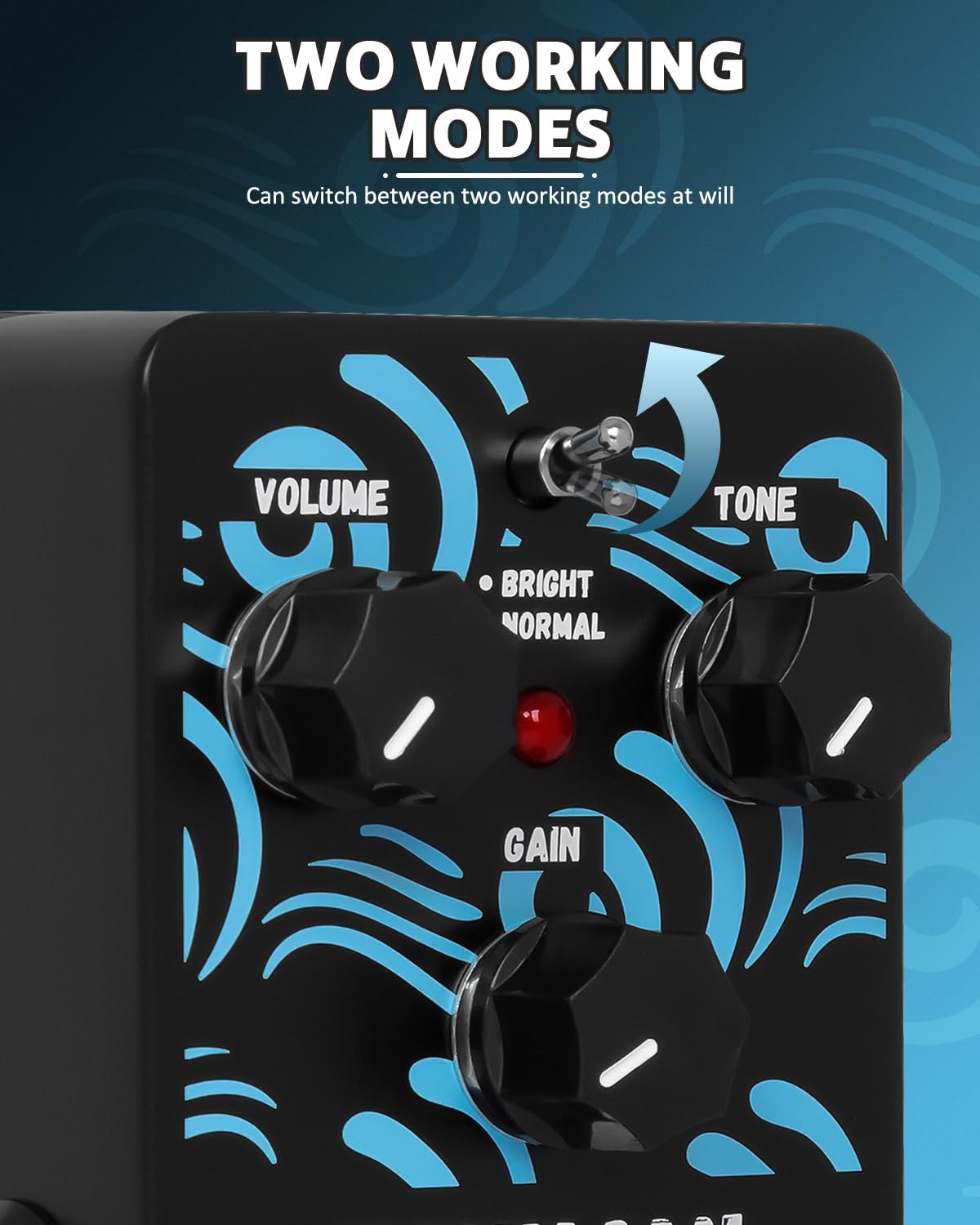
Image: The two working modes switch.

Image: The three control knobs for sound adjustment.
5. Controls and Functions
Familiarize yourself with the controls of your TSUNAMI pedal:

Image: Overview of STRICH TSUNAMI pedal controls.
| Control | Function |
|---|---|
| VOLUME Knob | Adjusts the overall output volume of the pedal. |
| GAIN Knob | Controls the amount of overdrive/distortion. Higher settings yield more saturated tones. |
| TONE Knob | Shapes the tonal character of the overdrive, from darker, warmer sounds to brighter, more cutting tones. |
| MODE Switch (Bright/Normal) | Toggles between two distinct overdrive characteristics: 'Bright' for a more articulate, crisp sound, and 'Normal' for a classic, warmer overdrive. |
| INPUT Jack | 1/4" mono input for connecting your guitar. |
| OUTPUT Jack | 1/4" mono output for connecting to your amplifier or next effect pedal. |
| FOOTSWITCH | Engages or disengages the effect (True Bypass). |
| DC 9V Power Input | Connects to a 9V DC power adapter (negative center, not included). |
6. Maintenance
To ensure the longevity and optimal performance of your STRICH TSUNAMI pedal, follow these maintenance guidelines:
- Cleaning: Use a soft, dry cloth to clean the pedal's exterior. Avoid abrasive cleaners or solvents.
- Storage: Store the pedal in a cool, dry place away from direct sunlight, extreme temperatures, and high humidity.
- Power: Always disconnect the power adapter when the pedal is not in use for extended periods.
- Connections: Periodically check all cable connections for tightness and wear.
7. Troubleshooting
If you encounter any issues with your STRICH TSUNAMI pedal, please refer to the following common problems and solutions:
| Problem | Possible Cause & Solution |
|---|---|
| No sound when pedal is engaged. |
|
| Unwanted noise (hissing, buzzing). |
|
| Effect is weak or inconsistent. |
|
| Pedal not turning on. |
|
If the issue persists after trying these steps, please contact STRICH customer support for further assistance.
8. Specifications
| Attribute | Value |
|---|---|
| Model Number | TSUNAMI |
| Item Weight | 9.9 ounces |
| Product Dimensions | 5.04 x 3.23 x 2.17 inches |
| Body Material | Aluminum Alloy |
| Color Name | Black Overdrive |
| Compatible Devices | Electric Guitar, Electric Bass, Pedalboards |
| Connector Type | DC Power Jack |
| Hardware Interface | 1/4-inch Audio |
| Signal Format | Analog |
| Power Source | Corded Electric |
| Voltage | 9 Volts |
| Amperage | 0.01 Amps |

Image: Dimensions of the STRICH TSUNAMI Overdrive Pedal.
9. Warranty and Support
STRICH is committed to providing high-quality products and excellent customer service.
9.1 Warranty Information
Your STRICH TSUNAMI Overdrive Pedal comes with an up to 12-month warranty from the date of purchase. This warranty covers manufacturing defects and ensures your product functions as intended under normal use. Please retain your proof of purchase for warranty claims.
9.2 Return Policy
We offer a 30-day free return policy. If you are not satisfied with your purchase within 30 days, you may return it for a refund or exchange, subject to the terms and conditions of the retailer.
9.3 Customer Support
For any questions, technical assistance, or warranty inquiries, please contact our customer support team. We aim to provide a prompt response via email chat assistant within 24 hours.
- Seller: Strich Direct
- Online Store: Visit the STRICH Store on Amazon

Image: STRICH Customer Care information.