
TEROW T1060
TEROW T1060 Graphics Drawing Tablet User Manual
Model: T1060
Introduction
The TEROW T1060 Graphics Drawing Tablet is a versatile digital drawing tool designed for artists, designers, and educators. Featuring a large 10x6 inch active drawing area, a battery-free stylus with 8192 levels of pressure sensitivity and tilt function, and customizable shortcut keys, it offers a natural and efficient creative experience. This manual provides comprehensive instructions for setting up, operating, maintaining, and troubleshooting your T1060 tablet.

The TEROW T1060 Graphics Drawing Tablet, showcasing its sleek design, included battery-free stylus, and essential accessories like the tablet stand, OTG adapters, and replacement nibs.
What's in the Box
Please verify that all items listed below are included in your package:
- 1 x Graphic Tablet (TEROW T1060)
- 1 x Battery-free Stylus
- 1 x Pen Holder
- 27 x Replacement Pen Nibs
- 1 x Nibs Remove Tool
- 1 x Tablet Stand
- 1 x Type-C OTG Adapter
- 1 x Micro-USB OTG Adapter
- 1 x Cleaning Cloth
- 1 x Cleaning Brush
- 2 x Two-finger Gloves

A visual representation of all components included in the TEROW T1060 Graphics Drawing Tablet package, ensuring all parts are present.
Setup Guide
System Requirements
- Windows: Windows 7 or above
- Mac: Mac OS 10.7 or above
- Android: Android 5.0 or above (with OTG function)

The TEROW T1060 tablet demonstrating its broad compatibility with various Windows versions (XP, Vista, 7, 8, 10) and Mac OS 10.7 and above.
Driver Installation (Windows/Mac)
- Uninstall Previous Drivers: If you have previously installed drivers for other graphics tablets, please uninstall them completely before proceeding.
- Connect Tablet: Connect the TEROW T1060 tablet to your computer using the provided USB cable.
- Download Driver: Visit the official TEROW website (refer to product packaging or included quick start guide for URL) to download the latest driver compatible with your operating system.
- Install Driver: Run the downloaded installer and follow the on-screen instructions. It is recommended to close all drawing software before installation.
- Restart Computer: After successful installation, restart your computer to ensure the driver is properly loaded.
- Verify Installation: Open the tablet driver software from your system tray or applications folder to customize settings and verify proper functionality.
Connecting to Android Devices
The TEROW T1060 supports Android 5.0 and above devices with OTG function. Use the included Micro-USB or Type-C OTG adapter to connect the tablet to your Android phone or tablet.
- Connect the tablet to your Android device using the appropriate OTG adapter and the USB cable.
- Ensure your Android device has OTG functionality enabled (may require enabling in settings for some devices).
- The active drawing area on Android devices will be 3.3 x 5.8 inches.

Illustration showing the TEROW T1060 tablet connected to an Android smartphone, highlighting the use of Micro USB and Type-C OTG cables for compatibility with Android 5.0 and above devices.
Operating Instructions
Battery-free Stylus
The TEROW T1060 comes with a battery-free stylus, eliminating the need for charging. It offers advanced features for precise control:
- 8192 Levels of Pressure Sensitivity: Allows for fine control over line thickness and opacity, mimicking traditional drawing tools.
- ±60° Tilt Function: Recognizes the tilt angle of the stylus, enabling natural shading and brush effects in supported software.
- 266 PPS Reporting Rate: Ensures smooth and responsive cursor movement with minimal lag.
- 5080 LPI Resolution: Provides high precision for detailed artwork.
- Programmable Buttons: The stylus features two customizable buttons for quick access to functions like right-click or eraser.

Close-up of the TEROW T1060 tablet and its battery-free stylus, highlighting key features such as 8192 levels of pressure sensitivity, ±60° tilt function, 266 PPS reporting rate, 5080 LPI resolution, and the inclusion of 27 replacement pen nibs.
Programmable Keys
The T1060 tablet is equipped with both shortcut keys and multimedia keys to enhance your workflow:
- 12 Customizable Shortcut Keys: Located on the side of the tablet, these keys can be programmed via the driver software for frequently used functions such as undo, zoom in/out, brush size adjustment, etc.
- 10 Multimedia Keys: Located on the top of the tablet, these keys control media playback (mute, volume up/down, play/pause, etc.). Note: Multimedia keys are compatible with Windows only.

An overhead view of the TEROW T1060 tablet, clearly labeling the 12 programmable press keys on the left side and the 10 multimedia keys along the top edge, illustrating their layout and function.
Active Drawing Space
The tablet offers a generous active drawing area:
- PC (Windows/Mac): 10 x 6 inch (254 x 152.4 mm)
- Android: 3.3 x 5.8 inch (83.8 x 147.3 mm)
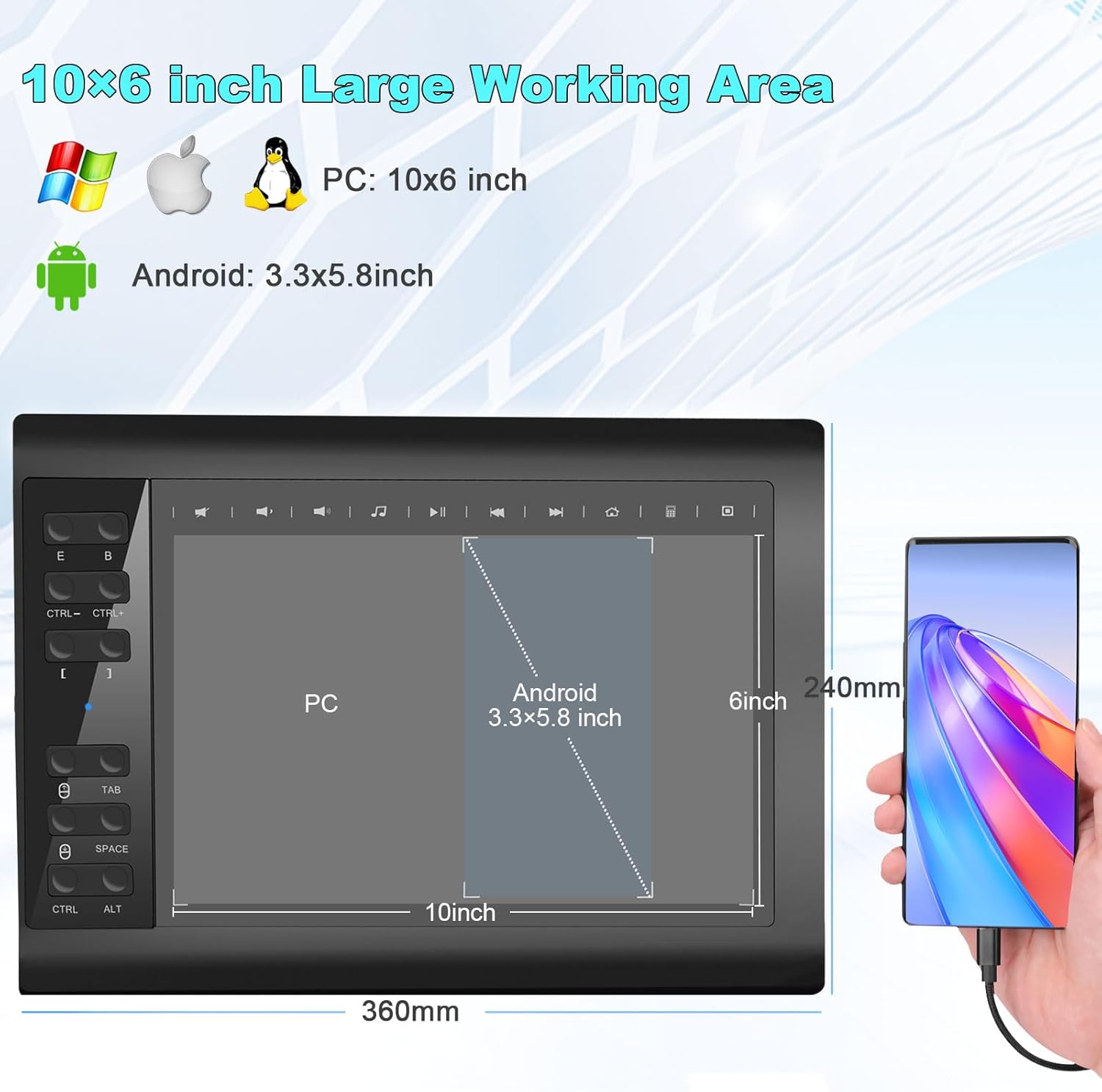
Diagram illustrating the active working area of the TEROW T1060 tablet, showing the full 10x6 inch area for PC (Windows, Apple, Linux) and the smaller 3.3x5.8 inch area when connected to an Android mobile phone.
Software Compatibility
The TEROW T1060 is widely compatible with most major design, creative, and office software:
- Creative Software: Photoshop, SAI, FlipaClip, Medibang, Adobe Illustrator, Adobe Premiere, Lightroom, Blender, Clip Studio Paint, Krita, etc.
- Office/Education Software: Microsoft Office (Word, Excel, PowerPoint, OneNote, Outlook, Access, Publisher), Teams, Zoom, Notability, etc.

An image showcasing the TEROW T1060 tablet's compatibility with a wide range of software, including popular creative applications like Photoshop and office suites like Microsoft Word, highlighting its utility for both artistic creation and online teaching/remote work.
Maintenance
- Cleaning: Use the provided cleaning cloth and brush to gently wipe the tablet surface and stylus. Avoid using harsh chemicals or abrasive materials.
- Stylus Nib Replacement: When the stylus nib wears down, use the nib removal tool to carefully pull out the old nib and insert a new one. The package includes 27 replacement nibs.
- Storage: Store the tablet and stylus in a dry, cool place away from direct sunlight and extreme temperatures.
- Cable Care: Avoid bending or twisting the USB cable excessively to prevent damage.
Troubleshooting
| Problem | Possible Cause / Solution |
|---|---|
| Stylus not working / No cursor movement |
|
| Pressure sensitivity not working |
|
| Programmable keys not responding |
|
| Tablet disconnects frequently |
|
Specifications
| Feature | Detail |
|---|---|
| Model Number | T1060 |
| Brand | TEROW |
| Product Dimensions | 12 x 9 x 0.4 inches (304.8 x 228.6 x 10.16 mm) |
| Item Weight | 2.94 pounds (1.33 kg) |
| Connectivity Technology | USB |
| Active Drawing Area (PC) | 10 x 6 inches |
| Active Drawing Area (Android) | 3.3 x 5.8 inches |
| Pressure Sensitivity | 8192 Levels |
| Tilt Support | ±60° |
| Report Rate | 266 PPS |
| Resolution | 5080 LPI |
| Stylus Type | Battery-free |
| Programmable Keys | 12 Shortcut Keys + 10 Multimedia Keys (Windows only) |
| Operating System Compatibility | Windows 7 and above, Mac OS 10.7 and above, Android 5.0 and above |
Warranty and Support
TEROW provides a standard manufacturer's warranty for this product. For specific warranty terms and conditions, please refer to the warranty card included in your product packaging or visit the official TEROW website.
For technical support, driver downloads, or further assistance, please contact TEROW customer service through their official website or the contact information provided in your product documentation.
Seller: TEROW US
Ask a question about this manual
Ask about setup, troubleshooting, compatibility, parts, safety, or missing instructions. Manuals+ will review the question and use this page’s manual context to help answer it.