
technaxx 5082
Technaxx Solar Table Power Plant TX-250 User Manual
Model: TX-250 (5082)
Introduction
This manual provides essential information for the safe and efficient operation, installation, and maintenance of your Technaxx Solar Table Power Plant TX-250. Please read this manual thoroughly before using the product and retain it for future reference.
The Technaxx TX-250 is a 2-in-1 balcony power plant with a table function, integrating a 400W PV system with a pre-mounted micro-inverter. It is designed for easy plug & play setup on balconies or terraces, offering adjustable solar panel angles for optimized energy yield.
Safety Instructions
Always observe the following safety precautions to prevent injury or damage to the device:
- Ensure all electrical connections are made by qualified personnel and comply with local regulations.
- Do not attempt to disassemble or repair the micro-inverter or solar panel yourself. Contact qualified service personnel.
- Keep the product away from flammable materials and sources of extreme heat.
- Ensure the installation location is stable and can support the weight of the unit.
- Avoid touching electrical components when the system is operational or exposed to sunlight.
- Disconnect the system from the main power supply before performing any maintenance or cleaning.
- This product is designed for outdoor use and is IP67 water and dust resistant. However, avoid submerging it in water.
What's in the Box
The Technaxx Solar Table Power Plant TX-250 package includes the following components:
- Solar Table (main frame and legs)
- PV Module (Solar Panel)
- Micro-Inverter (pre-mounted with WiFi)
- Connection Cable (5m)
- Assembly Hardware and Tools (if applicable, based on "Teilvormontiert")
Please check all components upon unpacking to ensure nothing is missing or damaged.
Setup and Installation
The Technaxx TX-250 is designed for quick and uncomplicated setup due to its pre-assembled components. Follow these steps for installation:
- Unpacking and Inspection: Carefully unpack all components. Inspect the solar panel, micro-inverter, and table frame for any signs of damage during transit.

Image: The Technaxx Solar Table Power Plant TX-250, showing its primary configuration with the solar panel angled upwards for optimal sun exposure.
- Assembly of Table Frame: Assemble the table legs and frame according to the included quick start guide. The system is partially pre-assembled, simplifying this step.

Image: The Technaxx Solar Table Power Plant TX-250 configured as a flat table, demonstrating its dual functionality.
- Positioning: Place the solar table in a location that receives maximum direct sunlight throughout the day. Consider the adjustable angle feature for optimal sun exposure. Ensure the surface is level and stable.
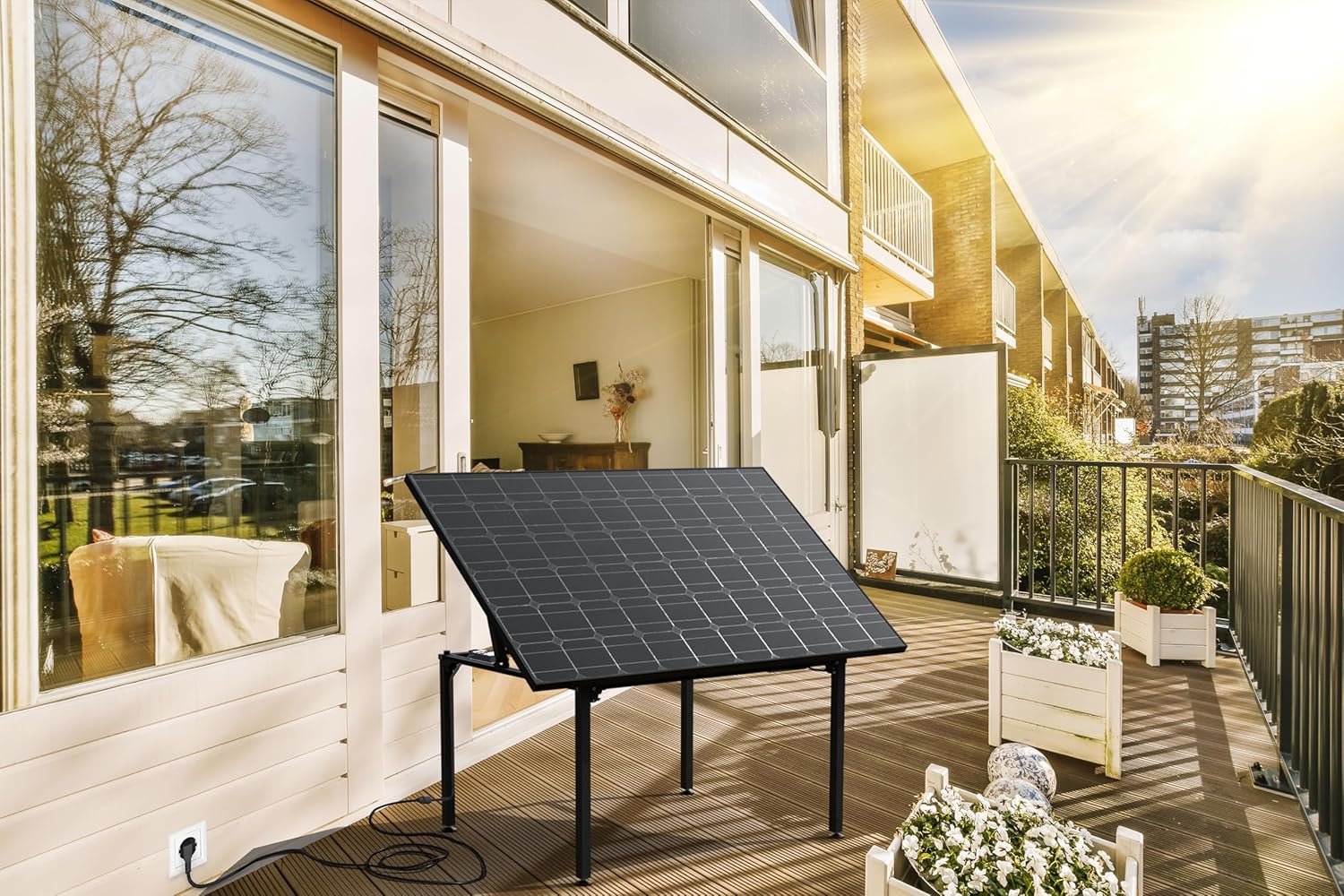
Image: The solar table positioned on a balcony, illustrating a typical installation scenario and its connection to a power outlet.
- Connecting the Micro-Inverter: The micro-inverter is pre-mounted. Connect the solar panel to the micro-inverter if not already connected. Then, connect the micro-inverter's output cable to a standard household power outlet using the provided connection cable. This is a "Plug & Play" system.

Image: Detailed view of the micro-inverter mounted underneath the solar panel, highlighting the electrical connections.
- Adjusting the Angle: Adjust the tilt angle of the solar panel (20°/30°/35°) to maximize sun exposure throughout the day or season. Refer to the specific mechanism for angle adjustment.

Image: The solar table installed on a rooftop, demonstrating its adaptability to various outdoor environments and its angled position for energy generation.
Operating Instructions
Once installed and connected, the Technaxx TX-250 operates automatically:
- Automatic Power Generation: The solar panel converts sunlight into DC electricity, which the micro-inverter then converts into AC electricity suitable for your household grid. This power is fed directly into your home's electrical system, reducing your reliance on grid power.
- WiFi Monitoring: The integrated micro-inverter features WiFi connectivity. Use the corresponding mobile application (details typically provided in a separate quick start guide or on the manufacturer's website) to monitor your system's performance, energy yield, and operational status in real-time.
- Angle Adjustment for Optimization: Periodically adjust the solar panel's tilt angle to match the sun's position throughout the seasons for maximum energy harvesting.
- Table Functionality: When not actively optimizing for solar gain, the unit can be used as a functional outdoor table, providing space for 6-8 people.
Maintenance
Regular maintenance ensures optimal performance and longevity of your solar table:
- Cleaning the Solar Panel: Clean the surface of the solar panel regularly with a soft cloth and water to remove dust, dirt, leaves, or bird droppings. A clean panel ensures maximum sunlight absorption. Avoid abrasive cleaners or harsh chemicals.
- Checking Connections: Periodically inspect all electrical connections and cables for any signs of wear, damage, or loose connections. Ensure the power cable is securely plugged into the outlet.
- Structural Integrity: Check the table frame and legs for stability and any signs of corrosion or damage. Tighten any loose screws or bolts as needed.
- Winter Care: In areas with heavy snowfall, clear snow from the solar panel to allow for continued energy generation.
Troubleshooting
If you encounter issues with your Technaxx Solar Table Power Plant TX-250, refer to the following common problems and solutions:
| Problem | Possible Cause | Solution |
|---|---|---|
| No power output / Low power generation |
|
|
| WiFi monitoring not working |
|
|
| Physical damage to panel or frame |
|
|
If the problem persists after attempting these solutions, please contact Technaxx customer support.
Technical Specifications
| Feature | Detail |
|---|---|
| Model Number | 5082 (TX-250) |
| Product Dimensions | 172.2 x 113.4 x 80 cm |
| Weight | 32.5 Kilograms |
| Wattage | 400 Watt (PV System) |
| Input Voltage | 65 Volts (DC from PV) |
| Connectivity | WLAN (WiFi) |
| Connector Type | Type J 3-pin (for grid connection) |
| Adjustable Angles | 20° / 30° / 35° |
| Ingress Protection (IP) Rating | IP67 (Water and Dust Resistant) |
| Seating Capacity | 6-8 persons (when used as a table) |
| Included Components | Solar Table, PV Module, Micro-Inverter |

Image: Dimensional diagram of the Technaxx Solar Table Power Plant TX-250, indicating its length, width, and height.
Warranty and Support
Technaxx provides a standard warranty for this product. For detailed warranty terms and conditions, please refer to the warranty card included with your purchase or visit the official Technaxx website.
For technical support, troubleshooting assistance, or spare parts, please contact Technaxx customer service:
- Website: www.technaxx.de (or relevant regional website)
- Email: Refer to website for contact email.
- Phone: Refer to website for contact phone number.
When contacting support, please have your model number (TX-250 / 5082) and purchase date ready.
Related documents5082


Ask a question about this manual
Ask about setup, troubleshooting, compatibility, parts, safety, or missing instructions. Manuals+ will review the question and use this page’s manual context to help answer it.