
1. Introduction
This manual provides comprehensive instructions for assembling and maintaining your BexGears DIY ST Style Electric Guitar Kit. This kit offers a unique opportunity to build a personalized electric guitar, featuring a mahogany body, maple neck, and composite ebony fingerboard with an S-S-H pickup configuration. All necessary electronic parts and hardware are included for a straightforward assembly process.
2. Kit Components
Your BexGears DIY ST Style Electric Guitar Kit includes the following main components and hardware:
- Unpolished Mahogany Wood Body with Engraved Surface
- Maple Neck with Composite Ebony Fingerboard
- Pre-wired Black Pickguard with S-S-H Pickups, Volume, and Tone Controls
- Bridge Assembly (Fixed)
- Tuning Machines (6 pieces)
- Output Jack
- Strap Buttons
- Neck Plate and Screws
- Tremolo Arm (if applicable to fixed bridge design)
- Strings
- Various screws and small hardware

Image: Overview of all parts included in the BexGears DIY ST Style Electric Guitar Kit, including the engraved mahogany body, maple neck, pre-wired pickguard, bridge, tuners, and other hardware.
3. Assembly Instructions
Follow these steps carefully to assemble your electric guitar kit. It is recommended to lay out all parts and familiarize yourself with them before beginning.
3.1. Body Preparation
The mahogany body comes unpolished. You may choose to sand and apply a finish (e.g., stain, oil, lacquer) to protect the wood and enhance its appearance. Ensure the body is clean and dry before proceeding.
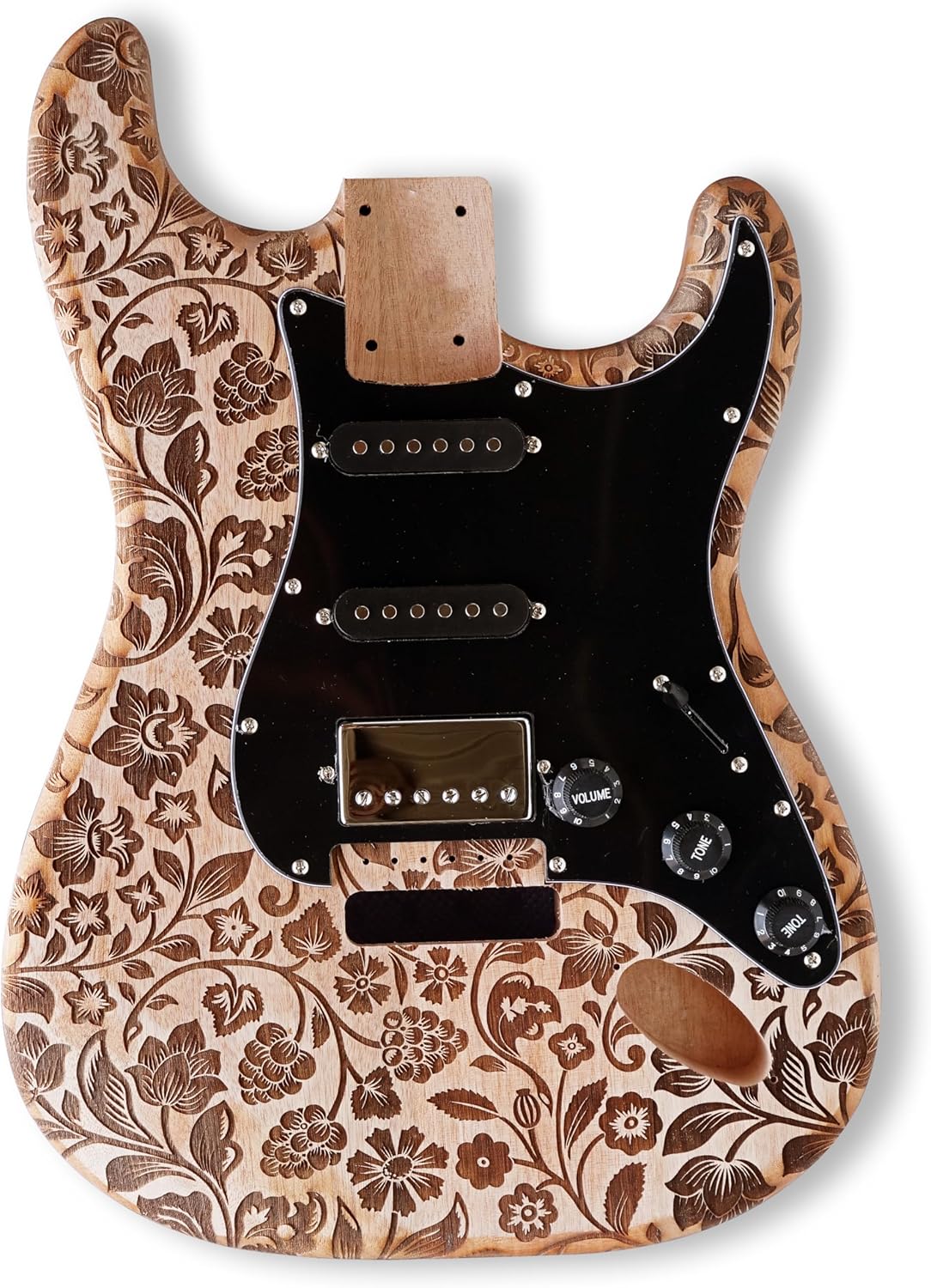
Image: Front view of the mahogany guitar body featuring an engraved surface and the pre-installed black pickguard with S-S-H pickups.

Image: Back view of the mahogany guitar body, illustrating the routing for the tremolo system and control cavity.
3.2. Neck Attachment
- Carefully align the maple neck with the neck pocket on the guitar body. Ensure a snug fit.
- Place the neck plate over the four screw holes on the back of the body, aligning it with the neck.
- Insert the four long neck screws through the neck plate and into the neck heel. Tighten them gradually and evenly until the neck is securely fastened to the body. Do not overtighten.

Image: A hand using a screwdriver to attach the guitar neck to the body using the neck plate and screws.

Image: Front view of the maple guitar neck, showcasing the composite ebony fingerboard with fret markers and pre-drilled holes for tuners.

Image: Back view of the maple guitar neck, showing the smooth wood finish.
3.3. Hardware Installation
- Tuning Machines: Install the six tuning machines into the pre-drilled holes on the headstock. Secure them with the provided screws and bushings.
- Bridge: Position the fixed bridge assembly over the pre-drilled holes on the guitar body. Secure it with the provided screws.
- Tremolo Springs: If your bridge uses tremolo springs, install them into the tremolo block in the back cavity of the guitar body.
- Output Jack: Install the output jack into its designated hole on the side of the guitar body.
- Strap Buttons: Attach the strap buttons to the body using the provided screws.

Image: A hand using a screwdriver to install a tuning machine onto the guitar headstock.

Image: A hand using a screwdriver to secure the guitar bridge to the body.

Image: A hand installing the tremolo springs into the back cavity of the guitar body.

Image: A hand using a screwdriver to install the guitar's output jack.
3.4. Electronics Wiring
The pickguard comes pre-wired with the S-S-H pickups, volume, and tone controls. You will primarily need to connect the output jack and the ground wire.
- Connect the wires from the pre-wired pickguard to the output jack.
- Connect the ground wire from the bridge to the main grounding point, typically on the tremolo claw in the back cavity.

Image: Hands connecting wires within the guitar's body cavity, illustrating the electronic connections.
3.5. Stringing and Initial Setup
- Install the guitar strings through the bridge and up to the tuning machines. Wind them securely.
- Tune the guitar to standard pitch (E-A-D-G-B-e).
- Perform a basic setup: check string action, intonation, and neck relief. Adjust as necessary.
4. Operating Your Guitar
Once assembled and set up, your BexGears electric guitar is ready for use.
- Connecting to an Amplifier: Use a standard 1/4-inch instrument cable to connect the guitar's output jack to your amplifier's input.
- Controls:
- Volume Knob: Controls the overall output level of the guitar.
- Tone Knobs: Adjust the treble frequencies.
- Pickup Selector Switch: Allows you to select individual pickups or combinations (Neck, Neck+Middle, Middle, Middle+Bridge, Bridge).
5. Maintenance
Regular maintenance will ensure the longevity and playability of your guitar.
- Cleaning: Wipe down the body, neck, and strings with a soft, dry cloth after each use. Use guitar-specific cleaning products for deeper cleaning.
- String Changes: Replace strings regularly, typically every 1-3 months depending on usage, to maintain optimal tone and playability.
- Fretboard Care: Periodically clean and condition the composite ebony fretboard to prevent drying and cracking.
- Hardware Check: Periodically check all screws and hardware for tightness.
6. Troubleshooting
Here are some common issues and their potential solutions:
- No Sound:
- Check if the guitar is properly connected to the amplifier.
- Ensure the amplifier is on and its volume is up.
- Verify all wiring connections inside the guitar, especially the output jack and ground wire.
- Test with a different cable or amplifier if possible.
- Buzzing Strings:
- Check string action (height of strings above frets). It might be too low.
- Inspect the neck for proper relief.
- Ensure frets are level.
- Poor Tuning Stability:
- Ensure strings are properly wound around the tuning posts.
- Check the tuning machines for any looseness.
- Lubricate the nut slots if strings are binding.
For more detailed troubleshooting or if you encounter persistent issues, please contact BexGears customer support.
7. Specifications
| Item Model Number | YGK-ST-CA |
| Body Material | Mahogany Wood |
| Top Material | Surface Engraving |
| Neck Material Type | Maple |
| Fretboard Material | Composite Ebony Fingerboard |
| Guitar Pickup Configuration | S-S-H (Single-Single-Humbucker) |
| Number of Strings | 6 |
| Guitar Bridge System | Fixed |
| String Material | Stainless Steel |
| Hand Orientation | Right |
| Color Name | Engraved surface |
| Package Dimensions | 30 x 19 x 3 inches |
8. Warranty and Support
For any questions regarding assembly, operation, or if you require a replacement copy of the instructions in PDF format, please contact BexGears customer support. Specific warranty details may be provided with your purchase documentation.