
TROND TD-EA-US01
TROND Multi Plug Outlet Extender User Manual
Brand: TROND | Model: TD-EA-US01
Introduction
Thank you for choosing the TROND Multi Plug Outlet Extender. This compact and versatile device is designed to expand your power options, converting a single wall outlet into three grounded AC sockets. Its innovative design allows for efficient use of space, making it ideal for various environments including homes, offices, and travel. Please read this manual carefully to ensure safe and optimal use of your product.
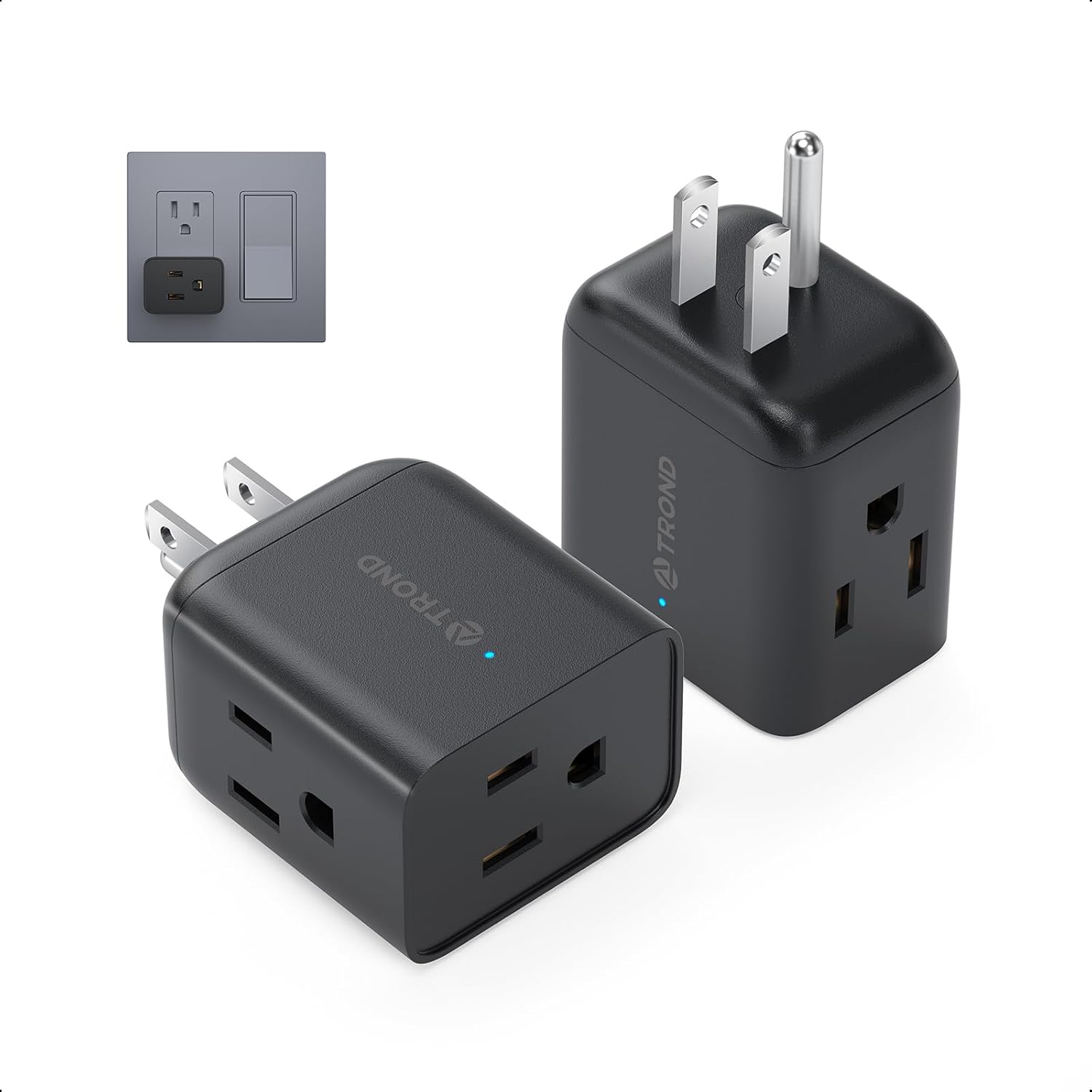
Image: The TROND Multi Plug Outlet Extender in black, showing its compact design and three-prong plug.
Key Features
- Easy Accessed 3 Way Plug Splitter: Outlets on 3 different sides allow for 3 large plugs to be used simultaneously without blocking neighboring outlets. Ideal for charging daily used devices like laptops, phones, toothbrushes, makeup mirrors, etc. An LED light indicates active power at the outlet. Max 1875W (125V/15A).
- Horizontal Wall Plug Adapter: Measured at 1.97 x 1.77 x 1.26 inches, the multi-plug outlet extender fits all GFCI/duplex/decor/USB receptacles without blocking the other socket (Not for recessed outlet). Super compact and lightweight design helps to save precious luggage space and makes this portable outlet extender a great companion for travel.
- Black Wall Outlet Extender 2 Pack: The multi plug outlet splitter turns a regular wall outlet into 3 grounded AC sockets, creating a handy charging station for your various electronic devices. The black color is sleek and unobtrusive, easily blending into any dark decor. Ideal for use in garages, homes, bathrooms, kitchens, bedrooms, living rooms, offices, hotels, and college dorm rooms.
- Correct Outlet Orientation: The plug extension outlet can "correct" outlet orientation for sideway-mounted outlets, allowing you to plug nightlights or air fresheners into them. If plugged into a vertical wall outlet, the electrical outlet adapter splits into 3 horizontal outlets.
- Safety Assurance Wall Outlet Expander: Certified by FCC & ROHS, and made of top-grade UL94 V-0 flame-retardant PC & ABS, the small plug extender is safe to use. No surge protection and no power cord, fully compliant with the restriction rules of all cruise lines.
Setup Instructions
The TROND Multi Plug Outlet Extender is designed for simple, plug-and-play setup. No complex installation is required.
- Identify a suitable wall outlet: Choose a standard 3-prong wall outlet (125V/15A) that is easily accessible and not recessed.
- Plug in the extender: Insert the TROND Multi Plug Outlet Extender directly into the chosen wall outlet. Ensure it is firmly seated. The compact design ensures it will not block the second outlet on a standard duplex receptacle.
- Observe the LED indicator: A small LED light on the extender will illuminate, indicating that the unit is receiving power and is ready for use.
- Connect your devices: You can now plug up to three devices into the available AC outlets on the extender. The side-facing outlets are particularly useful for accommodating bulky power adapters without obstructing other ports.

Image: The TROND Multi Plug Outlet Extender plugged into a wall outlet, demonstrating its compact fit and multiple accessible outlets.

Image: A visual comparison showing how the TROND extender avoids blocking adjacent outlets and switches, unlike some other designs.
Operating Instructions
Using the TROND Multi Plug Outlet Extender is straightforward:
- Power Distribution: Once plugged in, the extender provides power to all three AC outlets simultaneously.
- Optimal Plug Placement: Utilize the three distinct sides to plug in various devices, especially those with large power bricks, to prevent them from interfering with each other.
- LED Indicator: The blue LED light on the extender indicates that power is flowing through the unit. If the light is off, check the wall outlet's power supply.
- Load Capacity: Do not exceed the maximum rated power of 1875W (125V/15A) for the entire unit to prevent overheating and potential damage.

Image: The TROND Multi Plug Outlet Extender accommodating multiple bulky power adapters due to its 3-sided design.

Image: The TROND Multi Plug Outlet Extender used to reorient an outlet, allowing a nightlight to be plugged in conveniently.
Maintenance
The TROND Multi Plug Outlet Extender requires minimal maintenance to ensure long-lasting performance:
- Cleaning: Disconnect the extender from the wall outlet before cleaning. Use a dry, soft cloth to wipe the surface. Do not use liquid cleaners or aerosols.
- Storage: When not in use, store the extender in a cool, dry place away from direct sunlight and moisture.
- Inspection: Periodically inspect the extender for any signs of damage, such as cracks, frayed wires, or loose prongs. If any damage is found, discontinue use immediately.
Troubleshooting
If you encounter issues with your TROND Multi Plug Outlet Extender, please refer to the following common solutions:
- No Power/LED Off:
- Ensure the extender is fully and securely plugged into the wall outlet.
- Check if the wall outlet itself is functioning by plugging in another device.
- Verify that the circuit breaker for the outlet has not tripped.
- Devices Not Charging/Working:
- Confirm that the total wattage of all connected devices does not exceed the extender's maximum capacity (1875W).
- Ensure the devices themselves are functioning correctly by plugging them directly into a known working wall outlet.
- Check the connection of the device's plug into the extender's outlet.
- Overheating:
- Immediately unplug all devices and the extender from the wall.
- Reduce the number of devices or the power draw of connected devices.
- Ensure proper ventilation around the extender.
If the problem persists after trying these steps, please contact TROND customer support.
Specifications
| Attribute | Value |
|---|---|
| Model Number | TD-EA-US01 |
| Size | 3 Prong, 2 Pack |
| Product Dimensions | 1.97 x 1.26 x 1.77 inches |
| Material | UL94 V-0 flame-retardant PC & ABS |
| Shape | Rectangle |
| Voltage | 125 Volts |
| Wattage | 1875 watts |
| Amperage Capacity | 15 Amps |
| Item Package Quantity | 1 |
| Number Of Holes | 3 |
| Plug Format | Type B |
| Special Features | 2 Pack of 3 AC Outlet Adapter, 3 Side Design, Cruise Ship Approved, Home / Office / Dorm Room / Travel Essentials, Portable & Lightweight |
| Batteries Included? | No |
| Batteries Required? | No |
| Compatible Devices | Coffee Machine, Lamp, Laptop, Microwave Oven, Tablet |
Warranty and Support
TROND stands behind the quality of its products.
- Warranty: This product comes with an 18-Month Product Warranty and a 30-Day Money Back Guarantee.
- User Manual (PDF): For a detailed PDF version of the user manual, please refer to the official document provided by TROND.
- Customer Support: If you have any questions, concerns, or require technical assistance, please contact TROND Official customer support.
For more information and product updates, visit the TROND Store on Amazon.
Related documentsTD-EA-US01

Ask a question about this manual
Ask about setup, troubleshooting, compatibility, parts, safety, or missing instructions. Manuals+ will review the question and use this page’s manual context to help answer it.