
Introduction
The Smartmi Air Purifier P1 is designed to provide a cleaner, healthier indoor environment by efficiently filtering airborne particles and odors. Featuring advanced sensor technology and smart control options, it offers real-time air quality monitoring and purification tailored to your needs. Its compact and portable design makes it suitable for various spaces within your home.

Image: Smartmi Air Purifier P1, showcasing its sleek design and integrated leather handle.
Setup
- Unboxing: Carefully remove the air purifier and all accessories from the packaging. Ensure all components, including the power adapter and user manual, are present.
- Placement: Place the air purifier on a flat, stable surface in an appropriate location. For optimal performance, ensure there is adequate space around the unit for air intake and output. Keep doors and windows closed during operation for best results.
- Power Connection: Connect the power adapter to the power port at the back of the air purifier. Plug the adapter into a standard 110V electrical outlet.
- Initial Power On: Press the power button on the top display panel to turn on the air purifier. The display will illuminate, showing current air quality readings.

Image: Exploded view of the Smartmi Air Purifier P1, illustrating its internal components including the filter and motor.
Operating Instructions
Control Panel Overview
The intuitive touch display on top of the air purifier allows for easy control of all functions.
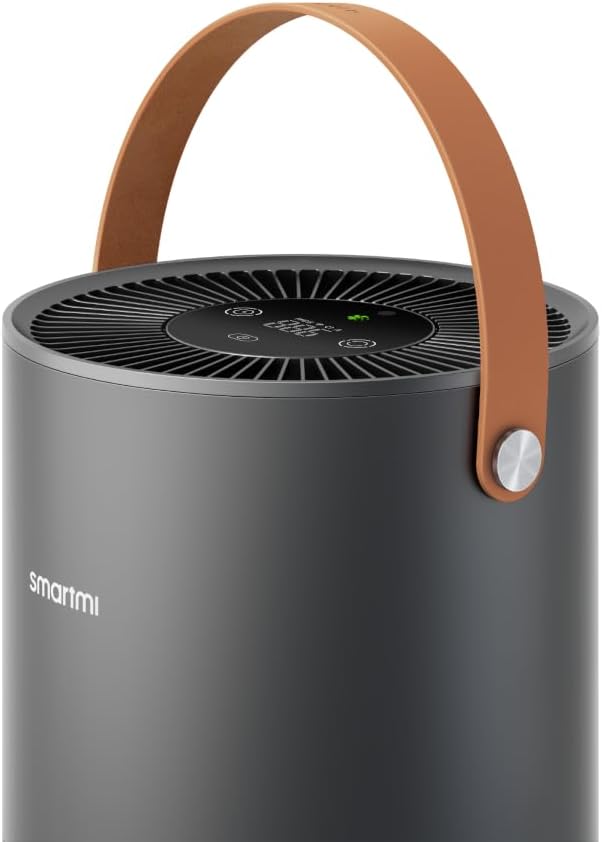
Image: Close-up of the Smartmi Air Purifier P1's top control panel, showing the digital display and touch-sensitive buttons for various functions.
- Power Button: Press to turn the unit on or off.
- Mode Button: Cycle through different operating modes (Auto, Sleep, Manual Speed).
- Timer Button: Set a timer for 1, 2, 4, or 8 hours of operation.
- PM2.5/PM1 Display: Shows real-time air quality readings.
- Indicator Light: Changes color (Green, Yellow, Orange, Red) to indicate air quality level.
Operating Modes
- Auto Mode: The purifier automatically adjusts its fan speed based on real-time air quality detected by its laser particle sensor. This ensures optimal purification with minimal intervention.
- Sleep Mode: Operates at the lowest fan speed with minimal noise (as low as 19dB) and dimmed display lights, ideal for undisturbed sleep while maintaining air quality.
- Manual Speed: Allows you to manually select the fan speed from levels 1 to 3 for customized purification intensity.
Smart Control
The Smartmi Air Purifier P1 supports integration with major smart home systems for convenient remote control:
- Smartmi Link App: Download the Smartmi Link app to your smartphone. Connect the purifier to the app to monitor air quality, adjust settings, set schedules, and check filter life remotely.
- Voice Assistants: Compatible with Google Assistant, Amazon Alexa, and Apple HomeKit. Use voice commands to control the purifier's functions.
The purifier features 360° cycled purification, ensuring efficient air circulation and cleaning throughout the room. Its high-efficiency motor can effectively clean a 320 sq. ft. room in under 20 minutes.
Maintenance
Filter Replacement
The Smartmi Air Purifier P1 uses a medical-grade HEPA 13 filter that captures 99.97% of particles as small as 0.3 microns, including dust, pollen, pet dander, smoke, bacteria, and viruses. The filter typically lasts for approximately 292 days (about 8-12 months) depending on usage and air quality.
- Check Filter Life: Monitor the remaining filter life through the Smartmi Link app. The device's display may also indicate when a filter change is needed.
- Access Filter: Turn off and unplug the air purifier. Gently turn the base of the unit counter-clockwise to unlock and remove the filter cover.
- Remove Old Filter: Carefully pull out the used filter.
- Install New Filter: Insert a new Smartmi HEPA 13 replacement filter into the unit. Ensure it is seated correctly.
- Secure Cover: Replace the filter cover and turn it clockwise to lock it into place.
- Reset Filter Life: After replacing the filter, reset the filter life counter via the Smartmi Link app or by following instructions in the full user manual.
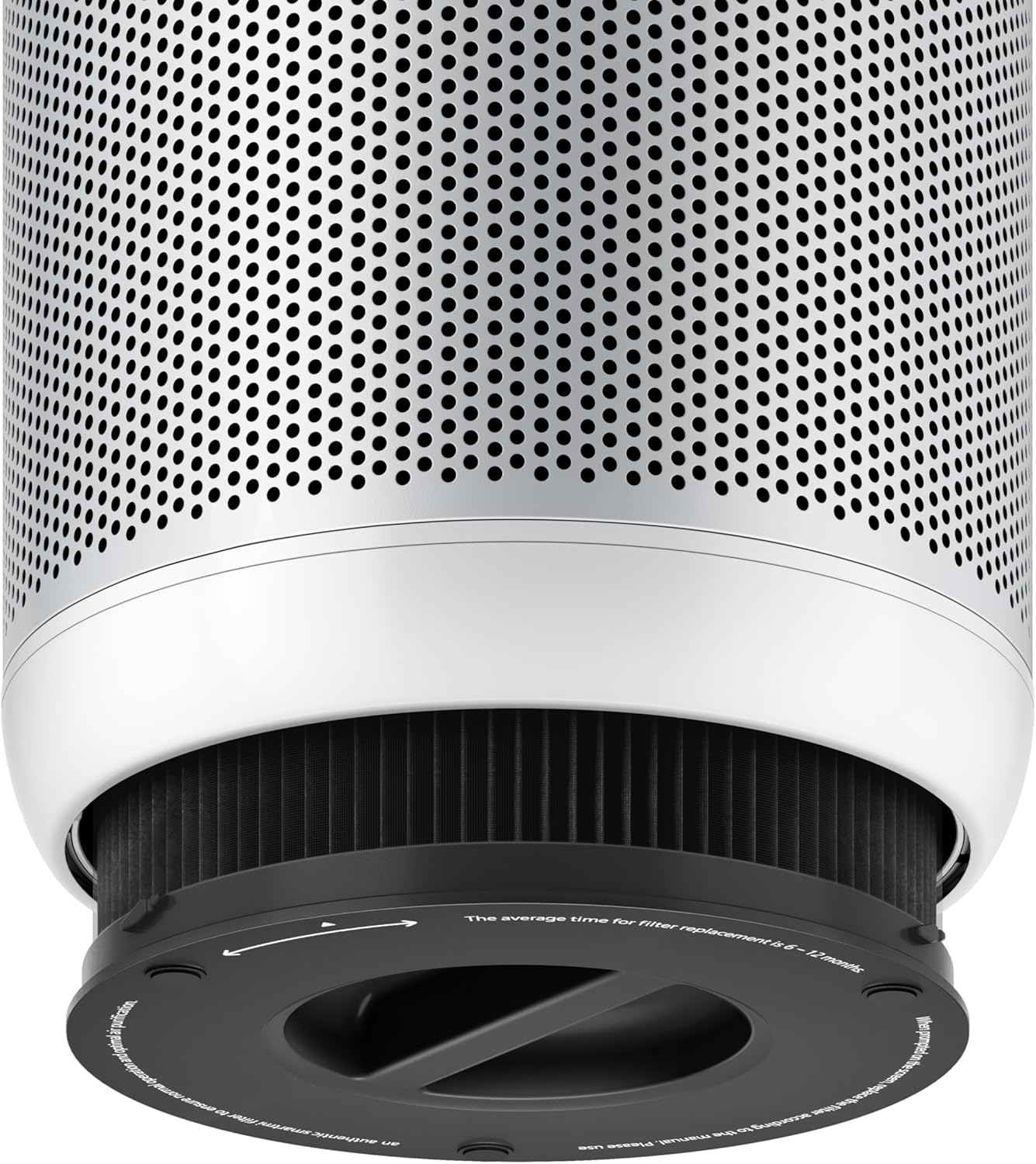
Image: The base of the Smartmi Air Purifier P1, showing how to access and replace the HEPA 13 filter.
Cleaning
- Exterior: Wipe the exterior of the air purifier with a soft, damp cloth. Do not use abrasive cleaners or solvents.
- Sensor: Periodically clean the laser particle sensor opening (located on the side of the unit) with a dry cotton swab to ensure accurate readings.
Troubleshooting
| Problem | Possible Cause | Solution |
|---|---|---|
| Unit does not turn on. | Power cord not properly connected; no power from outlet. | Ensure power cord is securely plugged in. Test outlet with another device. |
| Poor purification performance. | Filter is dirty or expired; air inlets/outlets are blocked. | Replace filter if necessary. Clear any obstructions from air vents. |
| Unusual noise during operation. | Foreign object inside unit; unit not on a stable surface. | Turn off and unplug. Check for foreign objects. Place on a flat, stable surface. |
| App connection issues. | Wi-Fi signal weak; incorrect network password; app not updated. | Ensure strong Wi-Fi. Re-enter password. Update Smartmi Link app. |
For more detailed troubleshooting, please refer to the complete user manual or contact Smartmi customer support.
Specifications
- Model: P1
- Product Dimensions: 11"D x 11"W x 17"H (28cm x 28cm x 43cm)
- Weight: Approximately 0.49 ounces (13.9 grams) - Note: This weight seems incorrect based on typical air purifiers. Please refer to product packaging for accurate weight.
- Noise Level: 19 dB (Sleep Mode) - 49 dB (Max Mode)
- Controller Type: Button Control, Smartmi Link App, Voice Control (Google Assistant, Alexa, Apple HomeKit)
- Coverage Area: Ideal for 180-320 sq. ft. (16.7-29.7 sq. meters) rooms
- Filter Type: Medical Grade HEPA 13 Filter
- GTIN: 06970403201721
Warranty & Support
For warranty information and customer support, please refer to the documentation included with your Smartmi Air Purifier P1 or visit the official Smartmi website. Keep your purchase receipt for warranty claims.


