
Introduction
This instruction manual provides detailed information on the installation, operation, and maintenance of your HelloBaby Universal Monitor Mount. Please read this manual thoroughly before use to ensure proper functionality and safety. This mount is designed to securely hold HelloBaby baby monitors with a 1/4-inch threaded port, offering flexible placement without the need for tools or wall damage.
Product Features
- Universal Compatibility: Designed for HelloBaby monitors with 1/4-inch threaded ports, including models HB40, HB6339, HB41, HB6351, HB6550, HB65, HB66, HB6250, HB6336, HB35, HB6081, HB6231, HB6233.
- Flexible Design: The unique twisted design allows for adjustable camera angles and versatile mounting options.
- Tool-Free Installation: No screws, drilling, or wall damage required.
- Safe and Sturdy: Constructed from stainless steel and silicone for durability and stability.
- Portable: Easy to move and re-position as needed.
Package Contents
Please verify that all items are present in your package:
- 1 x HelloBaby Universal Monitor Mount
Setup and Installation
Follow these steps to set up your HelloBaby Universal Monitor Mount:
Step 1: Identify the 1/4-inch Threaded Port on Your Monitor
Locate the 1/4-inch threaded port on the bottom or back of your HelloBaby monitor camera. This is a small, circular opening designed to accept a screw.

Image: The threaded screw at the end of the flexible mount, designed to connect to the monitor camera.
Step 2: Attach the Monitor to the Mount
Carefully screw the 1/4-inch threaded end of the monitor mount into the corresponding port on your HelloBaby monitor camera. Turn clockwise until it is securely fastened, but do not overtighten.
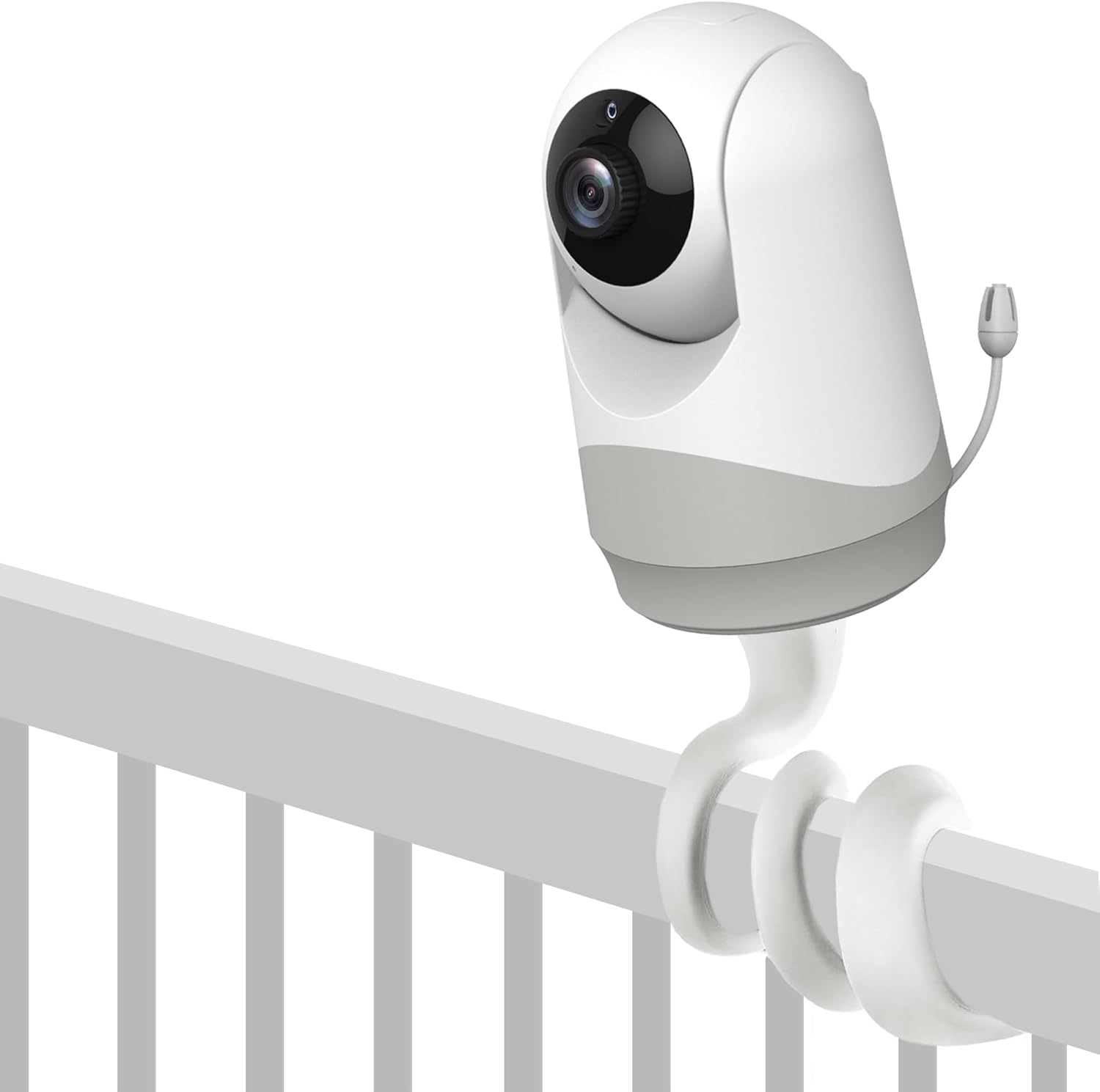
Image: A HelloBaby monitor camera securely attached to the flexible mount, demonstrating how it connects and can be positioned on a crib rail.
Step 3: Position the Mount
Wrap the flexible mount around a suitable surface such as a crib rail, shelf, or pole. Ensure the surface is stable and can support the weight of the monitor and mount. The mount's flexible body allows for various configurations.

Image: This image illustrates the versatility of the mount, showing it attached to different HelloBaby monitor models and an example of it wrapped around a crib rail above a sleeping baby.
Step 4: Adjust Camera Angle
Once the mount is securely positioned, bend and twist the flexible arm to achieve the desired camera angle. Ensure the camera has a clear view of the area you wish to monitor.

Image: The flexible mount is shown twisted into a stable base, demonstrating its ability to function as a freestanding monitor stand.
Operating Instructions
The HelloBaby Universal Monitor Mount is a passive accessory. Its operation is directly tied to the functionality of the HelloBaby monitor camera it supports.
- Stability Check: Before each use or repositioning, gently check the stability of the mount and the attached camera to ensure it is secure and will not fall.
- Angle Adjustment: Adjust the mount's flexible arm as needed to maintain the optimal viewing angle for your monitor.
- Repositioning: To move the mount, simply unwrap it from its current position and re-wrap it in the new desired location.
Maintenance
To ensure the longevity and proper function of your HelloBaby Universal Monitor Mount, follow these simple maintenance guidelines:
- Cleaning: Wipe the mount with a soft, damp cloth. Do not use harsh chemicals or abrasive cleaners, as these may damage the material.
- Storage: When not in use, store the mount in a clean, dry place away from extreme temperatures.
- Inspection: Periodically inspect the mount for any signs of wear or damage, particularly around the threaded connection point and the flexible arm. If any damage is observed, discontinue use.
Troubleshooting
| Problem | Possible Cause | Solution |
|---|---|---|
| Monitor feels unstable on the mount. | The monitor is not securely screwed into the mount, or the mount is not securely wrapped around the surface. | Ensure the monitor is tightly screwed into the 1/4-inch port. Re-wrap the flexible mount more securely around the chosen surface. Ensure the surface itself is stable. |
| Mount does not hold desired angle. | The flexible arm may not be bent sufficiently or is supporting too much weight. | Bend the flexible arm into a tighter coil or more rigid shape to provide better support. Ensure the monitor is compatible and not excessively heavy for the mount. |
| Mount does not fit my monitor. | Your monitor may not have a 1/4-inch threaded port or is not a HelloBaby brand monitor. | Verify your monitor has a 1/4-inch threaded port. This mount is specifically designed for HelloBaby monitors with this feature. Refer to your monitor's manual for compatibility. |
Specifications
- Product Name: HelloBaby Universal Monitor Mount
- Model Compatibility: HelloBaby monitors with 1/4-inch threaded ports (e.g., HB40, HB6339, HB41, HB6351, HB6550, HB65, HB66, HB6250, HB6336, HB35, HB6081, HB6231, HB6233)
- Material: Stainless Steel, Silicone
- Mounting Type: Flexible Wrap/Stand
- Item Weight: Approximately 3.52 ounces (100 grams)
- Package Dimensions: Approximately 3.94 x 3.78 x 1.14 inches
- UPC: 190282012898
- Manufacturer: HelloBaby
- Country of Origin: China
Warranty and Support
For warranty information and customer support, please refer to the documentation included with your HelloBaby monitor camera or visit the official HelloBaby website. Keep your purchase receipt for warranty claims.
Contact Information:
- Website: www.hellobaby.net (Please note: This is a placeholder URL, refer to your product packaging for the most accurate support contact.)
- Email: Refer to HelloBaby official website for support email.