
Introduction
Thank you for choosing the SPORTARC IN-12 Nixie Tube 4-Digit LED Retro Digital Clock. This manual provides detailed instructions for the proper setup, operation, and maintenance of your new clock. Please read this manual thoroughly before use to ensure optimal performance and longevity of your device.
This clock features a vibrant 4-digit LED display, reminiscent of classic Nixie tubes, housed in a durable ABS and metal casing. Its design is intended to add a unique aesthetic to any indoor environment, including living rooms, bedrooms, and nurseries.
Package Contents
Please verify that all items are present in your package. The contents may vary slightly depending on the style purchased (with or without tubes).
- Nixie Tube Clock Housing (1 unit)
- USB Cable (1 unit)
- IN-12 Nixie Tubes (4 units, included with Style B, not included with Style A)
Note: Other accessories shown in product images are for demonstration purposes only and are not included in the package.
Key Features
- Colorful 4-Digit LED Display: Features IN-12 luminous tubes for a retro aesthetic with vibrant, breathing background lights.
- Durable Construction: Made from high-quality ABS and metal materials for longevity.
- High Precision Clock Chip: Built-in chip ensures accurate timekeeping with an annual error of less than 1 minute.
- Versatile Display Modes: Supports time display (hours, minutes, seconds) and date display (year, month, day). Includes a time switch function.
- USB Powered: Operates via USB power, eliminating the need for internal batteries.
- Infrared Remote Control: Allows convenient adjustment of settings from a distance.
- Silent Operation: Designed to be a silent clock, suitable for bedrooms and quiet environments.
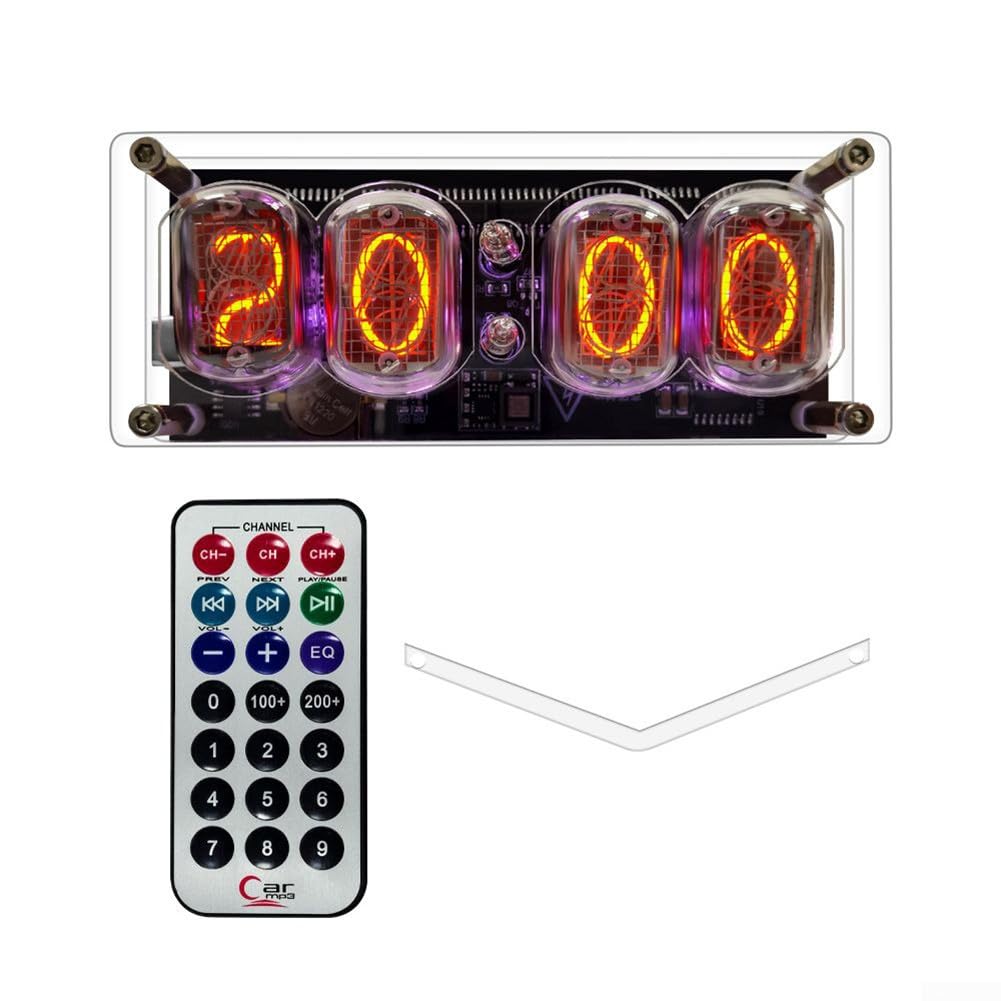
Image: The SPORTARC IN-12 Nixie Tube Clock showcasing its colorful background breathing lights in RGB mode, providing a bright and clear display.

Image: A close-up of the SPORTARC IN-12 Nixie Tube Clock highlighting its high precision chip, which ensures accurate time and date display with minimal annual error.

Image: The SPORTARC IN-12 Nixie Tube Clock alongside its infrared remote control, illustrating its USB power capability (no battery required) and remote operation.
Setup Instructions
- Unpacking: Carefully remove all components from the packaging. Inspect for any visible damage.
- Tube Installation (if applicable for Style A): If you purchased Style A (without tubes), gently insert the IN-12 Nixie tubes into their respective sockets on the clock housing. Ensure they are seated firmly but do not force them.
- Power Connection: Connect the provided USB cable to the clock's USB port. Plug the other end of the USB cable into a standard USB power adapter (not included) or a powered USB port (e.g., on a computer or power bank).
- Initial Power On: The clock should power on automatically once connected to a power source. The display will illuminate.
- Placement: Place the clock on a stable, flat surface. Ensure it is away from direct sunlight, excessive heat, or moisture.

Image: A side view of the SPORTARC IN-12 Nixie Tube Clock, illustrating the structure and the placement of the IN-12 tubes within the housing.
Operating Instructions
The SPORTARC IN-12 Nixie Tube Clock can be operated using the included infrared remote control.
Basic Functions:
- Time Display: The clock primarily displays time in hours, minutes, and seconds.
- Date Display: The clock can also display the current date (year, month, day).
- Time Switch: This function allows you to switch between different display modes or settings.
Using the Remote Control:
Point the remote control directly at the clock's infrared receiver. The specific buttons and their functions are typically indicated on the remote itself. Common functions include:
- Power On/Off: Usually a dedicated button to turn the display on or off.
- Mode Selection: Buttons to switch between time, date, or other display modes.
- Setting Adjustment: Buttons (e.g., '+', '-') to adjust hours, minutes, year, month, or day when in setting mode.
- Brightness/Color Control: Some remotes may offer options to change display brightness or LED background colors.
Note: Due to variations in remote control designs, refer to the button labels on your specific remote for exact functionality.

Image: A top-down view of the SPORTARC IN-12 Nixie Tube Clock, showing the illuminated Nixie tubes displaying numerical digits.
Maintenance
- Cleaning: Use a soft, dry cloth to gently wipe the clock's surface. Avoid abrasive cleaners or solvents, as they may damage the finish or the tubes.
- Tube Handling: If you need to remove or replace the Nixie tubes, do so carefully to avoid breaking the glass or bending the pins. Always ensure the clock is unplugged before handling tubes.
- Storage: If storing the clock for an extended period, disconnect it from power and store it in a dry, dust-free environment.
Troubleshooting
| Problem | Possible Cause | Solution |
|---|---|---|
| Clock does not power on. | No power supply; loose USB connection; faulty USB cable/adapter. | Ensure the USB cable is securely connected to both the clock and a working power source. Try a different USB cable or power adapter. |
| Display is dim or flickering. | Insufficient power; faulty tube; setting issue. | Ensure the power source provides adequate current. Check if any tubes are loose or damaged. Adjust brightness settings using the remote control. |
| Remote control is not working. | Remote battery depleted; obstruction; remote not pointed correctly. | Replace the remote control battery. Ensure there are no obstructions between the remote and the clock. Point the remote directly at the clock's infrared receiver. |
| Time/Date is incorrect. | Incorrect setting; power interruption. | Use the remote control to enter setting mode and adjust the time and date. If power was interrupted, settings might need to be re-entered. |
Specifications
| Brand | SPORTARC |
| Model Number | 1401157363 |
| ASIN | B0CHY91M85 |
| Material | ABS, Metal |
| Product Dimensions (L x W x H) | 17 x 8 x 7 cm (6.7 x 3.1 x 2.8 inches) |
| Item Weight | 210 Grams (0.46 lbs) |
| Display Type | Digital (Nixie Tube style LED) |
| Power Source | USB Powered |
| Special Feature | Silent Clock |
| Indoor/Outdoor Use | Indoor |