
1. Introduction
This manual provides detailed instructions for the operation and maintenance of your Skmei 1257 Digital Sports Watch. Please read this manual thoroughly to ensure proper use and to maximize the lifespan of your watch.
The Skmei 1257 is a versatile digital watch designed for daily wear and sports activities, featuring a 50-meter water resistance rating, alarm, stopwatch, calendar, and backlight functions.
2. Product Overview
2.1 Key Features
- Digital Display: Clear and easy-to-read digital time display.
- Water Resistance: 50 meters (5 ATM), suitable for swimming and showering, but not deep diving.
- Alarm: Daily alarm function.
- Stopwatch: Chronograph function for timing events.
- Calendar: Displays date, day of the week, and month.
- Night Light: Electroluminescent backlight for visibility in low light conditions.
- Countdown Timer: For specific timed activities.
2.2 Watch Components
Familiarize yourself with the main components and buttons of your Skmei 1257 watch:

Image: Front view of the Skmei 1257 digital watch, showing the display and four control buttons: LIGHT (top left), MODE (bottom left), START (top right), and RESET (bottom right). The watch face displays time, day, and date.
- LIGHT Button (Top Left): Activates the backlight.
- MODE Button (Bottom Left): Cycles through different modes (Time, Stopwatch, Alarm, Countdown).
- START Button (Top Right): Used to start/stop functions or adjust settings.
- RESET Button (Bottom Right): Used to reset functions or confirm settings.
3. Setup
3.1 Initial Power On
Your watch comes with a pre-installed battery. If the display is blank, press any button to activate it. If it remains blank, the battery may need replacement (refer to Maintenance section).
3.2 Setting Time and Date
- From the Time Display mode, press the MODE button three times to enter Time Setting mode. The seconds digits will flash.
- Press the RESET button to cycle through the settings: Seconds → Hour → Minute → Month → Date → Day of Week.
- Use the START button to adjust the flashing value. Hold START to change values faster.
- Once all settings are correct, press the MODE button to exit Time Setting mode and return to the normal time display.

Image: Close-up of the Skmei 1257 watch face showing the digital display with time (22:58:48), day (SAT), and date (10-20). This is the standard time display mode.
4. Operating Instructions
4.1 Switching Modes
Press the MODE button repeatedly to cycle through the following modes:
- Time Display (default)
- Stopwatch
- Alarm Setting
- Countdown Timer
4.2 Using the Stopwatch
- Press MODE once to enter Stopwatch mode. The display will show "00:00:00".
- Press START to begin timing.
- Press START again to pause timing.
- Press RESET to clear the stopwatch to "00:00:00".
- To return to Time Display, press MODE.
4.3 Setting the Alarm
- Press MODE twice to enter Alarm Setting mode. The hour digits will flash.
- Press START to adjust the hour.
- Press RESET to switch to minute setting.
- Press START to adjust the minutes.
- Press MODE to exit Alarm Setting mode.
- To turn the alarm ON/OFF: In Alarm Setting mode, press START and RESET simultaneously. An alarm icon will appear/disappear.
4.4 Using the Night Light
Press the LIGHT button (top left) to illuminate the display for a few seconds. This feature is useful in dark environments.
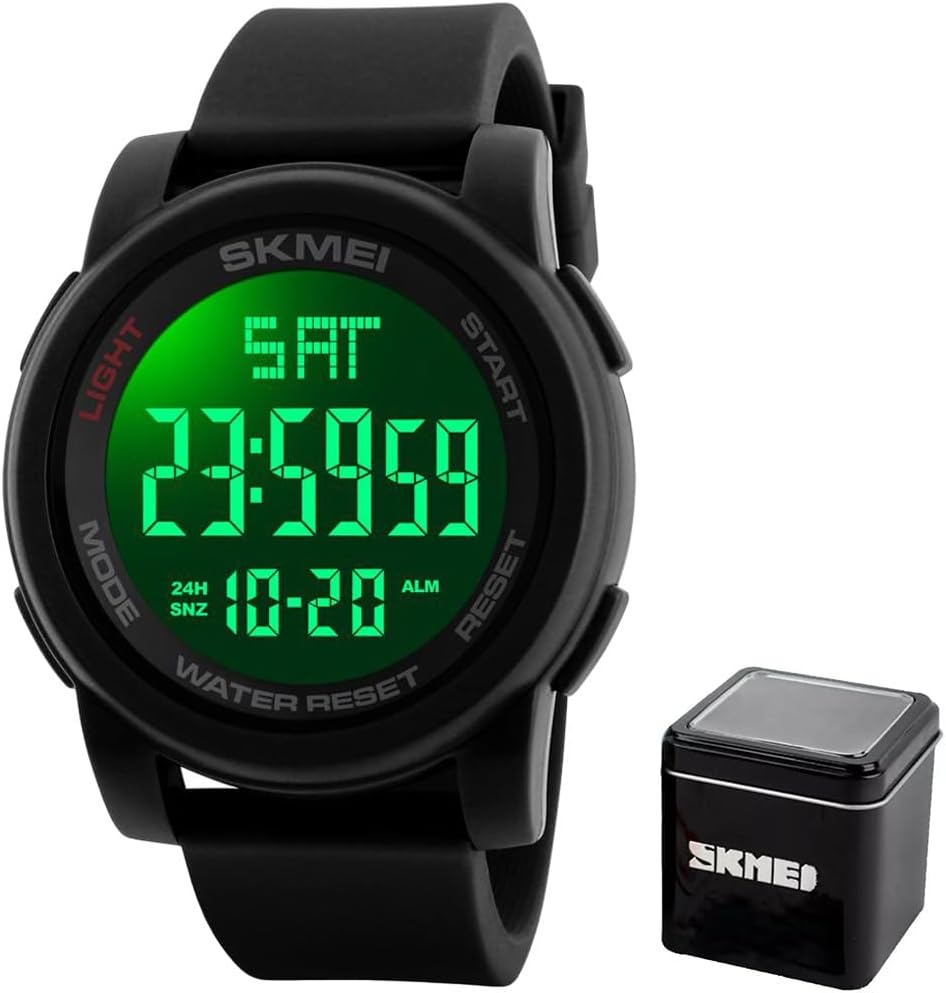
Image: The Skmei 1257 watch display illuminated with a green backlight, showing time (23:59:59), day (SAT), and date (10-20) clearly in a dark setting.
4.5 Water Resistance
The Skmei 1257 watch is water-resistant up to 50 meters (5 ATM). This means it is suitable for:
- Daily use and splashes.
- Showering.
- Swimming in shallow water.
Important: Do not press any buttons while the watch is submerged in water, as this can compromise the water seal and cause damage.
Avoid exposure to hot water or steam, as this can also damage the watch's seals.
5. Maintenance
5.1 Cleaning Your Watch
Wipe the watch regularly with a soft, dry cloth to remove dirt and sweat. For stubborn dirt, use a slightly damp cloth and then dry thoroughly. Avoid using chemical cleaners, as they can damage the watch's materials.
5.2 Battery Replacement
The watch uses a Lithium-metal battery. When the display becomes dim or the watch stops functioning, the battery may need replacement. Battery replacement should ideally be performed by a qualified watch technician to ensure the water resistance seal is properly maintained.
5.3 Storage
When not in use for extended periods, store the watch in a cool, dry place away from direct sunlight and extreme temperatures.
6. Troubleshooting
| Problem | Possible Cause | Solution |
|---|---|---|
| Watch display is blank. | Battery is depleted. | Replace the battery. |
| Time is incorrect. | Time settings need adjustment. | Refer to "Setting Time and Date" section. |
| Alarm does not sound. | Alarm is turned off or set incorrectly. | Ensure alarm is ON and set to the correct time. Refer to "Setting the Alarm" section. |
| Water inside the watch. | Water resistance compromised (e.g., buttons pressed underwater, exposure to hot water). | Immediately take the watch to a qualified technician for inspection and repair. Do not attempt to dry it yourself. |
7. Specifications
- Model: Skmei 1257
- Movement: Digital
- Case Diameter: 50 mm
- Case Thickness: 15 mm
- Band Material: Plastic/Silicone
- Band Width: 22 mm
- Band Length: 26 cm
- Weight: 63 g
- Water Resistance: 50 Meters (5 ATM)
- Display Type: Digital
- Special Features: Alarm, Calendar, Backlight, Stopwatch, Countdown
- Power Source: Battery (1 Lithium-metal battery included)
8. Warranty and Support
This product is covered by a manufacturer and seller warranty. Please refer to your purchase documentation for specific warranty terms and duration.
For technical support or warranty claims, please contact your retailer or the manufacturer directly. Keep your proof of purchase for warranty validation.