
AQESO U80BH
AQESO Upper Arm Blood Pressure Machine User Manual
Model: U80BH
Introduction
The AQESO Upper Arm Blood Pressure Machine is designed for accurate and fast blood pressure readings at home. Featuring upgraded Accurate Signal Processing (ASP) technology, it provides readings within 30 seconds. This device includes two cuff sizes to accommodate a wide range of arm circumferences, a large backlit LCD display for easy readability, and a dual-user mode with memory storage for tracking health data over time. Regular monitoring of blood pressure is an important aspect of personal health management.
What's Included
Upon opening the package, verify that all components are present:
- 1 x AQESO Blood Pressure Monitor (Model U80BH)
- 1 x Medium/Large Cuff (9"-17" arm circumference)
- 1 x Extra Large Cuff (13"-21" arm circumference)
- 1 x Cloth Carrying Bag
- 4 x AAA Batteries
- 1 x USB Plug (Power Adapter)
- 1 x USB Type-C Cable
- 1 x User Manual (this document)

Figure 1: All components included in the AQESO Blood Pressure Machine package.
Setup
1. Powering the Device
The AQESO Blood Pressure Machine offers two power options:
- Battery Power: Insert the 4 included AAA batteries into the battery compartment located on the back of the device. Ensure correct polarity.
- USB Power: Connect the provided USB Type-C cable to the device and the USB plug (power adapter). Plug the adapter into a standard wall outlet. Note that the device is not rechargeable and requires a continuous power connection when using USB.

Figure 2: Powering the device using either AAA batteries or the USB Type-C cable and adapter.
2. Attaching the Cuff
Select the appropriate cuff size (Medium/Large or Extra Large) based on your arm circumference. Connect the air tube from the cuff securely to the air jack on the side of the blood pressure monitor.

Figure 3: The two included cuff sizes, Medium/Large and Extra Large, designed to fit various arm dimensions.
Operating Instructions
1. Preparation Before Measurement
For accurate readings, observe the following:
- Avoid smoking, exercising, or consuming caffeinated drinks for at least 30 minutes prior to measurement. These activities can temporarily affect blood pressure.
- Rest for 5 minutes in a quiet environment before taking a reading.
- Ensure your bladder is empty.
2. Proper Measurement Posture
Correct positioning is crucial for reliable results:
- Sit comfortably with your back supported.
- Place your feet flat on the floor; do not cross your legs.
- Rest your arm on a table or flat surface, palm up, so that the cuff is at the same level as your heart.
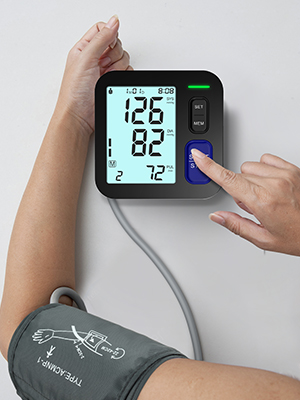
Figure 4: Correct posture for taking a blood pressure reading.
3. Cuff Placement
Wrap the cuff firmly around your bare upper arm, ensuring the air tube runs down the center of your arm. The bottom edge of the cuff should be approximately 2 fingers (about 1 inch) above your elbow joint. The cuff should be snug but not overly tight; you should be able to insert two fingers between the cuff and your arm. Incorrect cuff size or placement can lead to inaccurate readings.

Figure 5: Visual guide for correct cuff placement and the impact of incorrect cuff size on readings.
4. Taking a Measurement
With the cuff correctly placed and you in the proper posture, press the START/STOP button. The cuff will automatically inflate and deflate, and your systolic, diastolic, and heart rate readings will appear on the large backlit LCD display within approximately 30 seconds. The device also features a colorful WHO classification bar to help interpret your readings.

Figure 6: The large backlit display provides clear readings and a visual WHO classification indicator.
5. Dual-User Mode and Memory Function
The monitor supports two independent users, each capable of storing up to 99 measurements. Use the MEM button to access historical records for each user, allowing easy tracking of blood pressure and heart rate data by date and time.
Figure 7: The device supports two users, each with 99 memory sets for tracking readings.
Maintenance
- Clean the monitor and cuff with a soft, dry cloth. Do not use abrasive cleaners or immerse the device in water.
- Store the device in the provided cloth bag in a cool, dry place, away from direct sunlight and extreme temperatures.
- Remove batteries if the device will not be used for an extended period to prevent leakage.
Troubleshooting
If you encounter issues with your blood pressure monitor, consider the following common problems and solutions:
- Inaccurate Readings:
- Ensure the correct cuff size is used. The circumference of your upper arm determines the appropriate cuff.
- Verify correct cuff placement. The brachial artery marker should be above the artery, and the air tube should run down the center of your arm. Avoid wrapping the cuff too tightly or too loosely.
- Adhere to pre-measurement guidelines (no smoking, exercising, caffeine 30 minutes prior).
- Maintain proper posture during measurement (relaxed, feet flat, arm supported at heart level, no crossed legs).
- Device Not Powering On:
- Check if batteries are inserted correctly and have sufficient charge.
- If using USB power, ensure the cable and adapter are securely connected and the outlet is functional.
For further assistance, refer to the detailed user manual or contact customer support.
Specifications
| Feature | Detail |
|---|---|
| Model Name | U80BH |
| Product Dimensions | 6.22"L x 4.06"W x 2.05"Th |
| Weight | 1.52 Pounds |
| Cuff Sizes Included | Medium/Large (9"-17"), Extra Large (13"-21") |
| Power Source | 4 x AAA batteries (included) or USB Type-C cable |
| Display Type | Large Backlit LCD Display |
| Memory Capacity | 99 measurements per user (2 users) |
| Accuracy (Pressure) | ±3mmHg |
| Accuracy (Pulse) | ±5% of reading |
Warranty and Support
The AQESO Blood Pressure Machine comes with a 12-month warranty. For any questions, technical support, or warranty claims, please contact AQESO customer service. Our friendly customer service team is available to assist you.
Product Video Guide
Video 1: Unboxing and demonstration of the AQESO Blood Pressure Monitor, including setup and usage tips.
Related documentsU80BH


Ask a question about this manual
Ask about setup, troubleshooting, compatibility, parts, safety, or missing instructions. Manuals+ will review the question and use this page’s manual context to help answer it.