
1. Introduction
This user manual provides comprehensive instructions for the installation, operation, and maintenance of your Jebao MCP Series Smart Cross-Flow Wave Pump, specifically the MCP-180 model. Please read this manual thoroughly before using the product to ensure safe and efficient operation. Retain this manual for future reference.

Image 1.1: The Jebao Smart Cross-Flow Pump user manual as found inside the product packaging.
2. Product Features
The Jebao MCP Series Smart Cross-Flow Wave Pump incorporates advanced technology for optimal aquarium water circulation. Key features include:
- WiFi and Manual Control: Offers flexible control options via a dedicated mobile application or the integrated LCD controller.
- Smart AP Mode: Enables direct control without requiring an external Wi-Fi router, creating its own network for convenience.
- SINE Wave Technology: Ensures ultra-quiet operation and highly stable performance, minimizing noise and vibration.
- Cross-Wave Double Impeller Structure: Designed to generate efficient water flow with no dead spots, promoting comprehensive circulation within the aquarium.
- Marine and Freshwater Compatibility: Constructed without exposed copper elements, making it safe for use in both marine and freshwater environments.
- IC Electronic Detection: Features dry/locked rotor protection and automatic power-off upon detecting no water, enhancing safety and product longevity.
- Master and Slave Wireless Control: Allows for synchronized operation of multiple pumps for complex flow patterns.
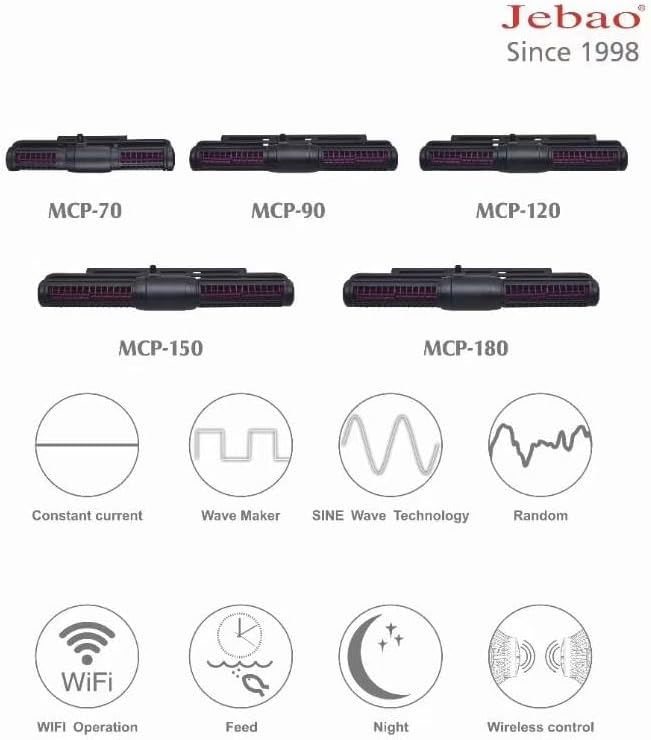
Image 2.1: Overview of Jebao MCP pump models and their various operational modes.
3. Package Contents
Upon unpacking, please verify that all components are present and undamaged. The standard package for the MCP-180 model includes:
- Jebao MCP-180 Cross-Flow Wave Pump Unit
- LCD Display Controller
- Power Adapter
- User Manual

Image 3.1: The Jebao MCP-180 pump unit and its accompanying LCD controller.
4. Safety Instructions
To prevent injury or damage to the product, always adhere to the following safety guidelines:
- Always disconnect power before performing any maintenance or installation.
- Ensure your hands are dry when handling electrical components.
- Do not operate the pump if the power cord or plug is damaged.
- This product is designed for indoor aquarium use only. Do not use it for other purposes.
- Keep the controller and power adapter away from water splashes.
- Ensure the pump is fully submerged in water during operation to prevent dry running.
- Children should be supervised to ensure they do not play with the appliance.
5. Setup
Follow these steps to set up your Jebao MCP-180 wave pump:
5.1 Mounting the Pump
- Position the pump unit inside the aquarium, ensuring it is fully submerged and clear of any obstructions.
- Use the magnetic mount to secure the pump to the aquarium glass. Align the external magnet with the internal pump unit.
- Ensure the pump is securely attached and will not move during operation.
5.2 Connecting the Controller
- Connect the pump unit cable to the designated port on the LCD controller.
- Connect the power adapter to the controller's power input port.
- Plug the power adapter into a suitable electrical outlet.
5.3 Initial Power On and WiFi Setup
Upon powering on, the controller LCD will illuminate. The pump will enter its default operating mode. For WiFi control:
- Download the 'Jebao Aqua' app from the App Store or Google Play.
- Follow the in-app instructions to connect your pump using Smart AP mode (no router required) or by connecting to your home Wi-Fi network.

Image 5.1: The Jebao Aqua mobile application for WiFi control, available on App Store and Google Play.
6. Operating Instructions
The MCP-180 pump offers various modes and settings for customized water flow.
6.1 Controller Overview
The LCD controller features several buttons for direct control:
- Mode Button: Cycles through different operational modes (e.g., Constant, Wave, SINE, Random).
- Up/Down Buttons: Adjust flow intensity or other parameters within a selected mode.
- Play/Pause Button: Starts or stops the pump operation.
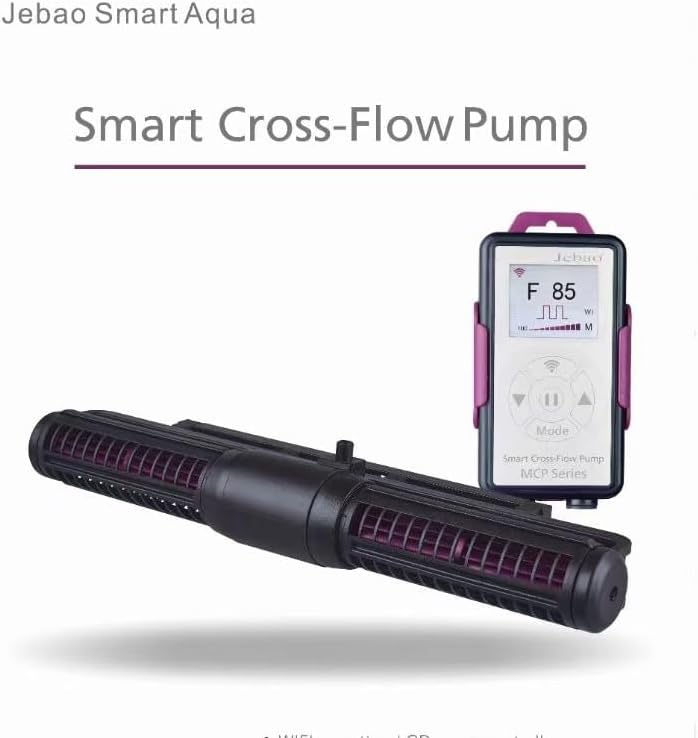
Image 6.1: The LCD controller displaying current flow settings.
6.2 Operational Modes
Press the 'Mode' button to cycle through the following modes:
- Constant Current: Provides a steady, continuous flow. Adjust intensity with Up/Down buttons.
- Wave Maker: Generates oscillating wave patterns. Adjust wave intensity and frequency.
- SINE Wave Technology: Produces smooth, natural-looking wave motions with minimal noise.
- Random Flow: Varies flow patterns and intensity unpredictably to simulate natural ocean currents.
- Feed Mode: Temporarily pauses the pump for a set duration (e.g., 10 minutes) to allow for feeding without food being swept away.
- Night Mode: Reduces pump activity during nighttime hours for quieter operation and to simulate natural diurnal cycles.
6.3 WiFi App Control
For advanced control and scheduling, use the Jebao Aqua mobile application. The app allows for:
- Precise adjustment of flow rates and wave patterns.
- Setting up daily schedules and custom programs.
- Monitoring pump status.
- Configuring master/slave pump synchronization.
7. Maintenance
Regular maintenance ensures optimal performance and extends the lifespan of your pump.
7.1 Cleaning the Pump Unit
- Disconnect the power adapter from the electrical outlet.
- Remove the pump unit from the aquarium.
- Carefully disassemble the pump housing to access the impeller.
- Clean the impeller, impeller shaft, and pump housing thoroughly using a soft brush and clean water. Remove any algae, debris, or calcium buildup.
- Rinse all components with clean water.
- Reassemble the pump unit, ensuring all parts are correctly seated.
- Place the pump back into the aquarium and reconnect power.
It is recommended to perform this cleaning every 2-4 weeks, depending on your aquarium's conditions.
8. Troubleshooting
If you encounter issues with your Jebao MCP-180 pump, refer to the following common problems and solutions:
| Problem | Possible Cause | Solution |
|---|---|---|
| Pump not running | No power; Impeller jammed; Dry run protection activated. | Check power connection; Clean impeller; Ensure pump is fully submerged. |
| Weak water flow | Impeller dirty; Obstruction in pump; Flow setting too low. | Clean impeller and housing; Remove obstructions; Increase flow setting on controller/app. |
| Unusual noise | Impeller dirty or damaged; Air trapped in pump. | Clean or replace impeller; Gently shake pump to release air. |
| WiFi connection issues | Incorrect network settings; Router too far; App not updated. | Verify network credentials; Move router closer or use AP mode; Update Jebao Aqua app. |
9. Specifications
The following table details the specifications for the Jebao MCP Series pumps, including the MCP-180 model:
| Model | Voltage | Watts | Dimensions L×W×H (mm) | Tank Size (cm) | Tank Thickness (mm) |
|---|---|---|---|---|---|
| MCP-70 | DC 24V | 18 | 218×62×40 | 80 | ≤8 |
| MCP-90 | DC 24V | 25 | 283×66×40 | 90 | ≤8 |
| MCP-120 | DC 24V | 45 | 295×72×45 | 120 | ≤15 |
| MCP-150 | DC 24V | 55 | 330×74×48 | 150 | ≤19 |
| MCP-180 | DC 24V | 65 | 340×82×52 | 180 | ≤19 |
Image 9.1: Detailed specifications for the Jebao MCP Series pumps.
10. Warranty and Support
For warranty information and technical support, please contact your retailer or visit the official Jebao website. Keep your purchase receipt as proof of purchase.
Official Website: www.jebao.com

