
1. Introduction
Thank you for choosing the ZVGREEN 4-Wheel Mobility Scooter, Model BULL. This manual provides important information regarding the safe operation, maintenance, and care of your new mobility device. Please read this manual thoroughly before operating the scooter to ensure proper use and to maximize its lifespan. Keep this manual for future reference.

This image displays the ZVGREEN 4-Wheel Mobility Scooter, Model BULL, in a vibrant red color, equipped with a protective canopy and windshield. It highlights the overall design and appearance of the scooter.
2. Safety Information
Your safety is paramount. Always adhere to the following safety guidelines:
- Read the Manual: Fully understand all instructions and warnings before operating the scooter.
- Weight Capacity: Do not exceed the maximum weight capacity of 500 lbs (227 kg).
- Terrain: Operate the scooter on stable, even surfaces. Avoid steep inclines exceeding 20 degrees. Exercise caution on uneven terrain, grass, sand, or gravel.
- Weather Conditions: The canopy and windshield provide protection, but avoid operating in severe weather conditions like heavy rain, strong winds, or snow.
- Visibility: Ensure all lights (LED, running, turn signals, brake) are functional before use, especially in low-light conditions.
- Speed Control: Always operate at a safe speed appropriate for the environment and your skill level. Use the three-speed gear selector responsibly.
- Charging: Only use the provided charger. Charge the battery in a well-ventilated area, away from flammable materials.
- Children and Pets: Keep children and pets away from the scooter during operation and charging.
- Modifications: Do not modify the scooter in any way. Unauthorized modifications can compromise safety and void the warranty.
3. Product Overview
Key Features
- Powerful Motor: Equipped with a 1000W brushless motor, capable of speeds up to 15 mph.
- Long Range Battery: Features a 60V20Ah lead-acid battery, offering a driving range of up to 31 miles per charge.
- All-Weather Protection: Includes a canopy and windshield for protection against rain, wind, and harsh sunlight.
- Intuitive Controls: User-friendly control panel with LED light switch, high-low beam, turn signal switch, USB charging port, throttle, and three-speed gear.
- Durable Tires: 3.00-10 tubeless tires (16-inch length) designed for various terrains including grass, roads, parks, and beaches.
- Convenient Storage: Offers a front hook, under-seat storage, and a spacious, waterproof, lockable rear box.

This graphic illustrates the core performance capabilities of the ZVGREEN Mobility Scooter. It features a 1000W powerful motor, a weight capacity of 500 pounds, a maximum speed of 15 miles per hour, a driving range of 25-31 miles, and a climbing ability of 20 degrees.
Components Diagram

This detailed diagram provides an exploded view of the ZVGREEN Mobility Scooter, labeling its key components with numbers. These include the Rearview Mirror (1), LED Light (2), LED Running Light (3), 3.00-10 Tubeless Tire (4), Roof (5), Rear Box (6), Charging Port (7), Backrest (8), Armrest (9), Brake Light (10), Reflector (11), Parking Brake Button (12), Throttle (13), Key Hole (14), and Side LED Running Light (15).
4. Setup
Unpacking
Carefully remove all components from the packaging. Inspect for any damage during transit. Retain packaging materials for potential future transport or returns.
Initial Charging
Before first use, fully charge the scooter's battery. Connect the charger to the charging port (7) and then to a standard electrical outlet. The charging indicator will show the charging status. A full charge typically takes several hours. Do not interrupt the charging cycle until complete.
Assembly
Your ZVGREEN Mobility Scooter may require minor assembly. Refer to the included assembly guide for detailed instructions on attaching the seat, backrest, armrests, canopy, and rear box. Ensure all connections are secure before operation.
5. Operating Instructions
Control Panel Overview
This image provides a clear diagram of the ZVGREEN Mobility Scooter's intuitive control panel. It labels various functions including the Hazard Light Switch, Brake Holder Button, Far-near light switch, Signal Light Switch, Horn, USB Charging Port, Battery Display, LCD Display showing Estimated Speed and Mileage, Speed Control Gear, Throttle, Forward/Reverse Switch, and Key Hole.
- Key Hole: Insert and turn the key to power on/off the scooter.
- LCD Display: Shows estimated speed, mileage, and battery level.
- Throttle: Gently twist to accelerate. Release to slow down.
- Speed Control Gear: Adjusts the maximum speed setting (e.g., low, medium, high).
- Forward/Reverse Switch: Selects driving direction.
- LED Light Switch: Turns the front LED light (2) on/off.
- Far-near light: Toggles between high and low beam for the front light.
- Signal Light Switch: Activates left or right turn signals.
- Hazard Light Switch: Activates all turn signals simultaneously for emergency situations.
- Horn: Press to sound the horn.
- Brake Holder Button: Engages the parking brake.
- USB Charging Port: For charging small electronic devices.
Starting and Driving
- Ensure the scooter is on a level surface and the parking brake is engaged.
- Insert the key into the Key Hole (14) and turn it to the ON position. The LCD display will illuminate.
- Select your desired speed gear using the Speed Control Gear.
- Select the Forward or Reverse direction using the switch.
- Release the parking brake.
- Gently twist the Throttle (13) to begin moving. Increase or decrease throttle pressure to control speed.
- To stop, release the throttle and apply the brakes. Engage the parking brake when stationary.
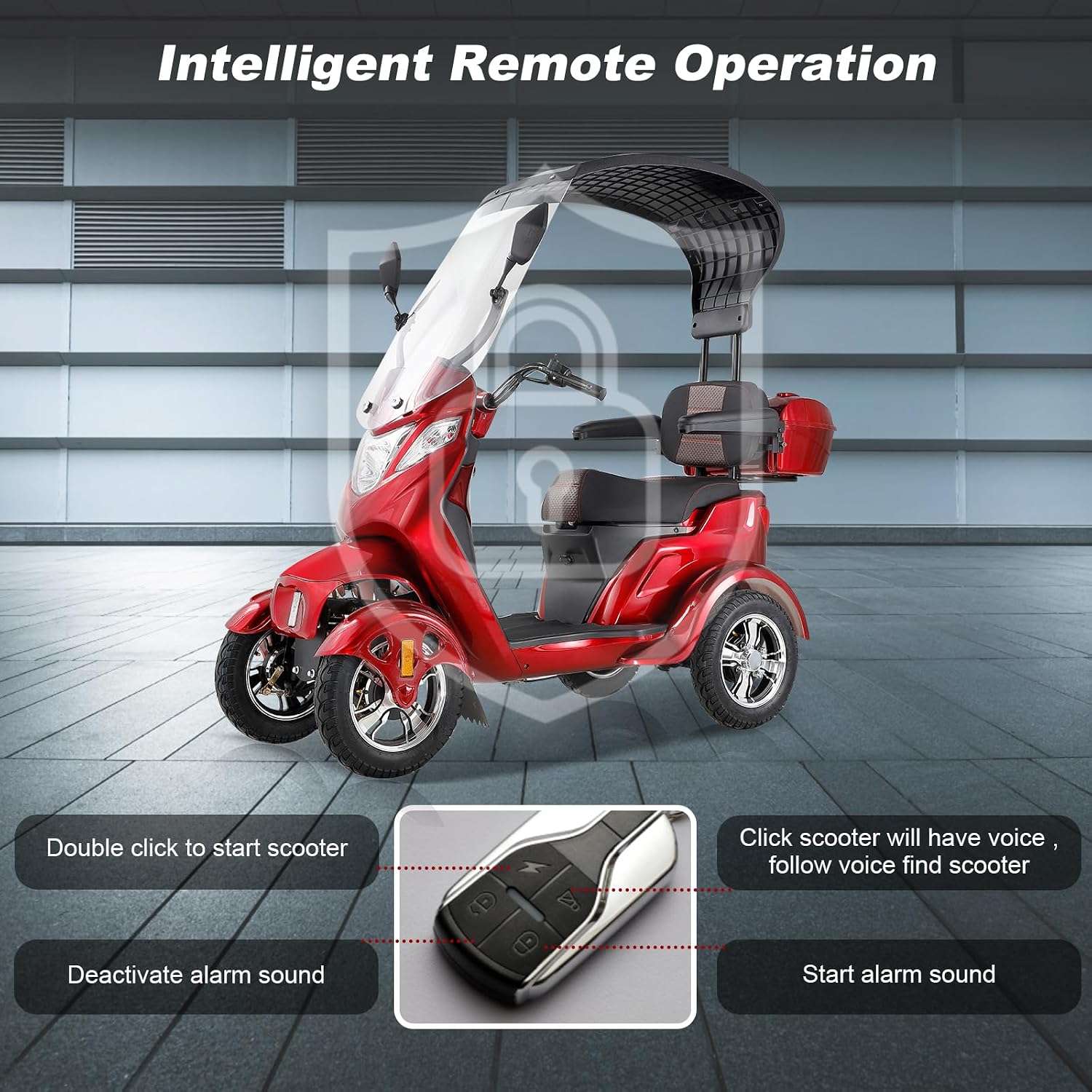
Intelligent Remote Operation

This image illustrates the intelligent remote operation capabilities of the ZVGREEN Mobility Scooter. It shows the remote control with buttons for double-clicking to start the scooter, activating an alarm sound, deactivating the alarm sound, and a function to locate the scooter with voice feedback.
The scooter features a remote control for convenient functions:
- Double Click to Start: Press the designated button twice to power on the scooter remotely.
- Start Alarm Sound: Activates an audible alarm for security or to locate the scooter.
- Deactivate Alarm Sound: Turns off the active alarm.
- Locate Scooter: Clicking a specific button will cause the scooter to emit a voice prompt, helping you find it.
6. Maintenance
Regular maintenance ensures the longevity and safe operation of your scooter.
- Battery Care:
- Charge the battery fully after each use.
- If storing for an extended period, charge the battery at least once a month.
- Avoid completely draining the battery, as this can reduce its lifespan.
- Tire Pressure: Regularly check the tire pressure of the 3.00-10 tubeless tires. Maintain the recommended pressure as indicated on the tire sidewall or in the specifications.
- Cleaning: Wipe down the scooter with a damp cloth. Avoid using harsh chemicals or direct water spray, especially near electrical components.
- Inspections: Periodically check all bolts, nuts, and fasteners for tightness. Ensure brakes are functioning correctly.
7. Troubleshooting
Refer to the table below for common issues and their solutions.
| Problem | Possible Cause | Solution |
|---|---|---|
| Scooter does not power on. | Battery is low or dead; Key not fully inserted/turned; Circuit breaker tripped. | Charge the battery; Ensure key is fully turned to ON; Reset the circuit breaker (if applicable). |
| Scooter moves slowly or lacks power. | Low battery charge; Overloaded; Tire pressure too low. | Recharge battery; Reduce load; Check and inflate tires to correct pressure. |
| Brakes feel weak or ineffective. | Brake adjustment needed; Worn brake pads. | Consult a qualified technician for brake inspection and adjustment. |
| Lights are not working. | Light switch off; Blown fuse; Damaged bulb/LED. | Turn on light switch; Check and replace fuse; Contact support for bulb/LED replacement. |
8. Specifications
The following are the technical specifications for the ZVGREEN Mobility Scooter Model BULL:
| Feature | Specification |
|---|---|
| Model Number | BULL |
| Motor Power | 1000W Brushless |
| Battery Type | 60V20Ah Lead Acid |
| Max Speed | Up to 15 mph |
| Driving Range | 25-31 miles per charge |
| Weight Capacity | Up to 500 lbs |
| Climbing Ability | 20° incline |
| Tire Size | 3.00-10 Tubeless (16 inch length) |
| Product Dimensions | 75"D x 32"W x 66"H |
| Seat Height | 16 Inches |
9. Warranty and Support
For warranty information, please refer to the documentation provided with your purchase or contact ZVGREEN customer support directly. If you encounter any issues not covered in this manual or require technical assistance, please reach out to the manufacturer's customer service department.