
ele ELEOPTION T45
ele ELEOPTION T45 4G Kids Smartwatch User Manual
Model: T45
Introduction
Thank you for choosing the ele ELEOPTION T45 4G Kids Smartwatch. This device is designed to provide enhanced safety and communication for children, allowing parents to stay connected and monitor their child's whereabouts. This manual provides detailed instructions on how to set up, operate, and maintain your smartwatch to ensure optimal performance and a safe user experience.

The ele ELEOPTION T45 4G Kids Smartwatch, featuring a vibrant green design and a clear display for video calls.
Safety Information
- Do not attempt to disassemble, repair, or modify the device. This may void the warranty and pose safety risks.
- Keep the device away from extreme temperatures, direct sunlight, and open flames.
- Avoid exposing the device to strong magnetic fields.
- Ensure children use the device under adult supervision, especially when handling the SIM card or charging.
- Dispose of the device and its battery responsibly according to local regulations.
What's in the Box
Please check the contents of your package to ensure all items are present:
- 1x Smart Watch
- 1x Lanyard
- 1x Watchband (Replacement)
- 1x Protective Case (Silicone watch cover)
- 1x Gift Box
- 1x User Manual
- 2x USB Charging Cable
- 1x Needle (SIM Ejector Tool)
- 1x Plastic Rod
- 2x Strap Pin

A visual representation of all items included in the ele ELEOPTION T45 Smartwatch package.
Setup Guide
1. SIM Card Installation and Activation
The smartwatch requires a Standard Nano-SIM card for 4G connectivity, video calls, and real-time location tracking. Compatible mobile providers in Germany include Telekom, O2, and Vodafone. Ensure the 4G signals of your chosen operator cover your surroundings.
- Charge the Watch: Before inserting the SIM card, charge the watch for 2-3 hours using the provided USB charging cable and magnetic charging port.
- Turn Off the Watch: Ensure the smartwatch is powered off before inserting or removing the SIM card.
- Open SIM Slot: Use the provided needle or plastic rod to gently pull out the SIM card slot.
- Insert Nano SIM Card: Place the Nano SIM card into the slot with the chip facing up, ensuring it is correctly oriented. Close the card slot firmly.
- Activate SIM Card: The new SIM card needs to be activated by calling your mobile provider to enable caller ID, GPS data, internet access, and call functions. It may take up to 24 hours for data to synchronize and update with your smartwatch after activation. It is recommended to test the SIM card in a phone first to confirm 4G signal and basic call functionality.

Visual guide for SIM card installation and charging the smartwatch.
2. App Installation and Binding
To manage the smartwatch and access its full features, parents need to download and register the companion app, SeTracker2.
- Download the App: Search for "SeTracker2" in your smartphone's app store (iOS or Android) and download it.
- Ensure Connectivity: Make sure your smartwatch is connected to the internet via the inserted SIM card.
- Register and Log In: Open the SeTracker2 app and follow the on-screen instructions to register a new account and log in.
- Bind the Watch: Scan the QR code displayed on the smartwatch screen using the app to bind the device to your account. This allows you to control your child's watch from your phone.

Steps for downloading and binding the smartwatch with the SeTracker2 application.
Operating Instructions
1. Communication Modes
The T45 Smartwatch supports various communication methods to keep your child connected:
- Video Call: Make face-to-face video calls with registered contacts. Requires a stable 4G connection.
- Voice Chat: Send and receive voice messages.
- Phone Calls: Make and receive standard phone calls with pre-approved contacts.
- SMS: Send and receive text messages.
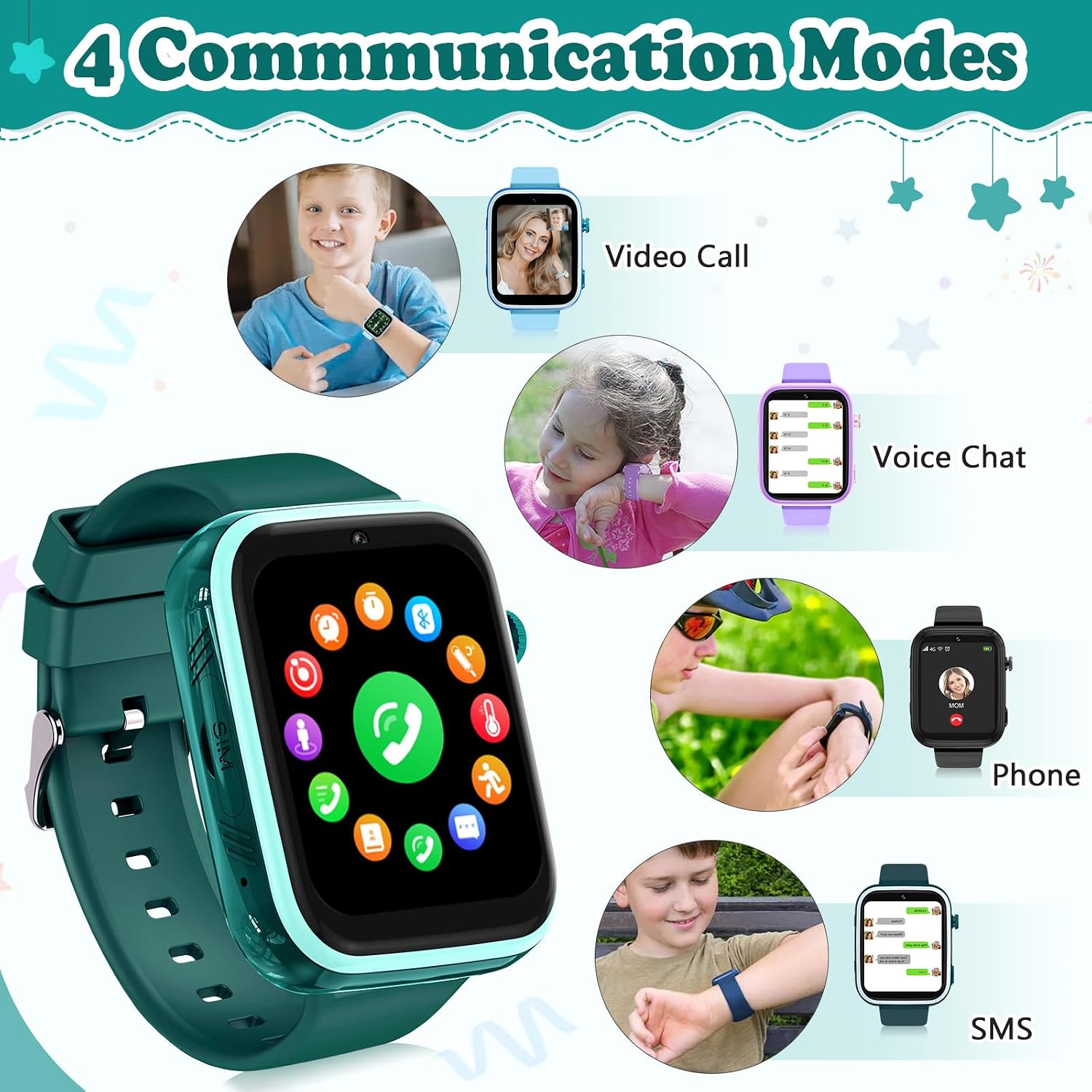
The smartwatch offers multiple ways to communicate, including video calls and voice chat.
2. SOS Emergency Call
For emergencies, the smartwatch features a dedicated SOS function:
- Activate SOS: Press and hold the SOS button (usually a side button) for 3-4 seconds.
- Automatic Dialing: The watch will automatically cycle through 3 pre-set SOS numbers until one answers. Ensure emergency contacts are added in the SeTracker2 app.

The SOS feature allows children to quickly call for help in emergencies.
3. GPS Real-time Location Tracking and Safety Zones
The smartwatch integrates AI positioning algorithms using GPS, WIFI, and LBS technologies for accurate location tracking.
- Real-time Tracking: Parents can check their child's real-time location and location history via the SeTracker2 app.
- Safety Electronic Fences: Set up virtual safety zones (e.g., home, school) in the app. If your child leaves a designated safety zone, you will receive an immediate notification on your phone.

Advanced positioning technologies provide accurate real-time tracking for child safety.
4. HD Camera Functions
The smartwatch features a 2-megapixel wide-angle camera for various uses:
- Photos and Videos: Children can record their daily life by taking photos and videos.
- POP Sticker: Make photos more interesting with fun stickers.
- Face Unlock: Protect the watch's privacy with face recognition.

The HD camera allows for capturing moments and offers fun features like POP stickers.
5. Class Mode and Unknown Call Rejection
Parents can configure settings to minimize distractions during school hours:
- Class Mode: Set specific times when the watch's functions are limited to prevent distractions during class.
- Unknown Call Rejection: Block calls from numbers not in the approved contact list, ensuring only trusted individuals can reach your child.
6. Multi-Functions
The smartwatch comes equipped with a variety of other useful and entertaining functions:
- Dial: Direct dialing.
- App Store: Access to additional applications.
- Calendar: Keep track of dates.
- Calculator: Basic arithmetic functions.
- Recorder: Voice recording.
- Player: Music and video playback.
- Wechat: Messaging application.
- Curriculum: Schedule management.
- Call Logs: View call history.
- Pedometer: Track steps and activity.
- Games: Pre-installed games for entertainment.
- Gallery: View saved photos and videos.
- Music: Play stored music files.
- Contacts: Manage approved contacts.
- Alarms: Set multiple alarms for reminders.
- Stopwatch: Timing function.
- Settings: Customize watch preferences.

An overview of the many applications and features available on the smartwatch.
Maintenance
Cleaning
To keep your smartwatch in good condition:
- Wipe the screen and body with a soft, dry, lint-free cloth.
- For stubborn smudges, slightly dampen the cloth with water. Avoid harsh chemicals or abrasive materials.
Water Resistance (IP67)
The smartwatch is rated IP67 waterproof, meaning it is protected from dust and can withstand immersion in water up to 1 meter for up to 30 minutes. However, it is important to note:
- IP67 rating is for fresh water and controlled conditions. Exposure to hot water, salt water, or chemicals (e.g., soap, shampoo) may compromise the seals.
- Avoid showering, swimming, or prolonged submersion with the watch. Water damage due to improper use is not covered under warranty.
- Ensure the SIM card slot cover is securely closed at all times to maintain water resistance.
Battery Care
- Charge the watch using only the provided charging cable.
- Avoid overcharging or completely draining the battery frequently to prolong its lifespan.
- Store the watch in a cool, dry place when not in use for extended periods.
Troubleshooting
| Problem | Possible Cause | Solution |
|---|---|---|
| Watch not turning on/charging | Low battery, faulty charger/cable, software issue. | Ensure watch is charged for 2-3 hours. Try a different USB port or charging cable. Perform a hard reset (if applicable, refer to manufacturer support). |
| Inaccurate GPS location | Poor signal, LBS/WIFI positioning active, environmental factors. | Ensure the watch has a clear view of the sky for GPS. Check 4G signal strength. GPS accuracy can vary indoors or in dense urban areas. The app uses a combination of GPS, WIFI, and LBS for positioning; LBS (cell tower) is less precise than GPS. |
| Video calls not connecting | Weak 4G signal, SIM card not activated for data, app issues. | Verify SIM card has active data plan and strong 4G signal. Ensure the SeTracker2 app is updated and properly configured. Restart both the watch and the phone. |
| Cannot make/receive calls | SIM card not inserted correctly, not activated, no signal, unknown call rejection enabled. | Re-insert SIM card. Confirm SIM card is activated and has credit/plan. Check network signal. Disable 'Unknown Call Rejection' in the app if necessary. Ensure contacts are saved correctly. |
| Touchscreen unresponsive | Software glitch, physical damage. | Restart the watch. If the problem persists, contact customer support. |
Specifications
| Feature | Detail |
|---|---|
| Model Number | N52-100-1300 |
| Brand | ele ELEOPTION |
| Operating System | Wear OS/watchOS (with German language support) |
| Connectivity Technology | Cellular (4G), WLAN, Bluetooth |
| GPS | Integrated GPS |
| Battery Type | Lithium-Ion |
| Battery Capacity | 700 mAh |
| Memory Capacity | 8 GB |
| Special Features | Alarm Clock, GPS, Time Display |
| Water Resistance | IP67 (refer to Maintenance section for details) |
| Dimensions (Packaging) | 14.8 x 9.7 x 3.8 cm; 120 Grams |
| Manufacturer | mingpinhui |
| Country of Origin | China |
Warranty and Support
For warranty information and customer support, please refer to the documentation provided with your purchase or contact the seller directly. Keep your proof of purchase for any warranty claims.
For technical assistance or further inquiries, please reach out to ele ELEOPTION customer service through the platform where you purchased the product.
Ask a question about this manual
Ask about setup, troubleshooting, compatibility, parts, safety, or missing instructions. Manuals+ will review the question and use this page’s manual context to help answer it.