
1. Introduction
This manual provides essential instructions for the safe and efficient use of your GOBOULT Z40 Pro Truly Wireless Stereo (TWS) Earbuds. Please read this manual thoroughly before using the product and retain it for future reference.
Package Contents:
- GOBOULT Z40 Pro TWS Earbuds
- Charging Case
- Type-C Fast Charging Cable
- Eartips (various sizes)
- User Manual
- Warranty Card
2. Setup
2.1 Initial Charging
Before first use, ensure the earbuds and charging case are fully charged. Remove any protective film from the charging contacts on the earbuds.
- Place the earbuds into the charging case.
- Connect the Type-C charging cable to the charging port on the case and to a power source.
- The indicator light on the case will show charging status. A full charge takes approximately 90 minutes.

2.2 Pairing with a Device
The GOBOULT Z40 Pro earbuds utilize Bluetooth 5.3 for a stable and efficient connection.
- Open the charging case lid. The earbuds will automatically enter pairing mode (indicated by flashing lights).
- On your device (smartphone, tablet, laptop), enable Bluetooth.
- Search for available devices and select "GOBOULT Z40 Pro" from the list.
- Once connected, the earbuds will indicate successful pairing, and the indicator lights will turn off or show a steady light.

3. Operating Instructions
3.1 Touch Controls
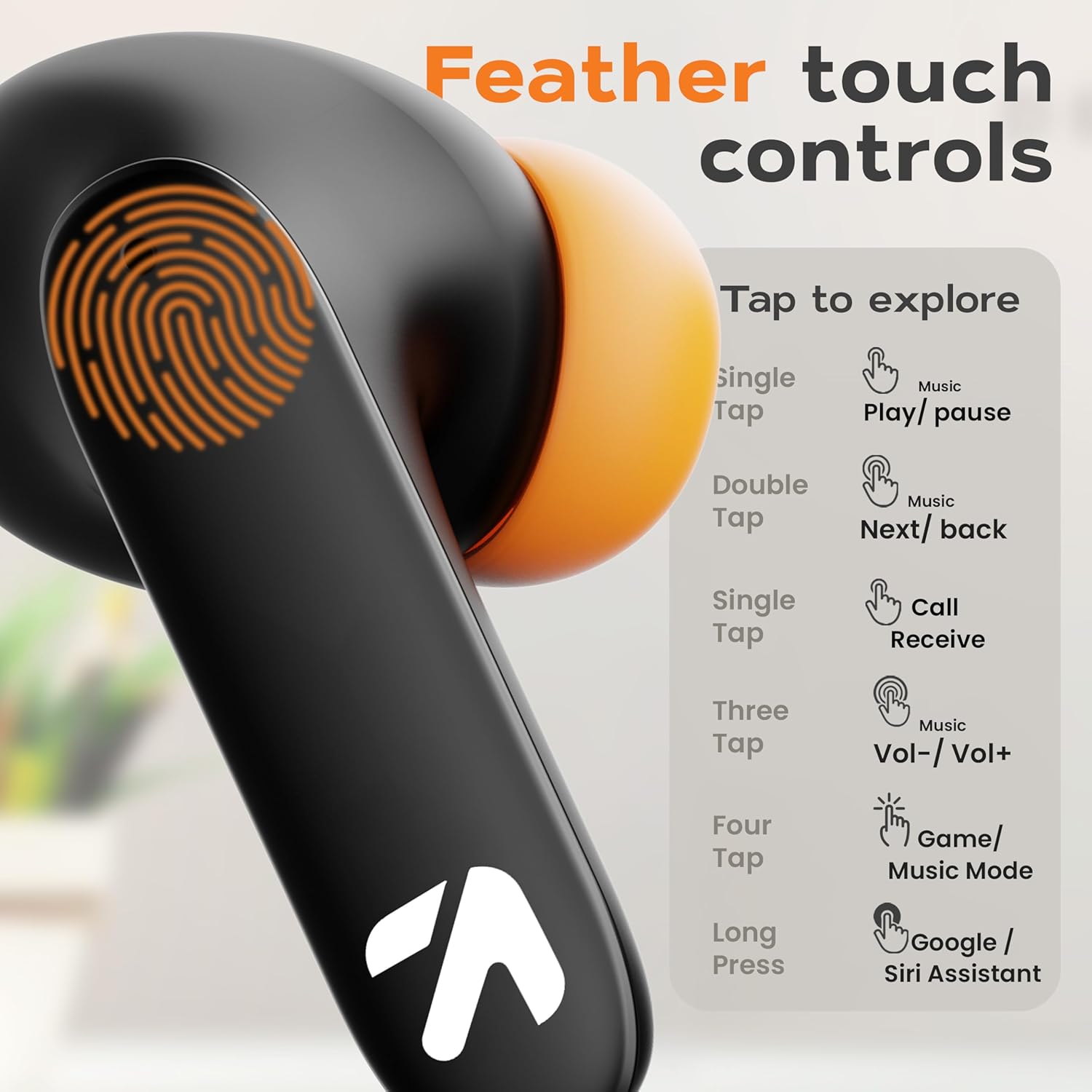
The GOBOULT Z40 Pro earbuds feature intuitive feather-touch controls on each earbud.
| Action | Left Earbud | Right Earbud |
|---|---|---|
| Single Tap | Music Play/Pause, Call Receive | Music Play/Pause, Call Receive |
| Double Tap | Previous Song | Next Song |
| Triple Tap | Volume Down | Volume Up |
| Four Taps | Activate Combat Mode (Gaming Mode) | |
| Long Press (2s) | Activate Voice Assistant (Google/Siri) | |
3.2 Gaming Mode (Combat Mode)
Activate Combat Mode for an ultra-low latency experience of 45ms, ideal for gaming. This synchronizes audio with visual action for a competitive edge.
- To activate: Tap either earbud four times.
- To deactivate: Tap either earbud four times again.

3.3 Voice Assistant
Access your device's voice assistant (Google Assistant or Siri) directly from the earbuds.
- To activate: Long press either earbud for 2 seconds.

3.4 Call Management
The Zen Quad Mic ENC (Environmental Noise Cancellation) technology ensures clear calls by minimizing background noise.
- Receive Call: Single tap either earbud.
- End Call: Single tap either earbud during a call.
- Reject Call: Long press either earbud for 2 seconds.

4. Maintenance
4.1 Cleaning
- Regularly clean the earbuds and charging case with a soft, dry, lint-free cloth.
- Do not use abrasive cleaners, solvents, or aerosol sprays.
- Ensure charging contacts on both earbuds and case are free from dust and debris.
4.2 Water Resistance
The GOBOULT Z40 Pro earbuds are IPX5 rated, meaning they are resistant to sweat, splashes, and light rain. They are not designed for submersion in water.
- Avoid exposing the earbuds to strong jets of water or prolonged submersion.
- If wet, dry the earbuds thoroughly before placing them back in the charging case to prevent damage.

4.3 Storage
When not in use, store the earbuds in their charging case to protect them and ensure they remain charged.
5. Troubleshooting
If you encounter issues with your GOBOULT Z40 Pro earbuds, refer to the following common solutions:
5.1 Pairing Issues
- Earbuds not pairing with device: Ensure Bluetooth is enabled on your device. Make sure the earbuds are charged and within range. Try forgetting the device in your phone's Bluetooth settings and re-pairing.
- Only one earbud connecting: Place both earbuds back into the charging case, close the lid for a few seconds, then open it again. This often resets the connection between the earbuds.
5.2 Sound Issues
- No sound or low volume: Check the volume levels on both your device and the earbuds. Ensure the earbuds are properly seated in your ears. Clean any debris from the earbud grilles.
- Intermittent sound: Ensure there are no obstructions between your device and the earbuds. Move closer to your device. Avoid environments with strong electromagnetic interference.
5.3 Charging Issues
- Earbuds not charging: Ensure the charging contacts on the earbuds and inside the case are clean and dry. Verify the charging cable and power adapter are working correctly.
- Case not charging: Check the Type-C cable and power source. Ensure the cable is securely connected.
6. Specifications
| Feature | Detail |
|---|---|
| Model Name | AirBass |
| Connectivity Technology | Wireless (Bluetooth 5.3) |
| Bluetooth Range | 10 Metres |
| Audio Driver Size | 13mm Dynamic Drivers |
| Frequency Response | 20 Hz - 20,000 Hz |
| Sensitivity | 115 dB |
| Impedance | 32 Ohm |
| Battery Life (Total) | Up to 100 Hours (with charging case) |
| Charging Time | Approx. 90 Minutes |
| Audio Latency | 45 Milliseconds (Combat Mode) |
| Noise Control | Passive Noise Cancellation, Quad Mic ENC |
| Water Resistance Level | IPX5 (Sweat and Splashproof) |
| Control Type | Touch, Voice |
| Item Weight | 50 Grams |
| Product Dimensions | 6 x 2.7 x 4.8 cm |
| Material | Rubber |
7. Warranty and Support
7.1 Warranty Information
Your GOBOULT Z40 Pro earbuds come with a standard warranty. Please refer to the included Warranty Card in your package for detailed terms and conditions, including warranty period and coverage.
7.2 Customer Support
For any product-related queries, technical assistance, or warranty claims, please contact the manufacturer:
- Manufacturer: Exotic Mile Pvt. Ltd.
- Address: B67 Wazirpur Industrial Area, New Delhi 110052
- You may also visit the official GOBOULT Store on Amazon for more information.


