
1. Introduction
The SMARTGEN EP4300 Engine Controller is designed for the control and data display of engines, particularly electric-controlled engines. It facilitates engine start/stop, speed control, data measurement, and alarm display. Featuring a 4.3-inch color LCD, the controller supports both Chinese and English languages, offering reliability and ease of use.
Utilizing 32-bit microprocessor technology, the EP4300 ensures precise measurement of various parameters. Most parameters can be adjusted directly from the front panel, with all parameters also configurable via USB or RS485 ports using a PC. Its compact design, straightforward wiring, and high reliability make it suitable for diverse engine automation systems.
2. Key Features
- ARM-based 32-bit SCM for high hardware integration.
- 4.3-inch color LCD display with 480x272 resolution and adjustable backlight (automatic or manual).
- Supports selectable Chinese and English languages for convenient commissioning.
- Silicon panel and pushbuttons with hard screen acrylic for display protection.
- CANBUS port for communication with J1939 engines, enabling monitoring of data (e.g., water temperature, oil pressure, engine speed, fuel consumption) and engine start/stop control.
- Three programmable analog sensor inputs: Sensor 3 supports resistance, voltage, or current sensors, while other sensor inputs are for resistance sensors only.
3. Product Overview
3.1 Front Panel
The front panel of the EP4300 features a 4.3-inch color LCD for displaying engine parameters and operational status. Below the display are control buttons and a rotary knob for navigation and parameter adjustment.
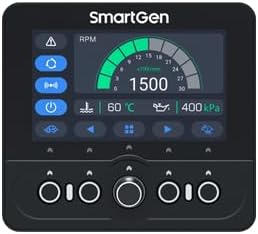
Figure 1: EP4300 Front Panel
3.2 Rear Panel and Connections
The rear panel provides various ports for power, sensors, communication, and auxiliary inputs/outputs, facilitating integration into engine systems.

Figure 2: EP4300 Rear Panel with Connection Labels

Figure 3: EP4300 Side View
4. Installation and Wiring
Proper installation and wiring are crucial for the correct operation of the EP4300 controller. Ensure all connections are secure and follow the provided wiring diagram.
4.1 Typical Application Diagram
The diagram below illustrates a typical wiring configuration for the EP4300, showing connections for power, sensors, CANBUS, RS485, and auxiliary I/O. Refer to this diagram for detailed wiring instructions.

Figure 4: EP4300 Typical Application Diagram
- Power Supply: Connect the controller to a stable DC power source (B+ and B- terminals).
- Sensors: Connect engine sensors (e.g., oil pressure, water temperature, fuel level) to the designated sensor inputs (SENSOR1, SENSOR2, SENSOR3). Note that SENSOR3 supports resistance, voltage, or current, while SENSOR1 and SENSOR2 are for resistance sensors.
- Magnetic Pickup: Connect magnetic pickup sensors to MP1 and MP2 for engine speed detection.
- CANBUS: Connect CAN H and CAN L to the engine's J1939 CANBUS interface for communication with electric-controlled engines.
- RS485: Use the RS485 interface for PC communication or integration with other devices.
- USB: The USB port allows for parameter configuration and data download via PC.
- Auxiliary I/O: Utilize auxiliary inputs and outputs for custom control and monitoring functions as per your application requirements.
Note: For speed control and instrument mode, an external start/stop device must be added.
5. Operation
5.1 Powering On/Off
To power on the controller, ensure the power supply is connected correctly. The unit will automatically initiate its startup sequence. To power off, disconnect the main power supply to the controller.
5.2 Display Navigation
The 4.3-inch color LCD displays real-time engine parameters and operational status. Use the physical buttons and the rotary knob on the front panel to navigate through menus, view different screens, and select options.
5.3 Parameter Adjustment
Many operational parameters can be adjusted directly from the front panel using the display and control buttons. For comprehensive configuration and advanced settings, connect the controller to a PC via the USB or RS485 port and use the SMARTGEN configuration software.
5.4 Language and Backlight Settings
The controller supports both Chinese and English languages. You can switch between languages through the system settings menu on the LCD. The display backlight intensity can also be adjusted manually or set to automatic adjustment via the same menu.
6. Maintenance
- Cleaning: Regularly clean the controller's front panel and display with a soft, dry cloth. Avoid using abrasive cleaners or solvents that could damage the screen or buttons.
- Connection Checks: Periodically inspect all wiring connections to ensure they are secure and free from corrosion. Loose connections can lead to intermittent operation or inaccurate readings.
- Environmental Conditions: Ensure the controller operates within its specified environmental conditions (temperature, humidity) to prevent damage and ensure longevity.
- Firmware Updates: Check the manufacturer's website for any available firmware updates that may improve performance or add new features.
7. Troubleshooting
This section provides solutions to common issues encountered with the EP4300 Engine Controller.
- Controller Does Not Power On:
- Verify that the power supply (B+ and B-) is correctly connected and providing the specified voltage.
- Check for any blown fuses in the power circuit.
- Display is Blank or Unresponsive:
- Ensure the controller is powered on.
- Adjust the backlight settings to ensure it's not set too low.
- If the issue persists, power cycle the unit.
- Incorrect Sensor Readings:
- Check the wiring of the specific sensor for loose connections or damage.
- Verify that the sensor type and calibration settings in the controller match the installed sensor.
- Ensure the sensor itself is functioning correctly.
- CANBUS Communication Errors:
- Confirm CAN H and CAN L connections are correct and secure.
- Check for proper termination resistors on the CANBUS network if applicable.
- Verify that the engine's ECU is powered and communicating.
For issues not covered here, or if troubleshooting steps do not resolve the problem, please contact SMARTGEN technical support.
8. Specifications
| Specification | Value |
|---|---|
| Brand | SMARTGEN |
| Model | EP4300 |
| Item Weight | 15.8 ounces (0.45 Kilograms) |
| Material | Copper |
| Display | 4.3-inch Colour LCD, 480x272 resolution |
| Processor | ARM-based 32-bit SCM |
| Communication Interfaces | CANBUS (J1939), RS485, USB |
| Analog Sensor Inputs | 3 programmable (Sensor 3: resistance/voltage/current; Sensor 1/2: resistance) |
9. Warranty and Support
The SMARTGEN EP4300 Engine Controller is manufactured by SMARTGEN. For warranty information, technical support, or service inquiries, please contact SMARTGEN directly through their official support channels. Please retain your proof of purchase for any warranty claims.


