
1. Introduction
Thank you for choosing the Topyond Multifunctional Headlight. This USB rechargeable LED headlamp is designed for various outdoor activities such as camping, fishing, and running, providing reliable and versatile illumination. This manual provides essential information for the safe and effective use of your new headlamp.

Image 1.1: Topyond Multifunctional Headlight in use during an outdoor activity.
Product Features:
- Durable ABS Materials: Constructed from high-quality ABS for long-lasting performance in various conditions.
- Type-C Fast Charging: Efficient and safe charging via a universal Type-C port.
- Replaceable 18650 Lithium Battery: Provides extended endurance for powerful light output. (Note: Battery not included).
- Induction Mode: Hands-free operation with a motion-sensing feature.
- 6 Lighting Modes: Offers a range of illumination options including COB Strong, COB Weak, Bright, COB Full Bright, COB Red Light, and COB Red Light Flashing.
- Waterproof Design: Suitable for use in various harsh environments.
2. Setup
2.1 Package Contents
Before proceeding, please ensure all items are present in the package:
- 1 x Topyond Multifunctional Headlight unit
- 1 x USB Data Cable (Type-C)
- 1 x Adjustable Headband
- Note: 18650 battery is not included and must be purchased separately.

Image 2.1: Contents of the Topyond Headlight package.
2.2 Battery Installation
- Locate the battery compartment on the headlamp unit.
- Gently open the battery compartment cover.
- Insert one 18650 lithium battery, ensuring the positive (+) and negative (-) terminals align correctly with the markings inside the compartment.
- Close the battery compartment cover securely.

Image 2.2: Proper insertion of the 18650 battery.
2.3 Initial Charging
For optimal performance, fully charge the headlamp before first use.
- Connect the provided USB Type-C cable to the charging port on the headlamp.
- Connect the other end of the USB cable to a compatible USB power source (e.g., wall adapter, computer USB port, power bank).
- The charging indicator light will illuminate (color may vary) to show charging is in progress.
- Once fully charged, the indicator light will change or turn off. Disconnect the cable.

Image 2.3: Charging the headlamp via Type-C USB.
2.4 Attaching the Headband
Thread the adjustable headband through the designated slots on the headlamp unit. Adjust the strap for a comfortable and secure fit on your head.

Image 2.4: Headlamp with attached headband.
3. Operating Instructions
3.1 Power On/Off and Mode Selection
The headlamp features a single power button for controlling power and cycling through light modes.
- Power On: Press the power button once to turn on the headlamp.
- Cycle Modes: With the headlamp on, press the power button repeatedly to cycle through the 6 available lighting modes:
- COB Strong Light
- COB Weak Light
- Bright Light (Spotlight)
- COB Full Bright (COB + Spotlight)
- COB Red Light
- COB Red Light Flashing
- Power Off: Press the power button after cycling through all modes, or long-press the button for approximately 2 seconds from any mode to turn off the headlamp directly.
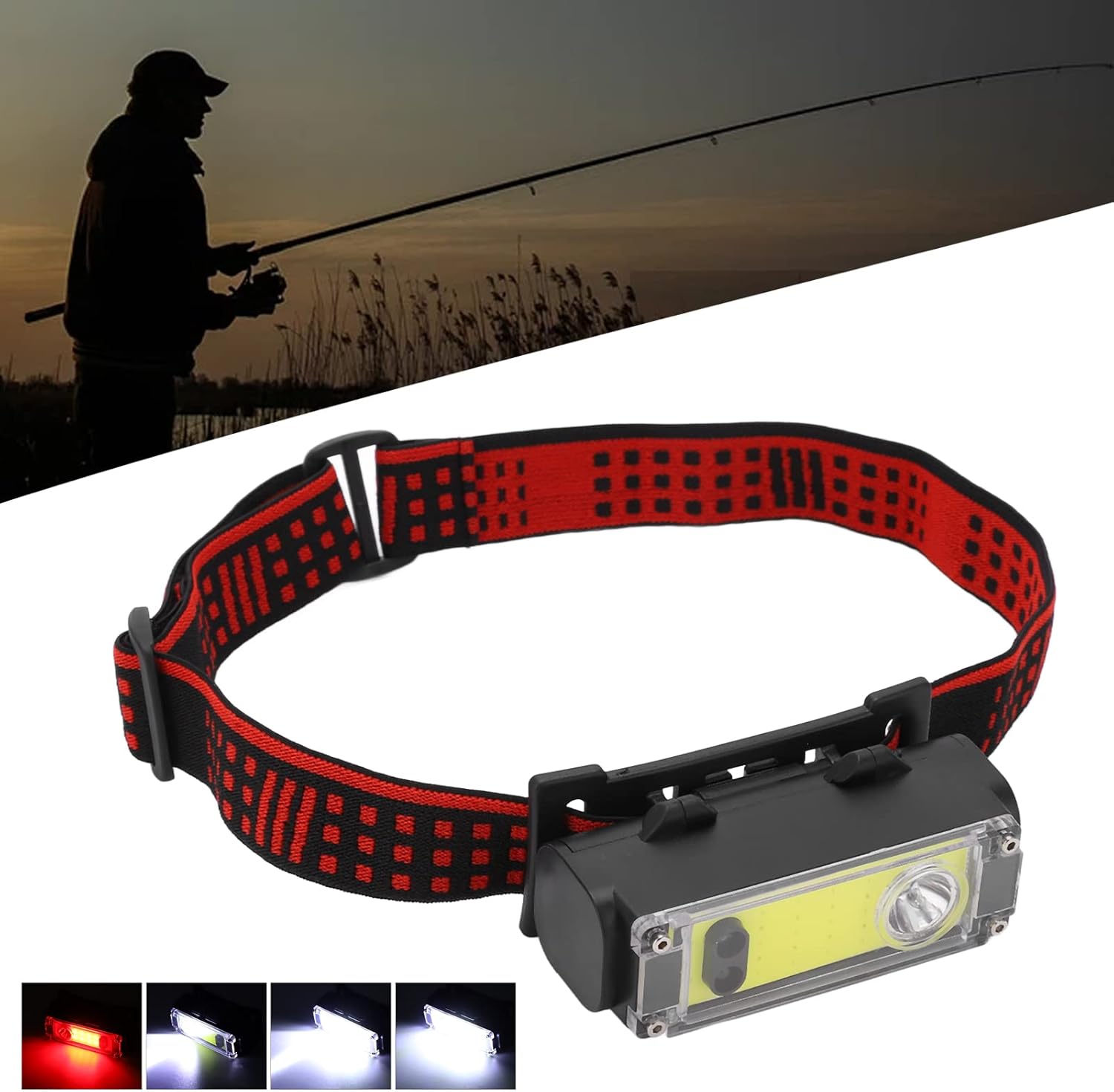
Image 3.1: Examples of the headlamp's various lighting modes.

Image 3.2: Headlamp operating in COB Red Light mode.
3.2 Induction Mode
The induction mode allows you to turn the headlamp on or off with a hand wave, providing convenient hands-free operation.
- Activate Induction Mode: From any lighting mode, long-press the power button for approximately 3 seconds. The indicator light will turn red to confirm induction mode is active.
- Operate with Hand Wave: Once activated, wave your hand in front of the headlamp's sensor to turn the light on or off.
- Deactivate Induction Mode: Long-press the power button again for approximately 3 seconds to exit induction mode. The red indicator light will turn off.
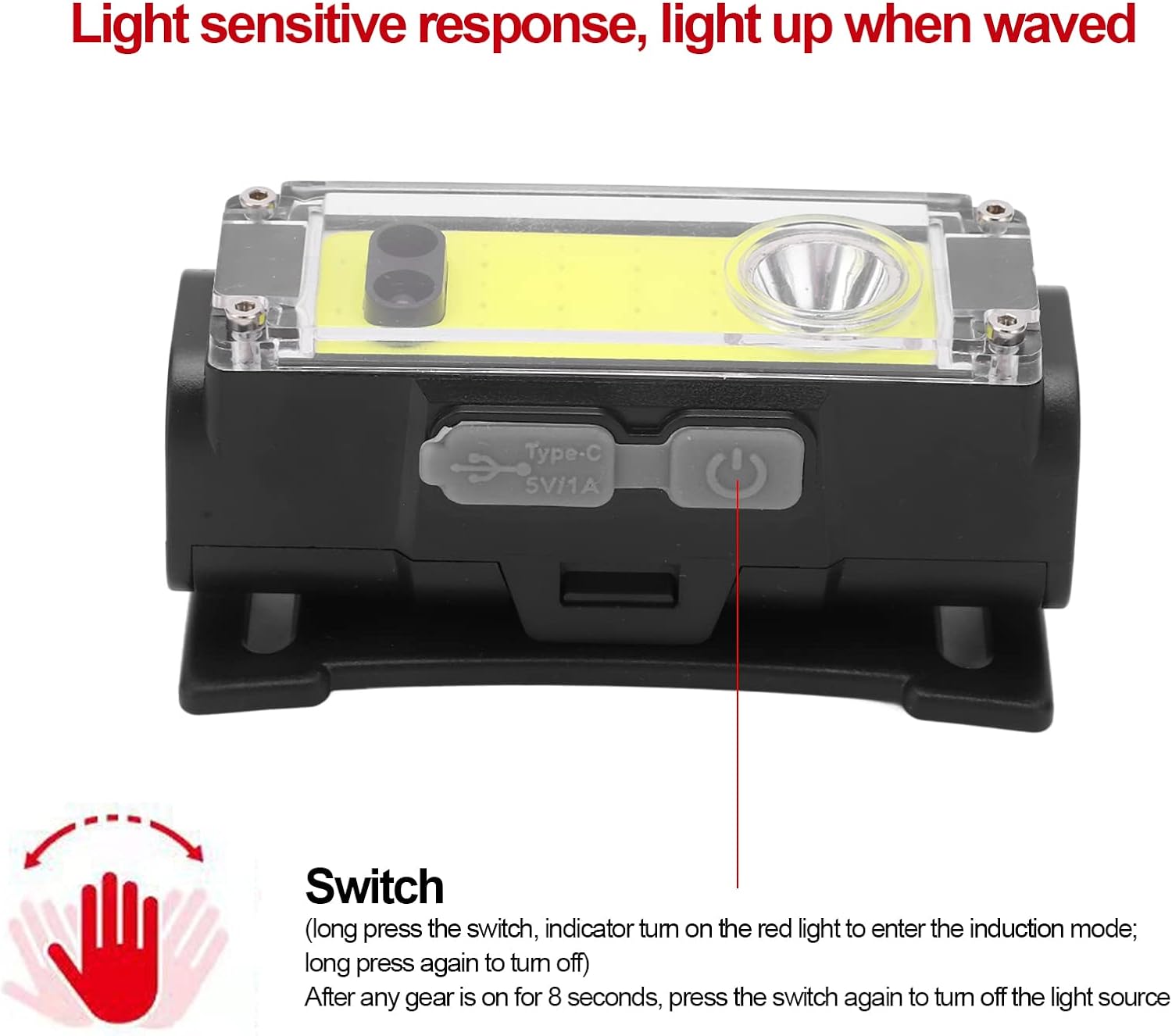
Image 3.3: Activating and using the induction mode.
4. Maintenance
4.1 Cleaning
- Wipe the headlamp body with a soft, damp cloth. Do not use abrasive cleaners or solvents.
- Ensure the charging port is free of dust and debris.
- The headband can be hand-washed with mild soap and water, then air-dried.
4.2 Battery Care
- Always use high-quality 18650 lithium batteries.
- If the headlamp will not be used for an extended period, remove the battery to prevent leakage.
- Store batteries in a cool, dry place.
- Dispose of depleted batteries according to local regulations.
4.3 Storage
Store the headlamp in a cool, dry place away from direct sunlight and extreme temperatures. Keep out of reach of children.
5. Troubleshooting
| Problem | Possible Cause | Solution |
|---|---|---|
| Headlamp does not turn on. | Battery is depleted or incorrectly installed. | Charge the battery or ensure it is inserted with correct polarity. |
| Headlamp does not charge. | USB cable or power source is faulty; charging port is obstructed. | Try a different USB cable or power source. Clean the charging port. |
| Induction mode is not working. | Induction mode not activated; sensor obstructed. | Long-press the power button to activate induction mode (red indicator). Ensure sensor is clean and unobstructed. |
| Light output is dim. | Low battery level. | Recharge the battery. |
6. Specifications
| Feature | Detail |
|---|---|
| Model Number | Topyond7yov68kghb |
| Material | ABS |
| Light Source Type | LED (COB and Spotlight) |
| Power Source | Battery Powered |
| Battery Type | 1 x 18650 Lithium Battery (not included) |
| Charging Port | USB Type-C |
| Lighting Modes | 6 Modes (COB Strong, COB Weak, Bright, COB Full Bright, COB Red Light, COB Red Light Flashing) |
| Special Features | Durable, Rechargeable, Induction Mode, Waterproof |
| Item Weight | Approx. 83g / 2.9oz (without battery) |
| Water Resistance Level | Waterproof |
7. Warranty and Support
7.1 Warranty Information
Specific warranty details for the Topyond Multifunctional Headlight are not provided in this manual. Please refer to the product packaging or contact the retailer/manufacturer directly for warranty terms and conditions.
7.2 Customer Support
For any questions, technical assistance, or support regarding your Topyond Multifunctional Headlight, please contact Topyond customer service through their official website or the retailer from whom you purchased the product.