
1. Introduction
This manual provides comprehensive instructions for the assembly, operation, and maintenance of your BTHFST Floating Bed Frame Full Size. This bed frame features integrated RGB LED lighting, a storage headboard with power outlets, and side storage bags. Please read this manual thoroughly before assembly and use to ensure proper function and safety.
2. Safety Information
WARNING: Failure to follow these safety instructions could result in injury or damage to the product.
- Do not exceed the maximum weight recommendation of 880 pounds.
- Be cautious of sharp edges during assembly and use.
- Always follow the assembly instructions precisely to ensure stability.
- Keep USB ports dry and avoid overloading them to prevent electrical shock.
- Ensure all connections are secure before use.
- Keep small parts away from children during assembly.
3. Package Contents
Verify that all components are present before beginning assembly. All parts and tools are labeled for easy identification.
- Headboard components (upholstered panels, shelves, power unit)
- Bed frame side rails and footboard
- Wooden slats with sound-absorbing velcro
- Support legs and hardware
- RGB LED light kit with remote control
- Assembly tools (e.g., Allen wrench)
- Side storage bags (2 units)
4. Assembly Instructions
Follow the numbered instructions provided in your physical assembly guide. The following points highlight key aspects of the assembly process:
- Unpack and Identify: Lay out all parts and hardware. Match them with the numbered labels in the instruction manual.
- Headboard Assembly: Begin by assembling the headboard structure, including the storage compartments and integrating the power unit.
- Frame Construction: Connect the side rails and footboard to the headboard. Ensure all bolts are tightened securely.
- Slat Installation: Position the wooden slats across the frame. The slats are designed with sound-absorbing velcro for quick and secure attachment, minimizing noise. Utilize the quick-lock system where applicable.
- LED Light Installation: Attach the RGB LED light strips to the designated areas under the bed frame and within the headboard. Connect the light kit to the power source as instructed.
- Final Checks: Verify all connections are tight and the frame is stable. Attach the side storage bags to the headboard.

Image: Detail of wooden slats with sound-absorbing velcro for secure and quiet installation.

Image: Overview of the bed frame structure, highlighting the integrated LED lighting and sturdy construction.
5. Operating Instructions
5.1 RGB LED Lighting System
The integrated RGB LED lights offer customizable ambiance for your bedroom. Use the provided remote control to manage the lighting.
- Power On/Off: Press the power button on the remote to turn the lights on or off.
- Color Selection: Choose from 16 distinct color options using the color buttons on the remote.
- Brightness Adjustment: Adjust the light intensity using the brightness control buttons.
- Mode Selection: Cycle through various dynamic lighting modes (e.g., flash, strobe, fade, smooth) for different effects.

Image: The bed frame illuminated with purple LED lights, showcasing the remote control and power outlets.
5.2 Integrated Power Outlets
The headboard features a convenient 4-in-1 power combo, including two AC outlets, one USB-C port, and one USB-A port, for charging your electronic devices.
- AC Outlets: Plug in standard electrical devices.
- USB-C Port: Provides fast charging for compatible USB-C devices.
- USB-A Port: Standard USB port for charging various devices.
- Usage: Connect your devices directly to the ports located on the headboard for easy access.

Image: Detailed view of the power unit embedded in the headboard, showing 2 AC outlets, 1 Type-C, and 1 USB-A port.
5.3 Storage Headboard
The headboard offers practical storage solutions to keep your bedside essentials organized.
- Hidden Cubby: A concealed compartment behind the linen-upholstered front panel is ideal for storing books, remotes, or personal items.
- 2-Tier Top Shelf: The open top shelf provides space for nighttime essentials such as an alarm clock, phone, or decorative items.

Image: The headboard's secret storage compartment is open, displaying various items stored within, along with the top shelf.
5.4 Side Storage Bags
Two fabric storage bags are attached to the sides of the headboard, providing convenient access to smaller items.
- Placement: One bag on each side of the headboard.
- Use: Ideal for holding your phone, remote control, glasses, or other small personal items.
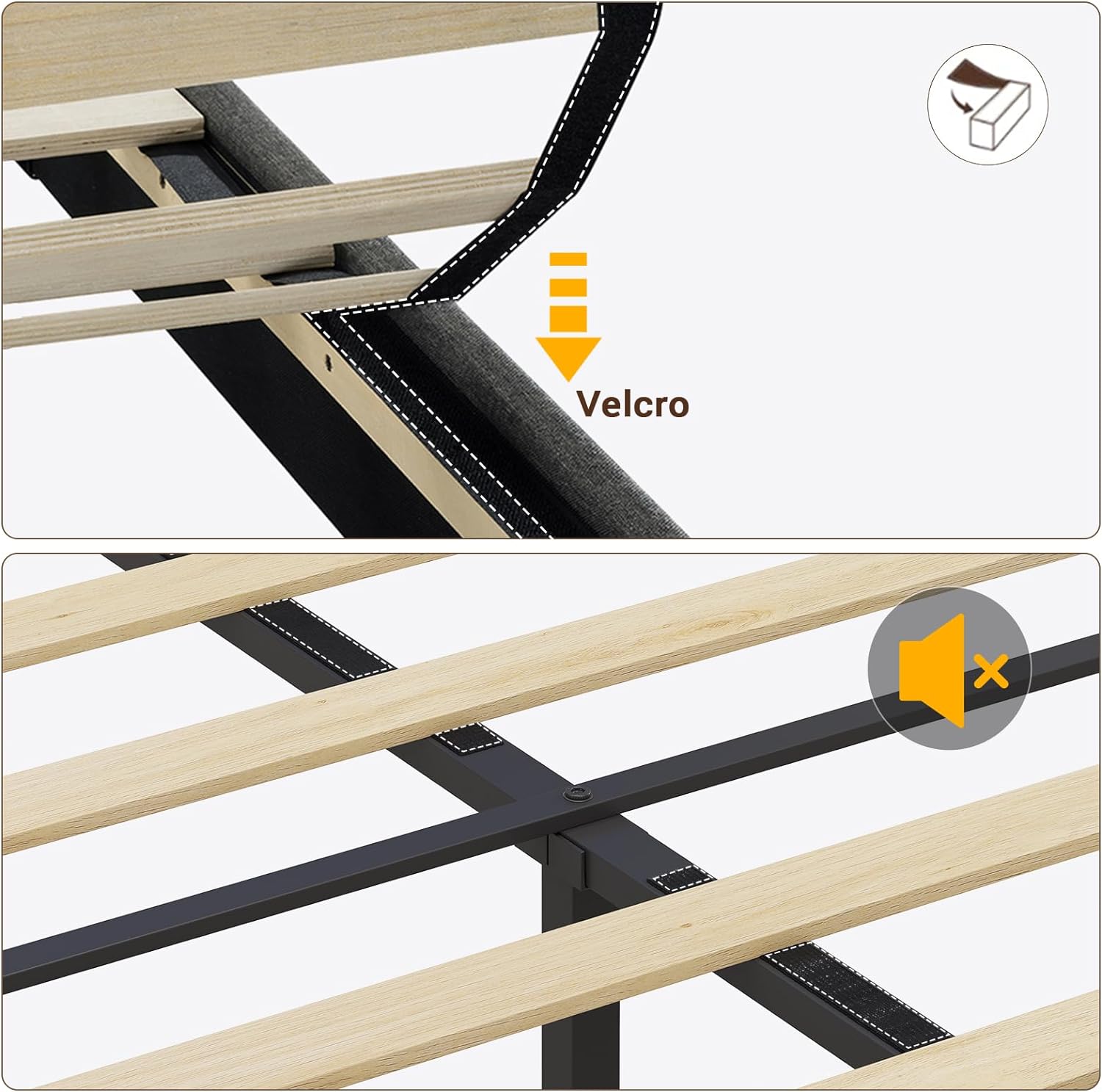
Image: The two side storage bags attached to the headboard, shown holding a smartphone and a television remote control.
6. Maintenance
- Cleaning Upholstery: The linen upholstery should be dry cleaned only. Do not use liquid cleaners or abrasive materials.
- Frame Cleaning: Wipe the metal and MDF components with a soft, damp cloth. Avoid harsh chemicals.
- LED Lights: Ensure the LED strips are free from dust. Do not attempt to disassemble the light kit.
- Power Outlets: Keep the power outlets and USB ports clean and dry. Regularly check for any loose connections.
- Hardware Check: Periodically check all bolts and screws to ensure they remain tight. Retighten if necessary to maintain stability.
7. Troubleshooting
| Problem | Possible Cause | Solution |
|---|---|---|
| LED lights not working. | Power cable disconnected; remote battery dead; light strip damaged. | Check power connections; replace remote battery; inspect light strips for damage. |
| Devices not charging via USB/AC outlets. | Bed frame not plugged into wall outlet; device cable faulty; outlet overloaded. | Ensure bed frame is plugged in; try a different charging cable/device; reduce number of devices connected. |
| Bed frame squeaks. | Loose bolts; slats not properly seated; uneven floor. | Tighten all assembly bolts; ensure slats are securely attached with velcro; use leveler legs to stabilize on uneven surfaces. |
| Headboard storage door not closing properly. | Obstruction in compartment; hinge issue. | Remove any items blocking the door; check hinges for alignment or damage. |
8. Specifications
- Size: Full
- Product Dimensions: 80.3"L x 55.5"W x 41.3"H
- Weight Capacity: 880 pounds (maximum recommendation)
- Color: Linen Gray
- Material: Alloy Steel, MDF, Linen Upholstery
- Special Features: RGB LED Lights, Storage Headboard, USB-C/A Power Outlets, Squeak Resistant, Side Storage Bags
- Assembly Required: Yes
- Manufacturer: BTHFST

Image: Dimensional diagram of the Full Size bed frame, indicating length, width, and height.
9. Warranty and Support
For warranty information or technical assistance, please refer to the documentation included with your purchase or contact BTHFST customer support. Details for customer support can typically be found on the manufacturer's website or through your retailer.
For additional support, you may visit the BTHFST Store on Amazon.