
Introduction
Thank you for choosing the TQQ Keyboard Case for your iPad. This manual provides detailed instructions for setting up, operating, maintaining, and troubleshooting your new keyboard case. Please read this manual thoroughly before use to ensure optimal performance and longevity of your product.
Compatibility
This keyboard case is designed for specific iPad models:
- iPad A16 11th Generation 11 inch (2025) - Models: A3354, A3355, A3356
- iPad 10th Generation 10.9 inch (2022) - Models: A2696, A2757, A2777, A3162
Note: This product is not compatible with iPad Air 7/6 11 inch or iPad Air 5/4 10.9 inch models.

This image illustrates the compatible iPad models for the keyboard case, including the 10th and 11th generation iPads.
What's in the Box
Upon opening the package, you should find the following items:
- 1 x TQQ iPad 10th/11th Generation Case
- 1 x Detachable Bluetooth Keyboard
- 1 x Clear Keyboard Protector
- 1 x USB Charging Cable (Type-C)
- 1 x User Manual (this document)
Product Features
- Detachable Bluetooth Keyboard: The keyboard attaches magnetically to the case, allowing for flexible use. It is compatible with iOS, Windows, and Android operating systems.
- Multiple Viewing Angles: The case features 3 adjustable slots, providing viewing angles of 120°, 125°, and 130° for comfortable use.
- Integrated Pencil Holder: A dedicated slot keeps your Apple Pencil or stylus secure and readily accessible.
- Rechargeable Battery: Built-in lithium-ion battery offers long-lasting operation with a quick charging time.
- Precise Cutouts: Ensures full access to all iPad ports, buttons, and camera.
- Full Body Protection: The case provides comprehensive protection for your iPad, featuring a honeycomb grid pattern for improved heat dissipation and a non-slip design.
- UK Layout Keyboard: Standard QWERTY layout with 78 keys, optimized for UK users.

This image demonstrates the magnetic detachment feature of the wireless keyboard from the case.

This image illustrates the three adjustable viewing positions (120°, 125°, 130°) of the case.
Setup
1. Charging the Keyboard
- Locate the Type-C charging port on the side of the keyboard.
- Connect the provided USB charging cable to the keyboard and a suitable USB power adapter (not included).
- The power indicator light will illuminate during charging. A full charge typically takes 2-3 hours.
- When the keyboard power indicator flashes red, it indicates a low battery and requires charging.
A full charge provides approximately 80 hours of continuous operation or 130 days of standby time.

This image highlights the Type-C charging port on the keyboard and indicates charging duration and battery life.
2. Pairing the Keyboard with your iPad
- Ensure the keyboard is fully charged.
- Turn on the keyboard by sliding the ON/OFF switch to the 'ON' position. The power indicator light will briefly turn on.
- Press the 'CONNECT' button on the keyboard. The Bluetooth indicator light will start flashing, indicating it is in pairing mode.
- On your iPad, go to Settings > Bluetooth.
- Turn on Bluetooth. Your iPad will search for available devices.
- Select 'Bluetooth Keyboard' (or a similar name) from the list of available devices.
- Follow any on-screen prompts to complete the pairing process. Once paired, the Bluetooth indicator light on the keyboard will stop flashing.
Operating Instructions
1. Attaching and Detaching the Keyboard
The keyboard is designed to attach magnetically to the case. Simply align the keyboard with the magnetic strip inside the case, and it will snap into place. To detach, gently pull the keyboard away from the magnetic strip.
2. Adjusting Viewing Angles
The case offers three distinct grooves to prop up your iPad at different viewing angles (120°, 125°, 130°). Position your iPad into the desired groove for optimal viewing during typing, watching videos, or browsing.
3. Using Keyboard Shortcuts
The keyboard includes convenient shortcut keys for enhanced productivity. These shortcuts are compatible with iOS, Windows, and Android operating systems.
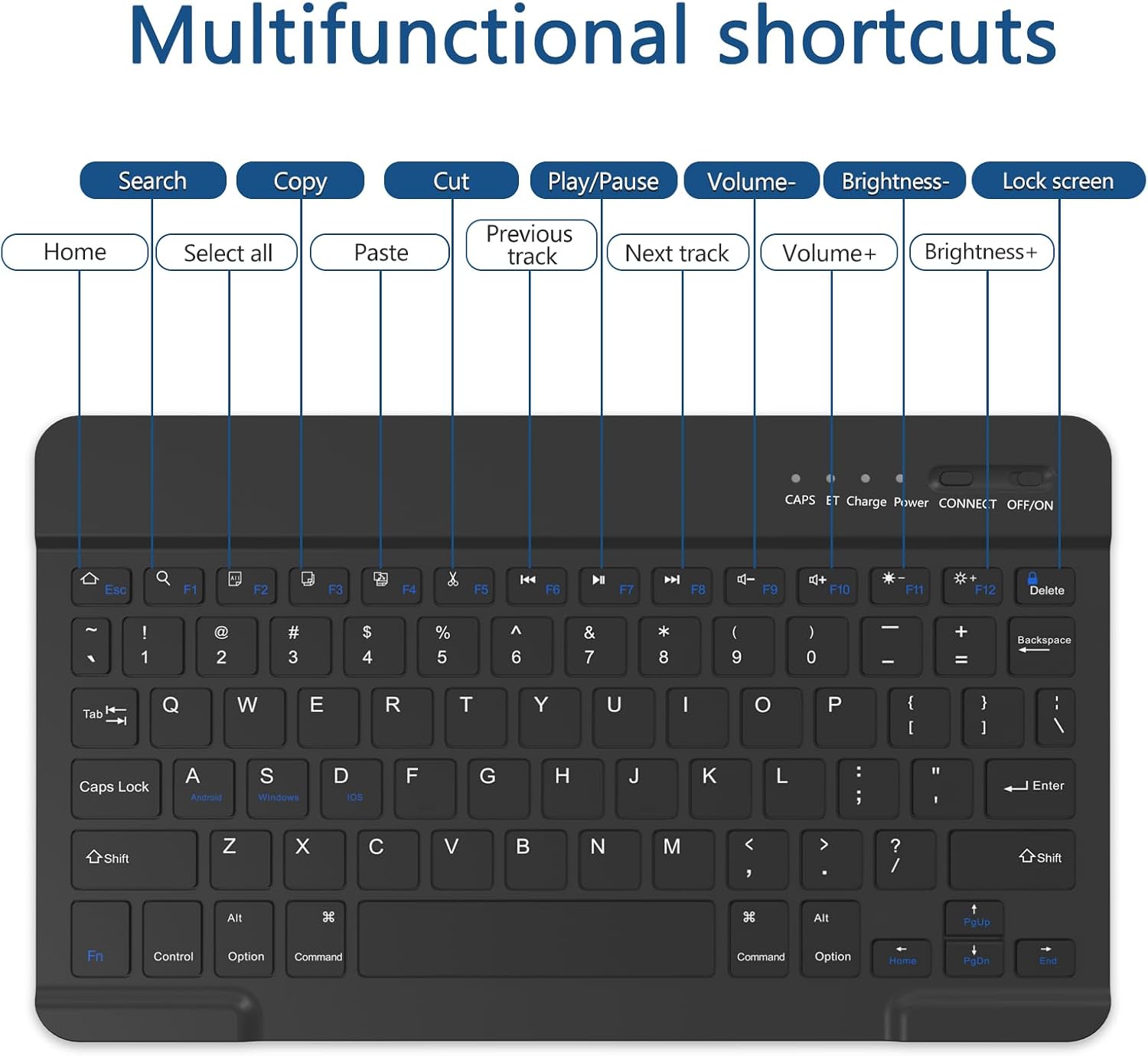
This image displays the various multifunctional shortcut keys available on the keyboard, such as Home, Search, Copy, Cut, Paste, media controls, and brightness adjustments.
Common shortcuts include:
- Home: Return to the home screen.
- Search: Activate search function.
- Copy/Cut/Paste: Standard text manipulation.
- Play/Pause: Control media playback.
- Volume +/-: Adjust audio volume.
- Brightness +/-: Adjust screen brightness.
- Lock Screen: Lock your iPad screen.
Maintenance
To ensure the longevity and proper functioning of your TQQ Keyboard Case, follow these maintenance guidelines:
- Cleaning: Use a soft, dry, lint-free cloth to clean the keyboard and case. For stubborn marks, slightly dampen the cloth with water. Avoid harsh chemicals or abrasive cleaners.
- Storage: When not in use for extended periods, store the keyboard and case in a cool, dry place. Ensure the keyboard is turned off to conserve battery life.
- Protection: Use the provided clear keyboard protector to shield the keys from dust and spills during use.
- Avoid Liquids: While the keyboard has some water resistance, avoid direct exposure to liquids to prevent damage.
Troubleshooting
If you encounter issues with your TQQ Keyboard Case, please refer to the following common solutions:
| Problem | Solution |
|---|---|
| Keyboard does not turn on. | Ensure the ON/OFF switch is in the 'ON' position. Charge the keyboard using the provided USB cable. |
| Keyboard does not pair with iPad. |
|
| Keys are unresponsive or typing incorrectly. | Ensure the keyboard is fully charged and properly paired. Restart both the keyboard and your iPad. Clean the keyboard if there is any debris under the keys. |
| iPad does not fit correctly in the case. | Verify that your iPad model is listed under the compatible devices section of this manual. This case is specifically designed for iPad 10th Gen (10.9 inch) and iPad 11th Gen (11 inch). |
Specifications
| Feature | Detail |
|---|---|
| Brand | TQQ |
| Model Number | BYWPTJP10-BLACK |
| Compatible Devices | iPad 10th Generation 10.9" 2022, iPad 11th Generation 11" 2025 |
| Connectivity Technology | Bluetooth |
| Keyboard Layout | QWERTY (UK Layout) |
| Number of Keys | 78 |
| Material | Acrylonitrile Butadiene Styrene (ABS) |
| Product Dimensions (L x W x H) | 18L x 160W x 230H millimetres |
| Power Source | Battery Powered |
| Charging Time | 2-3 hours |
| Operating Time | Approximately 80 hours |
| Standby Time | Approximately 130 days |
| Minimum Required OS | iOS 14 |
| Special Features | Ergonomic, Hotkeys and Media Keys, Lightweight, Portable, Rechargeable |
Warranty and Support
This TQQ Keyboard Case comes with a Two-year warranty from the date of purchase. This warranty covers manufacturing defects and issues arising from normal use.
For any questions, technical support, or warranty claims, please contact our customer service team through the retailer where you purchased the product. Please have your purchase details and product model number (BYWPTJP10-BLACK) ready when contacting support.