
Introduction
Thank you for choosing Csasan J90 Pro Wireless Earbuds. These earbuds are designed to provide a superior audio experience with advanced features for daily use, sports, and travel. This manual will guide you through the setup, operation, maintenance, and troubleshooting of your new earbuds.
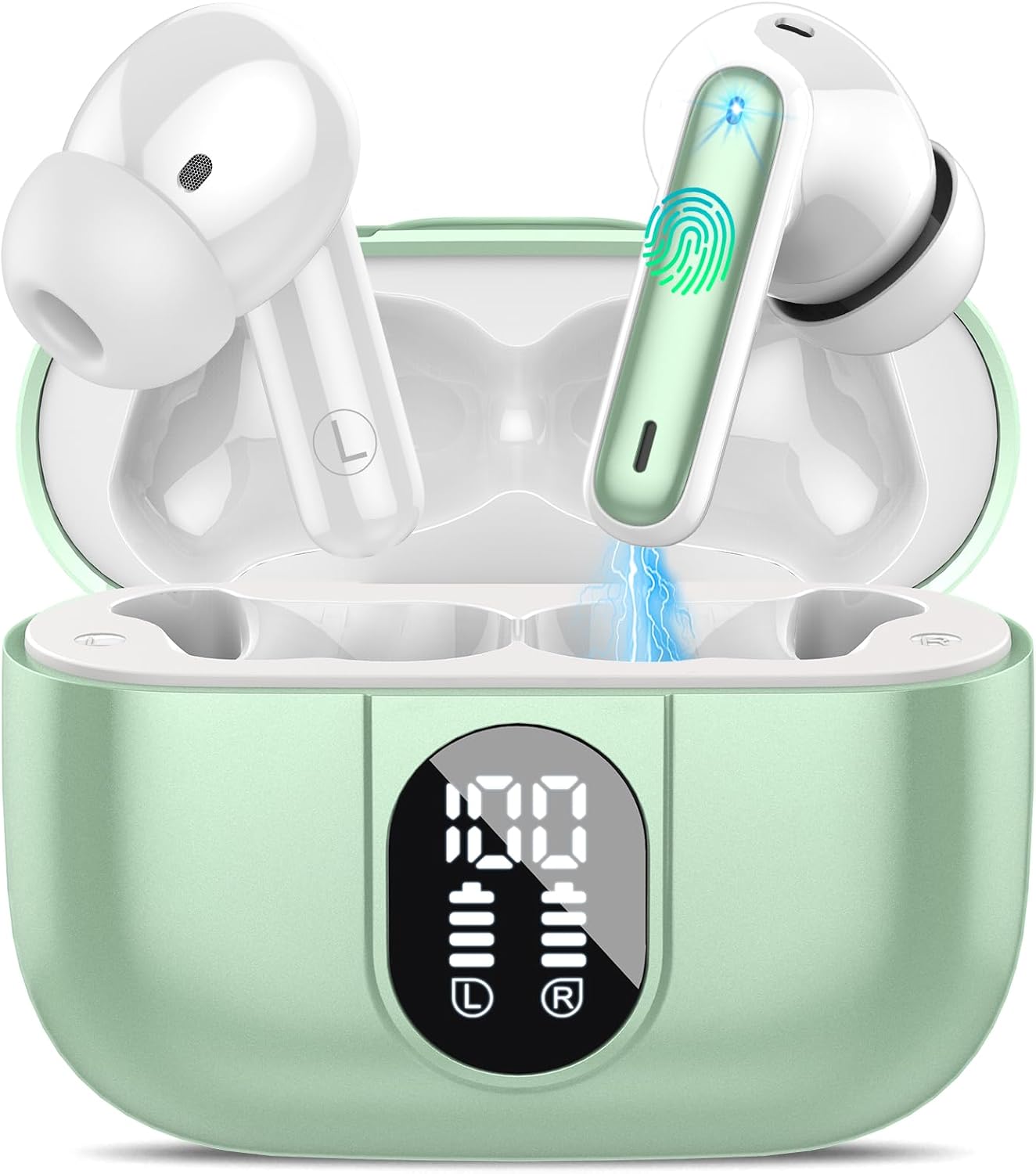
What's in the Box
Upon opening your Csasan J90 Pro package, you should find the following components:
- 2x Wireless Headphones (Left/Right)
- 1 x Fast Charging Case
- 1 x Type-C Charging Cable
- 3 x Pairs of Earplugs (Sizes S, M, L)
- 1 x Instruction Manual
Setup Guide
Initial Charging
Before first use, ensure both the earbuds and the charging case are fully charged. Connect the provided Type-C charging cable to the charging port on the case and a compatible USB power source. The LED display on the case will show the charging progress. A full charge typically takes about 1.5 hours.

One-Step Auto Pairing
The Csasan J90 Pro earbuds feature advanced Bluetooth 5.3 technology for quick and stable connections. Follow these steps to pair your earbuds:
- Ensure your earbuds are in the charging case and the case has sufficient power.
- Open the charging case. The earbuds will automatically power on and enter pairing mode.
- On your smartphone or Bluetooth-enabled device, go to the Bluetooth settings.
- Search for available devices and select "J90 Pro" from the list.
- Once connected, the earbuds will automatically pair with your device whenever you open the charging case.

Operating Instructions
Audio Quality and Noise Cancelling
Experience immersive sound with 13mm large composite diaphragms and AAC codec. The earbuds are equipped with ENC (Environmental Noise Cancellation) dual microphones to reduce up to 80% of background noise, ensuring crystal-clear calls.


Smart Touch Controls
The J90 Pro earbuds feature sensitive touch control panels on both earbuds for easy management of music and calls:
| Action | Left Earbud (L) | Right Earbud (R) |
|---|---|---|
| Play/Pause | Tap Twice | Tap Twice |
| Answer/End Call | Tap Once | Tap Once |
| Reject Call | Press and Hold 2s | Press and Hold 2s |
| Volume Up | N/A | Tap Once |
| Volume Down | Tap Once | N/A |
| Next Track | Press and Hold 2s | N/A |
| Previous Track | N/A | Press and Hold 2s |
| Activate Voice Assistant | Tap 3 Times | Tap 3 Times |

Maintenance
Waterproof Features
The Csasan J90 Pro earbuds are IP7 waterproof, meaning they are protected against immersion in water up to 1 meter for 30 minutes. This makes them suitable for use during workouts, in rainy conditions, or near water. However, they are not designed for swimming or prolonged submersion.

Cleaning and Storage
- Cleaning: Regularly clean the earbuds and charging case with a soft, dry, lint-free cloth. Avoid using abrasive materials or harsh chemicals.
- Ear Tips: Remove the silicone ear tips and clean them with mild soap and water. Ensure they are completely dry before reattaching.
- Storage: When not in use, store the earbuds in their charging case to protect them from dust and damage. Keep them in a cool, dry place away from extreme temperatures.
Troubleshooting
If you encounter any issues with your Csasan J90 Pro earbuds, please refer to the following common solutions:
- Earbuds not pairing: Ensure Bluetooth is enabled on your device. Place both earbuds back into the charging case, close the lid, wait a few seconds, then open it again to re-enter pairing mode.
- Only one earbud working: Try resetting the earbuds by placing them both in the case, closing the lid, and then opening it. Check your device's Bluetooth settings to ensure both earbuds are recognized.
- No sound: Check the volume level on your device and the earbuds. Ensure the earbuds are properly connected to your device.
- Charging issues: Verify the charging cable is securely connected to both the case and the power source. Clean the charging contacts on the earbuds and inside the case.
- Poor sound quality: Ensure the ear tips provide a good seal in your ear canal. Try different sized ear tips for a better fit.
If the problem persists, please contact customer support for further assistance.
Specifications
| Feature | Detail |
|---|---|
| Brand | Csasan |
| Model Name | J90 Pro |
| Bluetooth Version | 5.3 |
| Total Playtime | Up to 40 Hours (with charging case) |
| Earbud Playtime (Single Charge) | 6-8 Hours |
| Charging Time | 1.5 Hours |
| Water Resistance Level | IP7 Waterproof |
| Audio Driver Size | 13 Millimeters |
| Control Type | Touch |
| Included Components | Charging Case, 2x Wireless Headphones, 3x Pairs of Earplugs, Type-C Charging Cable, Instruction Manual |
Warranty and Support
Your Csasan J90 Pro Wireless Earbuds come with a 2-year warranty. For any product-related inquiries, technical support, or warranty claims, please contact our customer service. We offer 24-hour customer service response to ensure your satisfaction.
Please refer to the contact information provided on the product packaging or the official Csasan website for support details.