
Introduction
This manual provides instructions for the proper setup, operation, and maintenance of your Tayfun remote control for Daikin FTXM20R air conditioning units. Please read this manual thoroughly before using the remote control to ensure optimal performance and longevity.
Setup
1. Compatibility Check
Before use, verify that your air conditioner model is Daikin FTXM20R. The model number is typically located on a label on the right side of your indoor air conditioning unit. If the model numbers match, this remote control is compatible.
2. Battery Installation
The remote control requires two AAA batteries (not included). Follow these steps to install them:
- Slide open the battery compartment cover on the back of the remote control.
- Insert two AAA batteries, ensuring the positive (+) and negative (-) terminals align correctly with the markings inside the compartment.
- Close the battery compartment cover securely.

Image: Rear view of the remote control with the battery compartment open, showing where to insert batteries.
Operating Instructions
Familiarize yourself with the buttons on your remote control:
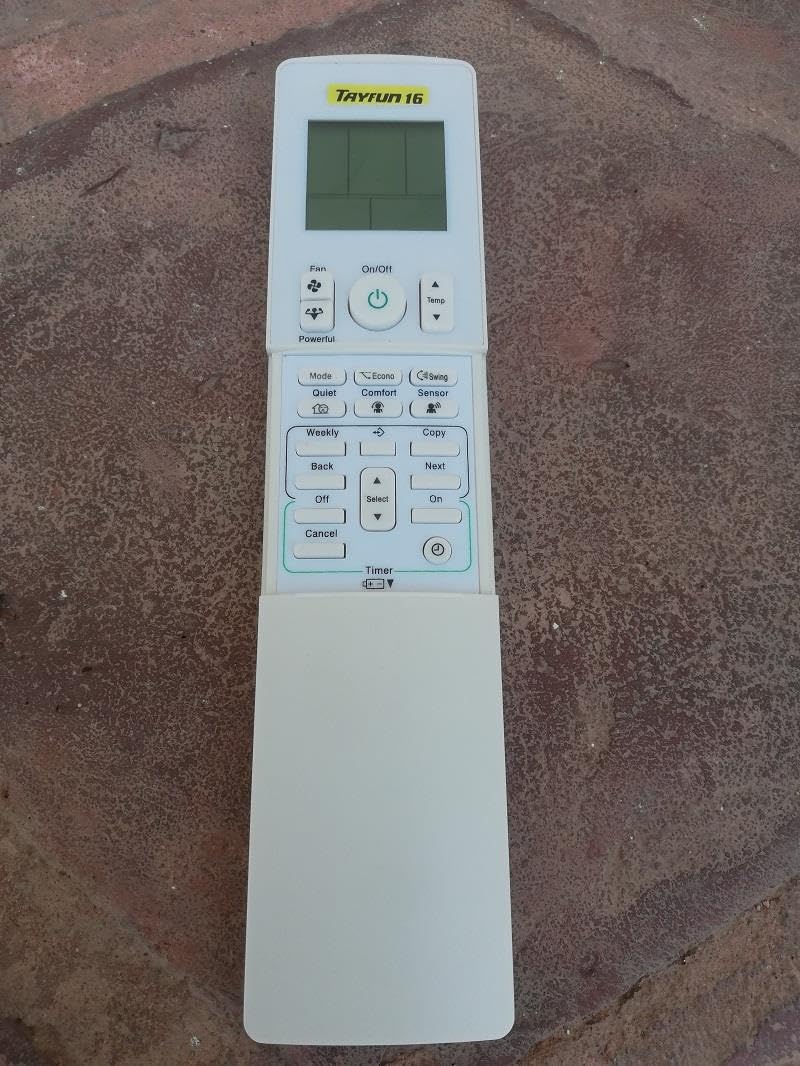
Image: Front view of the remote control, showing the display and primary buttons.
Basic Functions (Visible with cover closed)
- On/Off Button: Press to turn the air conditioner unit on or off.
- Temp ▲/▼ Buttons: Adjust the desired temperature up or down.
- Fan Button: Cycles through fan speed settings (e.g., Auto, Low, Medium, High).
- Powerful Button: Activates the powerful operation mode for rapid cooling or heating.
Advanced Functions (Under sliding cover)
Image: Front view of the remote control with the sliding cover open, revealing additional function buttons.
- Mode Button: Selects the operating mode (e.g., Auto, Cool, Dry, Heat, Fan).
- Quiet Button: Activates a low-noise operation mode.
- Comfort Button: Optimizes airflow for comfort.
- Econo Button: Engages energy-saving operation.
- Swing Button: Controls the vertical airflow direction (louver swing).
- Sensor Button: Activates or deactivates the intelligent eye sensor (if available on your AC unit).
- Weekly Button: Accesses weekly timer settings.
- Copy Button: Copies current settings for timer programming.
- Back/Next Buttons: Navigate through timer settings or other menu options.
- Off/On Buttons (Timer): Set the timer for automatic turn-off or turn-on.
- Select Button: Confirms selections in timer or other menu settings.
- Cancel Button: Cancels current timer settings or menu operations.
- Timer ▲/▼ Buttons: Adjust timer settings (e.g., time, duration).
Maintenance
Cleaning the Remote Control
To maintain the remote control's appearance and functionality:
- Wipe the surface with a soft, dry cloth.
- For stubborn dirt, lightly dampen the cloth with water and a mild detergent, then wipe dry immediately.
- Do not use abrasive cleaners, alcohol, or chemical solvents, as these can damage the surface.
Battery Replacement
Replace batteries when the display becomes dim or the remote control's response becomes sluggish. Always replace both batteries at the same time with new AAA batteries. Do not mix old and new batteries or different types of batteries.
Troubleshooting
| Problem | Possible Cause | Solution |
|---|---|---|
| Remote control does not respond. | Dead or incorrectly installed batteries. Obstruction between remote and AC unit. | Replace batteries. Ensure correct polarity. Remove any obstructions. Point remote directly at the AC unit's receiver. |
| Display is dim or blank. | Low battery power. | Replace batteries. |
| Air conditioner does not respond to commands. | Remote control not compatible. AC unit power off. | Verify AC unit model (Daikin FTXM20R). Check if the AC unit is powered on. |
Specifications
- Brand: Tayfun
- Compatible AC Model: Daikin FTXM20R
- Material: High-quality ABS Plastic
- Power Source: 2 x AAA Batteries (not included)
- Features: Super-fast sensor, soft keypad, hot and cold mode support.