
1. Introduction
This manual provides comprehensive instructions for the installation, operation, maintenance, and troubleshooting of the PowMr 60A MPPT Solar Charge Controller. This device is designed to efficiently manage power flow from your solar panels to your battery bank, ensuring optimal charging and system protection.

Figure 1: PowMr 60A MPPT Solar Charge Controller and accessories.
2. Key Features
- Wide Range Voltage/Power Support: Supports high PV input power/voltage for 12V, 24V, 36V, and 48V battery systems.
- Compatible with Multiple Batteries: Negative grounding design for enhanced safety. Compatible with 12V/24V/36V/48V batteries including AGM, Gel, Flooded, and Lithium (LFP). User-customizable charging parameters are available.
- LCD Display and User Interface: Equipped with a clear LCD screen displaying PV input voltage/power, battery voltage, charging current, and charging power. Features 4 buttons for easy navigation and parameter adjustment.
- High Tracking Technology: Advanced Maximum Power Point Tracking (MPPT) technology ensures continuous tracking of the array’s maximum power point for efficient battery charging, with tracking efficiency not less than 99% and peak conversion efficiency up to 97%.
- Excellent Heat Dissipation & Multiple Protections: Constructed from die-cast aluminum for superior heat dissipation. Includes built-in protections against reverse connection, overcurrent, short-circuit, and over-temperature.
3. Setup and Installation
Proper installation is crucial for the safe and efficient operation of your solar charge controller. Follow these steps carefully:
- Select Installation Location: Choose a location that is not exposed to direct sunlight, high temperatures, or water. Ensure sufficient air circulation around the controller for proper cooling.
- Fix the Controller: Use the provided mounting holes to securely fix the solar charge controller to a wall or suitable surface.
- Wire the Battery: Connect the battery to the controller first. Ensure correct polarity (positive to positive, negative to negative).
- Connect Solar Panels: After the battery is connected and the controller powers on, connect the solar panels to the controller. Ensure correct polarity.
- Connect Load (Optional): If using the DC load output, connect your DC loads to the designated terminals.

Figure 2: Basic wiring diagram for the solar charge controller.
Video 1: This video demonstrates the unboxing and initial connection process for the POW-M60-MAX solar charge controller, showing how to connect the battery and solar panels.
4. Operating Instructions
The controller features a user-friendly LCD display and four buttons for operation:
- PV Button: Switches between displaying photovoltaic input voltage and power.
- BAT/▲ Button: Navigates battery parameters and increases values during settings.
- DC/▼ Button: Navigates DC load parameters and decreases values during settings.
- SET/⚙ Button: Enters setting mode and confirms selections.

Figure 3: Detailed view of the enhanced user interface and LCD display.
4.1. Navigating the Display
Upon connecting the power source, the main screen displays key information including PV input voltage/power, current battery voltage, and load operating mode. Use the PV, BAT/▲, and DC/▼ buttons to cycle through different parameters such as charging current, device temperature, and battery calibration voltage.
4.2. Setting Battery Type
To set the battery type, press and hold the BAT/▲ button. Use the BAT/▲ and DC/▼ buttons to select from preset battery types (e.g., Sealed, Gel, Flooded, Lithium) or "USE" for user-defined settings. Confirm your selection with the SET/⚙ button.

Figure 4: Switching battery types on the controller.
4.3. Load Mode Settings
To adjust load mode settings, press and hold the DC/▼ button. Available modes include:
- "24H" (Always-On Mode): DC output remains continuously open. The controller provides over-discharge protection.
- "00H" (Light Control Mode): DC output is enabled only when there is sufficient sunlight.
- "1H" to "23H": Load output is enabled for a predefined duration in hours after sunset.
Video 2: This video provides guidelines for setting up the POW-M60-MAX MPPT controller, including navigating the interface and configuring various parameters.
5. Battery Compatibility
The PowMr 60A MPPT Solar Charge Controller is designed to work with a wide range of battery types, automatically detecting 12V, 24V, 36V, and 48V systems. It supports:
- Sealed Lead-Acid Batteries
- Gel Batteries
- Flooded Batteries
- Lithium Iron Phosphate (LiFePO4) Batteries
- Ternary Lithium Batteries
- User-Defined Battery Types (allowing custom charging parameters)
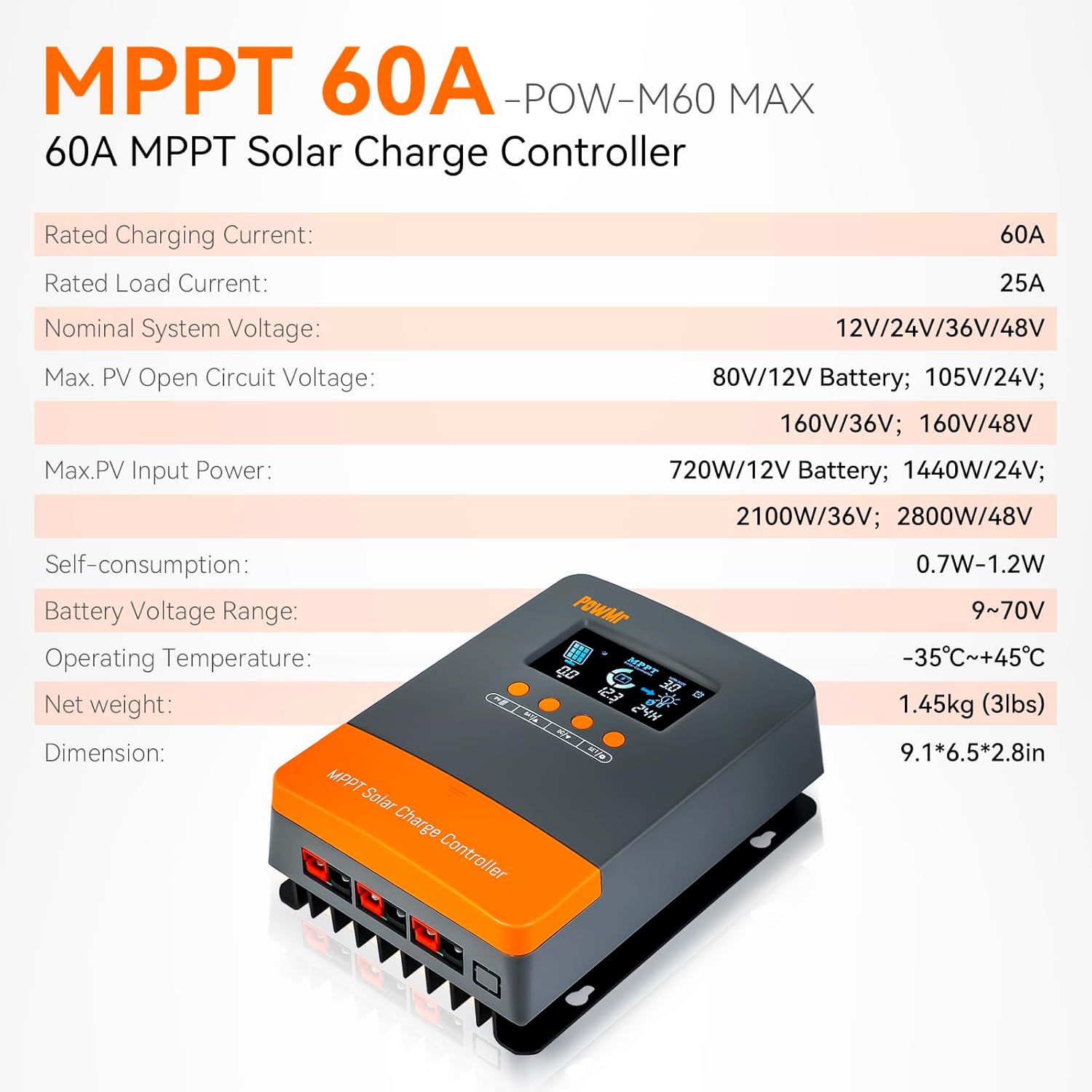
Figure 5: The controller is compatible with a variety of popular battery chemistries.
6. Intelligent Protection Features
The controller incorporates multiple protection mechanisms to ensure the safety and longevity of your solar power system:
- Over-discharging Protection: Prevents batteries from being discharged below a safe voltage level.
- Overcharging Protection: Stops charging when batteries reach their full capacity to prevent damage.
- Overload Protection: Protects the system from excessive current draw.
- Short Circuit Protection: Automatically disconnects in case of a short circuit.
- Temperature Compensation: Adjusts charging parameters based on ambient temperature to optimize battery life.
- Reverse Polarity Protection: Safeguards the controller and batteries from damage due to incorrect wiring.
- Reverse Current Protection: Prevents current from flowing back from the battery to the solar panels at night.
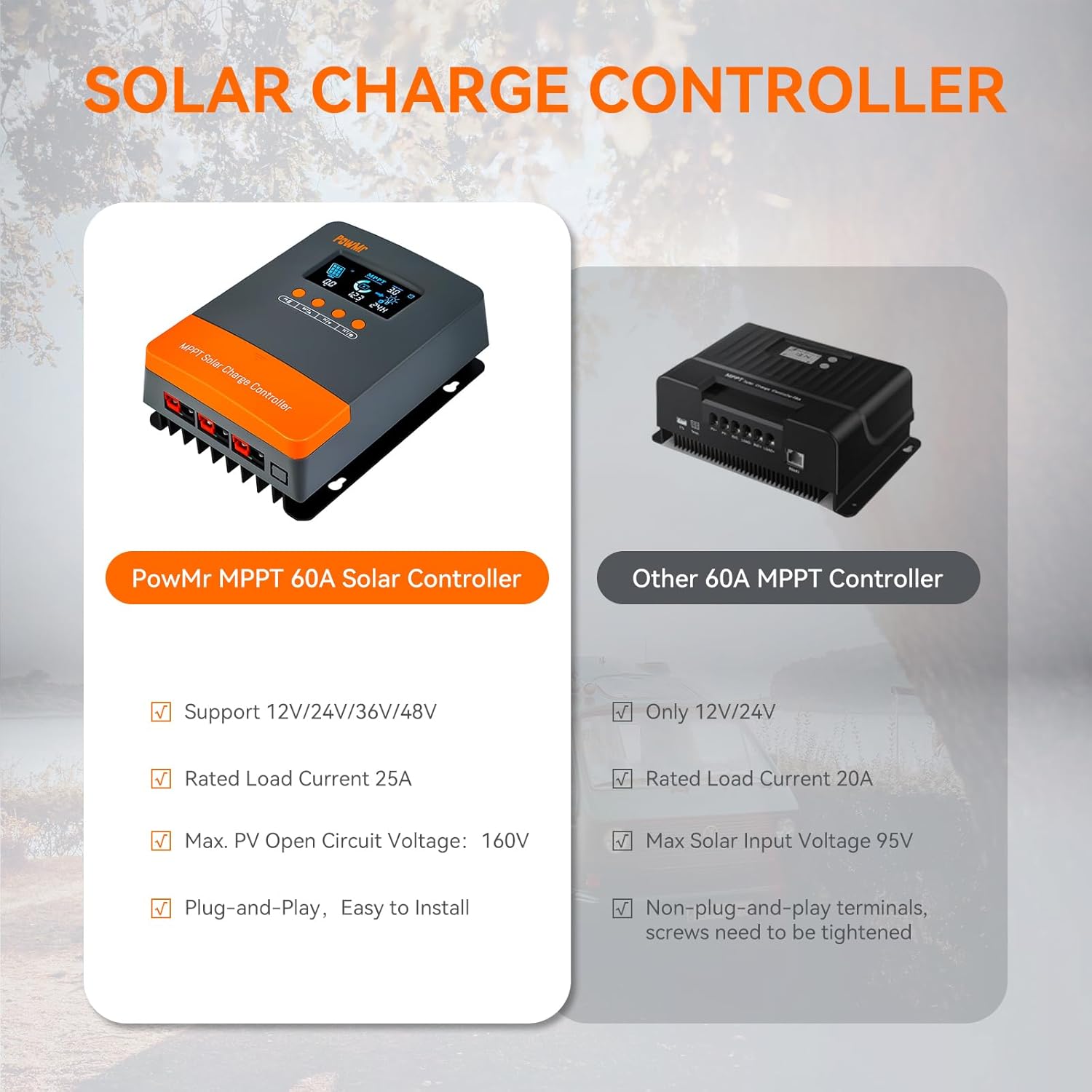
Figure 6: Overview of the controller's intelligent protection features.
7. Technical Specifications
| Attribute | Value |
|---|---|
| Model Number | POW-M60-MAX |
| Rated Charging Current | 60A |
| Rated Load Current | 25A |
| Nominal System Voltage | 12V/24V/36V/48V Auto |
| Max. PV Open Circuit Voltage | 80V (12V Battery); 105V (24V); 160V (36V/48V) |
| Max. PV Input Power | 720W (12V Battery); 1440W (24V); 2160W (36V); 2880W (48V) |
| Self-consumption | 0.7W-1.2W |
| Battery Voltage Range | 9~70V |
| Operating Temperature | -35°C ~ +45°C |
| Net Weight | 1.45 kg (3.19 lbs) |
| Dimensions | 9.1 x 6.5 x 2.8 inches |
| Display Type | LCD |
| Manufacturer | Temank |
8. Maintenance
Regular maintenance ensures the longevity and optimal performance of your solar charge controller:
- Cleaning: Periodically clean the exterior of the controller with a dry cloth to remove dust and debris. Ensure the LCD screen remains clear for readability.
- Ventilation: Verify that the cooling fins and ventilation openings are free from obstructions to allow for proper heat dissipation.
- Connection Checks: Regularly inspect all wiring connections (solar panels, battery, load) to ensure they are secure and free from corrosion. Loose connections can lead to overheating and inefficient operation.
- Environmental Conditions: Ensure the controller is operating within its specified temperature range (-35°C to +45°C) and protected from moisture.
9. Troubleshooting
If you encounter issues with your PowMr 60A MPPT Solar Charge Controller, consider the following common troubleshooting steps:
- Controller Not Powering On:
- Check battery connections for correct polarity and secure contact.
- Ensure the battery voltage is within the controller's operating range (9-70V).
- No Charging/Low Charging Current:
- Verify solar panel connections and ensure they are receiving adequate sunlight.
- Check PV input voltage on the display; it should be within the specified range for your battery system.
- Confirm the correct battery type is selected in the settings.
- Overheating:
- Ensure the controller has sufficient ventilation and is not installed in an enclosed space.
- Check for loose or corroded wiring connections, which can cause resistance and heat buildup.
- Verify that the load and PV input power do not exceed the controller's rated limits.
- Incorrect Voltage Readings:
- Perform a battery calibration if you suspect inaccurate voltage readings. Refer to section 4.1 for details.
- Ensure external measurement tools (multimeter) are accurate.
For persistent issues or complex problems, please contact customer support.
10. Warranty and Support
The PowMr 60A MPPT Solar Charge Controller comes with a manufacturer's warranty for 365 days from the date of purchase. Please retain your proof of purchase for warranty claims.
For technical support, warranty inquiries, or any questions regarding your product, please contact the manufacturer or your point of purchase. Refer to the contact information provided with your product packaging or on the official Temank website.


