
1. Introduction
Thank you for choosing the OFNEX X19 Wireless Earbuds. This manual provides detailed instructions for setting up, operating, and maintaining your earbuds to ensure optimal performance and longevity. Please read this manual thoroughly before use.
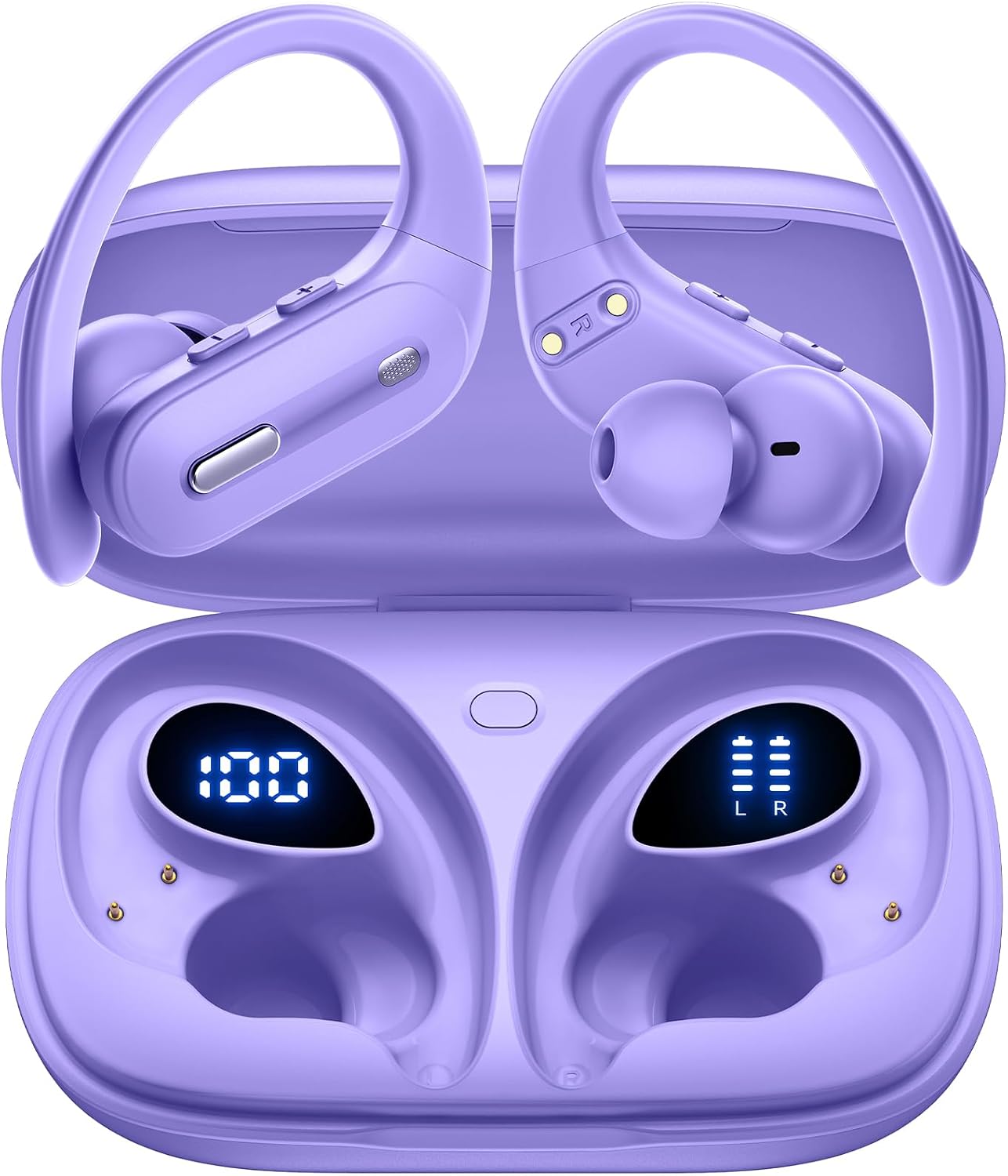
Image: OFNEX X19 Wireless Earbuds in their charging case, displaying battery levels.
2. Product Overview
2.1 Package Contents
- OFNEX X19 Wireless Earbuds (Left and Right)
- Wireless Charging Case
- USB-C Charging Cable
- Ear Cushions (pre-installed)
- Eartips (XS, S, M, L sizes)
- User Manual
2.2 Key Features
- Extended Playtime: Up to 9 hours on a single charge, with a total of 90 hours using the charging case.
- Dual Charging Options: Recharge via USB-C cable or wirelessly with a Qi-certified charging pad (not included).
- Digital Power Display: Built-in dual LED display shows battery status for both the case and individual earbuds.
- High-Fidelity Audio: Equipped with 14.2mm dual-chamber speaker drivers for crisp, balanced sound and deep bass.
- Crystal-Clear Calls: Two built-in microphones enhance call quality, ideal for meetings and online classes.
- Secure & Comfortable Fit: Ergonomic design with flexible, secure-fit ear hooks and four sizes of rubber ear tips (XS, S, M, L).
- IPX7 Waterproof: Provides protection against water droplets and sweat, suitable for workouts and outdoor activities.
- Advanced Connectivity: Bluetooth 5.3 technology ensures faster transfer speeds, stable connection, and wide compatibility.
- Intuitive Controls: Independent multi-function and volume buttons on each earbud for music, calls, and voice assistant activation.
- One-Key Reset: Convenient reset button on the charging case to restore factory settings.

Image: An overview of the OFNEX X19 True Wireless Sports Headphones highlighting key features like 90H Playtime, One-key Reset, Dual Digital Display, Dual Volume Control, Wireless Charging, and Secure Earhooks.
3. Setup
3.1 Initial Charging
Before first use, remove any protective films from the earbuds and fully charge the charging case and earbuds. Ensure the charging points are clean and dry before placing them into the charging case.
- Place both earbuds into the charging case.
- Connect the USB-C charging cable to the charging port on the case and a power source, or place the case on a Qi-certified wireless charging pad.
- The dual LED power display on the case will show the charging status. A full charge typically takes approximately 2 hours.

Image: The OFNEX X19 charging case demonstrating both wireless and USB-C charging capabilities.

Image: The OFNEX X19 charging case with earbuds inside, showing the digital display for case capacity and individual earbud power.
3.2 Pairing with Your Device
- Open the charging case. The earbuds will automatically power on and enter pairing mode.
- On your device (smartphone, tablet, etc.), enable Bluetooth and search for available devices.
- Select "X19" from the list of devices to connect.
- Once connected, the earbuds will automatically pair with your device for future use when taken out of the case.

Image: The OFNEX X19 earbuds and case surrounded by various compatible devices, illustrating one-step pairing and wide compatibility.
3.3 Fitting the Earbuds
- Choose the correct size ear tips (XS, S, M, L) for a comfortable and secure fit.
- Place the earbud in your ear and adjust the flexible ear hook over your ear for stability.

Image: A person wearing the OFNEX X19 earbuds during a workout, highlighting the secure earhooks and the availability of four different eartip sizes (L, M, S, XS).
4. Operating Instructions
4.1 Basic Controls
Each earbud features independent multi-function and volume buttons for easy control.
| Action | Left Earbud | Right Earbud |
|---|---|---|
| Play/Pause | 1x Press Multi-function Button | 1x Press Multi-function Button |
| Next Track | 2x Press Multi-function Button | 2x Press Multi-function Button |
| Previous Track | 3x Press Multi-function Button | 3x Press Multi-function Button |
| Volume Up | 1x Press Volume + Button | 1x Press Volume + Button |
| Volume Down | 1x Press Volume - Button | 1x Press Volume - Button |
| Answer/End Call | 1x Press Multi-function Button | 1x Press Multi-function Button |
| Reject Call | Press and Hold Multi-function Button | Press and Hold Multi-function Button |
| Activate Voice Assistant (Siri, Google Assistant) | Press and Hold Multi-function Button (2 seconds) | Press and Hold Multi-function Button (2 seconds) |

Image: A detailed diagram illustrating the physical buttons on the OFNEX X19 earbuds for dual audio control, including play/pause, track skipping, volume adjustment, and call management.

Image: A woman using the OFNEX X19 earbud to activate a voice assistant, with icons for Siri, Google Assistant, and another assistant displayed.
4.2 Single and Dual Earbud Use
The OFNEX X19 earbuds support both single and dual earbud use. You can use either earbud independently or both together for a stereo experience.

Image: An illustration showing a man and woman wearing OFNEX X19 earbuds, demonstrating the flexibility to switch between single and dual earbud use.
5. Maintenance
5.1 Cleaning
Regularly clean the earbuds and charging points to ensure proper function and charging. Use a soft, dry cloth. Do not use harsh chemicals or abrasive materials.
Caution: After using the earphones, please clean and dry the charging points before putting them into the charging case.
5.2 Water Resistance
The earbuds are IPX7 waterproof, meaning they are protected against temporary immersion in water (up to 1 meter for 30 minutes). However, the charging case is not waterproof. Ensure earbuds are completely dry before placing them back in the charging case.

Image: An OFNEX X19 earbud with water droplets, visually representing its IPX7 water resistance rating.
6. Troubleshooting
6.1 Resetting the Earbuds
If you experience pairing issues or other malfunctions, you can perform a one-key reset:
- Place both earbuds back into the charging case.
- Press and hold the reset button located on the charging case for approximately 10 seconds until the LED indicators flash.
- The earbuds will reset to factory settings. Re-pair them with your device as described in Section 3.2.

Image: The OFNEX X19 charging case with a clear indication of the one-key reset button for easy operation.
6.2 Common Issues
- Earbuds not pairing: Ensure both earbuds are charged, Bluetooth is enabled on your device, and they are within range. Try resetting the earbuds.
- No sound from one earbud: Check battery levels for both earbuds. Try placing them back in the case and taking them out again. If issues persist, perform a reset.
- Poor sound quality: Ensure ear tips are properly sealed in your ear. Check for obstructions in the earbud speaker mesh.
7. Specifications
| Feature | Detail |
|---|---|
| Model Name | X19 |
| Connectivity Technology | Wireless (Bluetooth 5.3) |
| Bluetooth Version | 5.3 |
| Bluetooth Range | 10 Meters |
| Battery Life (Earbuds) | Up to 9 Hours |
| Total Playtime (with Case) | Up to 90 Hours |
| Charging Time | Approx. 2 Hours |
| Audio Driver Size | 14.2 Millimeters |
| Water Resistance Level | IPX7 (Earbuds only) |
| Earpiece Shape | Over Ear (with earhooks) |
| Control Method | Physical Buttons |
| Material | Plastic |
| Item Weight | 0.039 ounces (per earbud) |
| Product Dimensions | 3.94 x 2.41 x 1.38 inches (charging case) |
8. Warranty and Support
OFNEX offers a comprehensive warranty and customer support for your X19 Wireless Earbuds.
- Lifetime Warranty: The product includes a lifetime warranty. Please refer to the warranty card included in your package or scan the QR code for activation.
- 365 Days Free Return: If you are not satisfied with your purchase, contact OFNEX's after-sale team for assistance with a replacement or a full refund.
- Contact Support: For any questions or issues, please contact our customer service team. Refer to the contact information provided in your product packaging or on the official OFNEX website.

Image: OFNEX customer service representatives ready to assist with product inquiries.
9. Safety Information
- Do not expose earbuds or charging case to extreme temperatures.
- Avoid dropping or applying excessive force to the product.
- Keep out of reach of children and pets.
- Do not attempt to disassemble or modify the product.
- Use only the provided charging cable or a Qi-certified wireless charger.
- Prolonged exposure to loud volume may cause hearing damage.
10. Official Product Videos
OFNEX X19 Earbuds Overview
Video: An official product video from OFNEX Direct showcasing the features and design of the X19 Wireless Earbuds, including their Bluetooth 5.3 connectivity and 90 hours of playtime.
OFNEX X19 Sports Earbuds Features
Video: An official product video from OFNEX Direct demonstrating the OFNEX X19 Earbuds, highlighting their suitability for sports and Bluetooth 5.3 capabilities.


