
BIGASUO 110B
BIGASUO 110B Outdoor Projector User Manual
Model: 110B
Introduction
This user manual provides detailed instructions for the operation, setup, and maintenance of your BIGASUO 110B Outdoor Projector. Please read this manual thoroughly before using the projector to ensure proper function and to maximize your viewing experience. This projector is designed for versatile use, offering a native 1080P resolution, high brightness, and a built-in rechargeable battery for both indoor and outdoor entertainment.

Image: The BIGASUO 110B Outdoor Projector, shown with its included tripod, highlighting its compact design and key features like built-in battery, 1080P resolution, 9000L brightness, and Bluetooth connectivity.
Package Contents
Upon opening the package, please verify that all the following items are included:
- BIGASUO 110B Outdoor Projector
- Power Cable
- Instruction Manual
- Tripod
- Remote Control
- 2*AAA Batteries (for remote control)
- HDMI Cable

Image: A visual representation of the BIGASUO 110B Projector and its complete set of accessories, including the power cable, instruction manual, tripod, remote control, AAA batteries, and HDMI cable.
Setup
- Power Connection: Connect the power cable to the projector and a power outlet. For battery operation, ensure the projector is charged.
- Placement: Place the projector on a stable, flat surface. The included tripod can be used for optimal positioning. Ensure the projection surface (wall or screen) is clean and smooth.
- Power On: Press the power button on the projector or remote control to turn it on.
- Focus Adjustment: Rotate the focus ring on the projector lens until the projected image is clear and sharp.
- Keystone Correction: Adjust the keystone correction dial (if available) or setting in the menu to correct any trapezoidal distortion, ensuring a rectangular image. The projector supports ±15° keystone correction.

Image: A visual guide demonstrating how ±15° keystone correction helps achieve a perfectly rectangular image, protecting eyes from strain caused by distorted reflections.
Operating Instructions
Basic Operation
- Navigation: Use the arrow keys and OK button on the remote control or projector panel to navigate through menus.
- Input Source Selection: Press the "Source" button on the remote or projector to select your desired input (HDMI, USB, AV, Micro SD).
- Volume Control: Use the volume buttons on the remote control to adjust the audio output.
Connectivity
The BIGASUO 110B projector offers multiple connectivity options:
- HDMI: Connect devices such as Fire TV Stick, Roku, DVD players, laptops, gaming consoles (PS5), and TV boxes.
- USB: Play media directly from USB flash drives.
- AV: Connect older devices using the AV port.
- Micro SD: Insert a Micro SD card to play media files.
- Bluetooth: Connect external Bluetooth speakers or headphones for enhanced audio. (Note: Does not support connection to smartphones via Bluetooth for audio output).
- Wi-Fi: Built-in Wi-Fi allows for smart features and potential streaming capabilities (specific features may vary).
Smartphone Connection: For connecting smartphones (iPhone, Android), an additional Type-C/Lightning to HDMI cable is required (not included).

Image: An illustration of the projector's wide compatibility, showing connections for USB flash drives, DVD players, speakers/headphones, laptops, TV sticks, TV boxes, and gaming consoles via HDMI.

Image: A close-up view of the projector's multimedia ports, including USB, HDMI, SD, DC, AV, and Audio out, demonstrating its comprehensive connectivity options.
Audio Features
The BIGASUO 110B projector is equipped with advanced audio capabilities:
- Built-in Dual Speakers: Features dual 3W speakers designed to deliver clear and immersive sound, providing a cinema-like auditory experience.
- Bluetooth 5.0 Function: Allows connection to external wireless audio devices such as Bluetooth speakers or headphones for enhanced sound. Please note that direct Bluetooth connection to smartphones for audio output is not supported.

Image: An illustration showing the two audio modes: connecting to an external Bluetooth speaker and utilizing the projector's built-in dual speakers for surround sound.

Image: The BIGASUO projector connected to an external Bluetooth speaker, illustrating its capability to enhance audio for parties and gatherings.
Display Adjustment
- Projection Size: The projector supports a projection display size ranging from 35 inches to 200 inches.
- Projection Distance: Optimal projection distance is between 5 feet and 16.4 feet. Adjust the distance to achieve your desired screen size.
- Focus and Keystone: As mentioned in the Setup section, use the focus ring and keystone correction to ensure a clear and properly shaped image.

Image: A scene depicting the BIGASUO projector projecting a large image onto the side of an RV, demonstrating its capability for up to 200-inch projection, ideal for outdoor entertainment.
Battery Information
The BIGASUO 110B projector features a built-in 3000mAh rechargeable Lithium Polymer battery, providing portability and flexibility for use without a constant power source.
- Battery Life: The battery provides approximately 1 to 1.5 hours of operation on a full charge. This allows for viewing 1-2 episodes of TV dramas.
- Charging: Connect the DC power cable to charge the projector. It can be used while charging.
- Battery Mode Brightness: When operating solely on battery power, the brightness is automatically reduced by 30-50% compared to DC power mode (9000L).
- Power Switch: A switch on the back of the projector allows you to select between "ON" (battery powered) and "OFF" (DC powered) modes.

Image: A family enjoying a movie outdoors with the BIGASUO projector, illustrating its portability and 1-1.5 hours of battery life. A note indicates that different environments can affect battery consumption.

Image: A camping scene with the BIGASUO projector displaying a movie, emphasizing its built-in battery for extended use outdoors, providing 1.5 hours of teleplay.
Maintenance
- Cleaning the Lens: Use a soft, lint-free cloth specifically designed for optical lenses to gently wipe the projector lens. Avoid abrasive materials or harsh chemicals.
- Cleaning the Exterior: Wipe the projector's exterior with a soft, dry cloth. Do not use liquid cleaners directly on the device.
- Ventilation: Ensure the projector's ventilation openings are not blocked to prevent overheating.
- Storage: When not in use for extended periods, store the projector in a cool, dry place, away from direct sunlight and extreme temperatures.
- Lamp Life: The integrated lamp has a long lifespan, extending up to 10,000 hours, ensuring reliable performance over an extended period.

Image: A diagram illustrating the integrated long-life lamp of the BIGASUO projector, highlighting its durability and extended lifespan of up to 10,000 hours.
Troubleshooting
If you encounter issues with your projector, please refer to the following common problems and solutions:
| Problem | Solution |
|---|---|
| Q: How long can the projector be used when fully charged? | A: Generally, it can be used for 1-1.5 hours. However, brightness, volume, and ambient temperature will affect the standby time. Keep the DC power cord nearby for continuous use. |
| Q: How can I play Netflix? | A: Due to HDCP copyright issues, Netflix, Disney, or other streaming media do not support mirroring. Please use a TV stick (e.g., Fire TV Stick, Roku) connected via HDMI to play these services. |
| Q: Can I use only the battery? | A: Yes, there is a switch on the back of the projector. "ON" means battery powered; "OFF" means DC powered. |
| Q: What is the brightness of the projector? | A: In DC power mode, the brightness is about 9000L. When it is powered by battery only, the brightness is automatically reduced by 30-50%. |
| No Image/Signal: | Check cable connections (HDMI, USB, AV). Ensure the correct input source is selected on the projector. |
| Blurry Image: | Adjust the focus ring on the lens. Ensure the projection distance is within the recommended range (5-16.4 feet). |
| Distorted Image (Trapezoid): | Adjust the keystone correction setting or dial to make the image rectangular. |
| No Sound: | Check the volume level on both the projector and the connected device. Ensure external speakers are properly connected or Bluetooth is paired correctly. |

Image: A comparison showing the visual clarity and sharpness improvement from 720P (6000L, 8000:1 contrast) to 1080P (9000L, 10000:1 contrast) on the BIGASUO projector, highlighting its superior visual feast.
Specifications
| Feature | Detail |
|---|---|
| Brand | BIGASUO |
| Model | 110B |
| Native Resolution | 1920 x 1080 (Full HD) |
| Brightness (DC Power) | 9000L |
| Contrast Ratio | 10000:1 |
| Projection Size | 35-200 inches |
| Projection Distance | 5-16.4 feet |
| Keystone Correction | ±15° |
| Connectivity Technology | Bluetooth, USB, Wi-Fi, HDMI, AV, Micro SD |
| Special Features | Built-In Wi-Fi, Portable, Wireless, Built-in Rechargeable Battery |
| Battery Type | 1 Lithium Polymer (included) |
| Battery Life | Up to 1-1.5 hours |
| Item Weight | 2.8 pounds |
| Package Dimensions | 9.8 x 7.2 x 3.7 inches |
| Lamp Life | Up to 10,000 hours |
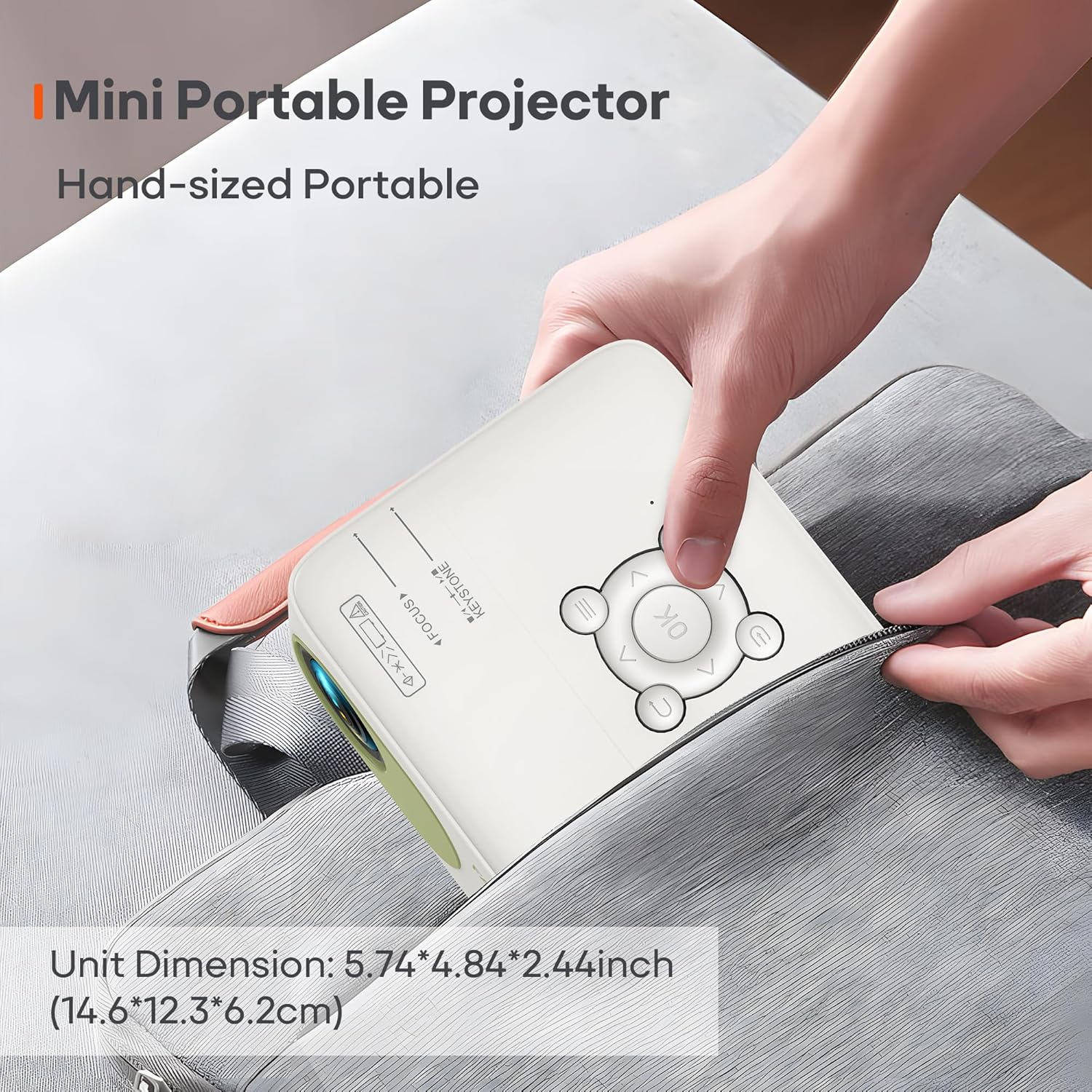
Image: A hand holding the BIGASUO mini portable projector, demonstrating its compact size (5.74*4.84*2.44 inches or 14.6*12.3*6.2cm), making it easy to carry.

Image: The BIGASUO mini projector placed inside a bag next to a laptop and smartphone, illustrating its compact size (1.31 lbs, 5.74*4.84*2.44 inches) for easy portability.
Warranty and Support
BIGASUO is committed to providing excellent customer service and support for your projector:
- Quick Reply: Expect a quick reply to inquiries within 24 hours.
- Return Policy: Enjoy a 30-day worry-free return period.
- Replacement: A replacement is available within 12 months of purchase.
- Lifetime Support: Lifetime after-sales consultation and technical support are provided.

Image: An infographic detailing BIGASUO's customer support commitments: 24-hour quick reply, 30-day return policy, 12-month replacement, and lifetime after-sales support.
For further assistance or to contact support, please refer to the contact information provided in your product packaging or visit the official BIGASUO website.
Ask a question about this manual
Ask about setup, troubleshooting, compatibility, parts, safety, or missing instructions. Manuals+ will review the question and use this page’s manual context to help answer it.