
SOYES XS16
SOYES XS16 Mini Smartphone User Manual
Model: XS16
1. Introduction
Welcome to the user manual for your new SOYES XS16 Mini Smartphone. This compact and powerful device runs on Android 10.0, offering a full smartphone experience in a handheld size. Designed for portability and convenience, it features 4G network support, a 3.0-inch HD display, and essential functionalities for daily communication and entertainment. This manual will guide you through the setup, operation, maintenance, and troubleshooting of your device.
2. What's in the Box
- SOYES XS16 Mini Smartphone
- USB Type-C Cable
- SIM Tray Ejector
- Phone Case
- Screen Protector
3. Product Overview
The SOYES XS16 is engineered for portability without compromising on features. Its small form factor makes it ideal for easy carrying, fitting comfortably in your hand or pocket.

Figure 3.1: The SOYES XS16 Mini Smartphone, showcasing its compact size when held in hand.
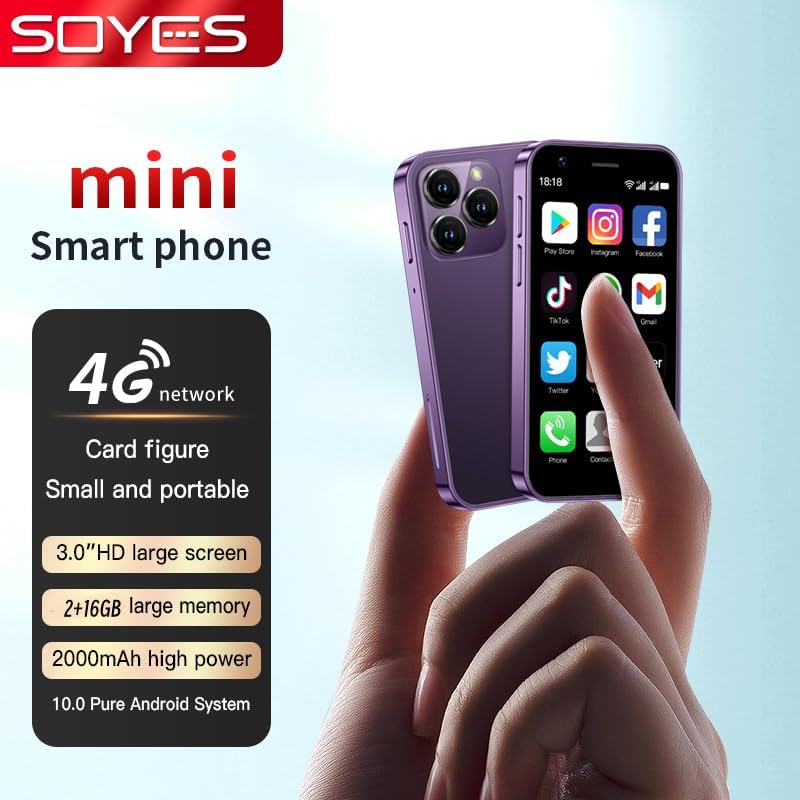
Figure 3.2: Overview of the SOYES XS16, highlighting its 4G network capability, 3.0-inch HD screen, memory options, 2000mAh battery, and Android 10.0 system.

Figure 3.3: The SOYES XS16 is available in various colors, offering a sleek and modern design.

Figure 3.4: An illustration of the phone's advanced features, including its compact body, large HD screen, high-definition camera, flagship multi-core processor, and 2000mAh battery.

Figure 3.5: The phone offers ample storage space and features a convenient Type-C charging port for efficient power delivery.

Figure 3.6: Demonstrating the phone's small and portable design, comparable to the size of a credit card.

Figure 3.7: The SOYES XS16 runs on a pure Android Native System, ensuring compatibility with mainstream applications and smooth multitasking.

Figure 3.8: The phone's thin and light profile allows it to be easily carried in small bags or pockets.

Figure 3.9: A summary of the phone's flagship configuration and basic parameters.
Product Video
Video 3.1: An official product video showcasing the SOYES XS16 Mini Smartphone's design, features, and compact size.
4. Setup
4.1. SIM Card Installation
- Locate the SIM card tray on the side of the phone.
- Insert the SIM tray ejector tool into the small hole next to the tray and press gently until the tray pops out.
- Place your Nano-SIM card(s) into the designated slots on the tray. Ensure the gold contacts face downwards. The SOYES XS16 supports dual SIM cards.
- Carefully push the tray back into the phone until it clicks into place.
4.2. Initial Power On & Language Selection
- Press and hold the Power button (located on the side) until the screen lights up.
- Follow the on-screen prompts to select your preferred language. The phone supports English, French, Spanish, Portuguese (Brazil), Italian, German, Dutch, Hungarian, Russian, Arabic, Greek, Romanian, Bulgarian, Vietnamese, Czech, Persian, Indonesian, Malay, Thai, Portuguese, Philippine, Hebrew, Korean, and Japanese.
- Complete the initial setup steps, including connecting to Wi-Fi and setting up your Google account.
4.3. Network Connectivity
The SOYES XS16 supports 4G, 3G, and 2G networks. Ensure your SIM card supports the following frequencies for optimal performance:
- 4G FDD: B1/B3/B5/B7/B8/B20 (2100/1800/850/2600/900/800MHz)
- 4G TDD: B39/B40 (2600/1900/2300MHz)
- 3G WCDMA: B1/B5/B8 (2100/850/900MHz)
- 2G GSM: B3/B5/B8 (1800/850/900MHz)
If you do not intend to use a SIM card, you can still use the phone by connecting to Wi-Fi.
5. Operating Your Device
5.1. Basic Navigation
The SOYES XS16 features a 3.0-inch IPS touchscreen. Navigate by tapping, swiping, and pinching. The Android 10.0 OS provides an intuitive user interface.
5.2. Calls and Messaging
Use the Phone app to make calls and the Messaging app to send and receive SMS/MMS messages. The dual SIM support allows you to manage two numbers simultaneously.
5.3. Camera Usage
The phone is equipped with a 5MP rear camera and a 2MP front camera. Open the Camera app to capture photos and videos. Tap the screen to focus and press the shutter button to take a picture.
5.4. App Management
Download and install applications from the Google Play Store. You can manage installed apps through the Settings menu, including permissions and storage usage.
5.5. Connectivity Features
- Wi-Fi: Connect to wireless networks for internet access.
- Bluetooth: Pair with Bluetooth devices like headphones or speakers.
- Mobile Hotspot: Share your phone's cellular data connection with other devices.
6. Maintenance
6.1. Charging
Charge your SOYES XS16 using the provided USB Type-C cable and a compatible power adapter. The 2000mAh battery provides sufficient power for its compact size. Avoid using damaged cables or chargers.
6.2. Software Updates
Periodically check for system updates in the Settings menu to ensure your phone has the latest features and security patches.
6.3. Cleaning
Use a soft, lint-free cloth to clean the screen and body of the phone. Avoid using harsh chemicals or abrasive materials.
6.4. Protection
Utilize the included screen protector and phone case to safeguard your device from scratches and minor impacts.
7. Troubleshooting
If you encounter issues with your SOYES XS16, refer to the following common problems and solutions:
- Phone Not Powering On: Ensure the battery is charged. Connect the phone to a charger for at least 15 minutes before attempting to power on again.
- Network Connectivity Issues:
- Verify that your SIM card is correctly inserted and active.
- Check if your SIM card supports the phone's frequency bands (refer to Section 4.3).
- Restart the phone.
- Go to Settings > Network & internet > Mobile network > Advanced > Access Point Names (APN) and ensure the correct APN settings for your carrier are selected or configured.
- If issues persist, contact your mobile carrier for assistance.
- Freezing or Glitching:
- Restart the phone.
- Close background applications.
- Clear cache for problematic apps (Settings > Apps & notifications > [App Name] > Storage & cache > Clear cache).
- Ensure sufficient storage space is available.
- Language Changed Unexpectedly: If the phone's language changes to an unfamiliar one, navigate to Settings (usually represented by a gear icon) > System > Languages & input > Languages, and select your desired language.
- Poor Sound Quality: Ensure the speaker is not obstructed. Adjust volume settings.
- Difficulty Typing on Small Screen: Utilize predictive text features or consider using a stylus for more precise input if available.
If these steps do not resolve the issue, a factory reset may be necessary (Settings > System > Reset options > Erase all data (factory reset)). Warning: A factory reset will erase all data on your phone. Back up important information before proceeding.
8. Specifications
| Product Dimensions | 3.52 x 1.79 x 0.45 inches |
| Item Weight | 5.6 ounces |
| Item Model Number | XS16 |
| Operating System | Android 10.0 |
| Processor | MTK6737 |
| RAM | 2 GB |
| Memory Storage Capacity | 16 GB (also available in 3GB+64GB variant) |
| Screen Size | 3.0 Inches HD |
| Screen Resolution | 480 x 854 |
| Rear Camera | 5MP |
| Front Camera | 2MP |
| Battery Capacity | 2000 mAh Lithium Polymer |
| I/O Interface | Type-C |
| Wireless Communication Technologies | Cellular, Wi-Fi |
| Connectivity Technologies | Bluetooth, Wi-Fi, USB |
| Wireless Carrier | Unlocked for All Carriers |
| Phone Unlocking Method | Graphics + Password |
9. Warranty & Support
For any questions or support regarding your SOYES XS16 Mini Smartphone, please contact the seller or manufacturer. Please refer to your purchase documentation for specific warranty details and contact information.
Related documentsXS16


Ask a question about this manual
Ask about setup, troubleshooting, compatibility, parts, safety, or missing instructions. Manuals+ will review the question and use this page’s manual context to help answer it.