
Sena R1-ET00S01
Sena R1 Smart Communications Cycling Helmet User Manual
Model: R1-ET00S01
1. Introduction
Welcome to the user manual for your Sena R1 Smart Communications Cycling Helmet. This helmet is designed to enhance your cycling experience by integrating advanced communication features directly into your protective gear. With built-in speakers and a microphone, you can communicate with other riders, listen to music, and manage phone calls seamlessly while maintaining awareness of your surroundings. Please read this manual thoroughly to ensure proper use, optimal performance, and safety.

Figure 1: Sena R1 Smart Communications Cycling Helmet (Electric Tangerine)
2. Product Overview
The Sena R1 helmet combines safety with cutting-edge communication technology. Key features include:
- Built-in Speakers and Microphone: Enjoy clear audio for music, calls, and intercom without external devices.
- Group Intercom: Communicate with up to three other riders for enhanced group riding coordination.
- Bluetooth Connectivity: Easily pair with your smartphone for hands-free calling, GPS navigation, and music streaming.
- Comfortable and Secure Design: Features removable and washable padding, a durable nylon chinstrap, and a spin lock for a customized, snug fit.
- Smartphone App Integration: Customize settings, manage friend groups, and adjust volume levels via the dedicated Sena Cycling App.

Figure 2: Sena R1 Helmet Integrated Features
3. Setup
3.1 Initial Charging
Before first use, fully charge your Sena R1 helmet. The helmet features a USB charging port, eliminating the need for disposable batteries.
- Locate the USB charging port at the back of the helmet (refer to Figure 3).
- Connect the provided USB cable to the helmet and a compatible USB power source (e.g., wall adapter, computer USB port).
- The LED indicator will show charging status. A full charge typically takes a few hours.
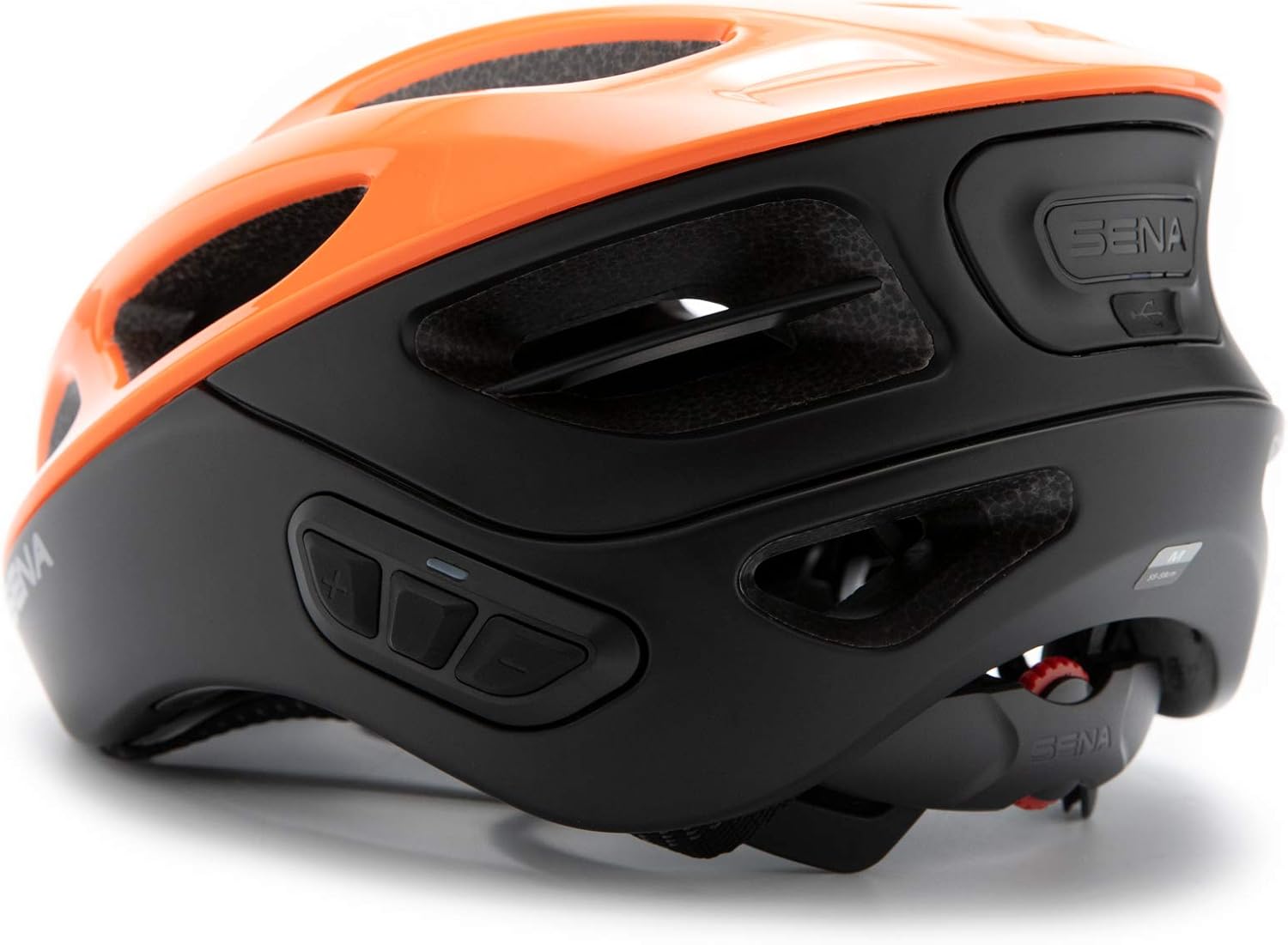
Figure 3: USB Charging Port Location
3.2 Helmet Sizing and Adjustment
Proper helmet fit is crucial for safety and comfort. Follow these steps to ensure your helmet fits correctly:
- Measure Your Head: Use a flexible tape measure to find the circumference of your head, approximately 1 inch above your eyebrows and at the top of your ears. Pull the tape snugly.
- Compare to Sizing Chart: Refer to the sizing guide below to determine your recommended helmet size.
- Adjust Dial: Before placing the helmet on your head, open the dial adjustment at the back to its widest setting.
- Position Helmet: Place the helmet on your head. It should sit level, not too far forward or back.
- Tighten Dial: Tighten the dial adjustment at the back until the helmet feels snug but comfortable. It should not be overly tight, just secure enough to prevent excessive movement.
- Buckle Chin Strap: Fasten the chin strap. It should be loose enough to allow you to move your mouth, but tight enough that you can only fit about three fingers between your chin and the strap.
- Adjust Side Buckles: Adjust the side buckles so they sit flat against your head, just below your ears. The straps should be in front and behind your ears without touching them.
Video 1: Sena Cycling Helmet Size Guide. This video provides a detailed guide on how to measure your head, adjust the helmet for a proper fit, and check for security, ensuring maximum comfort and safety.
Sizing Guide
| Size | Head Circumference (cm) | Head Circumference (inches) |
|---|---|---|
| S | 50 - 55 | 19 5/8 - 21 3/4 |
| M | 55 - 59 | 21 3/4 - 23 3/8 |
| L | 59 - 63 | 23 3/8 - 24 3/4 |
4. Operating Instructions
4.1 Power On/Off
- To Power On: Press and hold the Center Button until you hear an audible prompt.
- To Power Off: Press and hold the Center Button until you hear an audible prompt indicating power off.
4.2 Volume Adjustment
- Increase Volume: Press the Plus (+) Button.
- Decrease Volume: Press the Minus (-) Button.
4.3 Bluetooth Pairing (Smartphone)
To connect your Sena R1 helmet to your smartphone:
- With the helmet powered off, press and hold the Center Button until you hear the "Pairing" prompt. The LED will flash red and blue.
- On your smartphone, go to Bluetooth settings and select "Sena R1" from the list of available devices.
- Once paired, the LED will turn blue, and you will hear a confirmation.

Figure 4: Smartphone Connectivity via Sena Cycling App
4.4 Group Intercom
The R1 helmet supports communication with up to three other riders.
- Ensure all helmets are powered on and within range.
- To initiate intercom pairing, press and hold the Center Button on your helmet until you hear the "Intercom Pairing" prompt.
- Have the other riders do the same. The helmets will automatically connect when in pairing mode and within range.
- Once connected, you can speak freely with your group.

Figure 5: Group Intercom in Use
Video 2: R1 Bluetooth Integrated Smart Bicycle Helmet. This video demonstrates the integrated communication features of the Sena R1 helmet, including Bluetooth group intercom and music playback.
5. Maintenance
5.1 Cleaning the Helmet
- Wipe the exterior of the helmet with a soft, damp cloth. Avoid harsh chemicals or abrasive cleaners.
- The internal padding is removable and washable. Follow the care instructions on the padding label for cleaning.
- Ensure all components are completely dry before reassembling or storing the helmet.
5.2 Storage
Store the helmet in a cool, dry place away from direct sunlight and extreme temperatures. Do not place heavy objects on top of the helmet.
6. Troubleshooting
6.1 Common Issues and Solutions
| Issue | Possible Cause | Solution |
|---|---|---|
| No Power | Low battery | Charge the helmet fully using the provided USB cable. |
| Cannot Pair Bluetooth | Helmet not in pairing mode; Device already paired to another helmet/phone | Ensure helmet is in pairing mode (flashing red/blue). Disconnect from other devices if necessary. Refer to Section 4.3. |
| Intercom Disconnects Frequently | Out of range; Obstructions; Low battery | Stay within recommended intercom range. Ensure clear line of sight. Charge helmet. |
| Poor Audio Quality | Volume too low/high; Microphone/speaker obstruction | Adjust volume. Ensure microphone is positioned correctly and speakers are not obstructed by padding. |
6.2 Factory Reset
If issues persist, a factory reset may resolve them. Consult the full user manual (link in Warranty & Support section) for specific instructions on performing a factory reset.
7. Specifications
| Feature | Detail |
|---|---|
| Brand | Sena |
| Model Name | R1 |
| Model Number | R1-ET00S01 |
| Color | Electric Tangerine |
| Size | Small |
| Age Range (Description) | Adult |
| Special Feature | Bluetooth |
| Outer Material | Polycarbonate (PC) |
| Inner Material | Expanded Polystyrene |
| Item Weight | 380 Grams |
| UPC | 885465014218 |
| Included Components | Cable, Helmet |
8. Warranty & Support
8.1 Warranty Information
The Sena R1 Smart Communications Cycling Helmet comes with a 2-Year Warranty from the date of purchase. This warranty covers manufacturing defects and ensures your product performs as expected under normal use. Please retain your proof of purchase for warranty claims.
8.2 Customer Support
For further assistance, technical support, or warranty inquiries, please refer to the following resources:
- Official Sena Store: Visit the Sena Store on Amazon for product information and accessories.
- User Manual (PDF): A comprehensive PDF version of the user manual is available for download here.
- Installation Manual (PDF): For detailed installation instructions, download the PDF manual here.
- User Guide (PDF): An additional user guide is available here.
Related documentsR1-ET00S01


Ask a question about this manual
Ask about setup, troubleshooting, compatibility, parts, safety, or missing instructions. Manuals+ will review the question and use this page’s manual context to help answer it.