
Maxlite UNL-DTDS
MaxLite Plug-in Night Light
Model: UNL-DTDS
Dusk to Dawn, Energy Saving LED Night Light
Introduction
Thank you for choosing the MaxLite Plug-in Night Light. This manual provides essential information for the safe and efficient use of your new night light. Designed for convenience and energy efficiency, this night light features a built-in photo cell that automatically turns the light on at dusk and off at dawn, providing subtle illumination where you need it most.
Product Overview
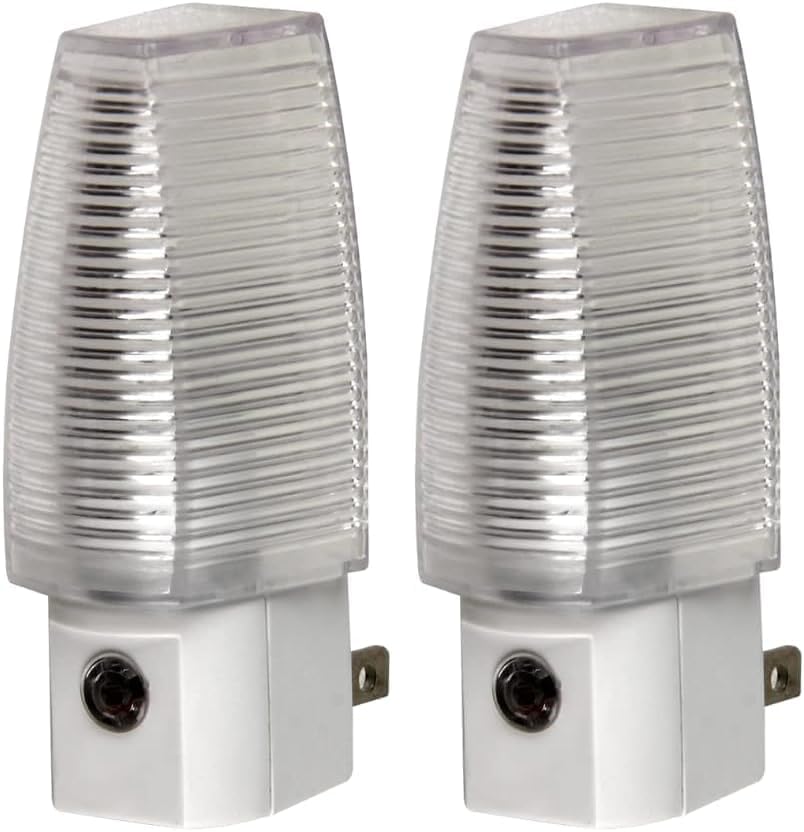
Image: Two MaxLite Plug-in Night Lights, showing their compact design and standard plug.

Image: A single MaxLite Plug-in Night Light highlighting its LED light source, compact size, and built-in photo cell.
The MaxLite Plug-in Night Light is a compact and efficient lighting solution. It utilizes an LED light source for energy saving and features a built-in photo cell for automatic operation. Its design is suitable for various indoor spaces requiring subtle illumination.
Setup
- Unpack: Carefully remove the night light from its packaging.
- Select Location: Choose a standard 120V AC wall outlet in an indoor area where you desire subtle illumination, such as hallways, bathrooms, or bedrooms. Ensure the outlet is not obstructed and allows the photo cell to detect ambient light changes.
- Plug In: Insert the night light directly into the wall outlet. Ensure it is securely seated.
- Test: The night light will automatically activate when the ambient light level is low enough (dusk) and deactivate when sufficient light is present (dawn). You can test this by covering the photo cell or by observing its operation in varying light conditions.
Note: This night light is designed for indoor use only and is not waterproof.
Operating Instructions
The MaxLite Plug-in Night Light operates automatically using its integrated photo cell sensor. No manual switching is required.
- Automatic On: The night light will turn on automatically when the surrounding area becomes dark (e.g., at dusk or when room lights are turned off).
- Automatic Off: The night light will turn off automatically when the surrounding area becomes sufficiently bright (e.g., at dawn or when room lights are turned on).
The LED light source provides a soft, white glow that is bright enough for navigation without being overly intense, making it ideal for nighttime use without disturbing sleep.
Maintenance
- Cleaning: To clean the night light, unplug it from the wall outlet. Wipe the exterior with a soft, dry cloth. Do not use abrasive cleaners or immerse the unit in water.
- Bulb Replacement: The LED bulb in this night light is integrated and not user-replaceable. The product is designed for long-term use without bulb changes.
Troubleshooting
| Problem | Possible Cause | Solution |
|---|---|---|
| Night light does not turn on in the dark. |
|
|
| Night light stays on during the day. |
|
|
| Light output seems too dim. |
|
|
Specifications
| Feature | Detail |
|---|---|
| Model Number | UNL-DTDS |
| Light Source Type | LED |
| Power Source | Corded Electric (Plug-in) |
| Voltage | 120 Volts |
| Wattage | 0 Watts (Energy Saving) |
| Special Feature | Dusk to Dawn Sensor, Energy Efficient |
| Material | Alloy Steel (Base) |
| Color | White |
| Indoor/Outdoor Usage | Indoor |
| Dimensions | 1 x 2.09 x 5 inches |
| Item Weight | 2.12 ounces |
Warranty and Support
MaxLite products are manufactured to high-quality standards. For specific warranty information or technical support, please refer to the official MaxLite website or contact their customer service directly. Keep your purchase receipt as proof of purchase for any warranty claims.
For further assistance, please visit the MaxLite Store on Amazon.
Important Safety Information
- Do not disassemble or modify the night light.
- Do not expose to water or excessive moisture. This product is for indoor use only.
- Ensure the night light is plugged into a properly functioning 120V AC outlet.
- Keep out of reach of small children and pets.
Related documentsUNL-DTDS


Ask a question about this manual
Ask about setup, troubleshooting, compatibility, parts, safety, or missing instructions. Manuals+ will review the question and use this page’s manual context to help answer it.