
Waterdrop WD-EDFA
Waterdrop WD-EDFA Alkaline Filter Replacement Instruction Manual
Model: WD-EDFA
Introduction
This manual provides essential information for the proper installation, operation, and maintenance of your Waterdrop WD-EDFA Alkaline Filter Replacement. Please read these instructions carefully before use to ensure optimal performance and longevity of your product.
Product Overview
The Waterdrop WD-EDFA Alkaline Filter is designed to replace filters in compatible Waterdrop Electric Pitcher models. It features advanced filtration technology to improve water quality and increase pH levels.
Key Features
- Alkaline Filtration: Provides a prolonged slow release for pH balancing, increasing initial pH by 1.5-2.5.
- Contaminant Reduction: Effectively reduces over 30 contaminants, including chlorine, PFOA/PFOS, lead, and other impurities.
- Material Safety: Constructed from BPA-free and Lead-free materials.
- Filter Life: Each filter lasts up to 3 months or 200 gallons, whichever occurs first.
Compatible Models
This filter is compatible with the following Waterdrop Electric Water Filter Pitcher models:
- WD-ED01AW
- WD-ED01AB
- WD-ED01B
- WD-ED01W
- WD-EDC01W
- WD-ED02W
- WD-ED02B
- WD-ED04W-L
- WD-ED04B-L
Specifications
| Property | Value |
|---|---|
| Material | Carbon Fiber |
| Product Dimensions | 2.36"D x 2.36"W x 5.12"H |
| External Testing Certification | ANSI (NSF/ANSI 42 & 372) |
| Filter Life | Up to 3 months or 200 gallons |
| Flow Rate | Up to 0.21 GPM (0.8 LPM) |
| Temperature Range | 33-101 °F / 1-38 °C |
| Item Weight | 5.3 ounces |
Setup and Installation
Initial Preparation
Before installing the new filter, ensure your Waterdrop Electric Pitcher is clean and empty.
Filter Installation Steps
- Remove the water pumping unit from the pitcher.
- Pinch the buckles on both sides of the existing filter and pull it out. Allow any remaining water to drain from the old filter.
- Insert the new Waterdrop WD-EDFA filter into the water pumping unit. Align the buckles to the notches and push until a "click" sound is heard, indicating it is securely in place.
- Place the water pumping unit back into the pitcher.
- Fill the pitcher with tap water up to the MAX fill line.
- Tap the "Drop" button once to activate the pitcher. Press and hold the "Drop" button for 3 seconds. When the button turns blue, the filter is successfully replaced and ready for use.
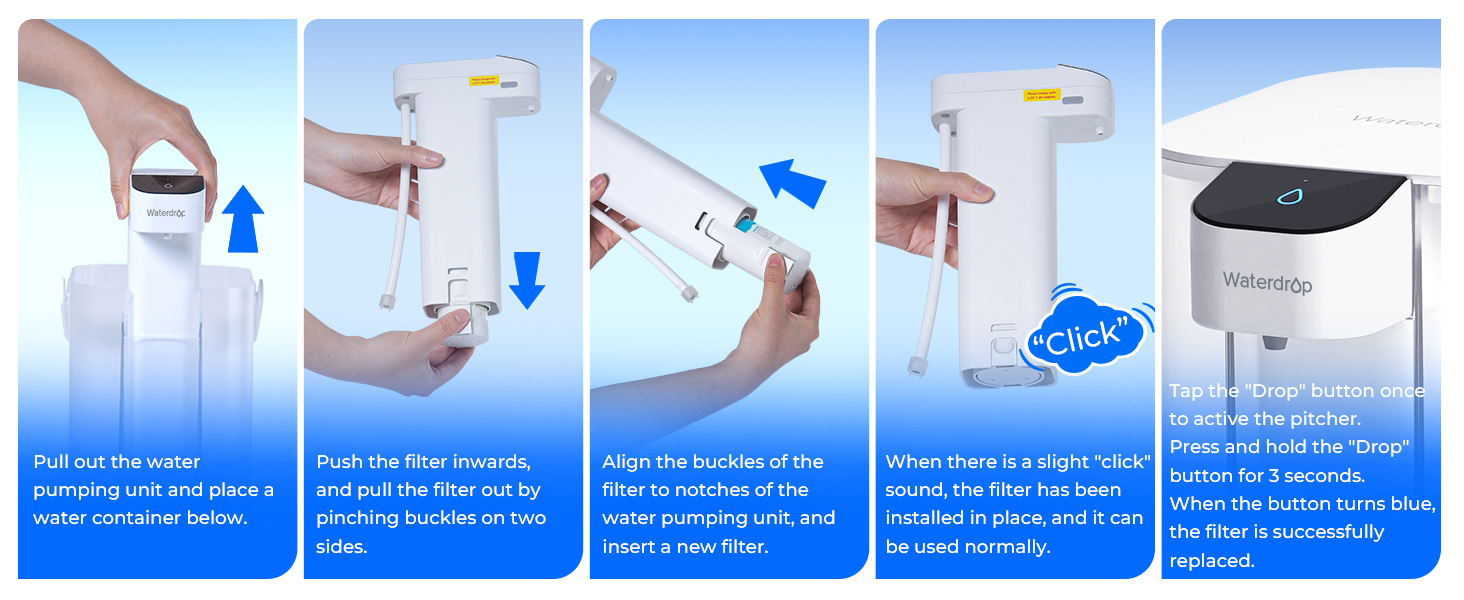
This image illustrates the five-step process for replacing the filter: 1. Pull out the water pumping unit. 2. Push the filter inwards and pull it out. 3. Align buckles and insert new filter. 4. Listen for a 'click'. 5. Tap and hold the 'Drop' button to activate.
Operating Instructions
To dispense filtered water, ensure the pitcher is filled and the filter is correctly installed.
- Place a glass or container under the dispenser spout.
- Double-tap the "Drop" button on the top of the water pumping unit to start water flow.
- Single-tap the "Drop" button to stop water flow.
The indicator light on the water pumping unit will show the operational status of the pitcher.
Maintenance
Filter Replacement
For optimal performance and water quality, it is recommended to replace the filter after filtering 200 gallons of water or every 3 months, whichever occurs first. Local water quality may affect filter life.
Refer to the "Filter Installation Steps" in the Setup and Installation section for detailed replacement instructions.

This image displays the Waterdrop WD-EDFA filter, highlighting its model number, compatible pitcher models, operating temperature range, flow rate, and recommended filter life of up to 3 months or 200 gallons.
Cleaning
Regularly clean the pitcher and water pumping unit with mild soap and water. Do not use abrasive cleaners. Ensure all parts are thoroughly rinsed before reassembly.
Troubleshooting
Slow Water Flow
- Check if the filter needs replacement. A clogged filter can reduce flow rate.
- Ensure the filter is correctly seated in the water pumping unit.
Water Taste or Odor Issues
- Replace the filter if it has exceeded its recommended lifespan.
- Ensure the pitcher and filter unit are clean.
Indicator Light Not Functioning
- Check if the unit's battery is charged. Connect the USB charging cable.
- Ensure the water pumping unit is properly seated in the pitcher.
Warranty and Support
For warranty information or technical support, please refer to the official Waterdrop website or contact Waterdrop customer service directly.
Email: service@waterdropfilter.com
Phone: 1-888-352-3558 (U.S.)
Related documentsWD-EDFA

Ask a question about this manual
Ask about setup, troubleshooting, compatibility, parts, safety, or missing instructions. Manuals+ will review the question and use this page’s manual context to help answer it.