
1. Product Overview
The Soehnle Professional 9067 Table Scale is an innovative and robust weighing solution designed for various professional applications. It features an extra-flat and ergonomic stainless steel platform, ensuring effortless and accurate measurements. With its intelligent design, only minimal lifting of the item is required for precise readings.
This scale boasts an IP 42 protection rating, making it resistant to dust and moisture, suitable for diverse environments. Its user-friendly interface includes a 5-button operation panel, complete with a freely adjustable 'F' button for customized functions. The unit supports easy switching between kilograms (kg) and pounds (lb) to suit user preferences.
For energy efficiency, the scale incorporates an integrated auto-off function, automatically powering down when not in use to conserve battery life and extend operational time.
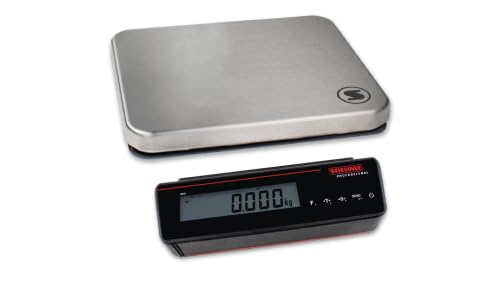
Figure 1: The Soehnle Professional 9067 Table Scale, showing the stainless steel weighing platform and the separate digital display unit. This design ensures the display is always visible, even when large items are being weighed.
Key Features:
- Separate Display Unit: Prevents the display from being obscured by the weighing product.
- 5-Button Operation: Intuitive control panel with a freely adjustable 'F' button for custom functions.
- Flexible Use: Battery operation allows for use in various locations.
- Multiple Functions: Includes Weighing, Taring, Plus/Minus weighing, Pushing, Hold, User Filter Setting, EDV for 5 data set variants, and Auto-Tare.
- Large LCD Display: Clear readability with a digit height of 25 mm.
- IP 42 Protection: Protected against solid objects larger than 1mm and splashing water.
- Unit Switching: Easily switch between kilograms (kg) and pounds (lb).
- Auto-Off Function: Enhances energy efficiency and battery life.
2. Setup
2.1 Unpacking and Inspection
- Carefully remove the scale and all components from the packaging.
- Inspect all parts for any signs of damage during transit. If any damage is found, contact your supplier immediately.
- Ensure all components listed in the packing list are present.
2.2 Power Supply (Battery Installation)
The Soehnle Professional 9067 scale operates on batteries, providing flexibility for use in various locations.
- Locate the battery compartment on the display unit.
- Open the battery compartment cover.
- Insert the required batteries, ensuring correct polarity (+/-).
- Close the battery compartment cover securely.

Figure 2: Detail of the display unit's side, showing the open battery compartment and connection ports. This illustrates how to access the battery area for installation or replacement.
2.3 Placement
For accurate measurements, place the scale on a stable, flat, and level surface. Avoid locations with excessive vibrations, drafts, or extreme temperature fluctuations. Ensure the separate display unit is positioned where it can be easily viewed.
3. Operating Instructions
3.1 Turning On/Off
- To turn on the scale, press the Power button (symbol: circle with vertical line) on the display unit.
- To turn off the scale, press and hold the Power button until the display turns off.
- The scale features an automatic shut-off function to conserve battery power.
3.2 Basic Weighing
- Turn on the scale. Wait for the display to show "0.000 kg" (or "0.000 lb").
- Place the item to be weighed gently on the center of the stainless steel platform.
- Read the stable weight displayed on the LCD screen.
3.3 Taring (Zeroing)
The taring function allows you to subtract the weight of a container or packaging, so only the net weight of the contents is measured.
- Place the empty container on the weighing platform. The display will show its weight.
- Press the Tare button (symbol: T with arrow). The display will reset to "0.000 kg".
- Add the items to be weighed into the container. The display will now show only the weight of the added items.
- To clear the tare, remove the container from the platform and press the Tare button again, or turn the scale off and on.
3.4 Unit Switching (kg/lb)
To switch between kilograms (kg) and pounds (lb):
- Press the dedicated unit conversion button (if available, or refer to the 'F' button customization). The display will change the unit accordingly.
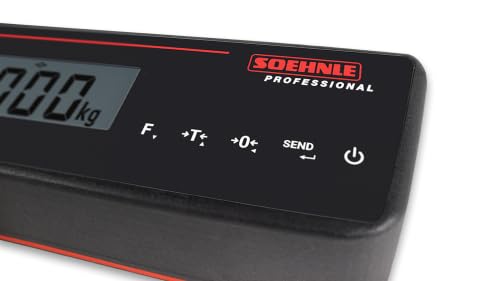
Figure 3: The 5-button control panel of the display unit, showing the 'F' (Function), 'T' (Tare), '0' (Zero), 'SEND', and Power buttons.
3.5 Advanced Functions (F-Button, Hold, etc.)
The 'F' button is freely adjustable and can be configured for various functions based on your specific needs. Refer to the detailed programming guide (not included in this basic manual) for customization options. Other functions like 'Hold' (to freeze the displayed weight), 'Plus/Minus weighing', and 'Auto-Tare' are accessible via the control panel or specific button combinations.
4. Maintenance
4.1 Cleaning
- Always turn off the scale before cleaning.
- Wipe the stainless steel platform and display unit with a soft, damp cloth.
- Use mild soap if necessary. Avoid abrasive cleaners, solvents, or harsh chemicals, as they may damage the surface or electronic components.
- Do not immerse the scale or display unit in water.
- Ensure the scale is completely dry before turning it on again.
4.2 Storage
When not in use for extended periods, store the scale in a dry, cool place, away from direct sunlight and extreme temperatures. If storing for a very long time, it is recommended to remove the batteries to prevent leakage.
4.3 Battery Replacement
When the battery indicator on the display shows low power, replace the batteries as described in Section 2.2. Use only the specified type of batteries.
5. Troubleshooting
| Problem | Possible Cause | Solution |
|---|---|---|
| Scale does not turn on. |
|
|
| Inaccurate or fluctuating readings. |
|
|
| Display shows "Err" or error code. |
|
|
| Tare function not working. |
|
|
6. Specifications
| Model Number | 9067.05.001 |
| Brand | Soehnle Professional |
| Manufacturer | Soehnle Industrial Solutions GmbH |
| Weight Limit | 200 Kilograms |
| Material | Stainless Steel |
| Display Type | LCD |
| Protection Class | IP 42 |
| Package Dimensions | 78 x 58 x 23 cm |
| Package Weight | 30 kg |
7. Warranty and Support
7.1 Warranty Information
Soehnle Industrial Solutions GmbH products are manufactured to the highest quality standards. For specific warranty terms and conditions, please refer to the warranty card included with your product or visit the official Soehnle Industrial Solutions GmbH website. Keep your proof of purchase for warranty claims.
7.2 Customer Support
Should you encounter any issues or have questions regarding your Soehnle Professional 9067 Table Scale that are not covered in this manual, please contact Soehnle Industrial Solutions GmbH customer support.
Contact Information: Please refer to the contact details provided on the product packaging or the official Soehnle Industrial Solutions GmbH website for the most up-to-date support channels.
