
Introduction
This manual provides comprehensive instructions for the proper setup, operation, and maintenance of your Comix C-2736 12-Digit Desk Calculator. Please read this manual thoroughly before using the calculator to ensure optimal performance and longevity.

Figure 1: Comix C-2736 Desk Calculator. This image displays the overall design of the calculator, featuring its large LCD display and prominent buttons.
Setup
The Comix C-2736 calculator operates on dual power: solar energy and a single AAA battery. An AAA battery is included with your purchase.
- Battery Installation:
Locate the battery compartment on the underside of the calculator. Open the compartment cover. Insert one AAA battery, ensuring the polarity (+/-) matches the diagram inside the compartment. Close the cover securely.
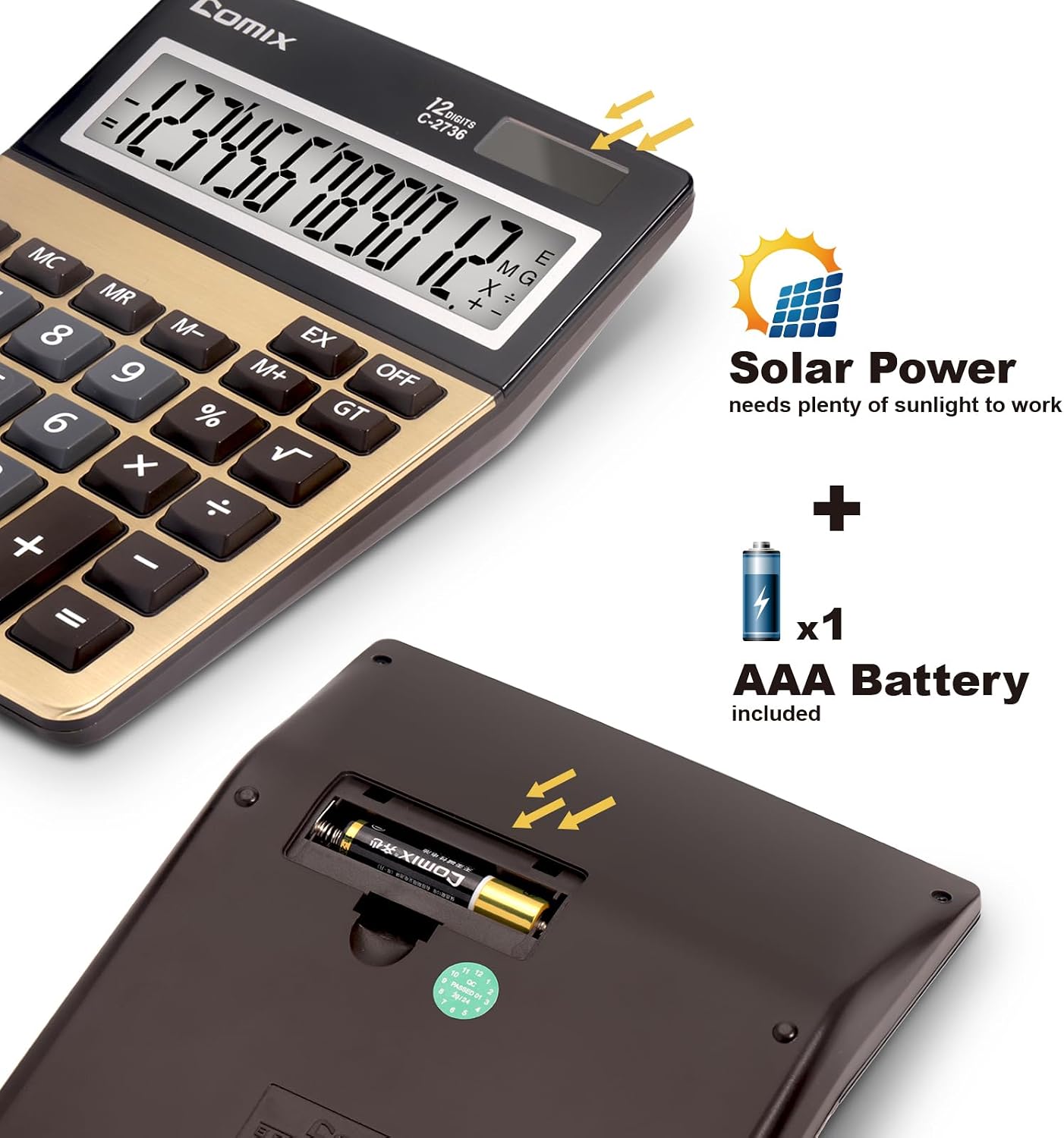
Figure 2: Battery compartment and solar panel. This image illustrates the location for AAA battery installation and highlights the solar panel for dual power functionality.
- Power On:
Press the ON/AC button to turn on the calculator. The display will show "0".
- Solar Power:
For optimal solar power function, ensure the calculator's solar panel is exposed to sufficient ambient light. The solar panel acts as the primary power source in well-lit conditions, conserving battery life.
Operating Instructions
Familiarize yourself with the calculator's layout and key functions for efficient use.

Figure 3: Labeled diagram of Comix C-2736 calculator keys. This image identifies the solar panel, 12-digit display, and various function keys including Memory Load/Clear, Margin Account, Back Space, Root, Memory Function, Grand Total, On/All Clear, and Clear Entry/Clear.
Key Functions:
- ON/AC (On/All Clear): Turns the calculator on and clears all entries and memory.
- CE/C (Clear Entry/Clear): Clears the last entered number. Pressing it twice clears the entire calculation (similar to AC if no entry is made).
- 0-9, 00, . (Number Keys, Decimal Point): Used for entering numerical values.
- + , - , × , ÷ (Arithmetic Operations): Standard addition, subtraction, multiplication, and division.
- = (Equals): Completes a calculation and displays the result.
- +/- (Sign Change): Changes the sign of the displayed number (positive to negative, or negative to positive).
- % (Percentage): Used for percentage calculations.
- √ (Square Root): Calculates the square root of the displayed number.
- ← (Backspace): Deletes the last digit entered.
- MU (Mark Up): Used for calculating mark-up percentages.
- M+ (Memory Plus): Adds the displayed number to the memory.
- M- (Memory Minus): Subtracts the displayed number from the memory.
- MR (Memory Recall): Recalls the value stored in memory.
- MC (Memory Clear): Clears the memory.
- GT (Grand Total): Displays the grand total of all calculations performed since the last GT clear.
- EX (Exchange): Swaps the current display value with the value in the memory register.
- OFF (Power Off): Turns the calculator off. The calculator also features an auto power-off function to save energy.
Basic Calculations:
- Addition: Enter first number + Enter second number =
- Subtraction: Enter first number - Enter second number =
- Multiplication: Enter first number × Enter second number =
- Division: Enter first number ÷ Enter second number =

Figure 4: User interacting with the Comix C-2736 calculator. This image highlights the large, easy-to-press buttons, designed for comfortable and efficient data entry.
Maintenance
- Cleaning: Use a soft, dry cloth to clean the calculator's surface. For stubborn marks, slightly dampen the cloth with water. Avoid using harsh chemicals, abrasive cleaners, or solvents, as these can damage the display or casing.
- Storage: Store the calculator in a cool, dry place away from direct sunlight and extreme temperatures. Prolonged exposure to high temperatures can affect battery life and display performance.
- Battery Replacement: If the display becomes dim or unresponsive, replace the AAA battery. Ensure the calculator is off before replacing the battery. Dispose of used batteries according to local regulations.
Troubleshooting
| Problem | Possible Cause | Solution |
|---|---|---|
| Calculator does not turn on. | Insufficient light for solar power, or depleted battery. | Ensure adequate light for the solar panel. Replace the AAA battery. |
| Display is dim or flickering. | Low battery power. | Replace the AAA battery. Ensure sufficient light for solar power. |
| Incorrect calculation results. | Incorrect key input or complex operation sequence. | Press ON/AC to clear all and restart the calculation. Review the operating instructions for complex functions. |
| Keys are unresponsive. | Dust or debris under keys, or internal issue. | Gently clean around the keys. If the problem persists, contact customer support. |
Specifications
- Model: C-2736
- Display: 12-Digit Large LCD Display (4.5 inches)
- Power Source: Dual Power (Solar and 1x AAA Battery - included)
- Material: Plastic
- Dimensions: 18.19 cm (L) x 13.46 cm (W) x 0.25 cm (H) / 7.16"L x 5.3"W x 1.67"H
- Weight: Approximately 250 g
- Features: Large buttons, Auto Power-Off, Memory Functions (M+, M-, MR, MC), Grand Total (GT), Mark Up (MU), Square Root (√), Percentage (%).

Figure 5: Dimensions and ergonomic design of the Comix C-2736 calculator. This image shows the calculator's length (7.16 inches), width (5.3 inches), and a comfortable 30-degree viewing angle for the display.
Warranty and Support
For warranty information or technical support, please refer to the contact details provided with your purchase documentation or visit the official Comix website. Keep your purchase receipt as proof of purchase for any warranty claims.
Comix is committed to providing reliable products and customer satisfaction.