
SHW OD-41N-K
SHW L Shaped Gaming Desk with Full Around Monitor Stand and Drawer
Model: OD-41N-K
Product Overview
The SHW L-Shaped Gaming Desk is designed to optimize space in home offices or dorm rooms, providing a versatile workstation. It features a full-around monitor shelf, a convenient drawer, and integrated hooks for accessories. Its robust metal construction ensures stability and durability for daily use.

Image: The SHW L-Shaped Gaming Desk, showcasing its L-shape design, integrated monitor stand, and pull-out drawer. Accessories like monitors, speakers, and a backpack are shown for scale and utility.
Setup and Assembly
This section provides general guidelines for assembling your SHW L-Shaped Gaming Desk. While specific steps may vary, the overall process involves connecting the frame components and attaching the desk surfaces. It is recommended to assemble the desk with at least two people for ease and safety.
- Unpack Components: Carefully unpack all parts from the packaging. Verify that all components listed in the included hardware and parts list are present and undamaged.
- Assemble Frame: Begin by assembling the metal frame components. Connect the main L-shaped frame pieces using the provided screws and tools. Ensure all connections are secure but do not fully tighten screws until all parts are aligned.
- Attach Desk Surfaces: Once the frame is stable, attach the main L-shaped desk surfaces to the frame. Align pre-drilled holes with the frame and secure with screws.
- Install Monitor Stand: Attach the U-shaped monitor stand to the designated points on the desk surface. This stand provides elevated space for monitors and other peripherals.
- Insert Drawer: Slide the pull-out drawer into its designated slot under the desk. Ensure it glides smoothly. The drawer includes removable dividers for organization.
- Attach Hooks: Secure the heavy-duty hooks to the sides of the desk as desired. These hooks are suitable for hanging headphones, backpacks, or other items.
- Final Tightening and Leveling: Once all parts are in place and aligned, fully tighten all screws. Adjust the foot glides at the base of the desk legs to stabilize and balance the desk on uneven floors.

Image: A diagram illustrating the key dimensions of the SHW L-Shaped Gaming Desk, including its 50-inch width, 19-inch depth, and 28.5-inch height, along with monitor stand dimensions.
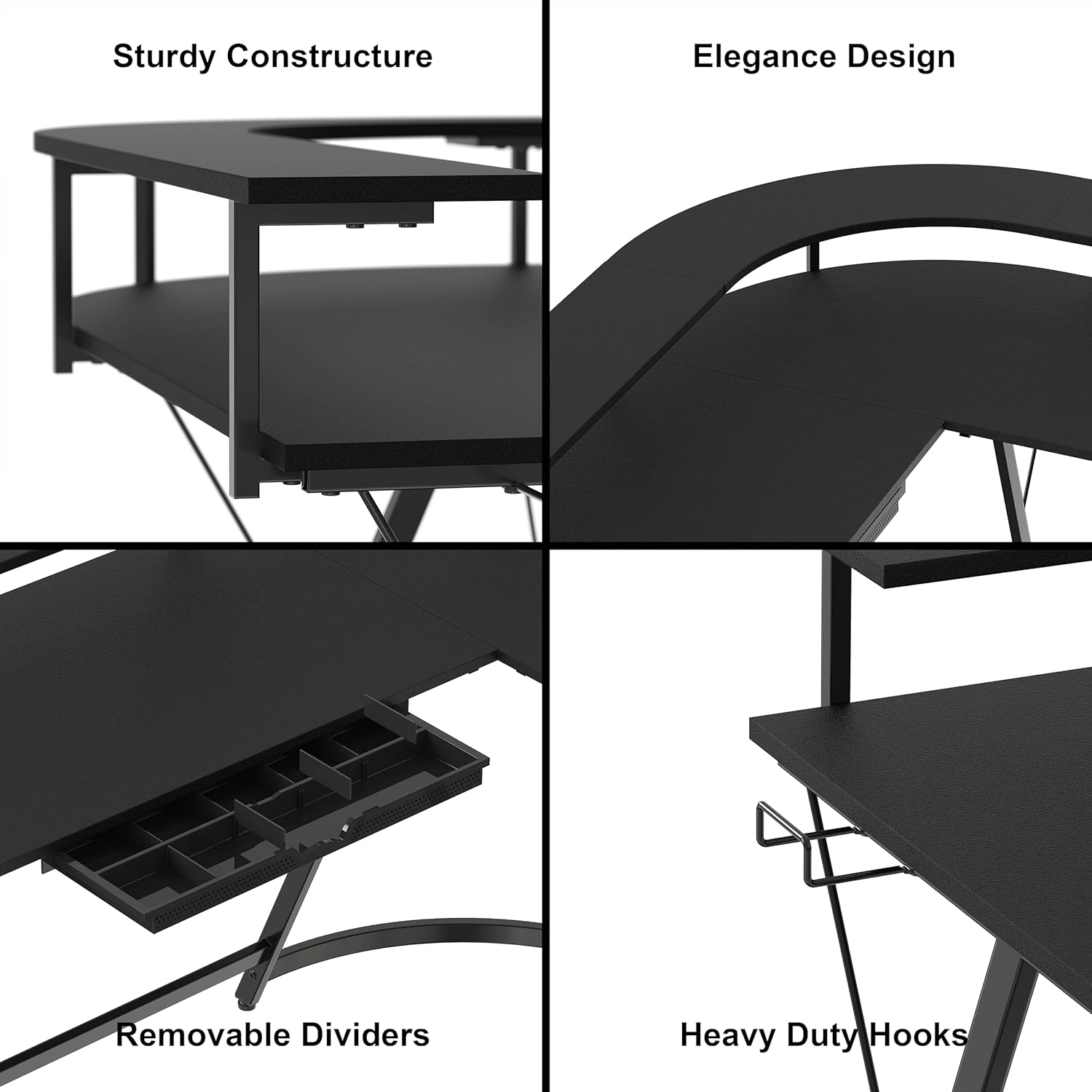
Image: A collage of close-up images highlighting the desk's features: sturdy construction of the monitor stand, the elegant curve of the desk, the pull-out drawer with removable dividers, and the heavy-duty side hooks.
Operating Instructions
The SHW L-Shaped Gaming Desk is designed for versatile use in various settings. Here are guidelines for optimal operation:
- Utilizing the L-Shape: The L-shaped design is ideal for corner placement, maximizing room space. It provides ample surface area for multiple monitors, a keyboard, mouse, and other peripherals.
- Monitor Stand Usage: The full-around monitor shelf elevates your screens to an ergonomic height, reducing neck strain. It can accommodate multiple monitors or provide additional storage space underneath.
- Drawer Functionality: The integrated drawer is suitable for storing small office supplies, cables, or personal items. The removable dividers allow for customizable organization within the drawer.
- Accessory Hooks: Use the side hooks to keep your workspace tidy. They are designed to hold headphones, backpacks, or other frequently used items within easy reach.
- Foot Rest Bar: The integrated foot rest bar provides comfort during long periods of sitting, promoting better posture.

Image: The SHW L-Shaped Gaming Desk set up in a modern office, demonstrating its functionality with a computer, printer, and other office essentials.
Maintenance
Proper maintenance will extend the life and appearance of your SHW L-Shaped Gaming Desk.
- Cleaning: Wipe surfaces regularly with a soft, damp cloth. For stubborn marks, use a mild soap solution and dry immediately. Avoid abrasive cleaners or harsh chemicals that can damage the finish.
- Spills: Clean up spills immediately to prevent staining or damage to the engineered wood surface.
- Hardware Check: Periodically check all screws and fasteners to ensure they remain tight. Re-tighten if necessary to maintain stability.
- Weight Distribution: Distribute weight evenly across the desk surface. Avoid placing excessively heavy items on one concentrated area. The maximum recommended weight is 53 pounds.
- Environmental Conditions: Avoid exposing the desk to extreme temperatures or humidity, which can affect the material integrity.
Troubleshooting
This section addresses common issues you might encounter with your desk.
| Problem | Possible Cause | Solution |
|---|---|---|
| Desk is wobbly or unstable. | Uneven floor surface; loose screws. | Adjust the glides on the bottom of the desk legs to level the desk. Ensure all assembly screws are fully tightened. |
| Drawer does not slide smoothly or falls out. | Improper installation of drawer glides; damaged drawer components. | Verify that the drawer and its glides are correctly installed according to assembly instructions. Check for any obstructions or damage to the drawer or glides. |
| Parts do not align during assembly. | Screws tightened prematurely; incorrect part orientation. | Loosen all screws, re-align components, and then tighten. Refer to the assembly diagram to ensure correct part orientation. |
Specifications
| Feature | Detail |
|---|---|
| Brand | SHW |
| Model Number | OD-41N-K |
| Product Dimensions | 19"D x 50"W x 28.5"H |
| Color | Black |
| Style | Minimalist |
| Base Material | Metal |
| Top Material Type | Engineered Wood |
| Finish Type | Powder Coated |
| Special Feature | Monitor Riser, Drawer, Foot Rest Bar, Adjustable Glides |
| Room Type | Office |
| Recommended Uses | Working, Gaming |
| Mounting Type | Freestanding |
| Maximum Weight Recommendation | 53 Pounds |
| Number of Drawers | 1 |
| Item Weight | 24.04 Kilograms |
| Assembly Required | Yes |
Warranty and Support
SHW stands behind the quality of its products. For specific warranty information, please refer to the documentation included with your purchase or contact SHW customer support directly.
- Customer Support: For assistance with assembly, missing parts, or product inquiries, please contact SHW customer service. Contact details are typically available on the manufacturer's website or in the product packaging.
- Returns and Replacements: If you purchased this product through a retailer, please refer to their return and replacement policy.
Ask a question about this manual
Ask about setup, troubleshooting, compatibility, parts, safety, or missing instructions. Manuals+ will review the question and use this page’s manual context to help answer it.