
LUNYEE 3018 pro ultra
Lunyee 3018 Pro Ultra CNC Machine User Manual
Model: 3018 Pro Ultra
Brand: LUNYEE
1. Introduction
This manual provides essential information for the safe and efficient operation of your Lunyee 3018 Pro Ultra CNC Machine. Please read this manual thoroughly before assembly and operation to ensure proper use and to maximize the lifespan of your machine.
2. Key Features
- New Upgrade: Features a Z-Axis Height of 80mm and a 500W Spindle. The X-Axis is upgraded to HGH15 Linear Guide, enhancing metal engraving capabilities for materials like Brass, Copper, and 6061 Aluminum.
- High Precision: Built on the 3018 Pro Max foundation, with upgraded linear guide structure, 2040 X-Axis Profiles, and 4040 Y-Axis Profiles for significantly enhanced engraving accuracy and processing strength. Addresses Z-Axis instability common in other desktop CNC machines.
- Scale Grid Aluminum Plate Platform: One-piece machined and molded aluminum design ensures flatness and strength. Integrated measurement scale aids material positioning. Includes 2pc T-Track Mini Hold Down Clamp Kit for secure material fastening.
- Integrated Switching Power Supply Design: Streamlines installation and improves safety with an integrated power supply, reducing wiring time.
- Easy Assembly and Support: Features pre-assembled main parts and clear cable management. Assembly videos and paper user manuals are provided.
- Auxiliary Instructions: Machine installation and wiring videos are available on the product link page. A 4G USB Flash Drive with pre-installed relevant software is included in the package.

Figure 2.1: Lunyee 3018 Pro Ultra CNC Machine overview.
3. Setup and Assembly
The Lunyee 3018 Pro Ultra CNC Machine is designed for quick and easy assembly, with many main parts pre-assembled. Follow these general steps for setup:
- Connect XY Assembly with Platform: Secure the X and Y axis components to the main platform.
- Install the Rubber Feet: Attach the rubber feet to the base of the machine for stability.
- Install the Spindle: Mount the 500W spindle securely into its designated housing.
- Install Power and Wiring: Connect the integrated power supply and ensure all cables are managed clearly and correctly.
Refer to the provided assembly videos and paper user manuals for detailed, step-by-step instructions. The included 4G USB Flash Drive contains necessary software and additional resources.

Figure 3.1: Visual guide for quick installation.
4. Operating the CNC Machine
The Lunyee 3018 Pro Ultra supports both CNC and optional Laser Modes, offering versatility for various projects.
4.1 Software Compatibility
The machine is compatible with GRBL control software such as Candle and other GRBL-compatible software like UGS (Universal Gcode Sender). The included USB drive contains pre-installed software.
4.2 Offline Control
For standalone operation, the machine can be controlled using the offline controller, allowing you to execute G-code without a direct computer connection.
4.3 Spindle and Working Area
- Spindle Power: 500W, with a maximum speed of 12000 RPM/Min.
- Effective Working Area: 300mm x 180mm x 80mm (11.81in x 7.09in x 3.15in).

Figure 4.1: Effective working area dimensions.
4.4 Supported Materials
The Lunyee 3018 Pro Ultra is suitable for engraving and cutting a wide range of materials, including:
- Wood
- Bamboo
- Acrylic
- Plastic
- PVC
- ABS
- PCB
- Brass
- Resin

Figure 4.2: Examples of materials that can be processed.
4.5 Milling Tools
The machine comes with various milling tools suitable for different applications. Ensure you select the correct tool for your material and desired cut.
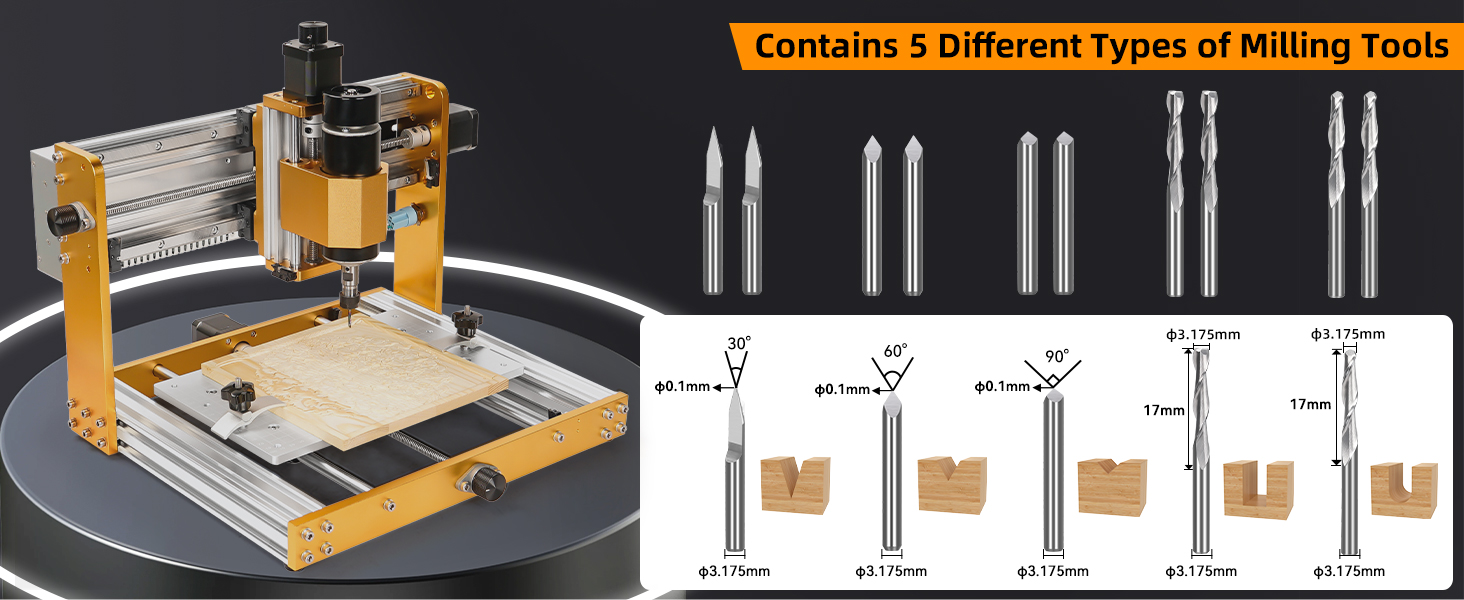
Figure 4.3: Overview of included milling tools.
5. Maintenance
Regular maintenance ensures the longevity and optimal performance of your CNC machine. Keep the machine clean from dust and debris, especially around the linear guides and lead screws. Periodically check all connections and fasteners to ensure they are secure.
6. Troubleshooting
If you encounter any issues with your Lunyee 3018 Pro Ultra CNC Machine, please refer to the troubleshooting section in the detailed user manual (PDF) or contact customer support. Common issues often relate to software configuration, material clamping, or tool selection.
7. Specifications
| Attribute | Value |
|---|---|
| Manufacturer | LUNYEE |
| Part Number | 3018 pro ultra |
| Item Weight | 30.8 pounds |
| Package Dimensions | 20.7 x 18.2 x 11.9 inches |
| Item Model Number | 3018 pro ultra |
| Style | 3018 pro ultra |
| Material | Aluminum |
| Power Source | ac/dc |
| Voltage | 110 Volts |
| Wattage | 500 watts |
| Horsepower | 500 Watts |
| Batteries Included? | No |
| Batteries Required? | No |
| Description Pile | Corded electric |
| Date First Available | September 8, 2023 |

Figure 7.1: Detailed view of the 32-bit control board.
8. Warranty and Support
LUNYEE is committed to providing excellent customer support. If you have any queries or require assistance, please contact the support team. They aim to respond within 24 hours.
For a complete user guide, please refer to the official PDF document: User Guide (PDF)
You can also visit the official LUNYEE store for more information and products: LUNYEE Store
9. Additional Product Views

Figure 9.1: Close-up of the 500W spindle, highlighting its cooling fan and ER11 collet set.

Figure 9.2: The robust all-metal body construction featuring HGH15 linear guides for enhanced stability.

Figure 9.3: Illustration of the X-axis (20x40mm) and Y-axis (40x40mm) aluminum profiles, contributing to high precision.

Figure 9.4: The integrated one-piece all-metal anodized work surface, featuring a grid for precise material positioning.

Figure 9.5: Overview of key functional components including the spindle, limit switches, hand knob, and emergency stop.

Figure 9.6: The machine's compatibility with popular GRBL control software like Candle and UGS.

Figure 9.7: The machine's dual functionality, supporting both CNC milling and laser engraving modes.

Figure 9.8: The integrated power supply design, enhancing safety and simplifying wiring.
Related documents3018 pro ultra


Ask a question about this manual
Ask about setup, troubleshooting, compatibility, parts, safety, or missing instructions. Manuals+ will review the question and use this page’s manual context to help answer it.