1. Introduction
This manual provides detailed instructions for the installation, operation, and maintenance of your OISE ART STORE AHD-HV4006 4.0MP AHD Security Camera. This camera is designed for surveillance applications, offering high-definition video and night vision capabilities. Please read this manual thoroughly before using the product to ensure proper setup and optimal performance.
2. Safety Information
- Power Supply: Use only the specified DC 12V, 1A power adapter. Using an incorrect power supply may damage the camera and void the warranty.
- Installation Environment: Ensure the camera is installed in a stable location. Avoid direct exposure to extreme temperatures, humidity, or corrosive environments.
- Water Resistance: The camera is rated IP66 for water resistance, suitable for outdoor use. However, avoid submerging the camera in water. Ensure all connections are properly sealed.
- Cleaning: Disconnect power before cleaning. Use a soft, dry cloth. Do not use harsh chemicals or abrasive cleaners.
- Servicing: Do not attempt to disassemble or repair the camera yourself. Refer all servicing to qualified personnel.
3. Package Contents
Please check the package contents upon opening. If any items are missing or damaged, contact your retailer.
- OISE ART STORE AHD-HV4006 4.0MP AHD Security Camera
- Mounting Screws and Wall Plugs
- User Manual (this document)
- (Power adapter may be sold separately or included depending on package)
4. Product Overview
The AHD-HV4006 is a bullet-style security camera featuring a 4.0-megapixel sensor for high-resolution video. It includes infrared LEDs for night vision and is housed in an IP66-rated weather-resistant casing.
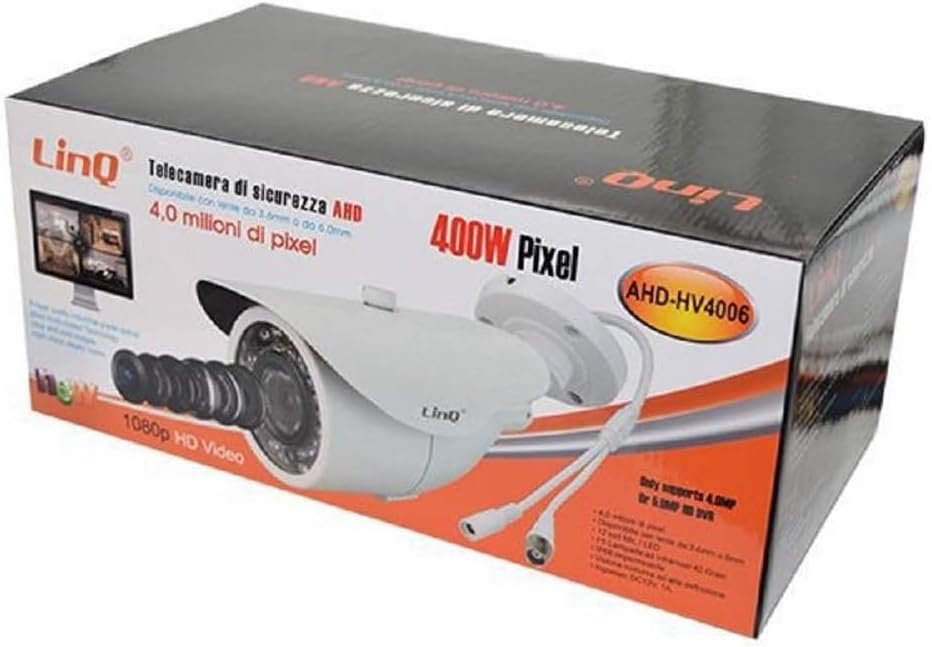
Figure 1: Product Packaging
This image shows the OISE ART STORE AHD-HV4006 4.0MP AHD Security Camera packaged in its retail box. The box highlights key features such as '4.0 million pixels', '1080p HD Video', '400W Pixel', and the model number 'AHD-HV4006'. The camera itself, a white bullet-style camera with a prominent lens, is visible on the front of the box, along with its connection cables.
Key Features:
- High Resolution: 4.0 Megapixel (4MP) sensor for clear 1080p Ultra HD video.
- Lens: Fixed 3.6mm lens (6mm option may be available for specific models).
- Night Vision: Equipped with 12 F5 infrared LEDs (42 degrees) for effective night surveillance.
- Weatherproof: IP66 rated for outdoor installation, protecting against dust and water jets.
- Durable Construction: Features 6 layers of industrial-grade glass lenses for clear and vivid visibility.
- Compatibility: Designed for use with AHD DVRs that support 4.0 million pixels, such as LinQ model Ahd-6208x.
5. Setup
5.1 Physical Installation
- Choose a Location: Select a suitable location for the camera, ensuring it provides the desired viewing angle and is within reach of power and video cables. Consider factors like lighting, potential obstructions, and security.
- Mounting:
- Position the camera mount against the wall or ceiling.
- Mark the drilling points through the mounting holes.
- Drill pilot holes using an appropriate drill bit.
- Insert wall plugs (if necessary) into the drilled holes.
- Secure the camera mount using the provided screws.
- Adjust Angle: Loosen the adjustment screws on the camera bracket to position the camera for the optimal viewing angle. Tighten the screws once the desired angle is achieved.
5.2 Wiring Diagram and Connections
The AHD-HV4006 camera typically has two main cables: a BNC connector for video output and a DC power input jack.
- Video Connection (BNC): Connect the BNC cable from the camera to an available AHD video input port on your compatible DVR (Digital Video Recorder).
- Power Connection (DC 12V): Connect a DC 12V, 1A power adapter (not always included) to the camera's power input jack. Plug the adapter into a standard electrical outlet.
Ensure all connections are secure and protected from environmental elements, especially if installed outdoors.
5.3 Connecting to DVR
After physically installing and wiring the camera:
- Power on your AHD DVR.
- Power on the camera by connecting its power adapter.
- Access your DVR's interface (via a monitor connected to the DVR).
- The camera's video feed should appear on one of the input channels. If not, consult your DVR's manual for channel detection or configuration settings. Ensure your DVR supports 4.0MP AHD cameras.
6. Operation
6.1 Basic Monitoring
Once connected to a compatible AHD DVR, the camera will continuously transmit video. You can view the live feed, record footage, and manage settings through your DVR's interface. Refer to your DVR's user manual for specific operating instructions.
6.2 Night Vision
The AHD-HV4006 camera is equipped with an automatic infrared (IR) cut filter and IR LEDs. In low-light conditions, the camera will automatically switch to night vision mode, activating the IR LEDs to provide clear black-and-white video. The 12 F5 infrared LEDs offer effective illumination for surveillance in complete darkness.
7. Maintenance
- Lens Cleaning: Periodically clean the camera lens with a soft, lint-free cloth. For stubborn dirt, use a lens cleaning solution designed for optical surfaces. Avoid scratching the lens.
- Casing Cleaning: Wipe the camera casing with a damp cloth to remove dust and dirt. Do not use abrasive cleaners.
- Cable Inspection: Regularly inspect cables and connections for any signs of wear, damage, or corrosion, especially for outdoor installations. Ensure waterproof seals are intact.
- Firmware Updates: Check the manufacturer's website or contact support for any available firmware updates for your camera or compatible DVR.
8. Troubleshooting
| Problem | Possible Cause | Solution |
|---|---|---|
| No video signal on DVR. |
|
|
| Poor image quality / blurry video. |
|
|
| Night vision not working. |
|
|
9. Specifications
| Model | AHD-HV4006 |
| Image Sensor | 4.0 Megapixel |
| Video Resolution | 1080p Ultra HD (compatible with 4.0MP AHD DVRs) |
| Lens | 3.6mm fixed (6 layers industrial-grade glass) |
| Night Vision | 12 F5 Infrared LEDs (42 degrees), automatic IR-CUT |
| Minimum Illumination | 0 Lux (IR On) |
| Weather Resistance | IP66 |
| Power Supply | DC 12V, 1A |
| Connectivity | AHD (Analog High Definition) via BNC connector |
| Material | Multimaterial |
| Manufacturer Reference | linq43677 |
10. Warranty and Support
For warranty information and technical support, please refer to the documentation provided at the time of purchase or contact your retailer. Keep your proof of purchase for warranty claims.
Manufacturer: OISE ART STORE


