
Sanpyl Sanpyl0gqdx3re4k-11
Sanpyl 10.36 Inch Tablet User Manual
Model: Sanpyl0gqdx3re4k-11
1. Introduction
This manual provides essential instructions for setting up, operating, and maintaining your Sanpyl 10.36 Inch Tablet. Please read this manual thoroughly before using the device to ensure proper function and longevity.
The Sanpyl 10.36 Inch Tablet features a 2560x1600 HD+ display, an MTK6762 chipset, 16GB RAM, and 512GB ROM. It supports dual SIM cards and 5G connectivity, running on the Android 13 operating system.
2. Package Contents
Verify that all items are present in the package:
- 1 x Sanpyl 10.36 Inch Tablet
- 1 x Protective Film
- 1 x Patch Cable
- 1 x USB Cable (Type-C)
- 1 x SIM Eject Pin
- 1 x User Manual (this document)

Image: The Sanpyl 10.36 Inch Tablet shown alongside its included accessories: protective film, patch cable, USB cable, SIM eject pin, and user manual.
3. Device Layout
Familiarize yourself with the physical components of your tablet.

Image: Front view of the Sanpyl 10.36 Inch Tablet, showing the display with a digital clock and date.

Image: Rear view of the Sanpyl 10.36 Inch Tablet, highlighting the blue finish and the dual camera module with "AI Camera" text.
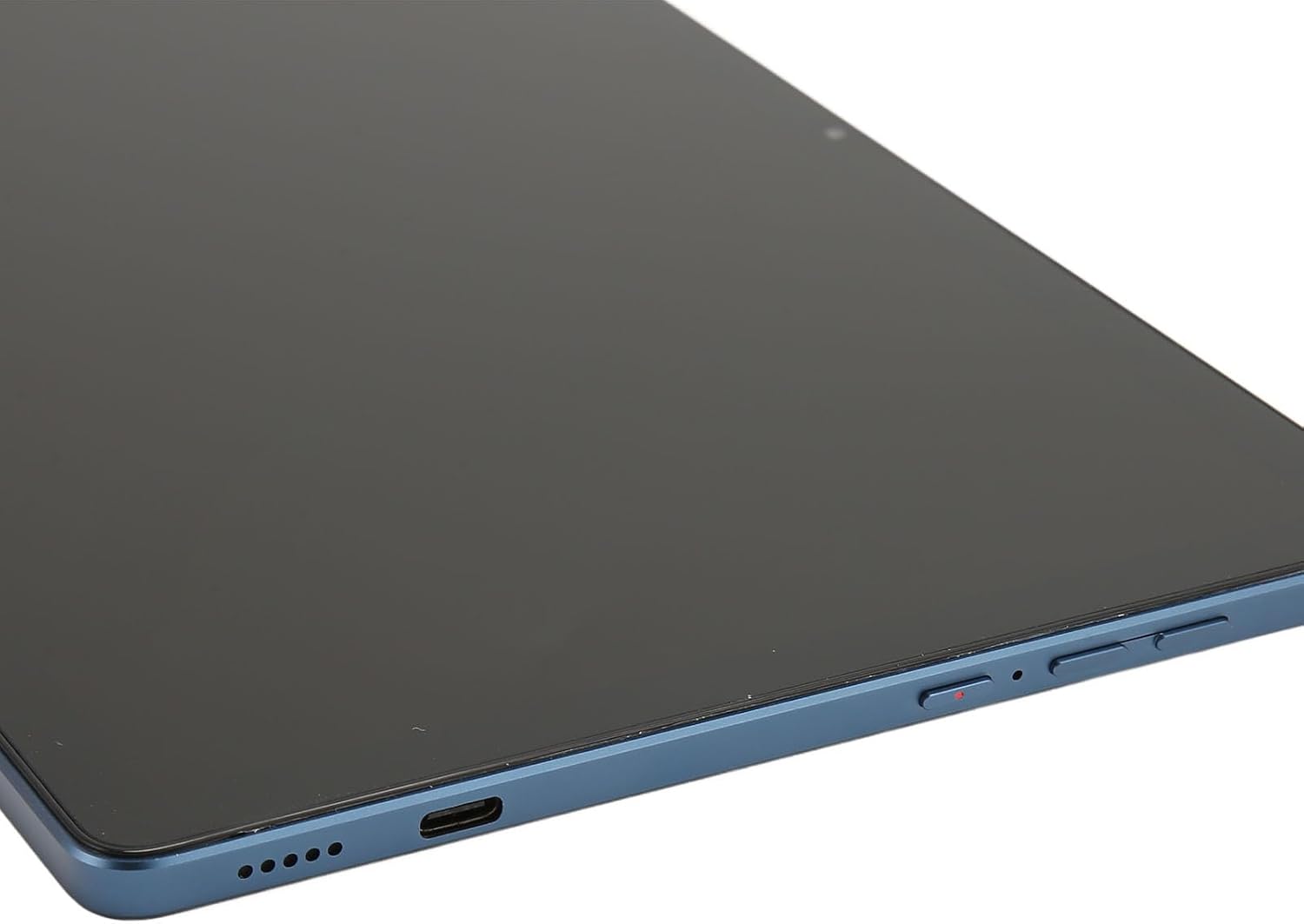
Image: Close-up side view of the Sanpyl 10.36 Inch Tablet, showing the USB-C charging port, speaker grille, and the power and volume buttons.
4. Setup
4.1 Powering On/Off
- To power on: Press and hold the power button (located on the side) until the screen illuminates.
- To power off: Press and hold the power button, then select "Power off" from the options that appear on the screen.
4.2 SIM Card and Memory Card Installation
The tablet supports two nano SIM cards or one nano SIM card and one memory card (up to 128GB, not included).
- Locate the SIM card tray on the side of the tablet.
- Insert the provided SIM eject pin into the small hole on the tray to eject it.
- Place your nano SIM card(s) and/or memory card into the tray with the gold contacts facing down, ensuring correct orientation.
- Carefully reinsert the tray into the tablet until it clicks into place.

Image: Close-up view of the Sanpyl 10.36 Inch Tablet with the SIM card tray ejected, showing the slot for SIM and memory cards.
4.3 Initial Setup
Upon first power-on, follow the on-screen prompts to complete the initial setup, which includes:
- Language selection
- Wi-Fi network connection
- Google account sign-in (optional but recommended for full functionality)
- Date and time settings
- Security settings (PIN, pattern, or password)
5. Operating Instructions
5.1 Basic Navigation
- Touch: Tap the screen to select items, open apps, or type.
- Swipe: Slide your finger across the screen to scroll, switch between home screens, or view notifications.
- Pinch: Use two fingers to zoom in or out on photos and web pages.
- Long Press: Press and hold an item to access contextual menus or move icons.
5.2 Network Connectivity
Your tablet supports 2.4G+5GHZ dual-band Wi-Fi and various cellular network formats (GSM, WCDMA, TDD LTE, FDD LTE).
- Wi-Fi: Go to Settings > Network & Internet > Wi-Fi to connect to available Wi-Fi networks.
- Mobile Data: If a SIM card is installed, enable mobile data via Settings > Network & Internet > Mobile network.
5.3 Camera Usage
The tablet is equipped with a 13 MP front camera and a 26 MP rear camera.
- Open the Camera application from the home screen or app drawer.
- Tap the screen to focus.
- Press the shutter button to take a photo.
- Switch between front and rear cameras using the camera toggle icon.
6. Maintenance
6.1 Battery Care
- Use only the provided USB cable and a compatible charger.
- Avoid exposing the tablet to extreme temperatures.
- Do not fully discharge the battery frequently.
6.2 Cleaning
- Use a soft, lint-free cloth to clean the screen and body.
- Avoid using harsh chemicals or abrasive materials.
6.3 Software Updates
Regularly check for and install software updates to ensure optimal performance and security. Go to Settings > System > System update.
7. Troubleshooting
| Problem | Solution |
|---|---|
| Tablet does not power on. | Ensure the battery is charged. Connect the tablet to a charger for at least 30 minutes, then try powering on again. |
| Screen is unresponsive. | Perform a forced restart by holding the power button for 10-15 seconds. If the issue persists, contact support. |
| Cannot connect to Wi-Fi. | Check if Wi-Fi is enabled in settings. Restart your router and the tablet. Ensure you are entering the correct password. |
| SIM card not detected. | Ensure the SIM card is correctly inserted into the tray. Restart the tablet. Verify the SIM card is active with your carrier. |
| Apps are crashing or slow. | Close background applications. Clear app caches (Settings > Apps > [App Name] > Storage & cache > Clear cache). Restart the tablet. |
8. Specifications
| Feature | Detail |
|---|---|
| Model Name | Sanpyl0gqdx3re4k-11 |
| Screen Size | 10.36 Inches |
| Display Resolution | 2560 x 1600 pixels (HD+) |
| Processor | MTK6762 Chipset, 8 Cores |
| RAM | 16 GB |
| Internal Storage (ROM) | 512 GB |
| Expandable Storage | Up to 128GB via memory card (not included) |
| Operating System | Android 13 |
| Network Support | GSM: 850/900/1800/1900MHz, WCDMA: 900/2100MHz, TDD LTE: B38/B39/B40/B41, FDD LTE: B1/B3/B5/B7/B8/B20 (5G capable) |
| Wi-Fi | 2.4G + 5GHZ Dual Band |
| Bluetooth | Supported |
| Front Camera | 13 MP, f/2.0 aperture, fixed length |
| Rear Camera | 26 MP (color, f/1.8 aperture), autofocus |
| Interfaces | 1 x Type-C, 1 x 3.5mm Audio Jack |
| Battery | Built-in 11200mAh Li-ion Battery |
| Material | Aluminum Alloy |
9. Warranty and Support
For warranty information and technical support, please refer to the warranty card included with your product or visit the official Sanpyl website. Keep your purchase receipt as proof of purchase.
Return Policy: This product typically includes a 30-day return/replacement policy. Please check with your retailer for specific terms.
Ask a question about this manual
Ask about setup, troubleshooting, compatibility, parts, safety, or missing instructions. Manuals+ will review the question and use this page’s manual context to help answer it.