
Introduction
The Havit Gamenote KB885L mechanical keyboard is engineered for precision, durability, and customization. It features a gasket structure design, providing a soft and stable typing experience while minimizing noise. The full key rollover with multi-key response ensures fast and accurate input, crucial for gaming. With customizable RGB backlighting, you can personalize your keyboard with various lighting modes and effects. The detachable USB-C cable enhances portability and simplifies cable management. This keyboard is built with mechanical switches rated for 50 million key presses, making it suitable for gamers, typists, and professionals who require long-lasting performance.
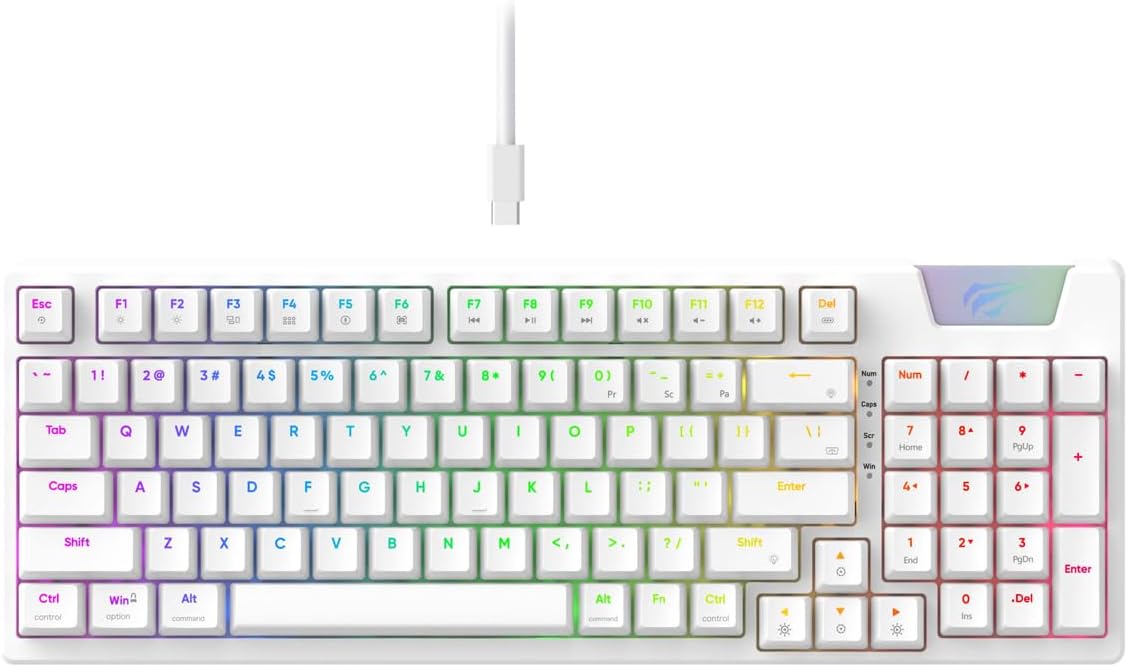
Image: The Havit Gamenote KB885L mechanical keyboard in white, showcasing its full layout and detachable USB-C cable.
Setup Guide
Follow these steps to set up your Havit Gamenote KB885L mechanical keyboard:
- Unpack the Keyboard: Carefully remove the keyboard and its accessories from the packaging.
- Connect the USB-C Cable: Insert the detachable USB Type-C cable into the port on the keyboard.
- Connect to Computer: Plug the other end of the USB cable into an available USB port on your computer.
- Driver Installation: The keyboard is plug-and-play and typically does not require additional drivers. Your operating system should automatically detect and install the necessary drivers.
- Test Functionality: Open a text editor or browser to test key presses and ensure all functions are working correctly.

Image: A close-up of the Havit Gamenote KB885L keyboard highlighting its portable design and detachable cable for easy setup and transport.
Operating Instructions
The Havit Gamenote KB885L keyboard offers various features for an enhanced user experience:
RGB Backlighting Control
The keyboard features customizable RGB backlighting. Use the following key combinations to adjust lighting effects:
- Fn + [Key]: Cycle through different RGB lighting modes. (Specific key combinations may vary, refer to on-keyboard legends if available).
- Fn + Arrow Keys: Adjust brightness and speed of lighting effects.

Image: The Havit Gamenote KB885L keyboard displaying its vibrant RGB backlighting, illustrating customizable lighting effects.
Full Key Rollover (NKRO)
This keyboard supports Full Key Rollover, meaning every key press is registered independently, regardless of how many keys are pressed simultaneously. This feature is essential for fast-paced gaming and typing, preventing ghosting or missed inputs.
Ergonomic Design
The keyboard is designed with ergonomics in mind to provide comfort during extended use. Its layout and keycap profile aim to reduce strain on your wrists and fingers.

Image: A view of the Havit Gamenote KB885L keyboard highlighting its ergonomic design for comfortable use.
Maintenance
Proper maintenance ensures the longevity and optimal performance of your keyboard:
- Cleaning: Regularly clean the keyboard with a soft, dry cloth. For deeper cleaning, use compressed air to remove dust and debris from between the keycaps. For stubborn dirt, a slightly damp cloth with mild soap can be used, ensuring no liquid enters the keyboard.
- Avoid Spills: Keep liquids away from the keyboard to prevent damage to the internal components. In case of a spill, immediately disconnect the keyboard and allow it to dry completely before reconnecting.
- Cable Care: Handle the detachable USB-C cable with care. Avoid sharp bends or excessive pulling to prevent damage to the cable or connectors.
- Storage: When not in use, store the keyboard in a clean, dry environment away from extreme temperatures.
Troubleshooting
If you encounter issues with your Havit Gamenote KB885L keyboard, try the following solutions:
- Keyboard Not Responding:
- Ensure the USB-C cable is securely connected to both the keyboard and the computer.
- Try plugging the keyboard into a different USB port on your computer.
- Test the keyboard on another computer to determine if the issue is with the keyboard or your system.
- RGB Lights Not Working:
- Check if the lighting is turned off using the Fn key combinations.
- Ensure the keyboard is properly powered via the USB connection.
- Keys Not Registering / Ghosting:
- Due to full key rollover, this is unlikely. However, ensure no debris is lodged under the keycap.
- If a specific key is consistently failing, it might indicate a switch issue. Contact support if the problem persists.
Specifications
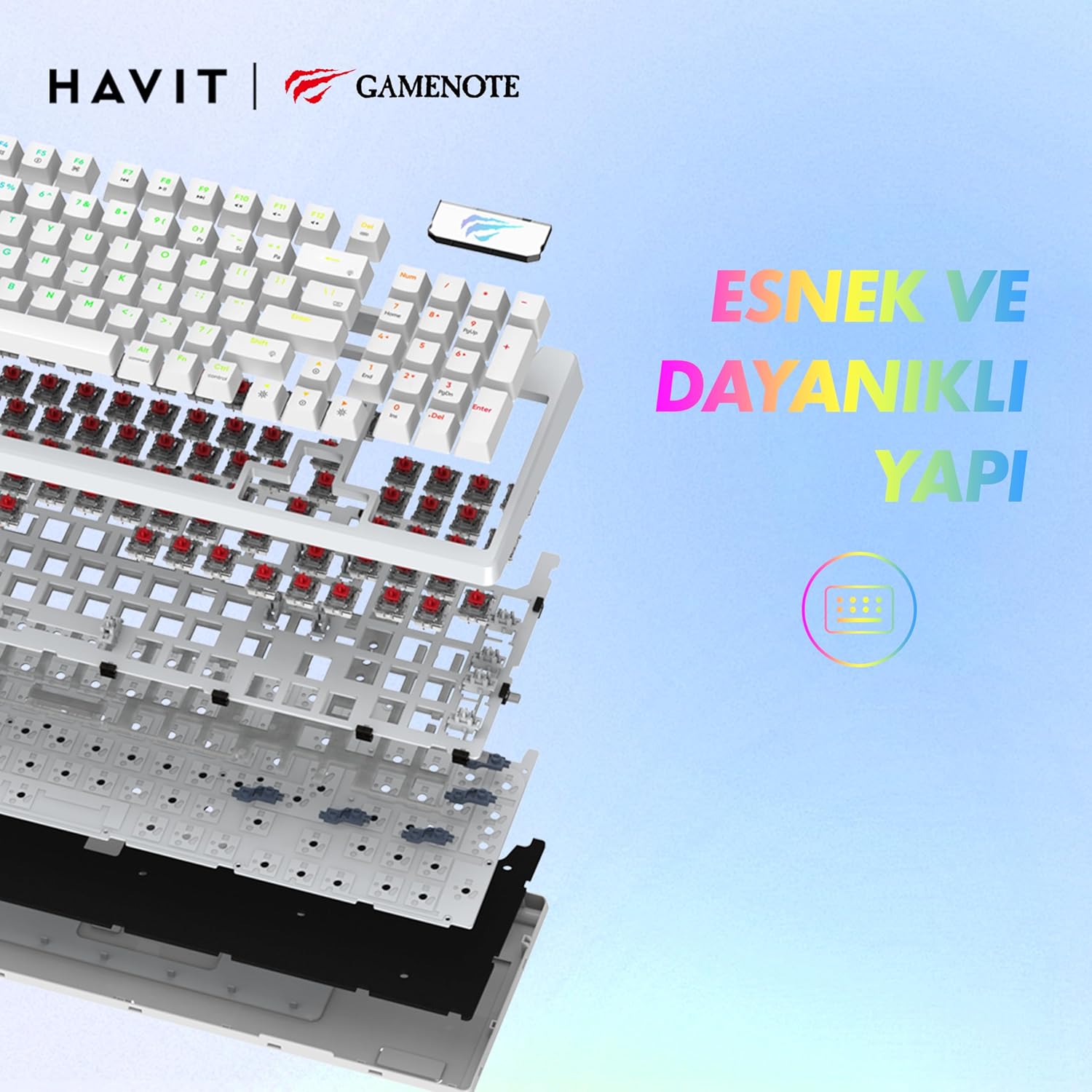
Image: An exploded view of the Havit Gamenote KB885L keyboard, illustrating its internal gasket structure for enhanced stability and typing feel.
| Feature | Detail |
|---|---|
| Brand | Havit |
| Model Number | KB885L |
| Compatible Devices | Computer |
| Connectivity Technology | USB |
| Keyboard Description | Gaming |
| Recommended Uses | Gaming |
| Special Feature | Portable |
| Color | White |
| Backlight Color Support | RGB (Red, Green, Blue model) |
| Style | Modern |
| Product Dimensions (L x W x H) | 38.7 x 14 x 4.5 cm |
| Language | English |
| Power Source | USB Power |
| Switch Type | Tactile |
| Keyboard Layout | QWERTY |
| Hand Orientation | Ambidextrous |
| Number of Keys | 95 |
| Button Quantity | 104 |
| Included Components | USB Cable |
| Material | Plastic |
| Key Press Lifespan | 50 Million (from description) |

Image: An illustration highlighting the Havit Gamenote KB885L's durable mechanical switches, rated for a 50 million key press lifespan.
Warranty Information
The Havit Gamenote KB885L Mechanical Keyboard comes with a one-year warranty from the date of purchase. This warranty covers manufacturing defects and issues arising from normal use. It does not cover damage caused by misuse, accidents, unauthorized modifications, or improper maintenance. Please retain your proof of purchase for warranty claims.
Customer Support
For further assistance, technical support, or warranty inquiries, please contact Havit customer service through their official website or the retailer where you purchased the product. Have your model number (KB885L) and proof of purchase ready when contacting support.


