
Y&H 6.2KW
Y&H 6.2 kW On/Off Grid Hybrid Solar Inverter User Manual
Brand: Y&H | Model: 6.2KW
1. Introduction
The Y&H 6.2 kW On/Off Grid Hybrid Solar Inverter is a multi-functional device designed to provide uninterrupted power. It integrates the functions of a power inverter, a solar charger, and a battery charger into a single, portable unit. This manual will guide you through the proper installation, operation, and maintenance procedures to ensure optimal performance and longevity of your inverter.
The comprehensive LCD display and user-friendly button interface allow for easy configuration of settings such as battery charging current, AC/solar charger priority, and acceptable input voltage range, adapting to various application needs.
2. Important Safety Warnings
Please read and understand all safety instructions before installation and operation. Failure to follow these instructions may result in electric shock, fire, or serious injury.
- In Utility Bypass mode, the device cannot be connected to 220V AC two-phase. Specifically, L1-L2 cannot be connected to L-N.
- In inverter mode, if the device is connected to 220V two-phase, do not select grid priority for output priority. This can cause safety risks to the device.
- Do not connect the AC output of the device to an economical transformer, as this may negatively affect the normal lifespan of the device.
- The single-phase output (Hot Leg) is 230V AC; it cannot output 110V AC.
- This Y&H solar inverter does not support parallel operation or phase splitting.
- Ensure proper grounding of the inverter before connecting any power sources.
- Only qualified personnel should perform installation and maintenance.
3. Product Features
The Y&H 6.2 kW Hybrid Solar Inverter offers a range of advanced features:
- Pure Sine Wave Inverter (On-Grid/Off-Grid capability).
- WIFI & GPRS communication available for iOS and Android devices (optional module).
- Ability to operate without a battery.
- One-key reset function to restore factory settings.
- Integrated automatic activation for lithium batteries.
- Built-in 120A MPPT solar charge controller.
- Wide PV input voltage range (90 ~ 450V DC).
- Integrated anti-noise kit for operation in harsh environments.
- Intelligent charging design to optimize battery lifespan.
- Dual AC output for flexible load management.
- Cold start function (46V).
- Automatic restart while AC is restored.
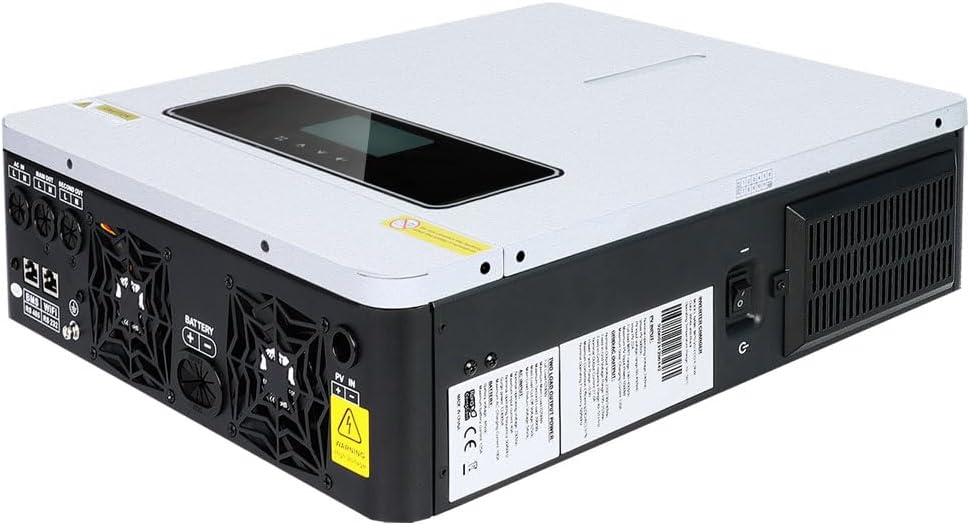
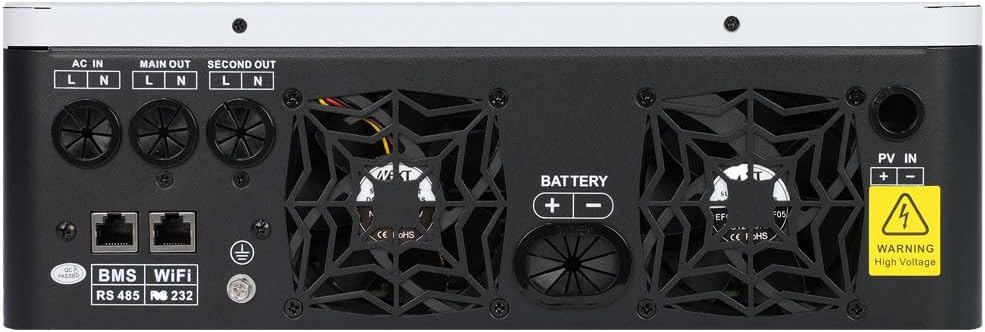
4. Components Overview
Familiarize yourself with the physical components and interfaces of the inverter.


5. Setup and Installation
Proper installation is crucial for the safe and efficient operation of your inverter. Refer to the following diagrams and instructions for guidance.
5.1 System Connection Diagram

The diagram above illustrates a typical hybrid power system setup. Ensure all connections are made securely and according to local electrical codes.
5.2 Battery Connection
The inverter is compatible with various battery types. Always use a circuit breaker between the battery and the inverter for safety.

Recommended Battery Cable Size:
| Model | Wire Size | Cable (mm²) | Torque Value (max) |
|---|---|---|---|
| 4.2 / 6.2KW | 1x 2AWG | 25 | 2 Nm |
6. Operating Instructions
6.1 Charging and Output Modes

The inverter supports four charging modes and three output modes, configurable via the LCD display:
Charging Modes:
- Utility First: Prioritizes charging from the utility grid.
- Solar First: Prioritizes charging from solar panels.
- Solar and Utility: Charges from both solar and utility simultaneously.
- Battery and Solar: Charges from both battery and solar simultaneously.
Output Modes:
- PV Priority: Prioritizes power from solar panels to the load.
- Utility Priority: Prioritizes power from the utility grid to the load.
- SBU Priority (Solar-Battery-Utility): Prioritizes solar, then battery, then utility for load power.
6.2 Dual Output Voltage Point Setting

The setting range for the dual output functional voltage point is from 40.0V to 46.0V for the 6.2KW model. Each click adjusts by 0.1V.
- If the battery voltage falls below the set range, the Main OUT port will stop functioning. Only the Second OUT port will remain active.
- For areas with frequent power outages or loads that cannot be interrupted, you can set the battery voltage to 46V to retain more battery capacity for emergencies.
- If the battery voltage is above 46V, the Main OUT port will continue to operate.
6.3 WiFi Communication Function

The optional WiFi communication module allows you to monitor the inverter's working status and flexibly set required parameters from your mobile phone at any time and anywhere. The module is sold separately. For setup, refer to the QR code on the module for app download and connection instructions.
The image shows a QR code with the identifier Q2721100111238, which can be used to access more information or download the associated application for WiFi communication.
7. Maintenance
Regular maintenance ensures the longevity and optimal performance of your Y&H inverter:
- Keep the inverter clean and free from dust and debris. Use a dry cloth for cleaning.
- Ensure proper ventilation around the unit. Do not block the air vents.
- Periodically check all electrical connections for tightness and signs of corrosion.
- Inspect cables for any damage or wear. Replace damaged cables immediately.
- Monitor the LCD display for any error codes or unusual readings.
- If the inverter is connected to batteries, follow the battery manufacturer's maintenance guidelines.
8. Troubleshooting
This section provides solutions to common issues you might encounter. For problems not listed here, please contact customer support.
- No Power Output: Check input power sources (solar, utility, battery). Ensure all circuit breakers are on. Verify battery voltage is within operating range (above 40V).
- Inverter Not Charging Battery: Check solar panel connections and voltage. Verify utility input if charging from grid. Ensure charging mode is correctly set.
- Overload Warning: Reduce the connected load. Ensure the total power consumption does not exceed the inverter's rated output.
- High Temperature Warning: Ensure the inverter has adequate ventilation. Clear any obstructions from the vents. Operate within recommended ambient temperature range.
- System Settings Error: Use the one-key reset function to restore factory default settings if configuration errors occur.
9. Technical Specifications
| Parameter | Value |
|---|---|
| Brand | Y&H |
| Model Number | 6.2KW |
| Max PV Power | 6500 Watts |
| Output Power | 6200 Watts |
| Input Voltage (Battery) | 48 Volts |
| Output Voltage (AC) | 230 Volts (AC) |
| Efficiency | 90% or more |
| Total Current Outlets | 2 (Dual Output) |
| Power Source | Solar Energy |
| Recommended Use | Home |
| Max PV Open Circuit Voltage | 450 Vdc |
| PV Array MPPT Voltage Range | 60 ~ 450 Vdc |
| Max Charge Current | 120 A |
10. Warranty and Support
For warranty information and technical support, please refer to the product's packaging or contact Y&H customer service directly. Keep your purchase receipt as proof of purchase for any warranty claims.
Related documents6.2KW


Ask a question about this manual
Ask about setup, troubleshooting, compatibility, parts, safety, or missing instructions. Manuals+ will review the question and use this page’s manual context to help answer it.