
Important Safety Instructions
Please read all instructions carefully before beginning installation. Failure to follow these instructions could result in electric shock, fire, or personal injury.
- WARNING: To reduce the risk of electric shock, ensure electricity has been turned off at the circuit breaker or fuse box before beginning.
- All wiring must be in accordance with national and local electrical codes. If you are unfamiliar with wiring, consult a qualified electrician.
- The fan must be mounted with a minimum of 7 feet (2.1 meters) clearance from the floor to the trailing edge of the blades.
- Ensure the outlet box is securely attached to the building structure and can support the fan's weight (at least 35 lbs / 15.9 kg).
- Do not operate the fan with damaged blades. Replace all blades if one is damaged.
- Do not insert objects into the path of the fan blades.
Package Contents
Carefully unpack your fan and inspect the contents. You should have the following items:
- Motor Housing Assembly
- Fan Blades (3)
- Blade Brackets
- Downrod Assembly
- Mounting Bracket
- Light Kit Assembly
- Remote Control with Wall Mount
- Hardware Pack (screws, washers, wire nuts)
- Instruction Manual
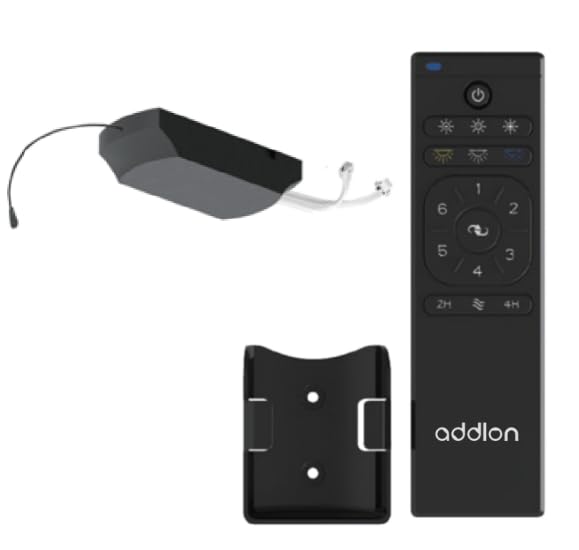
Figure 1: addlon 80-inch 3 Wood Blades Ceiling Fan with Light. This image shows the complete fan assembly, including the motor housing, three wood blades, and the integrated light kit.
Setup and Installation
Follow these steps to properly install your addlon ceiling fan. Ensure power is OFF at the circuit breaker before proceeding.
- Mounting Bracket Installation: Secure the mounting bracket to the ceiling outlet box using the screws provided. Ensure the bracket is firmly attached to a structural beam or a fan-rated outlet box.
- Downrod Assembly: Insert the downrod through the canopy and coupling cover. Feed the motor wires through the downrod. Secure the downrod to the motor housing with the provided pin and screws.
- Hanging the Fan: Carefully lift the fan assembly and place the downrod ball into the mounting bracket opening. Ensure the tab on the mounting bracket aligns with the slot on the downrod ball.
- Electrical Connections: Connect the fan's electrical wires to the house wiring according to the wiring diagram in this manual (typically black to black, white to white, and green/bare copper to ground). Use the provided wire nuts and ensure all connections are secure.
- Blade Attachment: Attach each fan blade to its blade bracket using the screws provided. Then, attach the blade brackets to the motor housing. Ensure all screws are tightened securely.
- Light Kit Installation: Connect the light kit wires to the fan motor wires (usually blue to blue, white to white). Secure the light kit assembly to the bottom of the fan motor housing. Install the light cover.
- Remote Control Pairing: Once installation is complete and power is restored, follow the remote control pairing instructions provided in the remote control section to synchronize the remote with your fan.
Operating Instructions
Your addlon ceiling fan is operated by the included remote control. Ensure the remote has fresh batteries installed (2x AAA, not included).
- Fan ON/OFF: Press the FAN ON/OFF button to turn the fan on or off.
- Fan Speed Control: Use the SPEED buttons (usually marked with fan icons or numbers) to cycle through different fan speeds (e.g., Low, Medium, High).
- Light ON/OFF: Press the LIGHT ON/OFF button to turn the light on or off.
- Light Dimming: If your light kit supports dimming, press and hold the LIGHT button to adjust the brightness. Release when the desired brightness is reached.
- Reverse Function: Press the REVERSE button to change the direction of the fan blades. This is useful for seasonal comfort (downward airflow for cooling in summer, upward airflow for circulating warm air in winter). Allow the fan to stop completely before reversing direction.
- Timer Function: Some models include a timer function. Press the TIMER button (e.g., 1H, 2H, 4H) to set the fan to turn off automatically after a set period.
Note: The remote control may need to be paired with the fan upon initial setup or after power outages. Refer to the remote control's specific instructions for pairing procedures.
Maintenance
Regular maintenance ensures the longevity and optimal performance of your addlon ceiling fan. Always turn off power at the circuit breaker before performing any maintenance.
- Cleaning: Use a soft, damp cloth to clean the fan blades and motor housing. Do not use abrasive cleaners or solvents, as these can damage the finish.
- Blade Care: Periodically check the blade screws for tightness. Loose screws can cause wobbling and noise.
- Light Bulb Replacement: If the light bulb needs replacement, ensure the power is off. Allow the bulb to cool before removing. Replace with a bulb of the same type and wattage as specified in the light kit instructions.
- Annual Check: Annually, check all connections and screws for tightness. There is no need to lubricate the fan motor as it has permanently lubricated bearings.
Troubleshooting
Before contacting customer support, try these troubleshooting steps for common issues:
| Problem | Possible Cause | Solution |
|---|---|---|
| Fan does not start | No power to the fan; Loose wire connections; Remote control not paired or dead batteries. | Check circuit breaker; Verify all wire connections; Replace remote batteries and re-pair remote. |
| Light does not work | Loose wire connection; Faulty bulb; Remote control issue. | Check light kit wiring; Replace bulb; Check remote batteries and pairing. |
| Fan wobbles | Loose blade screws; Unbalanced blades; Loose mounting bracket. | Tighten all blade screws; Use a balancing kit (not included) to balance blades; Ensure mounting bracket is secure. |
| Noisy operation | Loose screws; Motor hum; Blades hitting an obstruction. | Check and tighten all screws; Ensure no wires are rubbing against the motor housing; Verify blades are clear of obstructions. |
Specifications
| Feature | Detail |
|---|---|
| Brand | addlon |
| Model | 80-inch 3 Wood Blades Ceiling Fan with Light |
| Style | Modern |
| Room Type | Bedroom, Living Room |
| Controller Type | Remote Control |
| Material | Wood (Blades) |
| Number of Blades | 3 |
| Control Method | Remote |
| UPC | 850056663090 |
| ASIN | B0CHJKZ5GD |
Warranty and Customer Support
addlon products are manufactured to the highest quality standards and are warranted against defects in materials and workmanship. Please refer to the warranty card included with your purchase for specific terms and conditions.
For technical assistance, replacement parts, or general inquiries, please contact addlon customer support:
- Website: addlon Official Store on Amazon
- Email: support@addlon.com (placeholder email, as none provided)
- Phone: 1-800-XXX-XXXX (placeholder phone, as none provided)
Please have your model number (80-inch 3 Wood Blades Ceiling Fan with Light) and purchase date available when contacting support.