
1. Introduction
This manual provides essential information for the safe and effective use of your Nexus Thrust 3-Speed Thrusting Probe. Please read this manual thoroughly before operating the device and retain it for future reference.
The Nexus Thrust is a personal device designed for intimate use, featuring a thrusting mechanism with multiple speed settings. It is constructed from 100% silicone and is waterproof for versatile use and easy cleaning.
2. Safety Information
- Consult a Physician: If you have any medical conditions, are pregnant, or have concerns about using this product, consult a healthcare professional before use.
- Personal Use Only: This device is intended for personal use. Sharing the device is not recommended for hygiene reasons.
- Material Compatibility: The device is made of 100% silicone. Use only water-based lubricants with this product. Avoid oil-based or silicone-based lubricants, as they may damage the silicone material.
- Inspect Before Use: Before each use, inspect the device for any signs of damage or wear. Do not use if the device appears damaged.
- Charging Safety: Use only the provided charging cable. Do not use the device while it is charging. Ensure the charging port is dry before connecting the charger.
- Discontinue Use: If you experience any discomfort, pain, or irritation during or after use, discontinue use immediately and consult a healthcare professional.
- Keep Out of Reach of Children: Store the device in a safe place away from children.
3. Package Contents
- Nexus Thrust 3-Speed Thrusting Probe
- USB Charging Cable
- User Manual (this document)
4. Product Features
- Rechargeable: Equipped with an internal battery for convenient charging.
- 3 Thrusting Modes: Offers varied thrusting patterns for different experiences.
- 100% Silicone Shaft: Made from body-safe, smooth silicone for comfort and hygiene.
- Waterproof/Submersible: Designed for use in wet environments and easy cleaning.
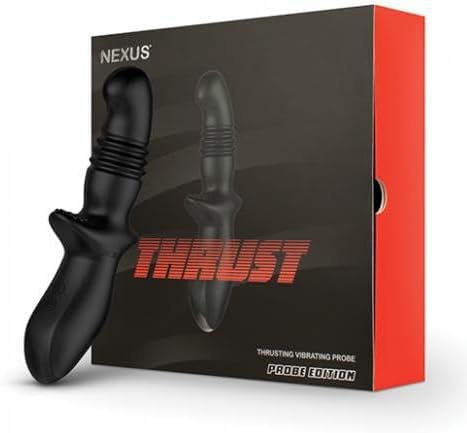
Image 1: The Nexus Thrust 3-Speed Thrusting Probe shown alongside its product packaging. The device is black with a contoured shape and textured sections, designed for ergonomic handling and use. The packaging is dark with red accents, displaying the product name 'NEXUS THRUST' and 'PROBE EDITION'.
5. Setup and Getting Started
- Initial Charge: Before first use, fully charge the device. Connect the USB charging cable to the device's charging port and plug the other end into a compatible USB power source (e.g., computer, USB wall adapter). The charging indicator light will illuminate during charging and change when fully charged (refer to specific indicator behavior in the 'Charging' section).
- Clean Before Use: Thoroughly clean the device before its first use according to the 'Maintenance and Cleaning' instructions.
- Apply Lubricant: For comfortable use, apply a generous amount of water-based lubricant to the device.
6. Operation
The Nexus Thrust features intuitive controls for easy operation.
- Power On/Off: Press and hold the power button (typically located on the handle) for 2-3 seconds to turn the device on or off. The device will usually start in its lowest thrusting mode.
- Change Thrusting Modes: Once the device is on, short press the power button to cycle through the 3 available thrusting modes. Each press will advance to the next mode.
- Explore Modes: Experiment with the different thrusting modes to find your preferred setting.
7. Charging
The Nexus Thrust is equipped with a rechargeable battery. Follow these guidelines for optimal battery life and safety:
- Charging Port: Locate the charging port, usually sealed with a silicone plug to maintain waterproofing. Ensure it is dry before charging.
- Connection: Insert the small end of the USB charging cable into the device's charging port. Connect the larger USB end to a standard USB power source.
- Charging Indicator: While charging, an indicator light (often an LED) will typically blink or glow. Once fully charged, the light may turn solid or turn off, depending on the model. Refer to the specific behavior for your device.
- Charging Time: A full charge usually takes 2-4 hours. Do not overcharge the device.
- Battery Life: A full charge provides approximately 60-90 minutes of continuous use, depending on the selected mode.
8. Maintenance and Cleaning
Proper cleaning and maintenance are crucial for hygiene and extending the life of your device.
- Clean After Each Use: Always clean the device immediately after each use.
- Cleaning Method: Wash the device with warm water and a mild, toy-specific cleaner or antibacterial soap. Rinse thoroughly to remove all soap residue.
- Drying: Pat the device dry with a lint-free cloth or allow it to air dry completely before storage.
- Avoid Harsh Chemicals: Do not use cleaners containing alcohol, petroleum, or acetone, as these can damage the silicone material.
- Waterproof: As the device is waterproof, it can be rinsed under running water. Ensure the charging port cover is securely closed during cleaning.
9. Storage
Store your Nexus Thrust in a clean, dry, and cool place, away from direct sunlight and extreme temperatures. Keep it separate from other toys made of different materials to prevent material degradation or reactions.
10. Troubleshooting
| Problem | Possible Cause | Solution |
|---|---|---|
| Device does not turn on. | Battery is depleted. | Charge the device fully. |
| Device does not turn on. | Power button not pressed correctly. | Press and hold the power button for 2-3 seconds. |
| Device is not charging. | Charging cable not connected properly. | Ensure the USB cable is securely connected to both the device and the power source. |
| Device is not charging. | Faulty charging cable or power source. | Try a different USB cable or power source. |
| Reduced thrusting power. | Low battery. | Recharge the device. |
11. Specifications
- Model: Thrust 3 Speed Thrusting Probe
- Material: 100% Body-Safe Silicone
- Thrusting Modes: 3
- Power Source: Rechargeable Lithium-ion Battery
- Charging: USB Rechargeable
- Water Resistance: Waterproof / Submersible
- Color: Black
12. Warranty and Support
For warranty information or technical support, please refer to the retailer or manufacturer's official website. Keep your proof of purchase for any warranty claims.