
1. Product Overview
The Marengo Mic Arm Stand MS198 is a versatile and adjustable microphone boom arm designed to securely hold various microphones, providing flexible positioning for recording, streaming, and broadcasting. It features a desk mount clamp for stable attachment and includes adapters for broad compatibility.

Image 1.1: Marengo Mic Arm Stand with included accessories (desk clamp, microphone clip, 5/8" to 3/8" adapter, cable ties).
2. What's in the Box
- Marengo Mic Arm Stand
- Standard Microphone Clip
- 5/8" to 3/8" Adapter
- Desk Mount Clamp
- Cable Management Ties (4 pieces)
3. Setup Instructions
3.1 Attaching the Desk Mount Clamp
- Identify a suitable flat desk surface edge. The clamp is designed for flat surfaces and is not compatible with slanted or curved edges. The maximum compatible desk thickness is 2.5 inches.
- Place the desk mount clamp onto the edge of your desk. Ensure the anti-scratch pads are positioned between the clamp and the desk surface to protect your furniture.
- Tighten the screw on the clamp firmly until it is securely attached to the desk. Avoid overtightening, but ensure there is no wobble.

Image 3.1: Proper installation of the desk clamp, highlighting the anti-scratch pad and compatibility with flat surfaces.
3.2 Installing the Mic Arm Stand
- Insert the base of the mic arm stand into the hole on the desk mount clamp.
- Tighten the side screw on the clamp to secure the mic arm stand in place.
3.3 Attaching Your Microphone
- Determine the thread size of your microphone or shock mount. The mic arm stand features a standard 5/8" thread.
- If your microphone or shock mount has a 5/8" thread, screw it directly onto the mic arm stand.
- If your microphone or shock mount has a 3/8" thread (common for many microphones like Blue Yeti, HyperX QuadCast, SoloCast, Shure SM7B, MV7, Fifine AmpliGame, Fifine K669B, Fifine AM8), first screw the included 5/8" to 3/8" adapter onto the mic arm stand, then attach your microphone or shock mount to the adapter.
- For dynamic microphones like Shure SM58, Samson Q2U, or Shure PGA48, use the provided standard microphone clip. Attach the clip to the mic arm stand (using the adapter if necessary), then insert your microphone into the clip.
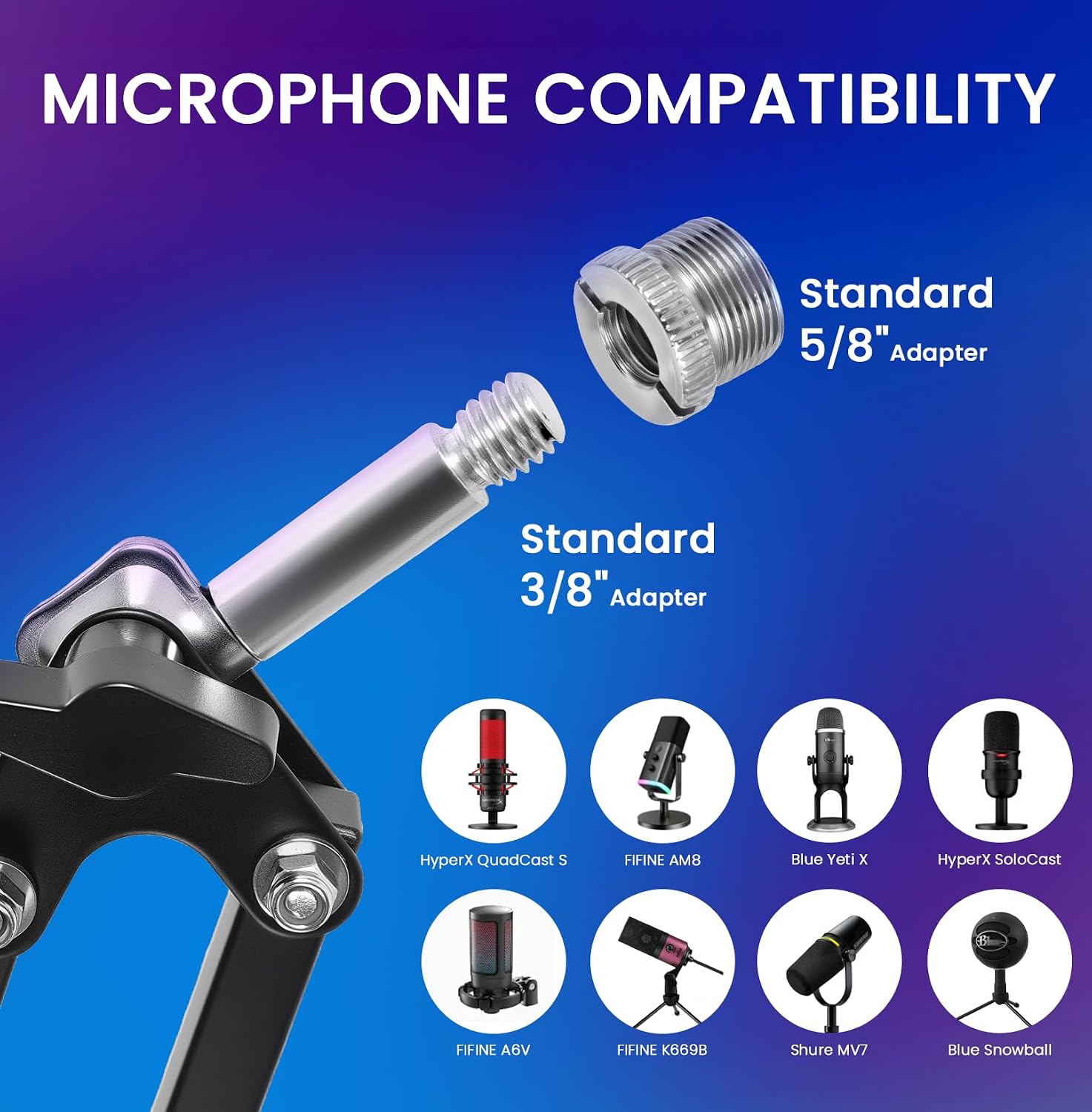
Image 3.2: Illustration of microphone compatibility with 3/8" and 5/8" adapters.
3.4 Cable Management
Use the provided cable management ties to neatly secure your microphone cable along the arm stand. This helps maintain a tidy workspace and prevents cables from interfering with arm movement.
4. Operating the Mic Arm Stand
The Marengo Mic Arm Stand offers extensive adjustability to position your microphone precisely.
- Base Rotation: The base of the arm can rotate 360° for full horizontal movement.
- Arm Extension: The arm extends 135° back and forth, allowing you to bring the microphone closer or push it further away.
- Vertical Adjustment: The arm shaft allows for 180° up-and-down movement to adjust the microphone's height.
- Microphone Angle: The metal adapter at the end of the arm allows for 270° rotation to fine-tune your microphone's angle.
When not in use, the arm can be easily folded and pushed away to save desk space.

Image 4.1: Illustration of the mic arm stand's dimensions and range of motion.
5. Maintenance
To ensure the longevity and optimal performance of your Marengo Mic Arm Stand, follow these simple maintenance guidelines:
- Cleaning: Wipe the stand with a soft, dry cloth to remove dust and debris. Avoid using abrasive cleaners or solvents.
- Joints and Screws: Periodically check all screws and joints for tightness. Gently re-tighten if any looseness is detected. Do not overtighten.
- Springs: The stand features durable springs. Avoid applying excessive force or bending the arm beyond its intended range of motion to prevent spring deformation.
- Clamp Pads: Ensure the anti-scratch pads on the desk clamp remain in place to protect your desk surface and maintain grip.
6. Troubleshooting
- Arm feels loose or unstable:
- Ensure the desk mount clamp is securely tightened to a flat, stable desk surface. The clamp is not designed for slanted or curved edges.
- Check that the mic arm stand is fully inserted into the clamp and its side screw is tightened. - Microphone is not holding position:
- Verify that your microphone or shock mount is correctly screwed onto the arm stand or adapter.
- Ensure all adjustable joints on the arm are tightened sufficiently to support the microphone's weight. The stand is designed to support up to 1.5 kg (3.3 lbs). - Difficulty adjusting the arm:
- Check for any obstructions. The arm should move smoothly within its intended range of motion. Do not force movement.
7. Specifications
| Model Number | MS198 |
| Brand | Marengo |
| Material | Alloy Steel |
| Color | Black |
| Item Weight | 0.87 Kilograms (1.92 pounds) |
| Max Load Capacity | 1.5 kg (3.3 lbs) |
| Connector Type | Threaded mount (5/8" with 3/8" adapter) |
| Package Dimensions | 16.69 x 5.71 x 2.28 inches |
8. Warranty and Support
For warranty information or technical support, please refer to the official Marengo website or contact your retailer. Keep your purchase receipt for warranty claims.