
1. Product Overview
The Nitecore NWL20 is a versatile COB mechanics work light designed for various applications including job sites, car repair, and outdoor activities. It features multiple lighting modes, a durable construction, and convenient charging options.

Figure 1.1: Nitecore NWL20 Work Light, showing the main unit, USB-C charging cable, and a Nitecore sticker.
2. Package Contents
- Nitecore NWL20 Work Light (with battery preinstalled)
- USB-C Charging Cable
- Nitecore Sticker
3. Key Features
- Bright COB Work Light: Max output of 600 lumens floodlight, 280 lumens spotlight, and 30 lumens red light.
- Multiple Ways to Use: Magnetic backing for hands-free use, 180-degree adjustable base, and integrated hanging hook.
- USB-C Rechargeable: Up to 78 hours runtime, with battery status indicator and ability to recharge while in use.
- Durable Construction: Made with durable ABS material, 1-meter impact resistance, and IPX5 water resistance.
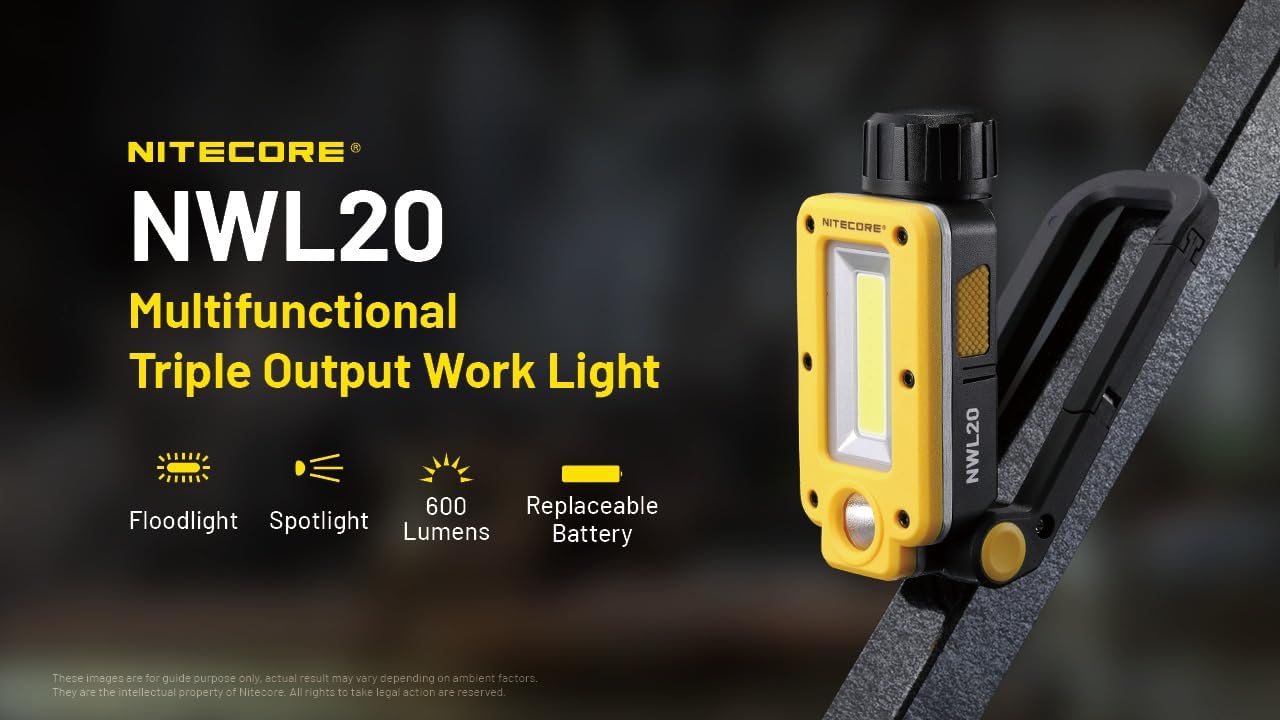
Figure 3.1: Overview of Nitecore NWL20's key features, including its triple output and replaceable battery.
4. Setup
4.1 Initial Charging
Before first use, fully charge the Nitecore NWL20. The device comes with a preinstalled Lithium-Ion battery.
- Locate the USB-C charging port on the side of the work light.
- Connect the provided USB-C charging cable to the port.
- Connect the other end of the USB-C cable to a compatible USB power source (e.g., wall adapter, computer USB port).
- The battery status indicator will show charging progress. Once fully charged, the indicator will change to a steady light.

Figure 4.1: The Nitecore NWL20 connected to a USB-C charging cable.
5. Operating Instructions
5.1 Power On/Off and Mode Switching
The NWL20 features a single button for controlling power and switching between various lighting modes.
- To Turn On: Press and hold the power button for approximately 1 second. The light will turn on in the last used mode.
- To Switch Modes: Once the light is on, short press the power button to cycle through the available modes:
- Spotlight (High)
- Spotlight (Low)
- Floodlight (High)
- Floodlight (Mid)
- Floodlight (Low)
- Red Light (Constant-On)
- Red Light (Flashing)
- To Turn Off: Press and hold the power button for approximately 1 second.
5.2 Light Modes Overview
The NWL20 offers three distinct light sources for various illumination needs:
- COB Floodlight: Provides wide-range illumination, ideal for lighting up large areas like job sites or camping spaces.
- LED Spotlight: Offers focused illumination, suitable for viewing objects at a distance or inspecting specific points.
- Red Light: Useful for preserving night vision, signaling, or as a warning light.

Figure 5.1: Visual comparison of the wide-angle COB Floodlight and focused LED Spotlight.
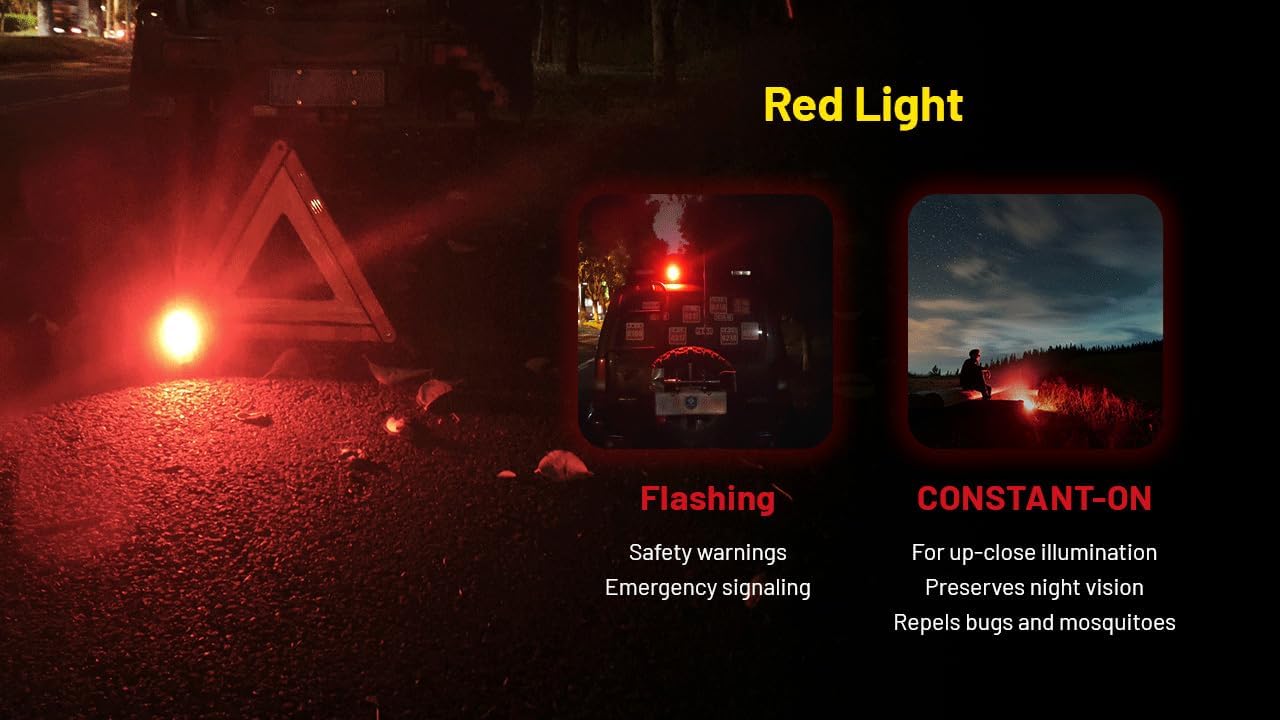
Figure 5.2: Examples of Red Light usage, including flashing for warnings and constant-on for night vision preservation.
5.3 Mounting Options
The NWL20 is designed with a versatile base to provide multiple mounting and positioning options:
- Adjustable Base: The base can be adjusted up to 180 degrees, allowing you to direct the light precisely where needed.
- Magnetic Backing: A strong magnetic backing allows the light to be securely attached to any ferrous metal surface for hands-free operation.
- Hanging Hook: An integrated metal hanging hook provides an option to suspend the light, illuminating larger areas from above.

Figure 5.3: Demonstrating the NWL20's adjustable base, magnetic attachment, and hanging capability.
6. Maintenance
Proper maintenance ensures the longevity and optimal performance of your Nitecore NWL20.
- Cleaning: Wipe the light with a soft, damp cloth to remove dirt and debris. Do not use abrasive cleaners or solvents.
- Storage: Store the light in a cool, dry place when not in use. For long-term storage, it is recommended to charge the battery every 3-6 months to maintain battery health.
- Water Resistance: The NWL20 has an IPX5 rating, meaning it is resistant to splashes of water. Do not submerge the light in water. Ensure the USB-C port cover is securely closed when not charging to maintain water resistance.
- Impact Resistance: The light is designed to withstand impacts up to 1 meter. Avoid dropping the light from greater heights.

Figure 6.1: The NWL20's durability features, including IPX5 water resistance and 1-meter impact resistance.
7. Troubleshooting
If you encounter issues with your Nitecore NWL20, refer to the following common problems and solutions:
| Problem | Possible Cause | Solution |
|---|---|---|
| Light does not turn on. | Low battery or battery depleted. | Charge the device using the provided USB-C cable. |
| Light flickers or dims unexpectedly. | Low battery. | Recharge the battery. |
| Device not charging. | Faulty cable or power source; charging port obstruction. | Try a different USB-C cable or power adapter. Ensure the charging port is clean and free of debris. |
| Light modes are not cycling correctly. | Button malfunction or internal issue. | Ensure the button is pressed firmly. If the issue persists, contact Nitecore customer support. |
8. Specifications
Detailed specifications for the Nitecore NWL20 Work Light:
| Characteristic | Detail |
|---|---|
| Model | NWL20 |
| Dimensions | 216.7mm x 50.0mm x 41.2mm (8.53" x 1.97" x 1.62" - Base Included) |
| Weight | 153g / 5.40 oz (Battery Not Included), 224g / 7.90 oz (Battery Included) |
| Material | Acrylonitrile Butadiene Styrene (ABS) |
| Light Source Type | COB LED (Floodlight), LED (Spotlight), Red LED |
| Power Source | Battery Powered (1 Lithium Ion battery required/preinstalled) |
| Voltage | 3.7 Volts |
| Charging Port | USB-C |
| Impact Resistance | 1 meter |
| Water Resistance | IPX5 |
| Special Features | Adjustable angle, magnetic base, metal hanger, spotlight, floodlight, red light, USB-C rechargeable, lightweight |
8.1 Performance Data
The following data is measured using 1x Li-ion battery (5,000mAh) under laboratory conditions. Data may vary in real-world use.

Figure 8.1: Detailed performance specifications including brightness, runtime, and beam distance for all light modes.
| Mode | Brightness | Runtime | Beam Distance |
|---|---|---|---|
| Spotlight High | 280 Lumens | 10 hours | 93 meters |
| Spotlight Low | 125 Lumens | 15 hours | 60 meters |
| Floodlight High | 600 Lumens | 6 hours | 43 meters |
| Floodlight Mid | 260 Lumens | 10 hours | 20 meters |
| Floodlight Low | 30 Lumens | 78 hours | 7 meters |
| Red Light Constant-On | 30 Lumens | 30 hours | 7 meters |
| Red Light Flashing | 30 Lumens | 60 hours | 7 meters |
9. Warranty and Support
Nitecore products are covered by a warranty. For detailed warranty information, please refer to the official Nitecore website or contact your local distributor.
For technical support, troubleshooting assistance, or warranty claims, please contact Nitecore Customer Service:
- Official Website: www.nitecore.com
- Contact Information: Refer to the "Support" or "Contact Us" section on the official website for regional contact details.


