
Introduction
Welcome to the Positive Grid Spark Live Smart Guitar Amp, a versatile multi-channel PA system and Bluetooth speaker designed for musicians. This all-in-one unit offers superior tone for guitar, bass, vocals, keyboards, and more, with built-in mixing, effects, and smart app integration. The Spark Live is engineered for portability and powerful performance, suitable for various musical applications from solo practice to full band jams.

Figure 1: Positive Grid Spark Live Smart Guitar Amp in a performance setting.
What's in the Box
Please check the package contents to ensure all items are present:
- Spark LIVE Amplifier
- USB A to C Cable
- Power Cord (2M)
- Quick Start Guide
- Safety Instructions Card
Product Overview
Front Panel Controls
The front panel provides intuitive controls for your primary instrument and overall sound shaping.
- Gain: Adjusts the input sensitivity for Channel 1.
- Bass: Controls the low-frequency response for Channel 1.
- Mid: Controls the mid-frequency response for Channel 1.
- Treble: Controls the high-frequency response for Channel 1.
- Master: Adjusts the overall output volume of the amplifier.
- Guitar Input: 1/4" input for connecting a guitar.
- Music Volume: Controls the volume of Bluetooth audio playback.
- Preset Button: Cycles through built-in presets. Press and hold to save current settings.
- Pair Button: Initiates Bluetooth pairing mode.

Figure 2: Front panel controls of the Spark Live.
Rear Panel Connections
The rear panel offers a comprehensive array of inputs and outputs for various instruments and external devices.
- MIDI In/Out: For connecting MIDI controllers or other MIDI-compatible devices.
- Output L/Mono, R: Line-level outputs for connecting to a PA system or recording interface.
- CH2 Input: 1/4" / XLR combo input for vocals, bass, or other instruments.
- CH3/4 Stereo Input: Stereo input for keyboards or other line-level sources.
- USB-C Audio/Data: For connecting to a computer for recording or firmware updates, and for charging external devices.
- Charge Out (5V/1.5A): USB port for charging mobile devices.
- Power Inlet: Connects the included power cord.
- Battery Compartment: Houses the optional rechargeable battery.

Figure 3: Rear panel connections for the Spark Live.

Figure 4: Close-up of the Spark Live's rear panel.
Setup
- Power Connection: Connect the included power cord to the Spark Live's power inlet and then to a suitable power outlet. If using the optional rechargeable battery, ensure it is charged and properly installed in the battery compartment.
- Power On: Press the power button located on the front panel to turn on the Spark Live. The indicator lights will illuminate.
- Instrument Connection:
- For guitar, connect to the Guitar Input (Channel 1).
- For vocals, bass, or other instruments, connect to the CH2 Input (1/4" or XLR).
- For stereo keyboards or line-level sources, connect to the CH3/4 Stereo Input.
- Bluetooth Pairing (Optional): To stream audio from a mobile device, press the Pair button on the front panel. On your device, search for "Spark Live" in Bluetooth settings and connect.
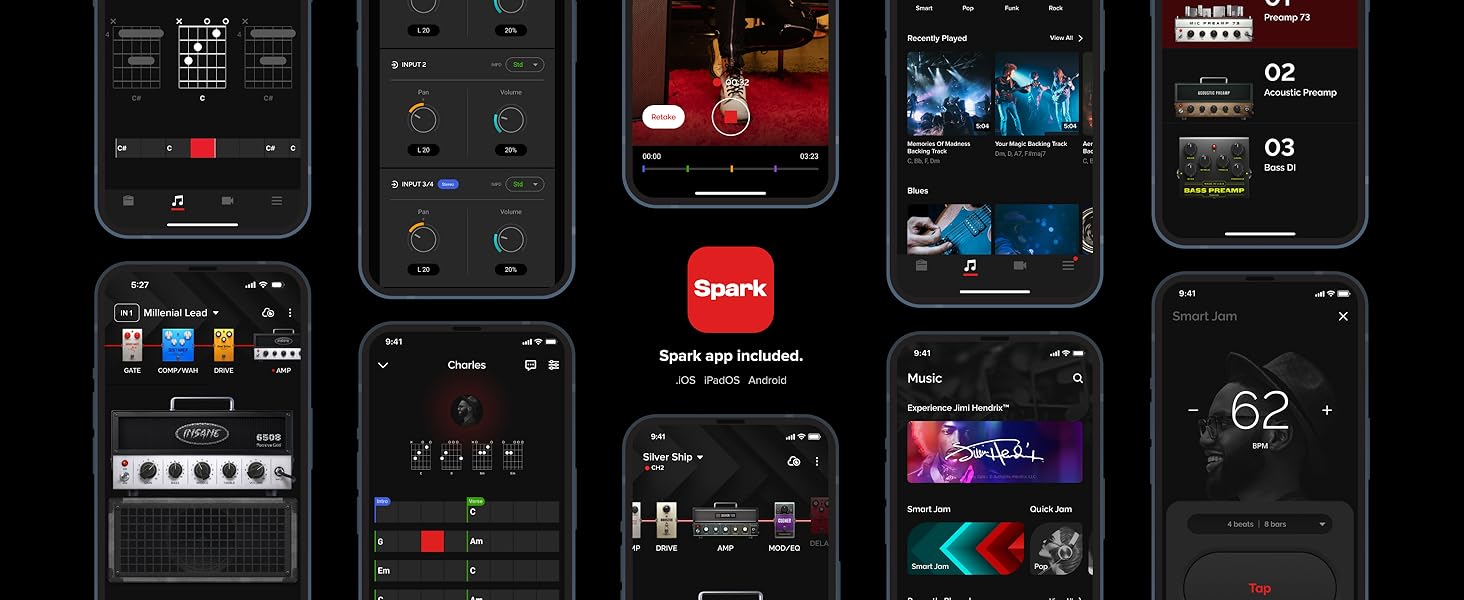
Figure 5: Installing the optional rechargeable battery.
Operating Instructions
Adjusting Sound for Channel 1 (Guitar)
Use the Gain, Bass, Mid, and Treble knobs on the front panel to shape the tone of your guitar. The Preset button allows you to cycle through pre-configured sounds.
Adjusting Sound for Channel 2 (Vocals, Bass, Acoustic)
Channel 2 features dedicated controls for vocal, bass, and acoustic gear. Adjust the input volume and effects as needed. Further customization is available via the Spark app.
Adjusting Sound for Channels 3/4 (Stereo Input)
For stereo inputs like keyboards, adjust the input volume using the dedicated controls.
Master Volume
The Master knob controls the overall output volume of the Spark Live. Adjust it to a comfortable listening level.
Bluetooth Audio Playback
Once paired, play audio from your mobile device. Use the Music Volume knob on the Spark Live to control the playback level.
App Integration
The Spark Live integrates with the Spark app (available for iOS and Android) to unlock its full potential. The app provides access to a vast library of amps and effects, AI-powered smart features, and advanced mixing capabilities.
Key App Features:
- Amp & Effects Library: Access 33 amps and 43 effects for Channel 1, and specialized vocal, bass, and acoustic gear for Channel 2.
- Smart Jam: The app can listen to your playing and generate a bass and drum track to jam along with.
- Auto Chords: Displays chords in real-time for millions of songs.
- Tone Cloud: Explore and download thousands of tones created by other Spark users and artists.
- Mixer: Fine-tune the levels and effects for all four channels directly from your device.

Figure 6: The Spark app interface on a smartphone.

Figure 7: The Spark app showing chord recognition.
Maintenance
- Cleaning: Use a soft, dry cloth to clean the exterior of the Spark Live. Avoid abrasive cleaners or solvents.
- Storage: Store the unit in a cool, dry place away from direct sunlight and extreme temperatures.
- Ventilation: Ensure proper ventilation around the unit to prevent overheating. Do not block any ventilation openings.
- Firmware Updates: Periodically check the Positive Grid website or the Spark app for available firmware updates to ensure optimal performance and access to new features.
Troubleshooting
| Problem | Possible Cause | Solution |
|---|---|---|
| No power | Power cord not connected, power outlet faulty, battery depleted (if applicable). | Check power cord connection. Try a different outlet. Charge or replace the battery. |
| No sound from instrument | Instrument cable faulty, volume knobs turned down, incorrect input selected in app. | Check instrument cable. Increase Gain and Master volume. Verify input selection in the Spark app. |
| Bluetooth not connecting | Spark Live not in pairing mode, device Bluetooth off, interference. | Press the Pair button on Spark Live. Ensure Bluetooth is enabled on your device. Move closer to the unit. |
| Distorted sound | Input gain too high, master volume too high, faulty cable. | Reduce input Gain or Master volume. Try a different instrument cable. |
Specifications
- Item Weight: 1 pounds
- Product Dimensions: 18.27 x 9.87 x 12.05 inches
- Item Model Number: 855316004781
- Output Wattage: 150 Watts
- Power Source: Battery Powered (Optional rechargeable battery)
- Compatible Devices: Guitar, Bass, Vocals, Keyboards, etc.
- Connector Type: USB, XLR, 1/4" Jack, MIDI
- Material Type: Custom Black/Brown
- Color Name: Black
Safety Information
Please read and follow these safety guidelines to ensure safe operation of your Spark Live:
- Do not expose the unit to rain or moisture.
- Do not open the casing; there are no user-serviceable parts inside. Refer all servicing to qualified personnel.
- Avoid placing the unit near heat sources or in direct sunlight.
- Use only the power adapter supplied with the unit.
- Keep out of reach of children.
- Disconnect the power cord during lightning storms or when unused for long periods.
Warranty and Support
For warranty information, technical support, or service inquiries, please visit the official Positive Grid website or contact their customer support. Keep your purchase receipt as proof of purchase.
Official Product Video
Watch the official product video for an overview of the Spark Live's features and capabilities.
Video 1: "Spark LIVE Born to play" - An official overview of the Spark Live's features and performance.