
Tefal CY855830
Tefal Cook4Me+ Connect Smart Multicooker CY855830 User Manual
Model: CY855830 | Brand: Tefal
Introduction
Welcome to the user manual for your Tefal Cook4Me+ Connect Smart Multicooker CY855830. This appliance is designed to simplify your cooking experience with its versatile functions, pre-programmed recipes, and smart connectivity. Please read this manual thoroughly before first use to ensure safe and optimal operation of your multicooker.

Image: The Tefal Cook4Me+ Connect Smart Multicooker, a black and silver appliance with a digital display and control knob.
Important Safety Instructions
Always follow basic safety precautions when using electrical appliances to reduce the risk of fire, electric shock, and/or injury to persons.
- Read all instructions carefully before use.
- Do not touch hot surfaces. Use handles or knobs.
- To protect against electric shock, do not immerse cord, plugs, or the appliance in water or other liquid.
- Close supervision is necessary when any appliance is used by or near children.
- Unplug from outlet when not in use and before cleaning. Allow to cool before putting on or taking off parts.
- Do not operate any appliance with a damaged cord or plug or after the appliance malfunctions or has been damaged in any manner.
- The use of accessory attachments not recommended by the appliance manufacturer may cause injuries.
- Do not use outdoors.
- Do not let cord hang over edge of table or counter, or touch hot surfaces.
- Do not place on or near a hot gas or electric burner, or in a heated oven.
- Extreme caution must be used when moving an appliance containing hot oil or other hot liquids.
- Always attach plug to appliance first, then plug cord into the wall outlet. To disconnect, turn any control to "off", then remove plug from wall outlet.
- Do not use appliance for other than intended use.
- This appliance cooks under pressure. Improper use may result in scalding injury. Make certain unit is properly closed before operating.
- Do not fill the unit over 2/3 full. When cooking foods that expand during cooking such as rice or dehydrated vegetables, do not fill the unit over 1/2 full.
- Always check the pressure release valve for clogging before use.
Product Components
Familiarize yourself with the main components of your Cook4Me+ Connect Multicooker.
- Main Unit with Control Panel and Digital Display
- Removable Cooking Pot (6 Liter capacity)
- Pressure Lid with Steam Release Valve
- Condensation Collector
- Steamer Basket (accessory)
- Power Cord
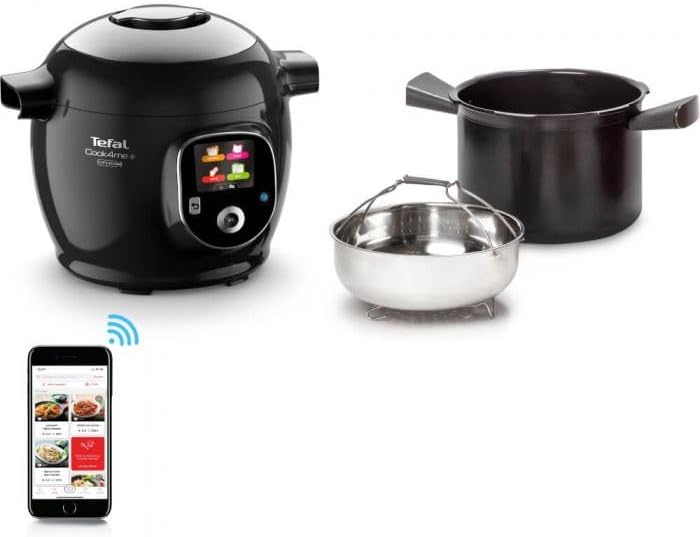
Image: The multicooker main unit, alongside its removable inner cooking pot, a stainless steel steamer basket, and a smartphone displaying the dedicated Cook4Me+ app interface.

Image: A close-up view of the stainless steel steamer basket, an accessory for the multicooker, designed for steaming food.
Setup and First Use
Unpacking and Initial Cleaning
- Carefully remove all packaging materials and accessories from the box.
- Wash the removable cooking pot, steamer basket, and lid components (inner lid, gasket, steam release valve) with warm soapy water. Rinse thoroughly and dry completely.
- Wipe the exterior of the main unit with a damp cloth. Do not immerse the main unit in water.
- Ensure all parts are dry before assembly.

Image: Hands using a cloth to clean the interior of the removable cooking pot, demonstrating the initial cleaning process.
Assembly
- Place the condensation collector into its slot at the back of the appliance.
- Insert the removable cooking pot into the main unit. Ensure it sits correctly.
- Close the lid by aligning the arrow on the lid with the arrow on the main unit, then rotate clockwise until it locks into place.
- Connect the power cord to the multicooker and then to a grounded electrical outlet.
Operating Instructions
Control Panel Overview
The Cook4Me+ Connect features an intuitive digital control panel with a central knob for navigation and selection, and dedicated buttons for back and OK functions.
- Digital Display: Shows cooking modes, recipes, time, and status.
- Central Knob: Rotate to scroll through options, press to select.
- Back Button: Returns to the previous screen.
- OK Button: Confirms selection.
Cooking Modes
Your Cook4Me+ Connect offers 6 cooking modes:
- Pressure Cook: For fast cooking under pressure.
- Steam: For healthy steaming of vegetables, fish, etc.
- Brown: For searing ingredients before cooking.
- Simmer: For slow cooking and gentle simmering.
- Reheat: For warming up dishes.
- Keep Warm: Automatically keeps food warm after cooking.
Using Pre-programmed Recipes
The multicooker comes with 150 pre-programmed recipes.
- Turn the central knob to navigate to the "Recipes" menu on the display.
- Select a recipe from the list.
- Follow the on-screen instructions for ingredient preparation and addition.
- The multicooker will automatically set the correct cooking time and temperature.
- Press OK to start cooking.

Image: A person is shown adding ingredients, including mushrooms and meat, into the open Tefal Cook4Me+ multicooker, which is placed on a kitchen counter.
App Connectivity
The Cook4Me+ Connect can be paired with a dedicated mobile application for extended recipe access and remote control.
- Download the "Cook4Me" app from your smartphone's app store.
- Ensure Bluetooth is enabled on your smartphone.
- Follow the in-app instructions to pair your multicooker.
- Once connected, you can browse additional recipes, send them to your multicooker, and monitor cooking progress from your phone.
Care and Maintenance
Regular cleaning and maintenance will ensure the longevity and optimal performance of your Tefal Cook4Me+ Connect. Always unplug the appliance and allow it to cool completely before cleaning.
Cleaning the Cooking Pot and Accessories
- The removable cooking pot and steamer basket are dishwasher safe.
- For hand washing, use warm soapy water and a non-abrasive sponge. Rinse thoroughly and dry.
Cleaning the Lid
- Remove the inner lid and gasket. Wash them with warm soapy water.
- Carefully remove the steam release valve and clean it to ensure no food particles are blocking it.
- Wipe the exterior of the lid with a damp cloth.
- Ensure all lid components are dry before reassembling.

Image: A pair of hands demonstrating the removal of a small, circular component, likely the steam release valve cover, from the top of the multicooker's lid for cleaning.

Image: A detailed close-up of the steam release valve area on the multicooker's lid, showing the perforated cover and surrounding mechanism.
Cleaning the Main Unit
- Wipe the exterior of the main unit with a soft, damp cloth.
- Clean the condensation collector regularly by emptying and washing it.
- Never immerse the main unit in water or any other liquid.

Image: A close-up view of the condensation collector, a small grey plastic component, attached to the side of the multicooker, designed to collect excess moisture.
Troubleshooting
If you encounter issues with your Cook4Me+ Connect, refer to the following common problems and solutions.
| Problem | Possible Cause | Solution |
|---|---|---|
| Appliance does not turn on. | Not plugged in; power outlet issue. | Ensure power cord is securely plugged into the appliance and a working wall outlet. |
| Lid cannot be closed or opened. | Lid not aligned; pressure inside. | Ensure the lid is correctly aligned with the main unit. If under pressure, wait for all pressure to be released before attempting to open. |
| Steam leaks from the lid during cooking. | Gasket not properly seated; steam release valve clogged. | Check that the sealing gasket is correctly installed and clean. Clean the steam release valve. |
| Food is undercooked or overcooked. | Incorrect cooking time/mode; insufficient liquid. | Verify the recipe settings and ensure adequate liquid is added for pressure cooking. Adjust cooking time if necessary. |
| App connection issues. | Bluetooth off; app not updated; multicooker not in pairing mode. | Ensure Bluetooth is active on your phone. Restart the app and multicooker. Follow app pairing instructions carefully. |
Technical Specifications
| Feature | Specification |
|---|---|
| Model | CY855830 |
| Brand | Tefal |
| Capacity | 6 Liters |
| Power | 1600 Watts |
| Voltage | 230 Volts |
| Control Method | App / Digital |
| Operating Mode | Automatic |
| Dishwasher Safe Parts | Yes (Removable Pot, Steamer Basket) |
Warranty and Support
Your Tefal Cook4Me+ Connect Smart Multicooker CY855830 is covered by a manufacturer's warranty. Please refer to the warranty card included with your product for specific terms and conditions, including the warranty period and coverage details.
For technical support, spare parts, or repair services, please contact Tefal Customer Service. You can find contact information on the official Tefal website or on your product's packaging.
Online Resources:
- Official Tefal Website: www.tefal.com
- Cook4Me App Support: Refer to the help section within the Cook4Me mobile application.
Related documentsCY855830


Ask a question about this manual
Ask about setup, troubleshooting, compatibility, parts, safety, or missing instructions. Manuals+ will review the question and use this page’s manual context to help answer it.