1. Introduction
Thank you for choosing the Fockety AL-130 Counterfeit Bill Detector. This device is designed to efficiently and accurately detect counterfeit banknotes and count genuine currency. This manual provides essential information for the safe and effective operation, setup, and maintenance of your detector. Please read it thoroughly before use.
2. Safety Information
- Ensure the power adapter voltage matches your local power supply.
- Do not expose the device to water or excessive moisture.
- Avoid disassembling the device; refer to qualified service personnel for repairs.
- Keep the device away from direct sunlight and high temperatures.
- Use only the provided charger and power adapter.
3. Product Overview
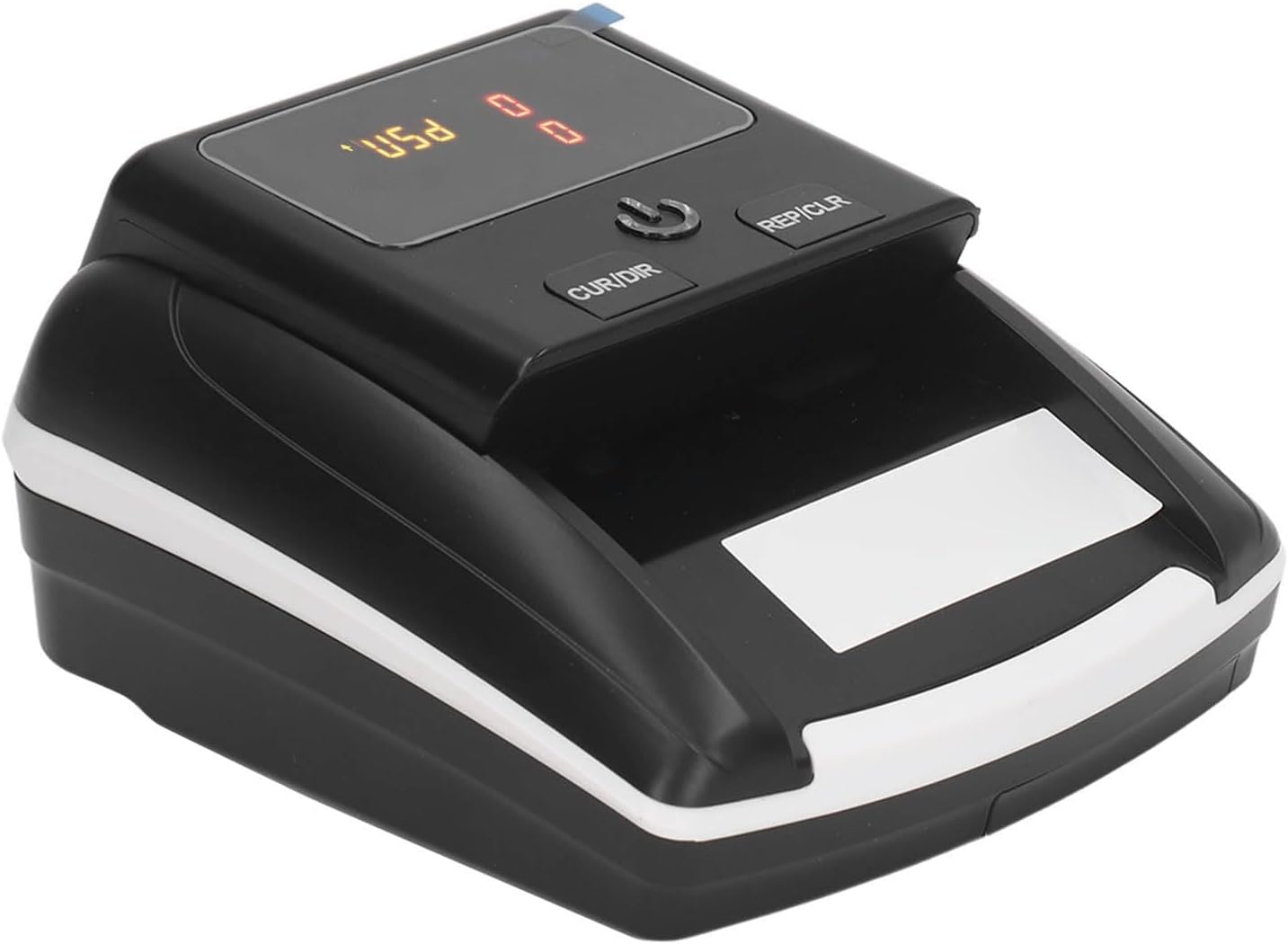
The Fockety AL-130 is an advanced counterfeit bill detector and money counter, designed for reliability and ease of use. It features multiple detection methods to ensure the authenticity of banknotes.
Key Features:
- Automatic Banknote Processing: Automatically feeds, processes, and exits banknotes through two exits, providing segmented denomination.
- Multiple Detection Functions: Identifies authenticity within 0.5 seconds using Ultraviolet (UV), Magnetic (MG), Infrared (IR), image analysis, and checks for paper quality, size, and thickness.
- Accurate Counting: Accurately counts banknotes up to 9999 without interruption. Data automatically resets after each count.
- Dual Power Supply: Operates on a 100-240V AC power adapter or a built-in rechargeable 500mAh lithium battery, offering 3-4 hours of portable use.
- Durable Design: Features an excellent rubber wheel synchronous belt for efficient banknote processing.

4. Setup
- Unpacking: Carefully remove the detector and all accessories from the packaging.
- Power Connection: Connect the provided charger to the DC Input Jack on the back of the detector. Plug the charger into a standard 100-240V AC power outlet.
- Initial Charge: For optimal battery life, fully charge the device before its first use. The built-in 500mAh lithium battery provides 3-4 hours of operation on a full charge.
- Placement: Place the detector on a stable, flat surface, ensuring adequate ventilation.

5. Operating Instructions
- Power On: Press the power button (usually indicated by a universal power symbol) on the top panel to turn on the device. The display will illuminate.
- Select Currency: Use the 'CUR/DIR' button to cycle through supported currencies (e.g., USD, EUR). Ensure the correct currency is selected for the banknotes you are processing.
- Insert Banknotes: Gently insert banknotes into the entry slot. The device will automatically feed and process them. Ensure banknotes are inserted smoothly and are not folded or crumpled.
- Detection and Counting: The detector will scan each banknote for authenticity and count them. The display will show the total quantity and total amount of genuine banknotes detected.
- Clear Data: After processing a batch, press the 'REP/CLR' button to reset the count to zero for the next batch.
- Power Off: Press the power button again to turn off the device when not in use.


6. Maintenance
- Cleaning: Regularly clean the banknote entry and exit slots, as well as the internal sensors, with a soft, dry, lint-free cloth. Do not use abrasive cleaners or solvents.
- Storage: When not in use for extended periods, store the device in a cool, dry place, away from direct sunlight and dust.
- Battery Care: If using the battery, ensure it is charged periodically even when not in use to maintain battery health.
7. Troubleshooting
- Device Not Turning On: Check if the power adapter is securely connected and plugged into a working outlet. If using battery, ensure it is charged.
- Banknotes Not Feeding: Ensure banknotes are inserted correctly and are not excessively crumpled or damaged. Clean the feed rollers if necessary.
- Incorrect Detection/Counting: Verify that the correct currency is selected. Ensure sensors are clean and free from dust or debris. Try processing banknotes again.
- Error Message on Display: Refer to the specific error code (if any) in the full user manual for detailed solutions. Generally, clearing the count and re-inserting banknotes can resolve temporary errors.
8. Specifications
| Item Type | Detector |
| Model | AL-130 |
| Material | ABS |
| Input Voltage | AC100-240V 50/60HZ |
| Output Voltage | 12V±5% |
| Supported Currency | USD, EUR |
| Counterfeit Detection Technology | Ultraviolet, Magnetic, Infrared, Image, Size, Thickness |
| Application Bill Thickness | 0.075-0.15mm |
| Power Consumption | <10W |
| Detection Speed | <0.5 seconds/bill |
| Battery | 1 x 11.1V 503035 500mAh Polymer Lithium Battery (built-in) |
| Size | Approx. 137 x 155 x 82mm / 5.4 x 6.1 x 3.2in |
| Package Dimensions | 7.48 x 6.69 x 5.51 inches |
| Item Weight | 1.81 pounds |

9. Package Contents
The following items are included in your package:
- 1 x Fockety AL-130 Counterfeit Bill Detector
- 1 x Charger
- 1 x User Manual (this document)
10. Warranty and Support
Specific warranty details and customer support contact information are not provided in the product data. Please refer to your purchase documentation or contact the retailer for warranty claims and technical assistance.


