
1. Introduction
This manual provides instructions for the ALLIMITY GZ-39GB replacement remote control. This remote is designed to operate various GALANZ air conditioner models, including GZ-39GB, GZ-46B-E1, and GZ-46B. No programming or setup is required; simply install batteries to begin use.
2. Setup: Battery Installation
To power your remote control, you will need two (2) AAA alkaline batteries (not included). Follow these steps for proper installation:
- Locate the battery compartment on the back of the remote control.
- Slide the battery compartment cover downwards and remove it.
- Insert two AAA alkaline batteries, ensuring the positive (+) and negative (-) terminals align correctly with the markings inside the compartment.
- Replace the battery compartment cover by sliding it back into place until it clicks securely.

Image: Rear view of the remote control with the battery cover removed, illustrating the correct orientation for AAA battery insertion.
Important: Do not mix old and new batteries. Do not mix alkaline, standard (carbon-zinc), or rechargeable (nickel-cadmium) batteries. Remove batteries if the remote will not be used for an extended period.
3. Operating Instructions: Button Functions
The ALLIMITY GZ-39GB remote control features a clear layout for easy operation of your GALANZ air conditioner. Below is a general guide to the main buttons and their functions. Refer to your air conditioner's manual for specific functions if needed.
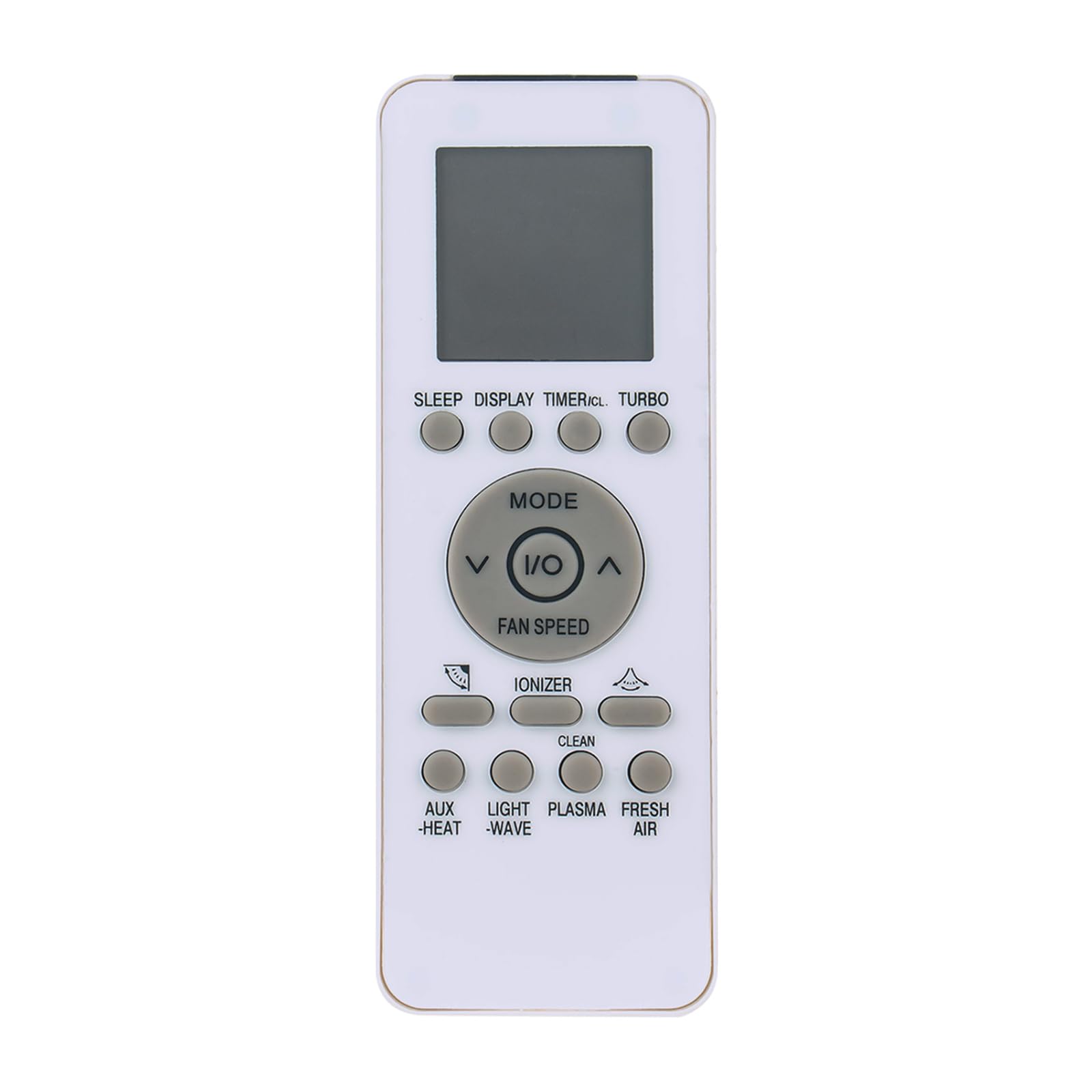
Image: Front view of the remote control, displaying the LCD screen and all functional buttons.
- I/O (Power) Button: Turns the air conditioner ON or OFF.
- MODE Button: Cycles through operating modes (e.g., Cool, Heat, Fan, Dry, Auto).
- FAN SPEED Button: Adjusts the fan speed (e.g., Low, Medium, High, Auto).
- Temperature Adjustment Buttons (Up/Down Arrows): Increases or decreases the set temperature.
- SLEEP Button: Activates or deactivates the sleep mode for comfortable night operation.
- DISPLAY Button: Toggles the display on the air conditioner unit.
- TIMER I/CL Button: Sets or cancels the timer function.
- TURBO Button: Activates rapid cooling or heating.
- IONIZER Button: Activates the air ionizer function (if available on your AC unit).
- CLEAN Button: Initiates the self-clean function (if available on your AC unit).
- LIGHT Button: Controls the light on the air conditioner unit.
- PLASMA/FRESH AIR Button: Activates plasma or fresh air functions (if available on your AC unit).
- AUX-HEAT Button: Activates auxiliary heating (if available on your AC unit).
- WAVE Button: Controls the swing function of the air conditioner's louvers.
4. Maintenance
Proper care and maintenance will extend the life of your remote control.
- Cleaning: Wipe the remote control with a soft, dry cloth. Do not use liquid cleaners, sprays, or abrasive materials, as these can damage the surface or internal components.
- Storage: Store the remote control in a cool, dry place away from direct sunlight and extreme temperatures.
- Battery Replacement: Replace batteries when the remote's range decreases or if the air conditioner does not respond consistently. Always replace both batteries simultaneously with new ones of the same type.
5. Troubleshooting
If you experience issues with your remote control, try the following troubleshooting steps:
- Remote not responding:
- Ensure batteries are inserted correctly with the correct polarity (+/-).
- Replace old batteries with new AAA alkaline batteries.
- Check for any obstructions between the remote control and the air conditioner's receiver.
- Ensure you are within the effective operating range of the air conditioner.
- Intermittent operation:
- This often indicates low battery power. Replace batteries.
- Ensure the remote's infrared emitter is clean and free from dust or debris.
6. Specifications
| Model Number | GZ-39GB |
| Compatible Air Conditioner Models | GALANZ GZ-39GB, GZ-46B-E1, GZ-46B |
| Battery Type | 2 x AAA Alkaline Batteries (not included) |
| Material | ABS |
| Dimensions | 6 x 2 x 0.6 inches (approximately) |
| Item Weight | 2.82 ounces (approximately) |
| Special Feature | Ergonomic design |
7. Warranty and Support
This product is a replacement remote control. For warranty information or technical support, please refer to the terms provided by your original seller or contact them directly. Keep your purchase receipt for any warranty claims.
