
1. Product Overview
The PerGar CLE6120UN+C is an advanced auto start controller designed for generator sets. It utilizes micro-machining technology to provide precise measurement, numerical adjustment, timing, and threshold setting capabilities. This controller supports both manual and automatic start options, making it suitable for various generator control systems.
Key features include:
- Multi-functionality: Capable of precise measurement, numerical adjustment, timing, and threshold setting.
- Easy Configuration: All parameters can be configured directly from the front panel or via a USB/RS485 interface using a PC.
- Multilingual Support: Supports Chinese, English, Spanish, Russian, Portuguese, Turkish, Polish, and French for broad international usability.
- Compact and Reliable: Features a compact structure, simple connectivity, and high reliability and durability.
- Wide Application: Ideal for various automatic control systems, compatible with both electronic and non-electronic engines.

2. Controls and Display
The controller features an LCD (132x64) display and an intuitive button layout for easy operation and monitoring. Refer to the diagram below for an overview of the control panel components.
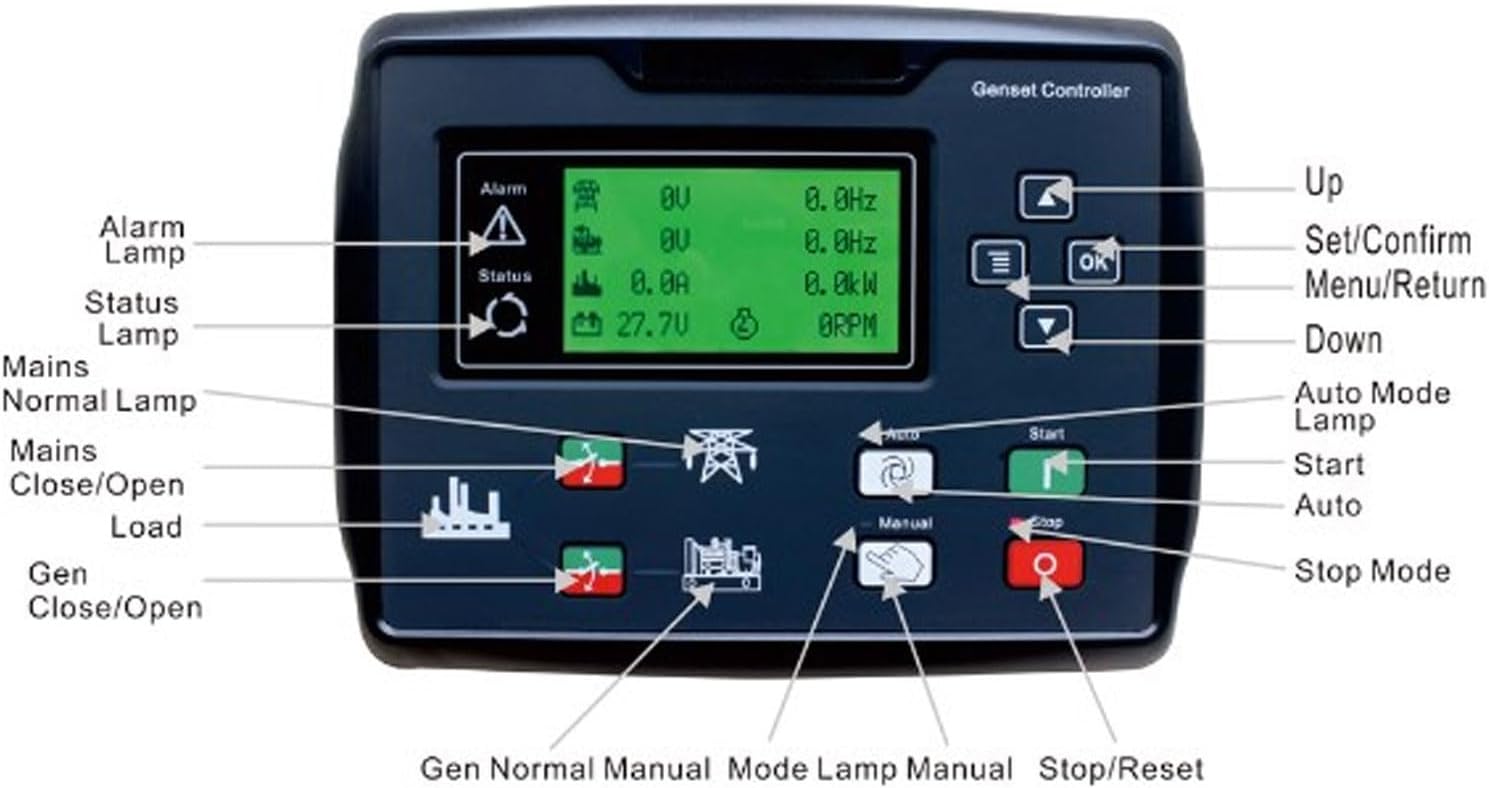
- LCD Display: Shows operational data, parameters, and status messages.
- Alarm Lamp: Indicates active alarms or fault conditions.
- Status Lamp: Provides general operational status feedback.
- Mains Normal Lamp: Illuminates when mains power is stable.
- Mains Close/Open Load Buttons: Control the connection/disconnection of the load to the mains.
- Gen Close/Open Buttons: Control the connection/disconnection of the load to the generator.
- Up/Down Buttons: Navigate through menus and adjust parameter values.
- Set/Confirm (OK) Button: Confirms selections and enters settings.
- Menu/Return Button: Accesses menus and returns to previous screens.
- Auto Mode Lamp: Indicates when the controller is in automatic operation mode.
- Start Button: Initiates generator start sequence (in manual mode).
- Auto Button: Switches the controller to automatic operation mode.
- Manual Button: Switches the controller to manual operation mode.
- Stop/Reset Button: Stops the generator and resets alarms.
- Gen Normal Manual Mode Lamp: Indicates generator normal operation in manual mode.
3. Setup and Installation
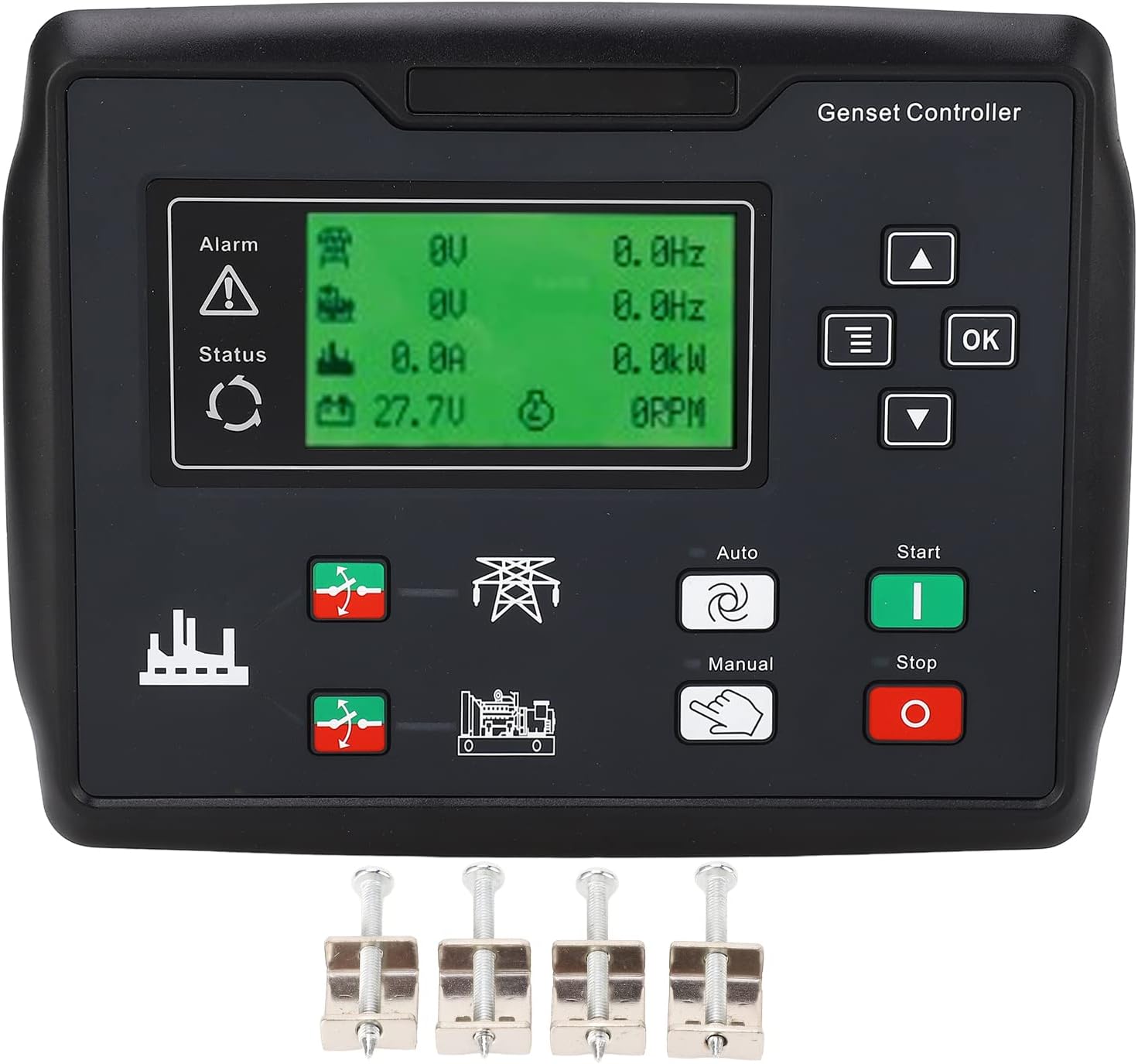
The CLE6120UN+C controller is designed for straightforward installation. It is typically mounted on a control panel. The package includes the generator controller, a user manual, and four installation screws.
3.1. Package Contents
- 1 x PerGar CLE6120UN+C Generator Controller
- 1 x User Manual (this document)
- 4 x Installation Screws
3.2. Installation Steps
- Prepare the mounting location on your control panel, ensuring adequate space and ventilation.
- Insert the controller into the panel cutout.
- Secure the controller using the provided four installation screws.
- Connect the necessary wiring for power, generator, mains, and other sensors according to the wiring diagram provided in the detailed manual (refer to the physical manual included in the package for specific wiring diagrams).
- Ensure all connections are secure and correctly polarized.
Important: Installation should be performed by qualified personnel to ensure safety and proper functionality. Always disconnect power before performing any wiring or installation procedures.
4. Operating Instructions
The CLE6120UN+C controller offers both manual and automatic operating modes. Detailed programming parameter tables are available in the comprehensive manual provided with the product.
4.1. Powering On
Once installed and wired, apply power to the controller. The LCD display will illuminate, and the controller will perform a self-test.
4.2. Mode Selection
- Auto Mode: Press the Auto button. The Auto Mode Lamp will illuminate. In this mode, the controller will automatically start and stop the generator based on configured parameters (e.g., mains failure, scheduled run times).
- Manual Mode: Press the Manual button. In this mode, the generator can be started and stopped manually using the Start and Stop buttons.
4.3. Parameter Configuration
Parameters such as timing, thresholds, and operational settings can be adjusted:
- Via Front Panel: Use the Menu/Return, Up, Down, and OK buttons to navigate through the menu structure and modify settings directly on the LCD display.
- Via PC: Connect the controller to a computer using a USB or RS485 interface. Use the dedicated PC software (refer to the full manual for software details) to configure parameters. This method allows for more comprehensive and detailed adjustments.
4.4. Generator Start/Stop (Manual Mode)
- To Start: In Manual Mode, press the Start button. The controller will initiate the generator start sequence.
- To Stop: Press the Stop/Reset button. The controller will initiate the generator stop sequence.
5. Maintenance
The PerGar CLE6120UN+C controller is designed for durability and requires minimal routine maintenance. However, regular checks can ensure optimal performance and longevity.
- Visual Inspection: Periodically inspect the controller for any signs of physical damage, loose connections, or dust accumulation.
- Cleaning: Gently clean the display and buttons with a soft, dry cloth. Avoid using abrasive cleaners or solvents.
- Connection Checks: Ensure all wiring connections remain tight and free from corrosion.
- Firmware Updates: Check the manufacturer's website periodically for any available firmware updates that may improve performance or add features.
For any internal maintenance or repairs, contact qualified service personnel.
6. Troubleshooting
This section provides general guidance for common issues. For specific error codes or complex problems, refer to the detailed troubleshooting guide in the full product manual or contact technical support.
- Controller Not Powering On:
- Check power supply connections to the controller.
- Verify the power source is active and within the specified voltage range.
- Generator Not Starting in Auto Mode:
- Ensure the controller is correctly configured for auto start conditions (e.g., mains failure detection).
- Check generator fuel levels, battery, and other essential components.
- Verify all safety interlocks are disengaged.
- Incorrect Readings on Display:
- Check sensor connections and calibration settings.
- Ensure the correct parameters are selected for display.
- Communication Issues (USB/RS485):
- Verify cable connections.
- Ensure correct drivers are installed on the PC.
- Check communication settings (baud rate, parity) in both the controller and PC software.
If the issue persists after attempting these steps, consult the detailed manual or contact PerGar technical support.
7. Specifications
| Parameter | Value |
|---|---|
| Model | CLE6120UN+C |
| Display Type | LCD (132x64) |
| Supported Languages | Chinese, English, Spanish, Russian, Portuguese, Turkish, Polish, French |
| Alternator Voltage Range | 15-360V |
| Alternator Frequency | 50/60Hz |
| Monitor Interface | RS485 |
| Material | ABS, Rubber |
| Package Dimensions | 10.24 x 7.09 x 2.36 inches |
| Item Weight | 1.93 pounds |
| Manufacturer | PerGar |
8. Warranty and Support
For warranty information, please refer to the documentation included with your purchase or contact PerGar customer service. PerGar is committed to providing high-quality products and customer satisfaction.
For technical support, inquiries, or assistance with your CLE6120UN+C controller, please visit the official PerGar website or contact their customer support channels. Keep your product model number (CLE6120UN+C) and purchase details ready when seeking support.
Manufacturer: PerGar