
PRUNUS PRUNUS-WM-1
PRUNUS NOAA Weather Radio AM FM (Model PRUNUS-WM-1) Instruction Manual
1. Introduction
This manual provides essential information for the proper use and maintenance of your PRUNUS NOAA Weather Radio AM FM, Model PRUNUS-WM-1. This portable radio is designed to provide access to AM, FM, and NOAA weather band broadcasts, making it a valuable tool for daily listening and emergency preparedness. Please read these instructions thoroughly before operating the device.
2. Package Contents
Verify that all items are present in your package:
- PRUNUS NOAA Weather Radio (Model PRUNUS-WM-1)
- Owner's Manual
- Lanyard

Image: Contents of the PRUNUS NOAA Weather Radio package, showing the radio, user manual, and lanyard.
3. Product Overview
The PRUNUS NOAA Weather Radio is a compact and lightweight device, measuring approximately 69 x 128 x 28mm and weighing 119g (without batteries). It features a telescopic antenna for enhanced reception, a built-in speaker, and an earphone jack for private listening.

Image: Front and side view of the PRUNUS NOAA Weather Radio, showing the tuning dial, speaker, and controls.

Image: A hand holding the PRUNUS NOAA Weather Radio, illustrating its compact size and portability with dimensions (128mm height, 69mm width, 28mm depth) labeled.
4. Setup
4.1 Battery Installation
The radio operates on 2 AA batteries (not included). To install:
- Open the battery compartment cover located on the back of the radio.
- Insert 2 AA batteries, ensuring correct polarity (+/-) as indicated inside the compartment.
- Close the battery compartment cover securely.

Image: The open battery compartment of the PRUNUS NOAA Weather Radio, illustrating where to insert two AA batteries.
4.2 Antenna Extension
For optimal reception, especially for FM and WB bands, fully extend the telescopic antenna. For AM reception, the internal antenna is generally sufficient, but adjusting the radio's orientation may improve signal quality.
5. Operating Instructions
5.1 Controls Overview
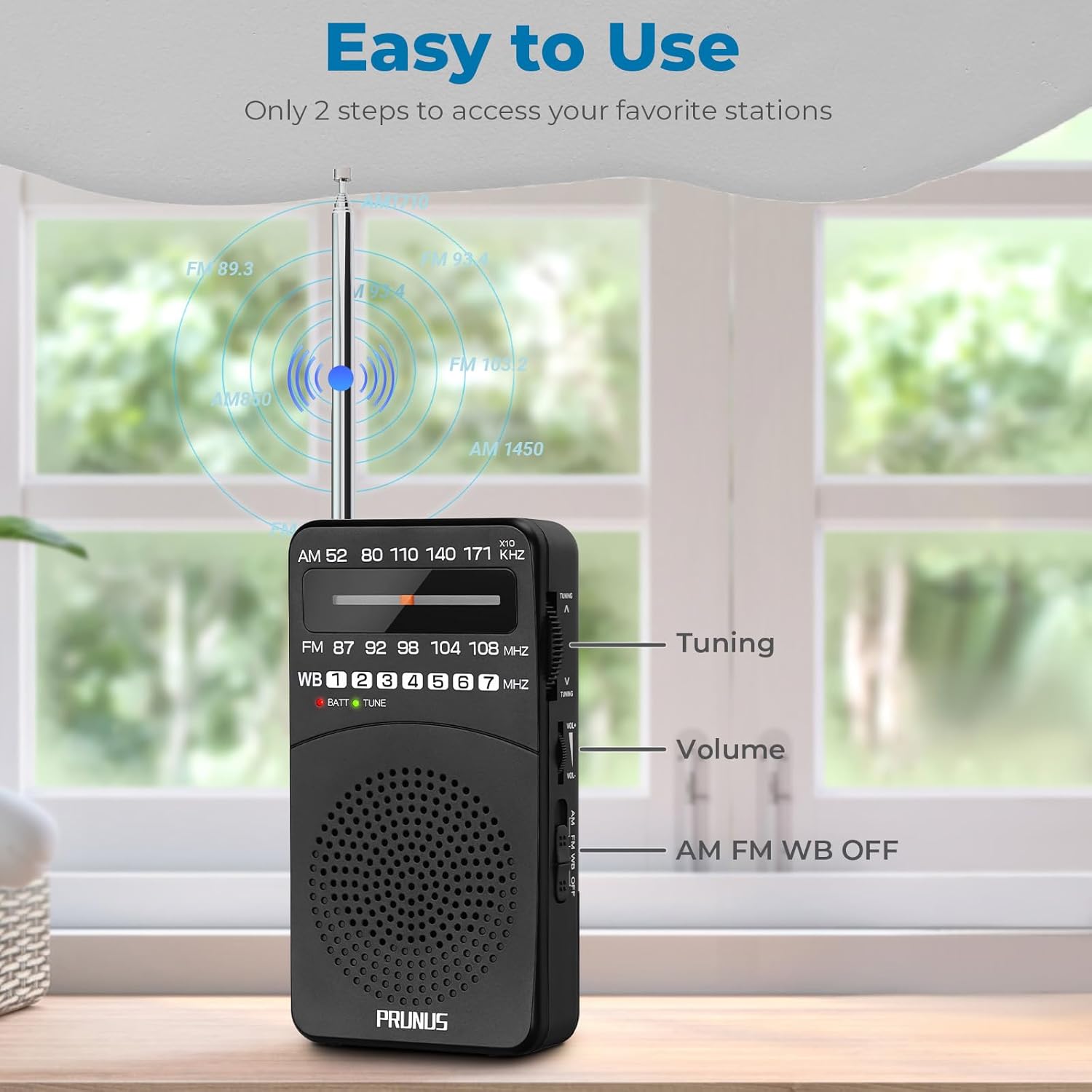
Image: The PRUNUS NOAA Weather Radio with key controls labeled: Tuning wheel, Volume control, and the AM/FM/WB/OFF band switch.
5.2 Power On/Off and Band Selection
Locate the AM FM WB OFF slide switch on the side of the radio. Slide it to your desired band (AM, FM, or WB) to turn the radio on. Slide it to OFF to power down the unit.
5.3 Tuning to a Station
Use the Tuning wheel on the side of the radio to scan through frequencies. The tuning indicator light will illuminate green when a strong signal is detected, assisting in precise station selection.
- AM Band: 520-1710 kHz
- FM Band: 87-108 MHz
- WB (NOAA Weather Band): 162.400MHz-162.550MHz (7 channels)
5.4 Volume Control
Adjust the listening volume using the VOL+ / VOL- wheel located below the tuning wheel.
5.5 Earphone Use
For private listening, plug standard 3.5mm earphones into the earphone jack on the side of the radio. The internal speaker will automatically mute when earphones are connected.

Image: A person using the PRUNUS NOAA Weather Radio with earphones plugged into the 3.5mm jack, highlighting the private listening feature.
5.6 NOAA Weather Band Operation
When the band switch is set to WB, the radio will receive broadcasts from the National Oceanic and Atmospheric Administration (NOAA) Weather Radio All Hazards network. These broadcasts provide continuous weather information directly from the nearest NOAA weather station. Note that this model does not support automatic NOAA alerts.
Video: An official product video demonstrating the PRUNUS NOAA Weather Radio's functionality, including tuning to weather bands.
6. Maintenance
- Clean the radio with a soft, dry cloth. Do not use abrasive cleaners or solvents.
- If the radio will not be used for an extended period, remove the batteries to prevent leakage and damage.
- Avoid exposing the radio to extreme temperatures, direct sunlight, or high humidity.
7. Troubleshooting
| Problem | Possible Cause | Solution |
|---|---|---|
| No sound or very low volume | Volume too low; batteries drained; radio off; earphones connected. | Increase volume; replace batteries; turn radio on; disconnect earphones if using speaker. |
| Poor reception/Static | Weak signal; antenna not extended; radio position; interference. | Fully extend antenna; reposition radio; try tuning slightly; move away from electronic devices. |
| Tuning light not illuminating | Weak signal; no station found. | Continue tuning slowly across the band; try a different location. |
8. Specifications
| Feature | Detail |
|---|---|
| Model Number | PRUNUS-WM-1 |
| Product Dimensions | 1.2 x 2.6 x 5 inches (30.5 x 66 x 127 mm) |
| Item Weight | 4.2 ounces (119 g) (excluding batteries) |
| Radio Bands Supported | WB: 162.400MHz-162.550MHz, FM: 87-108 MHz, AM: 520-1710 kHz |
| Power Source | 2 x AA Batteries |
| Special Feature | Lightweight, Portable |
| Connectivity Technology | IR (Infrared) |
| Included Components | Battery (referring to the need for batteries), Owner's Manual |
9. Warranty and Support
For detailed warranty information and customer support, please refer to the Owner's Manual included in your product package. The manual contains specific terms, conditions, and contact information for assistance.
Related documentsPRUNUS-WM-1

Ask a question about this manual
Ask about setup, troubleshooting, compatibility, parts, safety, or missing instructions. Manuals+ will review the question and use this page’s manual context to help answer it.