
TAB H6-6
TAB Cordless Spot Carpet Cleaner Machine User Manual
Model: H6-6 | Brand: TAB
1. Introduction
Thank you for choosing the TAB Cordless Spot Carpet Cleaner Machine. This portable and lightweight cleaner is designed for effective spot cleaning of carpets, upholstery, and various fabric surfaces. With its cordless design, powerful brush, and dual tank system, it provides a convenient solution for tackling everyday spills and stains. Please read this manual thoroughly before operation to ensure safe and optimal performance.
2. Product Overview
The TAB H6-6 Cordless Spot Carpet Cleaner is engineered for efficiency and ease of use. Key features include:
- Cordless & Rechargeable: Offers up to 20 minutes of runtime for flexible cleaning without cord limitations.
- PowerBrush & Extend Hose: Features a PowerBrush for deep stain agitation and an extendable hose for hard-to-reach areas.
- LED Digital Display: Provides real-time information on battery level, hose connection, and brush status.
- Suitable For Most Fabrics: Ideal for mattresses, fabric sofas, chairs, carpets, rugs, curtains, and car seats.
- Dual Large Tanks Design: Separates clean (350ml) and dirty (260ml) water for continuous clean water application.
- Portable And Lightweight: Weighing just 4.4lb, it's easy to carry and store.

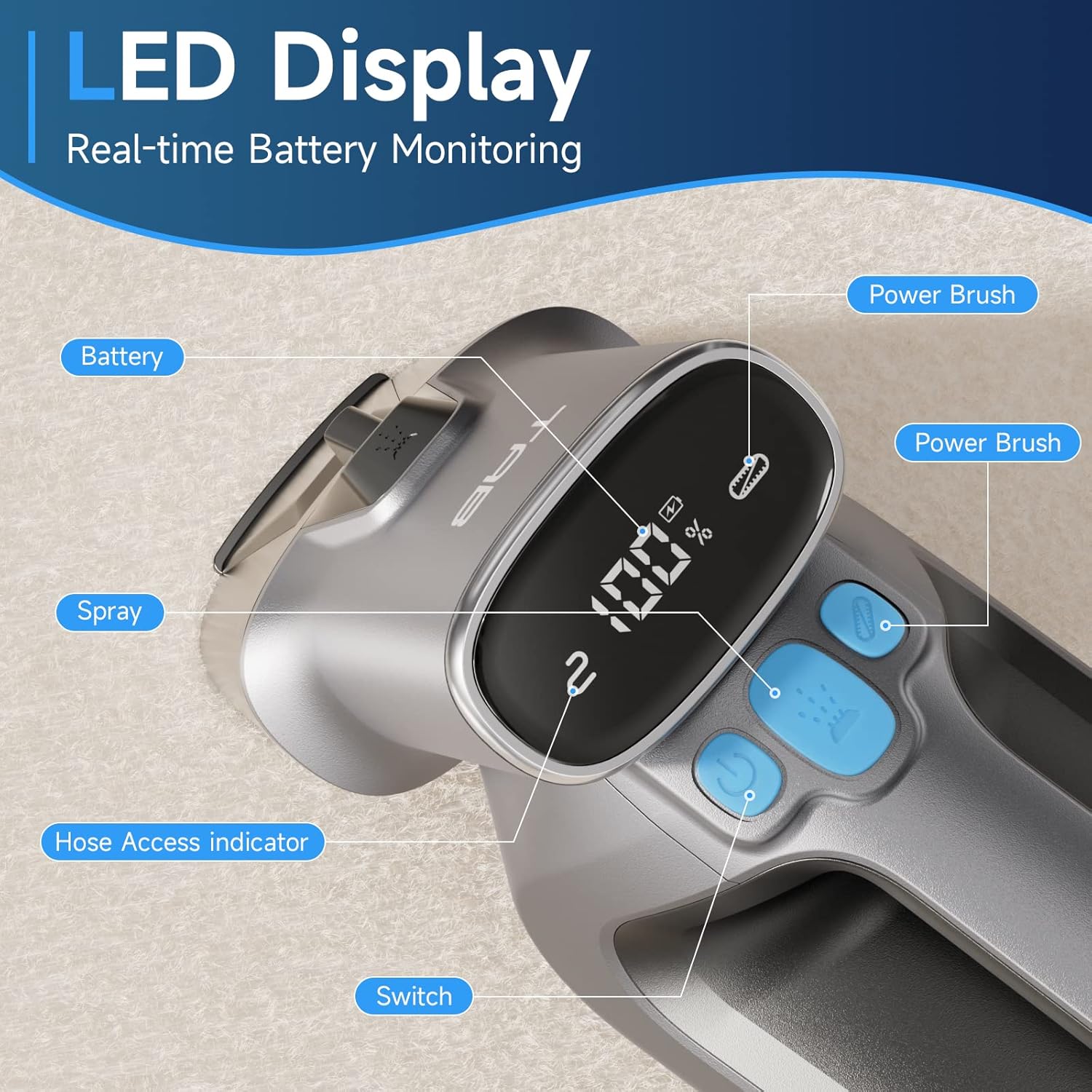

3. Setup
3.1 Unpacking and Assembly
Carefully remove all components from the packaging. Ensure all parts listed in the packing list are present. No complex assembly is required for the main unit.
3.2 Charging the Battery
Before first use, fully charge the cleaner. Connect the provided Type-C charging cable and adapter to the charging port on the unit. The LED display will show the charging progress. A full charge typically takes a few hours.
3.3 Filling the Clean Water Tank
- Remove the clean water tank from the main unit.
- Open the lid of the clean water tank.
- Fill the tank with proper amount of clean water. You may add a non-foaming cleaning solution suitable for carpet and upholstery cleaners. Do not exceed the MAX fill line.
- Securely close the lid and reinsert the tank into the main unit until it clicks into place.
4. Operating Instructions
4.1 Spot Cleaning
- Ensure the clean water tank is filled and the dirty water tank is empty.
- Press the power button to turn on the machine. The LED display will illuminate.
- For enhanced cleaning, press the PowerBrush button to activate the rotating brush.
- Position the cleaning head over the stain. Press the spray button to dispense cleaning solution onto the stained area.
- Move the cleaner slowly over the stain, allowing the PowerBrush to agitate and the suction to absorb the dirty water. Repeat as necessary until the stain is removed.

4.2 Using the Extended Hose
For cleaning hard-to-reach areas like stairs, car interiors, or curtains:
- Remove the standard cleaning head from the main unit.
- Attach the extended hose accessory to the main unit until it is securely connected. The LED display will indicate proper connection.
- Use the nozzle at the end of the hose to spray and suction as described in the spot cleaning section.

5. Maintenance
5.1 Emptying the Dirty Water Tank
After each use, or when the dirty water tank reaches its MAX fill line, it must be emptied:
- Press the release button to detach the dirty water tank from the main unit.
- Carefully remove the lid and pour out the dirty water into a sink or drain.
- Rinse the dirty water tank thoroughly with clean water.
- Reattach the lid and reinsert the tank into the main unit.
5.2 Cleaning the PowerBrush
Regularly inspect and clean the PowerBrush to ensure optimal performance. Remove any hair, debris, or tangled fibers from the brush. The brush can be detached for easier cleaning.
5.3 General Cleaning and Storage
Wipe down the exterior of the cleaner with a damp cloth. Do not immerse the main unit in water. Store the cleaner in a cool, dry place away from direct sunlight and extreme temperatures.
6. Troubleshooting
| Problem | Possible Cause | Solution |
|---|---|---|
| Cleaner does not turn on | Battery is low or depleted | Charge the battery fully. |
| No spray or weak spray | Clean water tank is empty or improperly installed | Refill the clean water tank and ensure it is securely in place. Check for clogs in the spray nozzle. |
| Weak suction | Dirty water tank is full or improperly installed; nozzle/hose clogged | Empty the dirty water tank and ensure it is securely in place. Check the nozzle and hose for blockages. |
| PowerBrush not rotating | PowerBrush button not activated; brush tangled with debris | Press the PowerBrush button. Clean any hair or debris from the brush. |
| Water leakage | Tanks not properly sealed; seals damaged | Ensure both clean and dirty water tanks are correctly installed and their lids are tightly closed. Check rubber seals for damage. |
7. Specifications
| Feature | Detail |
|---|---|
| Brand | TAB |
| Model Name | H6-6 |
| Color | Grey |
| Clean Water Tank Capacity | 350 ml |
| Dirty Water Tank Capacity | 260 ml |
| Power Source | Rechargeable Battery |
| Item Weight | 8 pounds (approx. 3.6 kg) |
| Product Dimensions | 16.42 x 8.43 x 5.12 inches (approx. 41.7 x 21.4 x 13 cm) |
8. Warranty and Support
The TAB Cordless Spot Carpet Cleaner Machine comes with a standard manufacturer's warranty. Please refer to the warranty card included in your product packaging for specific terms and conditions. For technical support, troubleshooting assistance, or warranty claims, please contact TAB customer service through the contact information provided on the product packaging or the official TAB website.
Related documentsH6-6

Ask a question about this manual
Ask about setup, troubleshooting, compatibility, parts, safety, or missing instructions. Manuals+ will review the question and use this page’s manual context to help answer it.