
1. Introduction
The Texet KLS-2 Microcurrent Facial Device is a versatile 6-in-1 home-use skincare tool designed to enhance your facial care routine. This device combines microcurrent technology with light therapy and various massage functions to promote skin tightening, lifting, and rejuvenation for the face, eyes, and neck. Please read this manual thoroughly before use to ensure safe and effective operation.
2. Safety Information
For your safety and to prevent damage to the device, please observe the following precautions:
- This device is for cosmetic use only and is not intended for medical purposes. Consult a physician before use if you have any medical conditions, especially if you are pregnant, have a pacemaker, or suffer from epilepsy.
- Do not use on broken, irritated, or infected skin, or on areas with sunburn, open wounds, or recent surgical scars.
- Keep the device out of reach of children.
- Do not immerse the device in water or use it in excessively humid environments.
- Avoid direct contact with eyes.
- Discontinue use immediately if you experience any discomfort or adverse reactions.
- Use only the provided charging cable.
3. Package Contents
Please check that all items are present in the package:
- Texet KLS-2 Microcurrent Facial Device
- USB Charging Cable
- User Manual
4. Product Features and Benefits
The Texet KLS-2 device offers a comprehensive skincare experience with its multiple functions:
4.1. 6-in-1 Skincare Modes
- Cleaning: Deep pore cleansing to remove impurities.
- Penetration: Promotes the absorption of skincare essences.
- Lifting: Helps shape and firm the face.
- Beauty: Brightens skin tone and reduces the appearance of wrinkles.
- Special: Targets smooth wrinkles around the eyes.
- Cool: Calms the skin and helps shrink pores.

Figure 1: Overview of the 6-in-1 Skincare Modes.
4.2. 7 Core Benefits
- Skin Tightening: To smooth wrinkles and fine lines.
- Skin Lifting: To firm sagging skin and enhance contours.
- Skin Toning: To improve skin radiance.
- Skin Rejuvenation: To reshape facial features.
- Eye Care: To remove wrinkles, fine lines, dark circles, eye bags, and puffiness around eyes.
- Cold Therapy: To remove facial swelling, puffiness, shrink pores, and soothe redness.
- High Frequency Massage: To promote blood circulation and relax muscles.

Figure 2: The 7 Core Benefits of the Texet KLS-2 Device.
4.3. Face LED Light Therapy
The device incorporates various LED light modes to target specific skin concerns:
- Orange Light: For clean export and purifying pores.
- Amber Light: To brighten skin tone and lighten skin lines.
- Crimson Light: For tight lifting and full face plasticity.
- Blue Light: To calm skin, control oil, and fight acne.
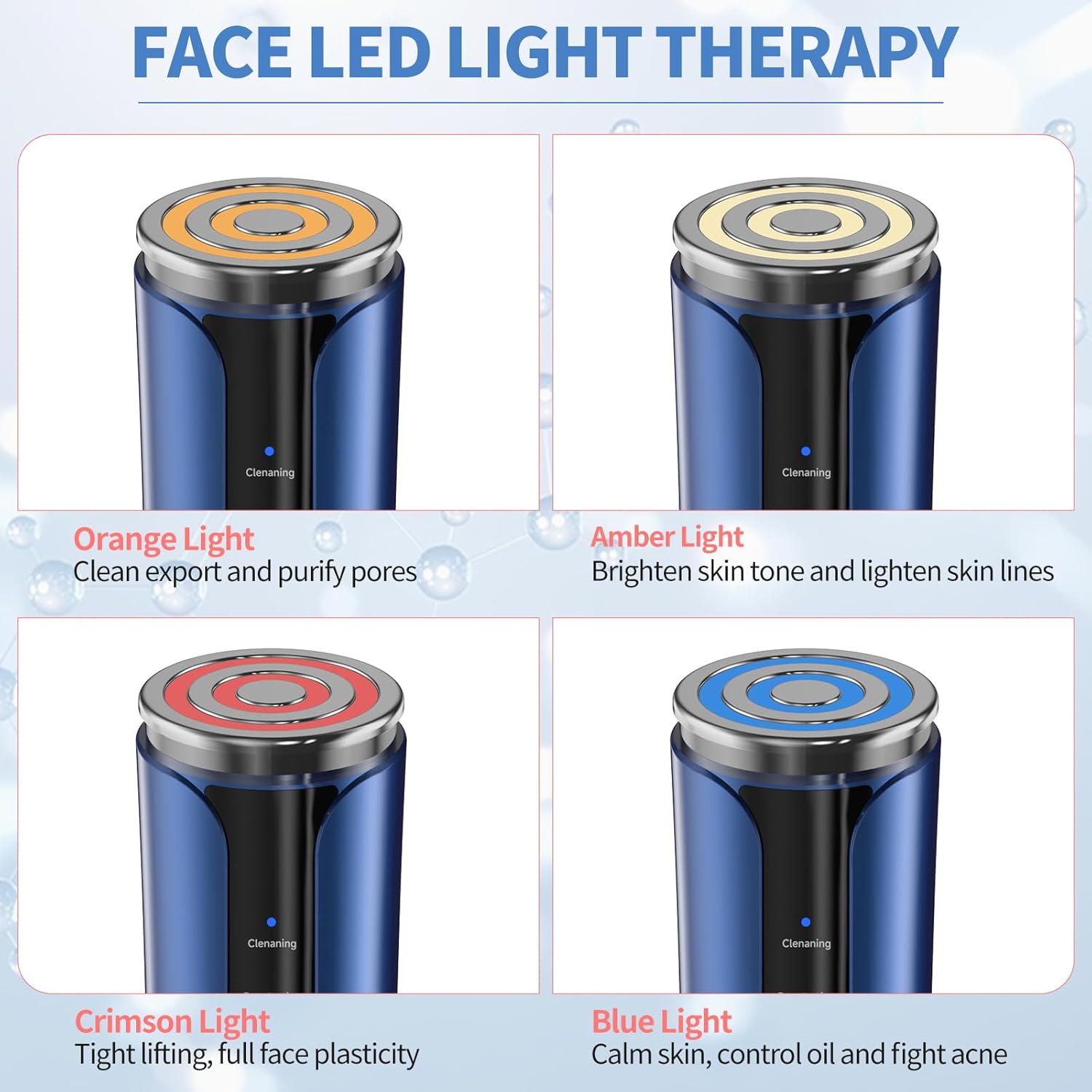
Figure 3: Face LED Light Therapy Modes.
4.4. Design and Portability
The Texet KLS-2 is designed to be lightweight and portable, making it a convenient companion for your skincare journey. It features a modern style and is USB rechargeable for ease of use.

Figure 4: Lightweight, Portable, and USB Rechargeable Design.
5. Setup
5.1. Charging the Device
- Connect the provided USB charging cable to the charging port at the bottom of the device.
- Plug the other end of the USB cable into a compatible USB power adapter (not included) or a computer USB port.
- The charging indicator light will illuminate, typically blinking while charging and solid when fully charged.
- A full charge usually takes approximately 2-3 hours.
5.2. Initial Preparation
- Before first use, fully charge the device.
- Clean the device head with a soft, damp cloth. Do not use abrasive cleaners or immerse the device in water.
6. Operating Instructions
Follow these steps for optimal use of your Texet KLS-2 Microcurrent Facial Device:
- Cleanse Your Face: Thoroughly clean your face and neck before using the device. Ensure your skin is free of makeup and impurities.
- Apply Skincare Product: For best results, apply a conductive gel, serum, or moisturizer to the treatment area. This helps the device glide smoothly and enhances the effectiveness of the microcurrent.
- Power On: Press and hold the power button (usually the lower button) for a few seconds to turn on the device.
- Select Mode: Press the mode selection button (usually the upper button) to cycle through the available modes (Cleaning, Penetration, Lifting, Beauty, Special, Cool) and LED light therapies (Orange, Amber, Crimson, Blue). Refer to Section 4.3 for light therapy benefits.
- Adjust Settings (if applicable): Some modes may allow for intensity or temperature adjustments. Follow the device's indicators to select your preferred level.
- Apply Device: Gently place the device head onto your skin. Move it slowly and smoothly across your face, eyes, or neck in upward and outward motions. Avoid staying in one spot for too long.
- Focus on Areas: For eye care, use the 'Special' mode and gently glide around the eye area, avoiding direct contact with the eyeball. For lifting and tightening, focus on jawline, cheekbones, and forehead.
- Cooling Mode: After other treatments, you may use the 'Cool' mode to help soothe skin, reduce puffiness, and close pores.
- Power Off: After your treatment, press and hold the power button to turn off the device.
- Clean Device: Wipe the device head clean with a soft, damp cloth immediately after each use.

Figure 5: Device Controls and Mode Indicators.
6.1. Recommended Usage Frequency
For visible improvements, consistent use is recommended. Many users observe noticeable changes within one month of regular use. Consult the device's specific mode guidelines for daily or weekly recommendations.

Figure 6: Visible Skin Improvement with Consistent Use.
7. Maintenance
7.1. Cleaning
- Always turn off the device before cleaning.
- Wipe the device head and body with a soft, slightly damp cloth after each use.
- Do not use alcohol, abrasive cleaners, or harsh chemicals, as these can damage the device.
- Ensure no liquid enters the charging port or other openings.
7.2. Storage
- Store the device in a cool, dry place, away from direct sunlight and extreme temperatures.
- Keep it away from moisture and dust.
- Ensure the device is fully charged before storing for extended periods to maintain battery health.
8. Troubleshooting
If you encounter any issues with your Texet KLS-2 device, please refer to the following common problems and solutions:
| Problem | Possible Cause | Solution |
|---|---|---|
| Device does not turn on. | Battery is low or depleted. | Charge the device fully using the provided USB cable. |
| Device not charging. | Charging cable or adapter is faulty; charging port is dirty. | Try a different USB cable or power adapter. Ensure the charging port is clean and free of debris. |
| No sensation or weak sensation during use. | Insufficient conductive gel/serum; low intensity setting. | Apply more conductive gel or serum to the skin. Increase the intensity setting if available for the selected mode. |
| Skin irritation after use. | Device used on sensitive or broken skin; allergic reaction to skincare product. | Discontinue use immediately. Ensure skin is healthy before use. Change skincare products if irritation persists. Consult a dermatologist if necessary. |
If the problem persists after trying these solutions, please contact customer support.
9. Specifications
| Brand | Texet |
| Model Name | KLS-2 |
| Item Model Number | s3 |
| Manufacturer | Shenzhen Keri Technology Co., LTD |
| Power Source | Corded Electric (USB Rechargeable) |
| Material | Plastic |
| Colour | White-blue |
| Item Weight | 0.32 Kilograms |
| Package Dimensions | 17.5 x 10.7 x 7 cm |
| Product Benefits | Improves Skin Elasticity |
| Recommended Product Uses | Improving skin elasticity and firmness |
10. Warranty Information
The Texet KLS-2 Microcurrent Facial Device comes with a standard manufacturer's warranty. Please refer to the warranty card included in your package or contact Texet customer support for detailed information regarding warranty terms and conditions.
11. Customer Support
For any questions, technical assistance, or support regarding your Texet KLS-2 Microcurrent Facial Device, please contact our customer service team. Contact details can typically be found on our official website or on the product packaging.